How to Choose an ATS in 2026: Requirements, Demos, and Traps to Avoid
This guide shows you how to choose an ATS as a repeatable process: define your requirements, score demos against a rubric, check references, watch for red flags, and model the true cost before you sign.
Vendor demos are built to show strengths, pricing models vary widely, and online recommendation threads can include undisclosed vendor promotion. The best applicant tracking system is not the one with the longest feature list.
It is the one your team will actually use and can still afford at renewal.
If you are still deciding whether you need a tool at all, start with our applicant tracking system overview. This guide assumes you are past that and ready to buy.
Start here: the short version
The hiring playbook, in your inbox
One email a week - benchmarks, AI screening tactics, and short interview templates from the 100Hires team. No product pitches.
- Requirements first, shortlist second. Name your must-haves before you look at a single tool. Reversing that order is how buyers end up with a system nobody wanted.
- Match the tool to your size. A ten-person startup and a two-thousand-person enterprise need different systems, not the same one at a different price.
- Score demos, do not admire them. Run a real hiring workflow live and give each finalist a score you can compare.
- Model cost at renewal, not at signing. Per-seat creep and hidden export fees are where the real bill shows up.
- Ask about the exit before you sign. By year three, switching is a bigger project, and that shifts the balance toward the vendor.
Define your requirements before you build a shortlist
A common mistake is starting with tool names. You ask around, collect five recommendations, and book five demos. Scripted demos can make several tools look suitable, so you pick on gut feel or price.
Reverse the order: write down what you need first, then judge tools against that list.
Treat the requirements list as a real project, not a hallway chat. Four moves make it work.
- Name the people who sign off. A recruiter, a hiring manager, someone from IT or security, and whoever controls the budget. Each gets a say in the must-have list before you look at a tool. A system can win a demo and still go unused if one of these voices was left out.
- Set a deadline and a decision gate. Give the evaluation a clear end date. One recruiter on Reddit watched a manager spend more than a year "evaluating" without ever deciding (r/recruiting). A timeline forces a choice.
- Weight for growth, not just today. If you plan to double headcount, factor in room for growth and per-seat costs now, before a renewal locks in the price.
- Turn the list into your demo scorecard. Every must-have becomes a row you grade later.
Rank each requirement as a must-have, a should-have, or a nice-to-have. Buyers often land on this structure on their own. In our own sales calls, one operations lead described sending over "essential features" first, then a separate list of important and nice-to-have items.
Another emailed a spreadsheet of features and asked the rep to mark which ones the tool actually supported.
You do not need to invent requirements from scratch. Look at what frustrates your team today and write the requirement that would fix it.
- Reporting you cannot run. A recurring complaint that pushes teams to switch is limited reporting: a handful of fixed reports, no filters, and a monthly ritual of exporting spreadsheets to rebuild the numbers by hand. That becomes a must-have reporting requirement.
- Managers who avoid the tool. If it takes ten clicks to add a hiring manager to a role, managers stop logging in. Ease of use for the people outside recruiting belongs in the must-have tier.
- Too many disconnected tools. Operators keep saying they want fewer systems, not more features. "Works with the HRIS and stack we already run" is a requirement, not a bonus.
Two capabilities worth putting on most lists early: structured interview scorecards so feedback is comparable across interviewers, and knockout questions so unqualified applicants filter themselves out before they reach a human.
Write the requirement, then check which tools do it natively versus with a workaround.
Match the shortlist to your company size
Requirements change with company size, not just budget. Compliance features like GDPR handling and EEOC reporting matter most at scale. A small team needs one-click job posting and a pipeline it can run without an admin.
An enterprise needs approval chains and predictive analytics. So the honest answer to "which ATS is best" is another question: best for a company like yours.
The table below groups common systems by the type of buyer they suit. It is a map, not a ranking. Each row points to a deeper guide where we compare the tools properly.
The 100 to 150 employee ranges overlap on purpose: a fast-scaling startup and an early mid-market team can sit in either row. One disclosure: 100Hires is our own product, so treat its placement as a maker's claim and verify it in your own scored demo.
| Company segment | Requirements to prioritize | Example systems | Deeper guide |
|---|---|---|---|
| SMB or first ATS (under ~50 employees) | One-click job posting, no-admin pipeline, fast setup, flat and predictable price | 100Hires, Zoho Recruit, Breezy HR, JazzHR, Manatal | ATS for small business |
| Fast-scaling startup (10 to 150) | Customization that scales, sourcing, growth-aware pricing | Ashby, Workable, Gem, Pinpoint | Best ATS software |
| Mid-market (100 to 1,000) | Structured scorecards, workflow config, source-of-hire analytics | Greenhouse, Lever, Workable, Teamtailor | ATS for mid-market |
| Enterprise (1,000+, compliance-heavy) | Requisition approvals, predictive analytics, GDPR and EEOC, SSO | iCIMS, Workday, SmartRecruiters, Greenhouse | Enterprise recruiting software |
| Staffing or recruiting agency | Agency CRM plus ATS, redeployment, back-office and timesheet links | Bullhorn, Loxo, Recruiterflow, Manatal | ATS for recruiters |
These groupings are not guesswork. G2 reviewer profiles suggest which company sizes most commonly use each tool: most Manatal reviewers come from companies under 50 employees, most iCIMS reviewers come from companies over 1,000, and Lever skews heavily mid-market.
Choose a system built for a company your size, and treat one built for a very different size as a warning sign, not a stretch goal.
Run demos that uncover weaknesses, and score them
A vendor demo is built to show strengths. Your job is the opposite: find where the tool struggles. So do not sit back and watch a scripted tour. Hand the vendor a real hiring workflow and ask them to run it live, then grade what you see.
Score every finalist against the same rubric so the decision rests on comparable results rather than the smoothest pitch. Start from these weights and adjust them to your size. An SMB might raise user experience and cost. An enterprise might raise compliance.
The table below is an illustrative worked example, so replace the sample observations and scores with what you see in your own demos.
| Criterion | Weight | Evidence observed in demo | Score 1 to 5 | Weighted score |
|---|---|---|---|---|
| Functionality | 25% | Posted a job and moved a candidate through three stages live, no workaround | 5 | 1.25 |
| User experience | 20% | Hiring manager needed help finding the review screen | 3 | 0.60 |
| Integrations | 15% | Native calendar and Slack shown, HRIS only through Zapier | 3 | 0.45 |
| Reporting | 15% | Built a filtered custom report live | 4 | 0.60 |
| Compliance and security | 10% | SSO on this tier, SOC 2 report provided | 5 | 0.50 |
| Vendor support | 10% | Named contact, 24-hour response in writing | 4 | 0.40 |
| Cost | 5% | Flat price, no per-seat renewal creep | 5 | 0.25 |
| Total | 100% | 4.05 / 5 |
Score each row on a simple scale. A 5 means the tool did it natively, live, with no workaround. A 3 means it worked but needed configuration, a higher tier, or a manual step.
A 1 means it could not do it, or the answer was a feature "coming soon." Multiply each score by its weight, add the results, and compare the finalists on their total weighted scores.
Three demo habits separate a real evaluation from a sales call.
- Put a hiring manager at the keyboard, not the recruiter. If the manager cannot move through the candidate review screen on their own, adoption will stall no matter how good the recruiter workflow looks.
- Ask for an unscripted task. Hand over a job description and a few resumes the rep has not seen and watch them work through it. A recruiter who evaluated ten platforms reported that two of them broke on screen during the sales call. If a tool fails on its own demo, expect worse once you depend on it daily.
- Score during the call, not from memory. Fill in the rubric as you watch. Impressions fade fast and blur together after the third demo.
Before you sign, ask for a reference: a current customer at your company size and in your industry. Ask that customer the questions the sales rep will not answer. What broke after go-live? How did the last renewal negotiation go? How fast is support when something breaks at 4pm?
Would you buy it again? If a vendor cannot connect you with a customer at your scale, treat that as a reason to dig deeper before signing.
You can apply the same test during a 100Hires demo and put your own hiring manager at the keyboard.
Red flags to watch for before you sign
Some warning signs show up in the demo, others in the contract. None of these means a tool is bad. Each one is a question to ask before you commit.
- The demo only shows strengths. If the rep steers hard away from your test workflow, ask why. Then run the live test described earlier.
- You cannot get your own data out. Some vendors document how to import candidates in, but not how to export them out. Manatal, for example, points departing customers to a sales contact rather than a self-serve export, and Ashby's public migration docs cover imports only. Ask every vendor to show you how you extract your data, in what format, at what cost, before you sign.
- The review badge does not match the review site. A score on a vendor's own marketing page can be stale or rounded up. Check the number on G2 or Capterra directly, not the logo on the homepage.
- No price without a sales call. Greenhouse, Lever, iCIMS, and others publish no dollar figure at all. Hidden pricing tells you something about the renewal conversation too.
- Annual-only contracts. If you hire in bursts or seasonally, a locked 12-month term is a real problem. Buyers rule vendors out over this alone.
- AI you cannot see inside. Some tools compare a resume to the job description, others compare it to your existing employees, and each choice has tradeoffs. Ask what data drives the score, how the vendor validated the model, and how they test for discriminatory outcomes.
- Liability caps on automated screening. If the tool makes automated screening or scoring decisions, read the liability clause. Check whether the vendor caps its own liability at the subscription fee, and ask who is responsible if the AI screens candidates unlawfully.
For a neutral second opinion on any vendor, the independent buyer guides at SelectSoftware Reviews are a good cross-check against the vendor's own pitch.
If data residency or candidate privacy is on your list, inspect each vendor's own data-protection and security documentation rather than taking a checkbox at face value. For 100Hires, that is our GDPR and security pages.
Model the true cost before you sign
The sticker price is only one part of ATS cost. Renewal changes, add-ons, and export charges may appear after the initial contract. Here are the traps that catch buyers, and how to see them coming.
- Per-seat creep at renewal. One recruiter described putting in Ashby as a first ATS at a ten-person company, growing to around 150 people, and hitting a renewal that charged per "elevated seat" at roughly $800 a year, extended to hiring managers rather than just admins. The renewal landed near $24,000 to $28,000 (r/recruiting). Model your cost at twice your current team size, and ask exactly who counts as a billable seat.
- Quote-only pricing. When a vendor hides all pricing behind a form, budget extra time and expect a negotiation. Ask why the number is hidden.
- AI locked to higher tiers. The AI on the homepage may not be the AI on your plan. Some vendors put automations or advanced AI behind an upper tier, and at least one meters AI usage separately on every plan. Confirm which tier includes the specific feature you want to use.
- Usage-based AI surprises. Consumption pricing on AI features can produce a bill nobody budgeted for. If AI is metered, ask for a cost ceiling you can plan against.
- Exit fees. One buyer reported their old ATS tried to charge $1,000 for a CSV of their own candidate records on the way out. Confirm export is free before you sign, not after.
- Add-on and plugin fees. A low base price can hide charges for the integrations you actually need. Total the add-ons, not the headline.
One useful way to classify vendors: fully transparent (a published, flat price), partly transparent (a priced entry tier and upper tiers by quote), or quote-only.
To turn that into a real comparison, record the same fields for every finalist:
- Annual price at your current headcount and at your projected headcount
- How a billable seat is defined
- Implementation cost and any required add-ons
- AI usage limits, if the tool meters them
- The renewal cap and the export charge
That total, not the headline number, is what you are choosing between.
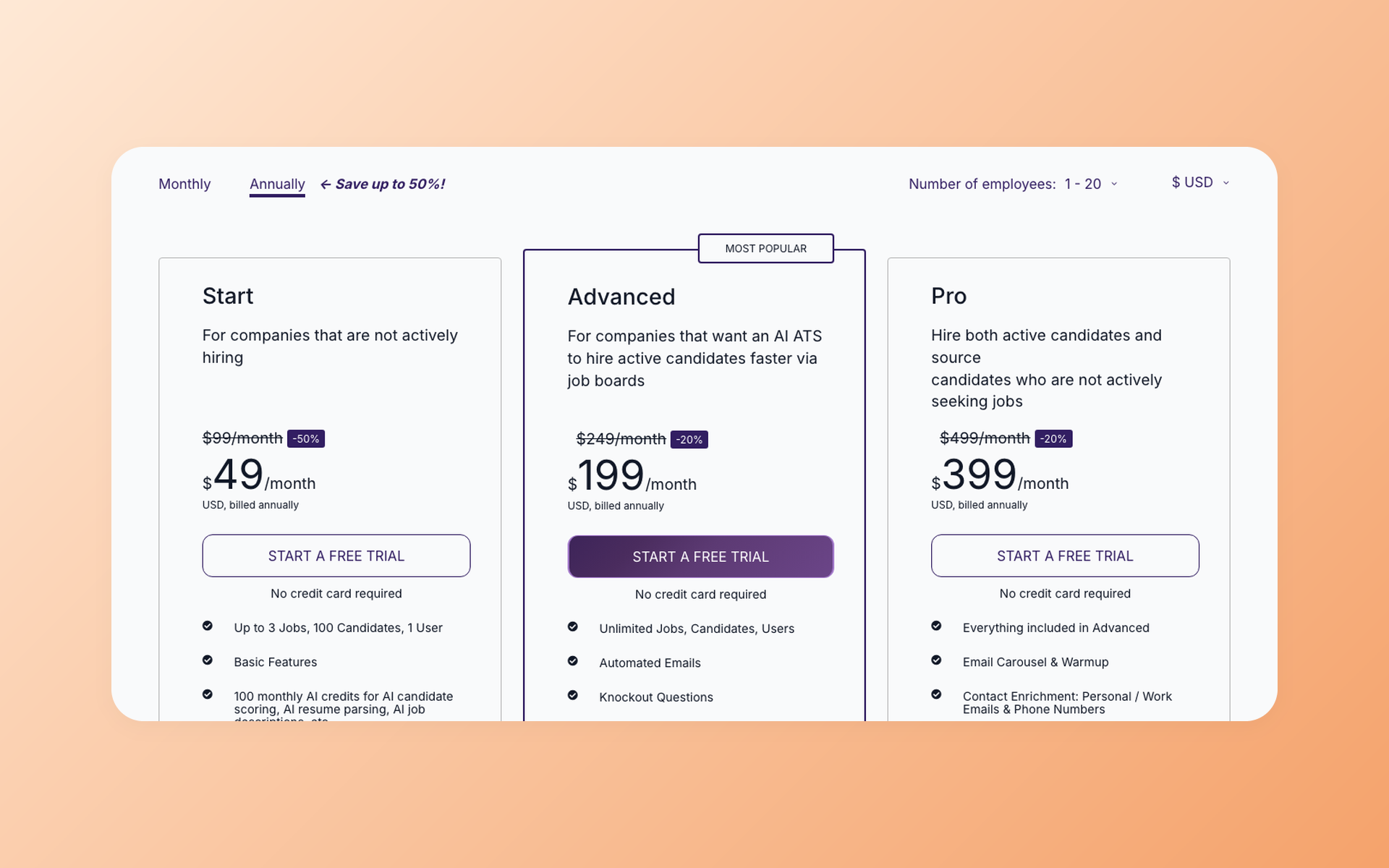
We deliberately use a different pricing model. 100Hires uses flat pricing banded by company size, with no per-seat charge, which is the direct counter to the renewal creep above.
Plans cost $49 a month for Start, $199 for Advanced, and $399 for Pro on annual billing, and Enterprise pricing is available by contacting sales (see current 100Hires pricing).
To keep the disclosure honest, here is where 100Hires is not the right fit. On the published Start, Advanced, and Pro plans there is no single sign-on and no requisition-approval workflow. Those live on the custom-quote Enterprise tier.
There is no SOC 2 Type II certification listed either. A large, compliance-first buyer may still shortlist an iCIMS- or Workday-class system for those reasons, and that can be the right call against your own requirements list.
Questions to ask about migration before you commit
By the third year, migration cost is what makes switching a project nobody wants to take on. That is exactly why you ask about the exit before you sign, when the vendor still wants your business. You do not need to run the migration during evaluation. You need the answers.
- Field mapping. Which of our fields map cleanly, and which get dropped or flattened?
- Export format and cost. Can we export all historical data ourselves, in a usable format, at what cost? Ask this of the vendor you are leaving, too.
- Test run or hard cutover. Is there a sandbox migration and a validation step, or does everything move at once?
- Who does the work. Us, the vendor, or a paid implementation partner?
- Realistic timeline. As a planning range from the examples we have, a small-team launch can take about a week and an enterprise deployment can run three months or more.
- Migration cost. Is it included, quoted separately, or gated behind a specific plan?
- Exit terms. What does moving off your platform look like? A vendor that makes the exit easy is showing confidence in its product.
- What not to carry over. Retention rules under GDPR or similar laws should decide what migrates, so you do not copy everything and clean up later.
One honest caveat: change management, not the software, is often what decides whether a switch succeeds. And sometimes the fix is a process change, not a new tool. If your only complaint is price, the cost of migrating can outweigh the savings.
For the mechanics of moving data, see our ATS data migration guide and the ATS implementation walkthrough. With 100Hires, done-for-you migration is included in the annual Pro plan.
Your next steps
You can start the process today without booking anything.
- Draft your must-have list with your stakeholders. A handful of items is a good starting point.
- Shortlist a few finalists from the guide that matches your company size.
- Book scored demos and bring the rubric to each one.
- Ask every finalist the export, renewal, and reference questions.
Frequently asked questions
Which ATS is best?
There is no objectively best ATS. The right one depends on your company size, budget, and hiring workflow. Small teams often prioritize self-serve setup, predictable pricing, and a workflow that does not need a dedicated administrator. A 2,000-person enterprise needs approval chains and compliance features a startup would never use. Match the tool to your requirements list, then compare finalists in the ranked guide for your segment.
How many applicant tracking systems are there?
Hundreds. One public directory, Workology's ATS list, catalogs more than 150 systems, and the real number is higher once niche and regional tools are counted. That volume is exactly why a requirements-first process beats browsing a list: you are filtering hundreds of options against your own must-haves rather than reacting to whichever name comes up most.
What are examples of applicant tracking systems?
Common examples include 100Hires, Greenhouse, Lever, Ashby, Workable, iCIMS, Workday, SmartRecruiters, Bullhorn, and Manatal. They serve different buyers, so use the company-size map above to see which ones fit a business like yours, then read the matching guide for a full comparison.
What are the most used applicant tracking systems?
The names cited most often include Greenhouse, Lever, Ashby, Workable, iCIMS, and Workday, but usage clusters by segment. Greenhouse and Lever are common in mid-market teams, Ashby among fast-scaling startups, iCIMS and Workday in large enterprises, and Workable, Zoho Recruit, and 100Hires among small or growing teams. The most familiar name is not always the best fit, so treat popularity as one input, not the decision.
What questions should I ask in an ATS demo?
Ask the vendor to run your real hiring workflow live rather than a scripted tour, put a hiring manager at the keyboard, and request an unscripted task. Score each finalist on the weighted rubric in this guide, and finish by asking for a reference customer at your size. The goal is to uncover weaknesses, not admire strengths.
How long does an ATS migration take?
It depends on your size and data. The examples we have range from about a week for a small-team launch to roughly three months or more for an enterprise deployment once approvals, integrations, and testing are included. Treat these as planning ranges, not promises. Ask each vendor for a realistic timeline and whether a test migration is part of the plan. Our ATS data migration guide covers the steps in detail.
How much should an ATS cost?
There is no universal ATS budget. Small-business tools can run from a few hundred dollars up to a few thousand a year, and enterprise contracts run far higher. Compare the annual total at your expected headcount, including implementation, add-ons, AI usage, and export costs, rather than the headline number. Watch the pricing model too: flat pricing is easier to budget than per-seat pricing, which can climb sharply at renewal.
ATS or a spreadsheet: when do I need one?
You need one when coordination starts to fail, regardless of headcount. When candidates fall through the cracks, hiring managers ask for updates you cannot find, and nobody knows who owns the next step, a spreadsheet has stopped working. Our ATS versus spreadsheets guide walks through exactly when to make the move.
If 100Hires matches your requirements, test the same workflow in a free 100Hires trial. No credit card is required.
Try 100Hires for free
No credit card. 14-day trial. Forbes Advisor #1 ATS for SMBs.

