
Candidate outreach that lands in the inbox, not spam
Reach hundreds of candidates a week without your outreach dying in spam or your domain taking the hit.
You can find every candidate you want, but if your messages land in spam, none of it matters. Candidate outreach is the work of reaching active and passive candidates directly, usually by email, at the volume a real pipeline demands. The hard part is rarely the message. It is getting hundreds of them into real inboxes.
Send too many emails from one mailbox and providers start routing your outreach to spam, your bounce rate climbs, and the domain you depend on loses its reputation. Most recruiters notice only when reply rates quietly drop. The messages that fail are often not blast campaigns. They are carefully written, targeted notes sent from a domain providers have never seen before, or from a single inbox that crossed its safe daily limit weeks ago. 100Hires fixes the sending side, so your outreach keeps reaching candidates as you scale.






Why high-volume recruiting outreach ends up in spam
Many recruiting teams set up SPF, DKIM, and DMARC records and assume that is enough. Authentication proves who you are. It does not build reputation. A properly authenticated domain with no sending history looks the same to Gmail and Outlook as a newly registered spam domain - neither has a track record of messages that people actually open. Reputation comes from consistent sending over weeks, not from DNS records.
Email providers score every sender based on that history. A brand-new account that suddenly fires off a big batch looks exactly like spam, so it gets filtered. An older account that jumps from a handful of emails to hundreds overnight trips the same filters. The answer is not to send less. It is to spread volume across accounts that are each warmed up and kept inside a safe daily limit. That is the job the 100Hires Email Carousel does for you.
How the Email Carousel keeps your outreach out of spam
Reach your whole candidate list without burning one inbox
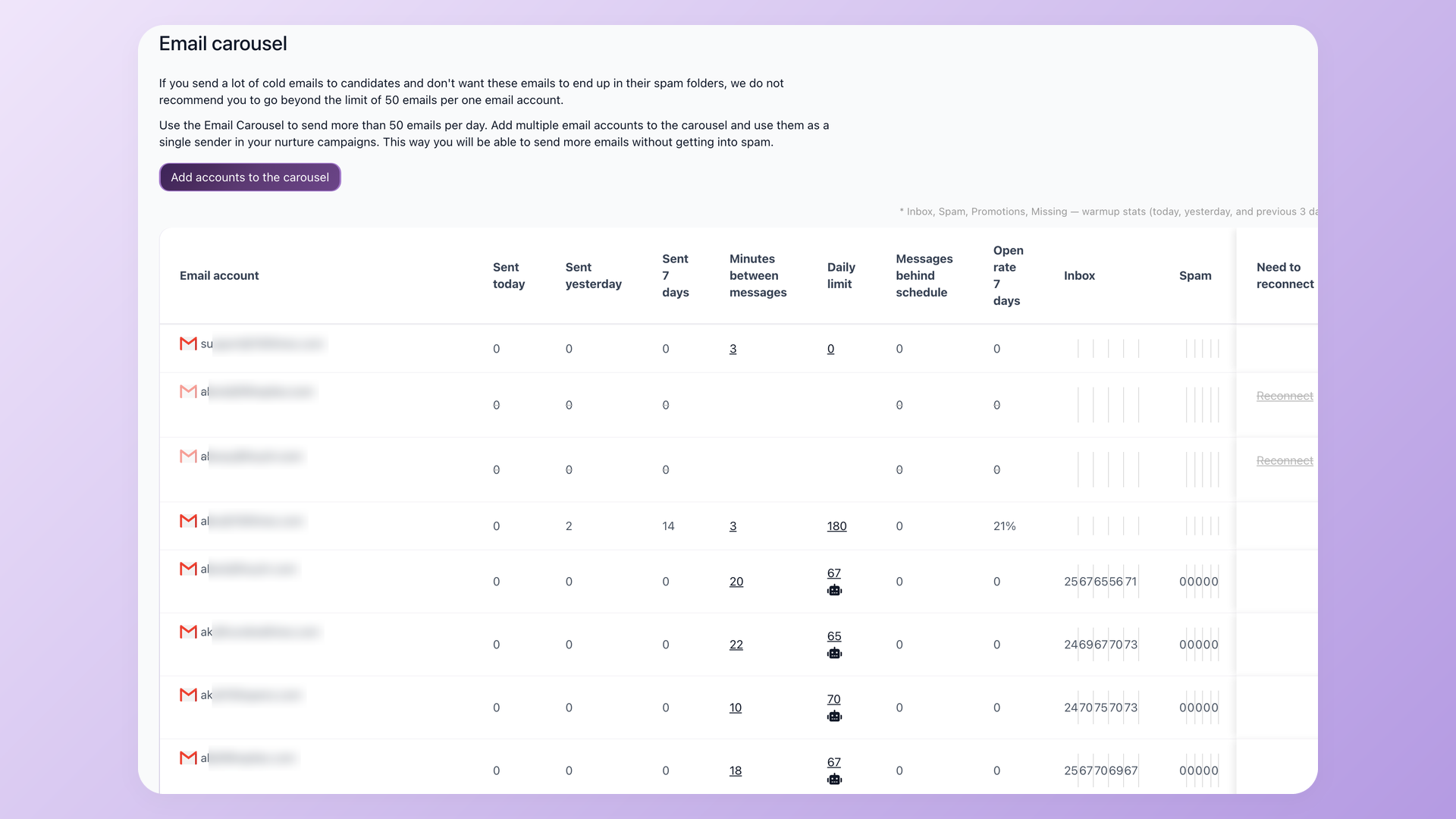
A single mailbox can only send about 50 cold emails a day before providers flag it. The 100Hires Email Carousel pools several Gmail or Outlook accounts into one sender, so a 250-person campaign goes out in a day instead of a week and no single inbox crosses its safe limit. You pick the accounts once, and the carousel splits every send across them. Each connected account keeps its own daily volume, current limit, and inbox-versus-spam rate, so a struggling sender is easy to spot.
- Multiple accounts, one sender
- Volume split automatically across mailboxes
- Five accounts send up to 250 emails a day
New sender accounts that do not trip spam filters
Fresh email accounts have no sending history, so volume out of the gate reads as spam. Turn on automatic warm-up and 100Hires ramps each new account over two to four weeks, low volume first and full limit once trust is built. You add the account and the warm-up runs on its own.
| Week | Daily volume | Account status |
|---|---|---|
| Week 1 | 10 to 20 emails | Building |
| Week 2 | 30 to 50 emails | Establishing |
| Week 3 | 75 to 100 emails | Growing |
| Week 4 and on | Full daily limit | Established |
Stop babysitting daily send limits
With warm-up on, the daily limit moves on its own. It climbs as an account earns reputation and pulls back automatically when deliverability slips, so you are never hand-tuning numbers or guessing how much is safe. Set the campaign and 100Hires protects the send.
- Limits adjust automatically
- Backs off when deliverability dips
- Manual override when you want it
None of this is magic. Warm-up takes two to four weeks before a new account runs at full volume, the carousel needs more than one connected mailbox to spread the load, and a poor-reputation domain pushing too hard will still hit spam. 100Hires protects how you send. A thin list or a generic message is still on you.
That is where the rest of your hiring workflow comes in. The Email Carousel handles how messages go out. To decide what they say, the 100Hires AI Email Composer drafts a tailored message from each candidate's profile, and you run the whole thing as a multi-step nurture campaign that pauses the moment a candidate replies.
No second email after a candidate has already replied
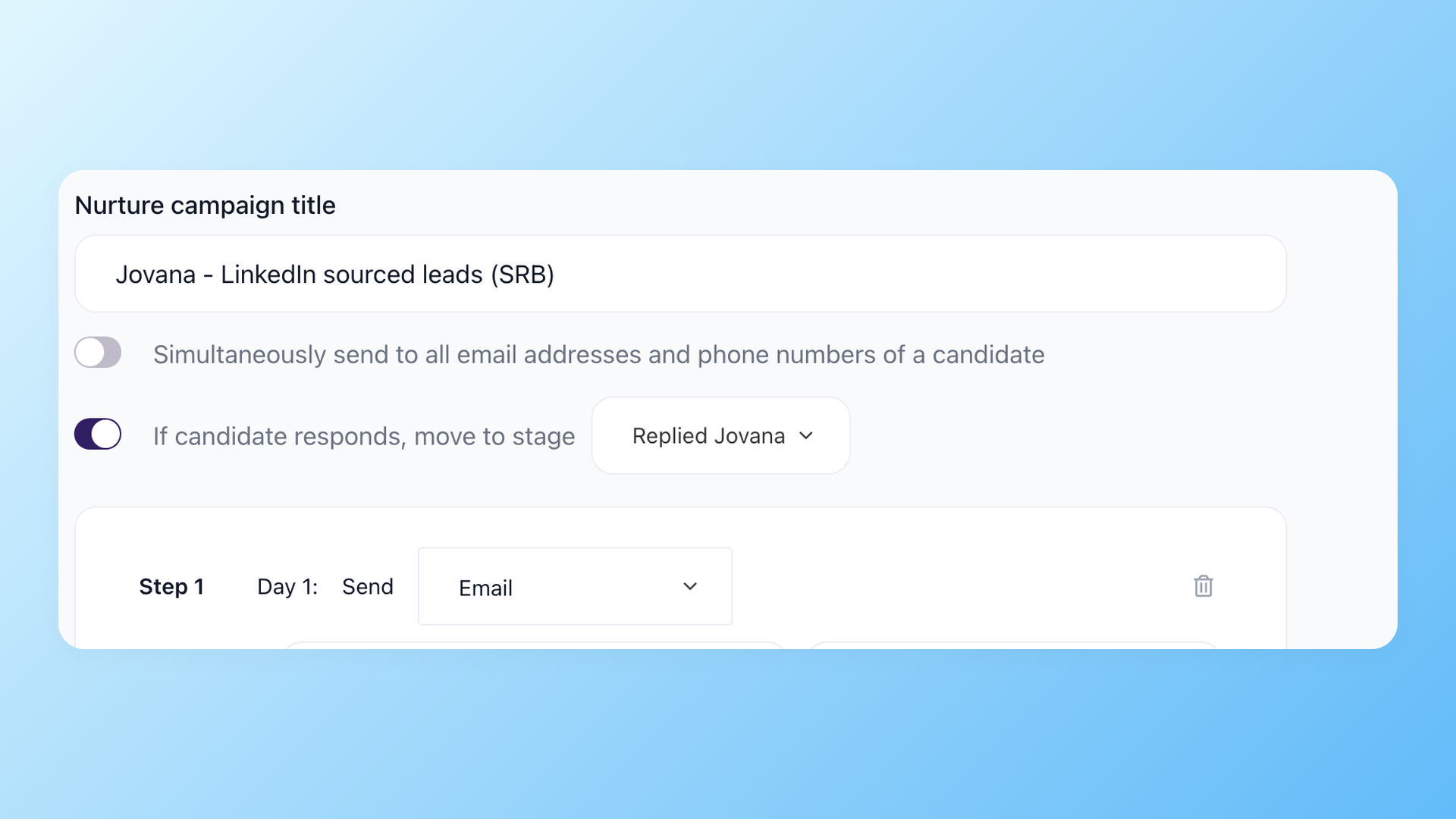
Run outreach as a multi-step nurture campaign and 100Hires moves a candidate to the next stage the second they respond, so the carousel never sends a follow-up to someone who already wrote back. The carousel sends every step; the campaign decides when to stop.
- Auto-pause on reply
- Stage moves on response
- Carousel sends every step
Know your outreach is landing, not guessing
Deliverability is only real if you can see it. 100Hires reports the numbers that tell you whether your messages reach inboxes, per account and per campaign, so you can catch a problem before a whole campaign sinks. Here is what healthy recruiting outreach looks like.
| Metric | Healthy | Warning sign |
|---|---|---|
| Bounce rate | Under 5% | Over 10% |
| Open rate | 20-40% | Under 10% |
| Reply rate | 10-20% | Under 5% |
| Spam complaints | Under 0.1% | Over 0.3% |
 100Hires

It solved all of my recruitment problems and offered all of the features I was looking for. It can automate most of my recruitment processes.

I’d happily recommend it to my industry peers. I’m able to use the platform with ease and don’t have to think twice about which function to use.

The system is very user-friendly. Even people with no experience will find it easy to understand its functionality.







 4.7
4.7
 4.8
4.8
The hiring playbook, in your inbox
One email a week - benchmarks, AI screening tactics, and short interview templates from the 100Hires team. No product pitches.
Related 100Hires resources: Explore candidate tracking software.