
ATS vs spreadsheets: when to switch in 2026 - 100Hires
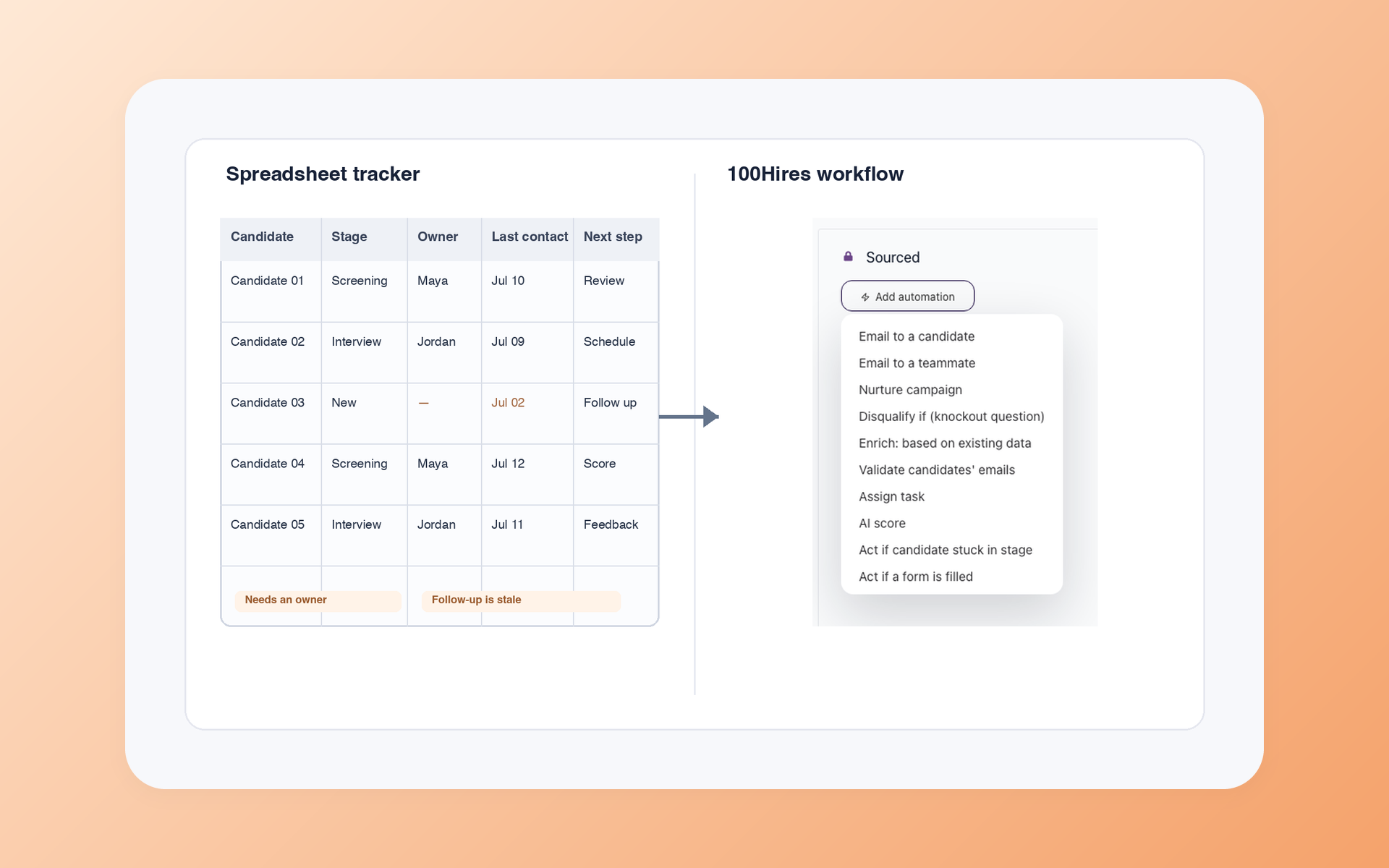
Is your hiring spreadsheet still a useful tracker, or has keeping it current become a second job?
When deciding between an ATS and a spreadsheet, keep the sheet when one owner can maintain one trusted record. Pilot an ATS when shared ownership, follow-up, feedback, history, or reporting starts creating administrative work.
The grid is not the deciding factor. What matters is whether your team can trust the current record without checking inboxes, files, and private notes. This guide gives you a fair comparison, a 10-question audit, and a one-role migration plan.
ATS vs spreadsheets at a glance
The hiring playbook, in your inbox
One email a week - benchmarks, AI screening tactics, and short interview templates from the 100Hires team. No product pitches.
A spreadsheet can be the right choice for one person running simple or infrequent hiring. An ATS earns its place when the candidate record must support shared work, follow-up, structured feedback, and history.
100Hires is our product. We separate its current capabilities and limits from the generic ATS category, where features and setup vary by vendor.
| Criteria | 100Hires | Generic ATS | Spreadsheet |
|---|---|---|---|
| Best fit | SMB team ready for a shared recruiting workflow | Team whose chosen vendor fits its process | One owner with simple or infrequent hiring |
| Initial setup | Start with one role, stages, users, and optional CSV mapping | Varies by vendor and process | Immediate when the workbook exists |
| Candidate record | Profile, discussion, messages, tasks, interviews, and evaluations | Usually centralized, with depth that varies | Only the fields and files the owner maintains |
| Stages and ownership | Shared, customizable pipeline | Usually included, with configuration that varies | Manual fields, filters, and conventions |
| Communication history | Messages and configurable follow-up | Varies by vendor and integration | Often split across inboxes and cells |
| Interview feedback | Evaluation Forms and reminders | Often included, with format that varies | Manual columns, forms, or separate documents |
| Screening and AI | Role-specific AI Score with human final review | Varies widely | Manual or formula-based unless built separately |
| Automation | Configurable workflow actions, reminders, and follow-up | Varies by vendor and plan | Formulas and reminders can help, but people maintain each rule |
| Reporting | Reports use shared system data | Varies by vendor | Possible when input and formulas stay clean |
| Talent-pool reuse | Searchable candidate history and later-role pipeline | Varies by vendor and data model | Possible with disciplined records, files, and consent handling |
| Access and retention | Shared account record, with team policy still required | Varies by vendor and configuration | File permissions, copies, and retention need owner control |
| Migration | Self-service CSV; assisted migration has plan conditions | Varies by vendor | The existing source record |
| Ongoing upkeep | Team maintains stages, criteria, automations, and adoption | Varies by vendor and process | Owner maintains fields, formulas, permissions, and data quality |
| Main limitation | Plan limits, setup choices, AI limits, and no resume anonymization | Cost, scope, and implementation vary | Manual upkeep and coordination load |
Create one role in a 14-day 100Hires trial. A live role will tell you more than rebuilding your entire workbook around a software demo.
A spreadsheet is enough when one owner can keep it current
Excel or Google Sheets can run a credible hiring tracker. A careful owner can add stages, source fields, next steps, dropdowns, protected formulas, conditional formatting, dashboards, and simple source reporting.
What a strong hiring spreadsheet can do
A useful workbook can hold candidate name, contact details, role, source, stage, owner, next step, notes, feedback links, and document links. Filters make one role manageable. Validation keeps stage names consistent.
Protected formulas can feed a dashboard without letting a casual edit break it. A solo founder or recruiter may prefer that control, especially when hiring happens in short bursts and no one else needs daily access.
A mature tracker may have several tabs and careful formulas. That sophistication is real. It still depends on an owner who understands the design, notices bad inputs, and can teach the rules to the next person.
You do not need an ATS just to make a sheet look more polished. If the workbook gives one owner a current view and candidates get timely replies, fixing a weak field or review habit may be the better move.
The maintenance cost lives outside the cells
The tradeoff appears in the chores around the workbook. Someone has to collect applications, store resumes, normalize source names, protect formulas, manage permissions, and explain what each color or blank cell means.
The sheet may still be accurate. The trouble starts when another person needs to trust it. A hiring manager might leave feedback in a document, a recruiter might update a candidate's email address, and the founder might read an older export.
At that point, the spreadsheet is one part of the process rather than the shared record of the process.
The real switch point is coordination failure
There is no universal applicant count, company size, or job count that makes a spreadsheet fail. The better signal is repeated reconciliation: people keep asking what changed, who owns the next step, or where the latest feedback lives.
Watch the workarounds. A weekly meeting exists just to reconstruct the current status. Candidate replies sit in one inbox. Interview notes arrive in chat. A private copy appears so one manager can sort the sheet without disrupting everyone else.
Shared status, communication, and feedback
Hiring becomes shared work once a recruiter, hiring manager, interviewer, and founder need the same answer. They need a current stage, a named owner, the next action, and a visible record of what happened.
Structured feedback matters here. A rating without an author or interview context is hard to use. Good hiring team collaboration ties each evaluation to the candidate, interview, and reviewer.
Follow-up exposes the same gap. A spreadsheet can store a next-contact date, but the email thread stays somewhere else. If the owner is away, the team may see a date without knowing what was sent or promised.
Reporting and candidate history
A report is useful only when its source fields are current. If stage or source data gets re-entered into a second tab each Friday, the report measures the cleanup routine as much as the hiring process.
Older candidates have value too. A past finalist may fit a new role, but that record helps only when the team can find the resume, prior feedback, communication, and consent status together.
An ATS and spreadsheet can coexist during a pilot. Ongoing dual entry is different. When the team must update both to feel safe, neither record is fully trusted.
Use this 10-question audit to choose keep, pilot, or switch
This is a practical editorial audit for the decision, not an industry score. Count each statement that is not consistently true in your current hiring process.
Answer based on the last live role, not on the process you meant to run. A written rule earns a yes only when the team followed it and the shared record showed the result.
- We have one current record for candidate, role, stage, owner, and next step.
- Anyone involved can see current status without asking another person.
- Communication and follow-up history are searchable.
- Interview feedback is structured, attributable, and tied to the candidate.
- Applications enter the process without routine copy-paste.
- Reports do not require repeated entry or reconciliation.
- Older candidates can be found and reviewed for a new role.
- Access, deletion, and retention are handled through deliberate rules.
- Screening criteria are job-related, and a person makes the final decision.
- The workflow is simple enough that the team uses it every day.
Keep and improve the spreadsheet with 0 to 2 gaps
If zero, one, or two statements are inconsistent, fix the weak field, owner, permission, or review habit first. Your sheet is doing its job. Buying software may add more change than value.
Pilot an ATS on one live role with 3 to 5 gaps
Three to five gaps suggest a limited test. Choose one role, one owner, a small CSV, and the real people who need to give feedback. Define success through cleaner ownership, faster status checks, and less duplicate entry.
Switch the live process with 6 to 10 gaps
With six to ten gaps, make moving the live process to an ATS your next practical test. Keep the old sheet read-only for a set reconciliation period.
A serious access or privacy problem can justify faster action at any score. Treat the ranges as a decision aid, not a prediction of return or hiring speed.
An ATS changes the operating record, not the quality of the process
The core of what an ATS does is simple: it connects a candidate record to stages, ownership, communication, feedback, reporting, automation, and searchable history.
What an ATS adds
The team can work from the same candidate profile instead of reconstructing context from rows, inboxes, and documents. Stage changes become visible. Feedback has an author. The workflow can trigger follow-up.
This changes the unit of work. A row tells you a status. A connected record can show the status, the event that changed it, the person responsible, the communication around it, and the next action.
Exact capabilities vary. Some systems include AI, job distribution, reports, migration support, or deep permission controls. Others do less. A category label does not prove that a chosen product fits your workflow.
What an ATS cannot fix
Software cannot define a vague stage, write useful interview criteria, assign ownership, or make a reluctant team use the record. A complicated action can send people back to a private sheet.
When rollout stalls, the product is not always the cause. Sometimes the team never moves its live process into the system. Keep the first version narrow enough that the team can finish the change.
100Hires is an easy first ATS when you start with one role
100Hires fits an SMB that has outgrown a shared spreadsheet and wants to test a narrower workflow before considering an enterprise-scale implementation. Start with one job, the smallest real hiring group, and fields you already trust.
One shared workflow replaces the bigger spreadsheet
A 100Hires candidate profile can hold Discussion, Messages, Tasks, Interviews, and Evaluation tabs. The job pipeline supplies shared stages, and Evaluation Forms give interviewers the same questions with reminders.
You can map CSV columns into profile fields, assign records to a job or candidate pool, and rebuild the stages and follow-up that the live role needs. That is a controlled first step, not an instant copy of every spreadsheet habit.
Start with the pieces that remove coordination work: clear stage ownership, one evaluation form, a visible discussion history, and a follow-up rule. Leave rare exceptions manual until the team proves it uses the core record.
There are boundaries. The Start plan has one user and limits on jobs and candidates. Comprehensive assisted migration has plan conditions. A dedicated CRM can offer deeper campaign and event tools than the recruiting pipeline.
AI helps prioritize review, and people make the decision
100Hires AI resume screening rates each candidate from 0 to 100 against criteria written for that role. Recruiters can sort the pipeline by AI Score, then review the resumes before making the final decision.
The score is decision support. A person makes the final call. A non-standard strong candidate can receive a lower score, so borderline profiles still need review and the criteria may need revision after the first batch.
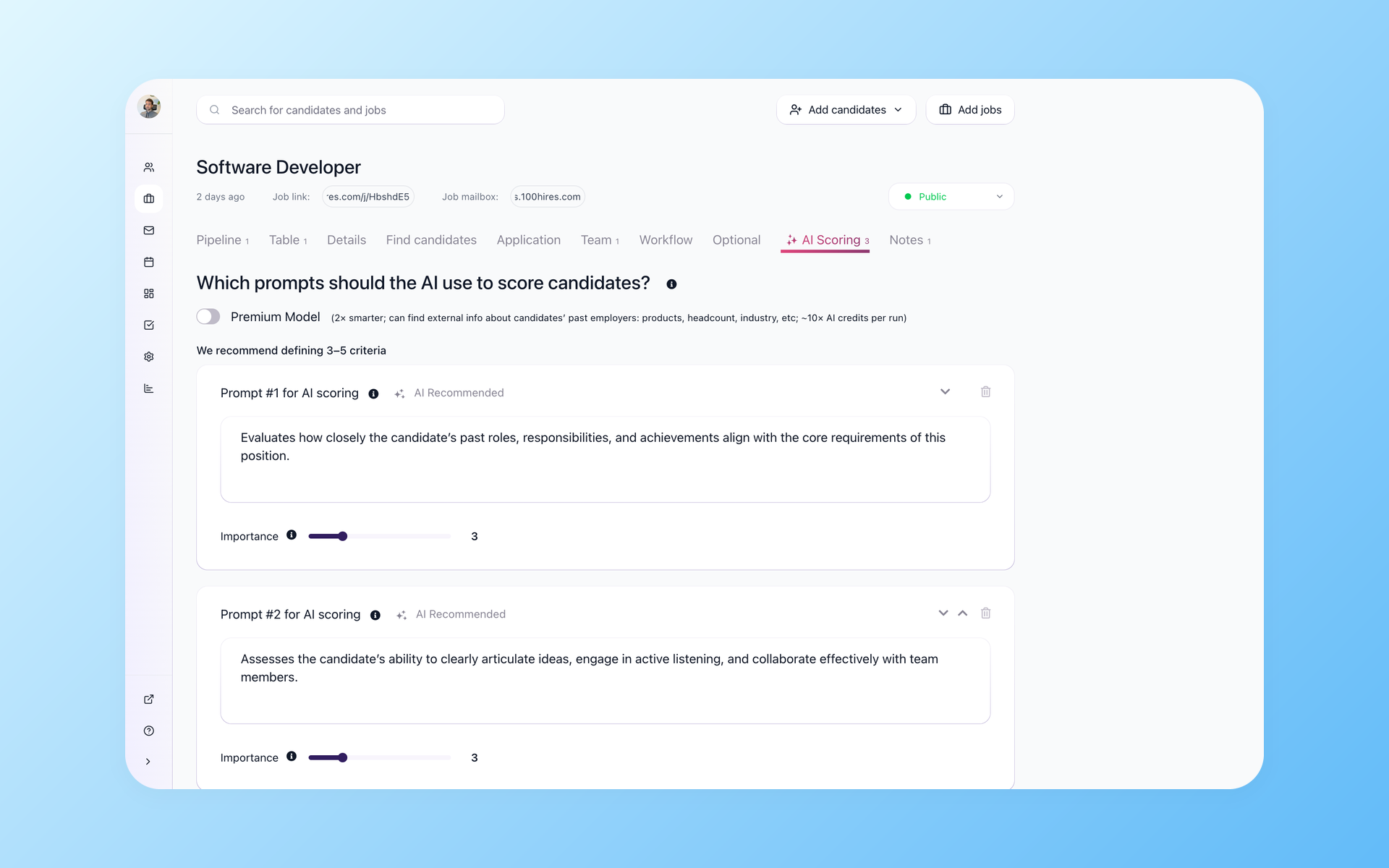
100Hires does not currently offer resume anonymization. Teams using employment tests or automated screening should keep criteria job-related, review outcomes, and keep a person accountable for the decision.
The EEOC guidance on prohibited employment practices explains the general anti-discrimination boundary. It is not a product endorsement or legal advice.
100Hires pricing compared with a category and a spreadsheet
The table uses the base USD values captured from 100Hires pricing on July 14, 2026. Employee-count and currency selectors can change the displayed values. Each annual total is the monthly rate under annual billing multiplied by 12.
| Option or plan | Monthly billing | Annual equivalent | Annual total | Public scope and limits |
|---|---|---|---|---|
| 100Hires Start | $99/month, displayed | $49/month, displayed | $588/year, derived | 3 jobs, 100 candidates, 1 user; 100 monthly AI credits |
| 100Hires Advanced | $249/month, displayed | $199/month, displayed | $2,388/year, derived | Unlimited jobs, candidates, and users wording; 300 monthly AI credits with monthly billing or 1,000 monthly AI credits with annual billing |
| 100Hires Pro | $499/month, displayed | $399/month, displayed | $4,788/year, derived | 3,000 monthly AI credits with monthly billing or 5,000 monthly AI credits with annual billing; comprehensive migration on annual contracts |
| Generic ATS category | No single public category price | No single public category price | No single public category price | Vendor, plan, billing basis, and implementation scope vary |
| Spreadsheet workflow | No single recruiting-software price | No single recruiting-software price | No single recruiting-software price | Existing suite, storage, labor, and upkeep vary |
Try one real role in 100Hires before you rebuild the full process. Use the pilot to test adoption, record quality, and follow-up with your actual team.
Run a one-role migration pilot before replacing the whole workbook
A smaller pilot makes the decision visible and reversible. You are testing whether the ATS fixes a coordination problem, not whether every historical row can move on day one.
Write down the pain before the import. If the problem is unclear or outdated ownership, measure whether owners and next steps stay current. If it is lost feedback, check whether every interviewer submits the same form in the candidate record.
Map the source fields and clean the exceptions
- Pick one live, manageable role. Name one owner and invite only the people needed for real feedback.
- Freeze the source fields. Include name, contact, role, source, stage, owner, next step, notes, feedback, documents, and consent or retention data.
- Clean obvious exceptions. Deduplicate records, normalize stage names, and list values that do not map cleanly.
- Recreate only the live process. Add current stages, evaluation questions, and essential follow-up. Leave retired fields behind.
Test, reconcile, and invite the smallest real team
- Import a subset using a CSV file. Map each source column, review proposed changes, and assign the records to the pilot job and stage.
- Reconcile before a wider rollout. Check profile counts, stages, notes, feedback, contact details, and documents against the source.
- Run the hiring process for the role with the real hiring group. Ask them to update stages, submit evaluations, and use the shared communication record.
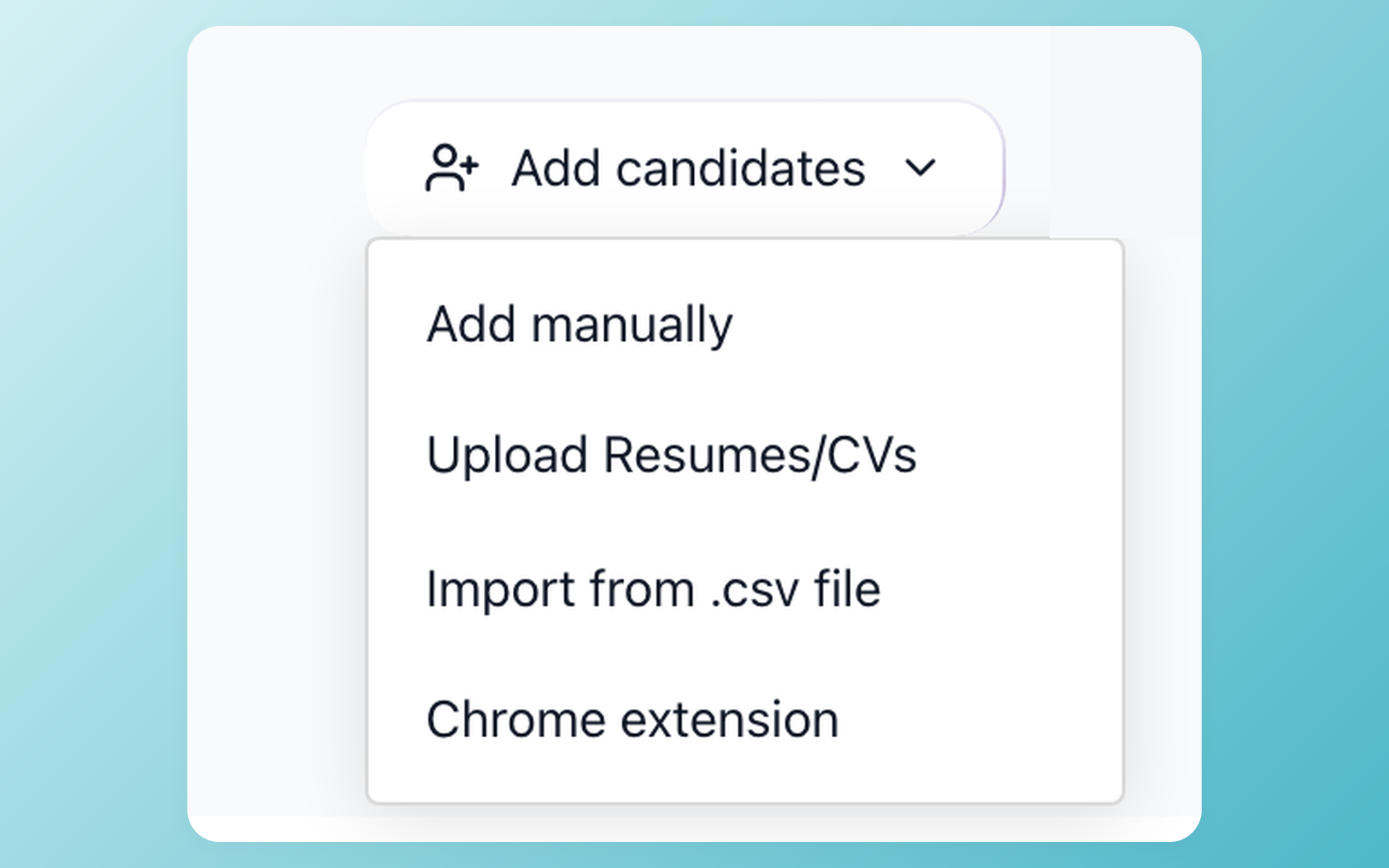
Self-service CSV import and assisted migration are different paths. Read the current candidate data migration scope before deciding which one your records need.
Expand only after the pilot fixes the original problem
Keep the old workbook read-only during reconciliation. Do not create permanent duplicate data entry. Review missing fields, overdue follow-up, reporting effort, team use, and any context that still lives outside the candidate record.
Expand to other roles when the pilot resolves the coordination problem that triggered the test. If people still bypass the system, simplify the workflow before importing more data.
The decision is about shared work, not spreadsheet size
A maintained spreadsheet can remain the right hiring tool. An ATS becomes useful when hiring turns into shared operational work and the team needs one record for ownership, communication, feedback, reporting, and history.
100Hires gives an SMB a small first step: one role, one pipeline, mapped candidate records, structured feedback, and optional AI support with human review.
Start a 14-day 100Hires trial with one role. Keep the sheet as a read-only source until the new record proves itself.
Frequently asked questions
Can Excel or Google Sheets be used as an ATS?
Yes. A spreadsheet can track candidates, stages, owners, sources, notes, and next steps. It works best with one owner and a simple process. 100Hires becomes useful when the same record must support shared feedback, communication, automation, and searchable history.
When should a small business move from a spreadsheet to an ATS?
Move when stale stages, unclear ownership, missed follow-up, split feedback, repeated reporting work, or access concerns become recurring. 100Hires lets a small business test the change on one live role before moving the full process.
Can an ATS and spreadsheet be used together?
Yes, during migration or a bounded pilot. Keep the sheet read-only for reconciliation, then make one system the live record. 100Hires supports CSV mapping, so the pilot does not need permanent updates in both places.
How do you migrate a recruiting spreadsheet into an ATS?
Remove duplicates, finalize the field list, map the fields in a small CSV file, test a subset, and reconcile records before the full import. 100Hires supports self-service CSV mapping, and assisted migration has plan conditions.
Does an ATS automatically reject candidates?
Not necessarily. It depends on the system and the rules a team configures. In 100Hires, AI Score helps sort candidates against role criteria, but a person makes the final call. Teams should review borderline profiles and never treat a score as the hiring decision.
How much does 100Hires cost compared with a spreadsheet?
A spreadsheet has no single recruiting-software price, since suite, storage, and upkeep vary. Current 100Hires base rates in USD start at $99 monthly or $49 per month billed annually, with employee and currency selectors that can change the displayed price.
Try 100Hires for free
No credit card. 14-day trial. Forbes Advisor #1 ATS for SMBs.

