
SMS + EMAIL + VOICEMAIL

Text Recruiting Software

Reach candidates on the channel they actually reply to, keep every text on the candidate record your whole team can see, and stop chasing unanswered emails by hand.

4.7
4.8
based on 1,300+ reviews
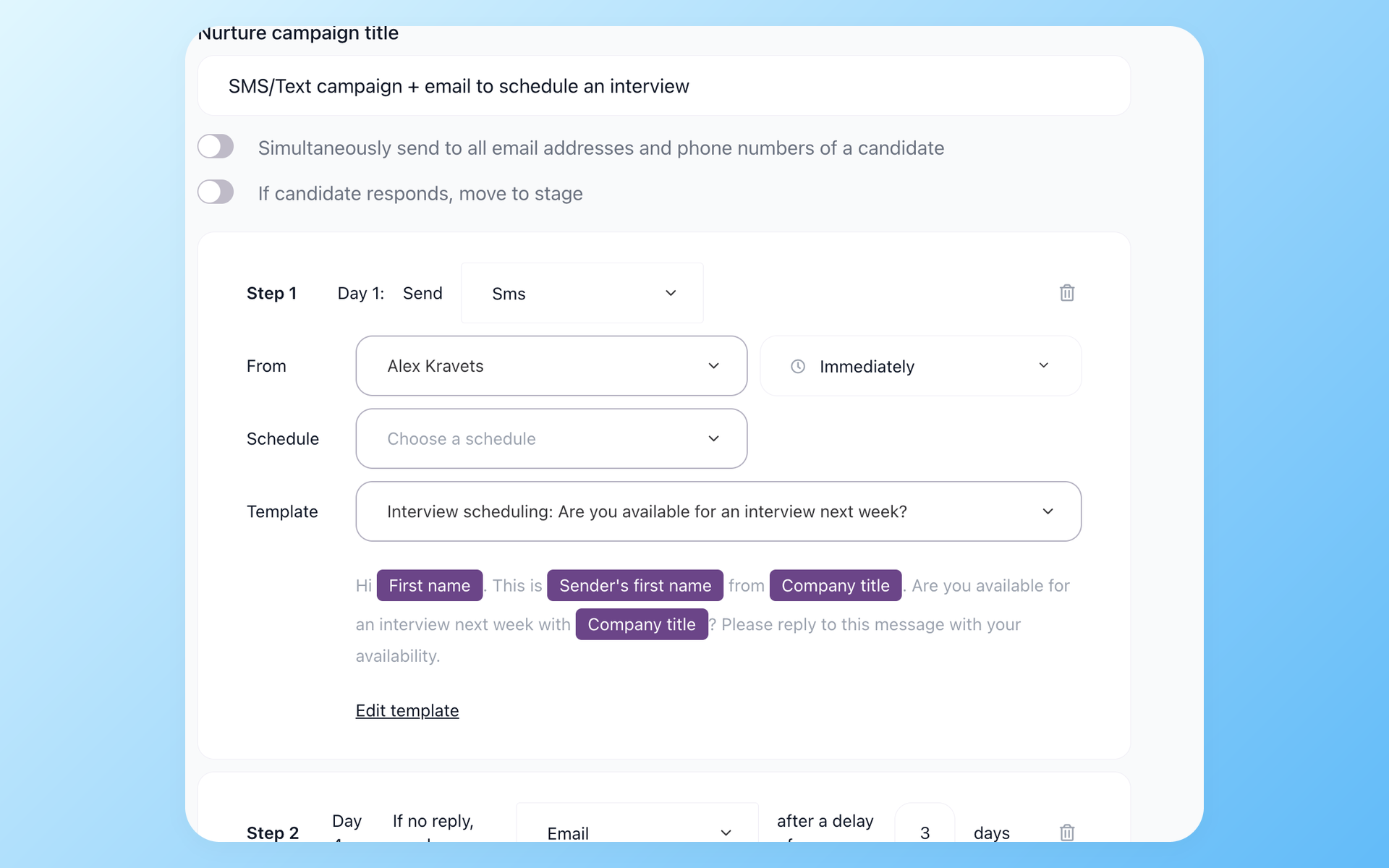
100Hires nurture campaign builder with an SMS first step, an email follow-up if there is no reply, and a move-to-stage rule

Your best candidates are not ignoring you, they are ignoring email

Industry data on candidate outreach is lopsided: text messages are read within minutes and have open rates near 98 percent, while a large share of candidates never open the recruiting email at all.

Hourly and deskless workers often do not check work email during the day, so an email-only process loses them before the first call.

So recruiters improvise. They text candidates from their personal phone, with numbers copied off a LinkedIn profile or a resume.

Those texts are invisible to the rest of the team, never land on the candidate record, cannot be measured, and sidestep any consent or opt-out trail. The conversation that moved the hire lives on one person's phone and leaves with them.

Text recruiting software fixes that by moving candidate texting into the system you already hire in.

100Hires sends SMS as a step inside automated recruiting sequences, captures every reply on the candidate, and runs it through your own registered work number instead of a personal cell.

Run texts, email, and voicemail from one hiring workflow

SMS in 100Hires is a step type in Nurture campaigns, alongside email and ringless voicemail, so candidate texting runs on the same engine as the rest of your recruitment automation.

You build one sequence, the platform sends each step on schedule, and replies flow back into the pipeline where the whole hiring team can see them.

Texting is one channel in the broader candidate engagement software inside 100Hires, which also handles email and voicemail follow-ups.
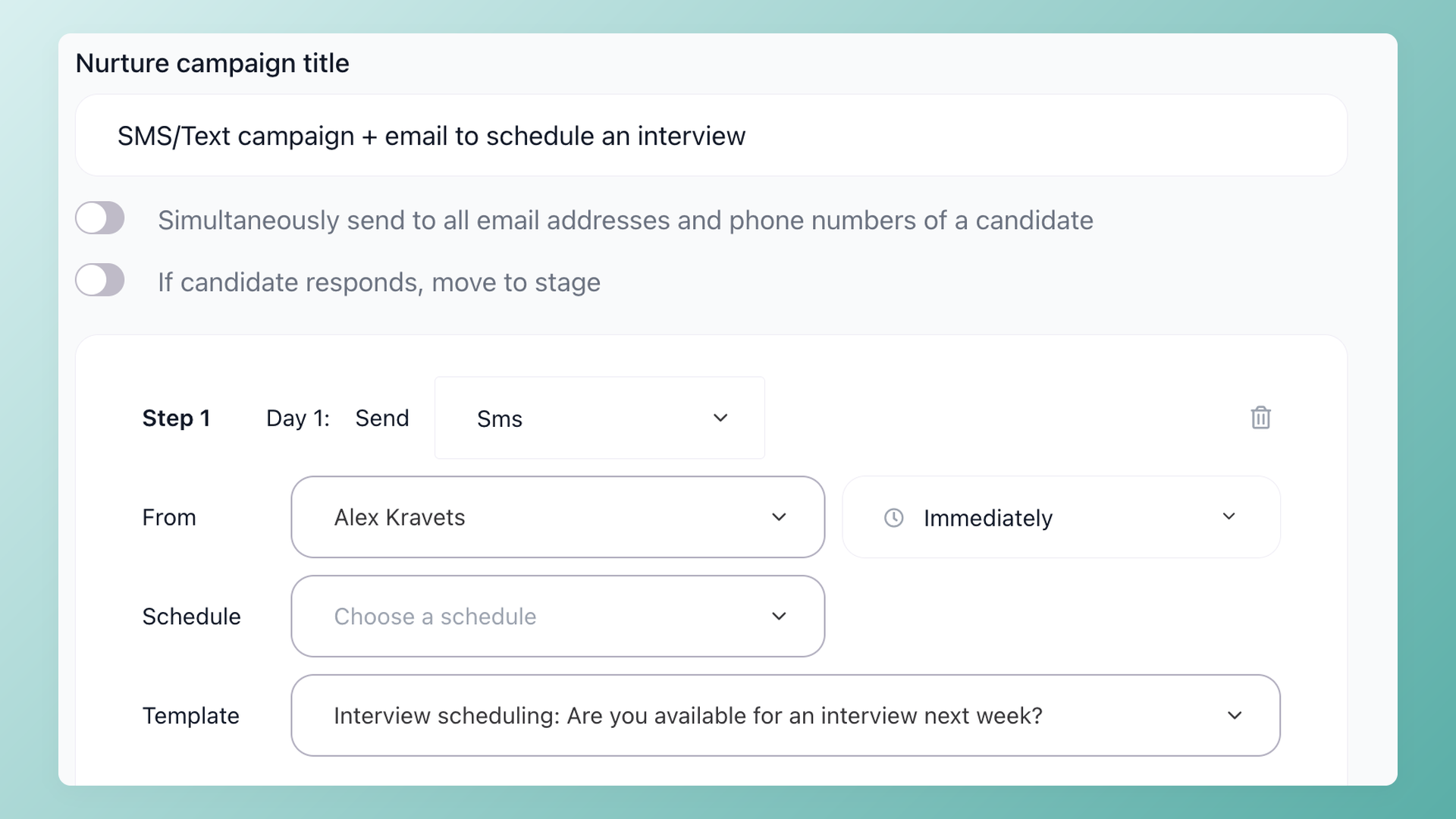
100Hires nurture campaign SMS step with a sender, a send schedule, and a reusable message template

Stop chasing unanswered emails by hand

Add an SMS step to a Nurture campaign and 100Hires sends the text on its own schedule, then follows up only if the candidate has not replied. Each step has its own delay and send window, and the whole sequence runs in the candidate's time zone so a text never lands at 3am. Mix SMS, email, and voicemail in the same campaign to reach people on the channel they answer.

  • SMS, email, and voicemail steps in one sequence
  • Per-step delay and send window, in the candidate's time zone
  • Follow-up fires only when a candidate stays silent
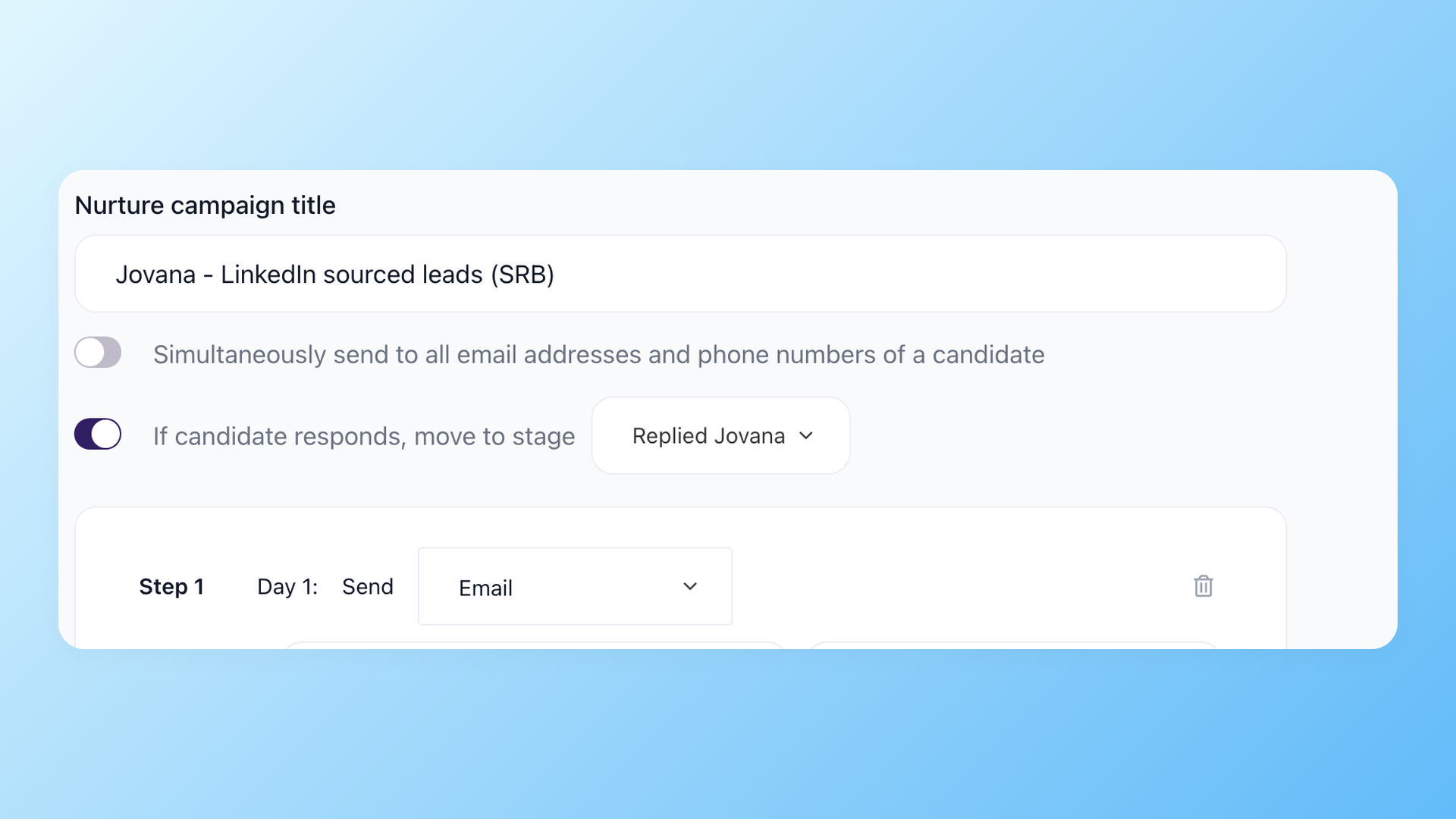
100Hires nurture campaign setting that moves a candidate to a chosen stage the moment they reply

Every reply lands on the candidate record, not someone's phone

When a candidate texts back, 100Hires records the message on their Discussion timeline next to their resume, emails, calls, and notes, so anyone on the team picks up the thread without asking who owns the conversation. Turn on the reply rule and the sequence pauses and moves the candidate to the stage you choose the moment they answer, so a warm reply gets picked up instead of going cold.

  • Inbound texts saved on the candidate's profile
  • Whole team sees the thread, not a personal phone
  • A reply can auto-move the candidate to the next stage
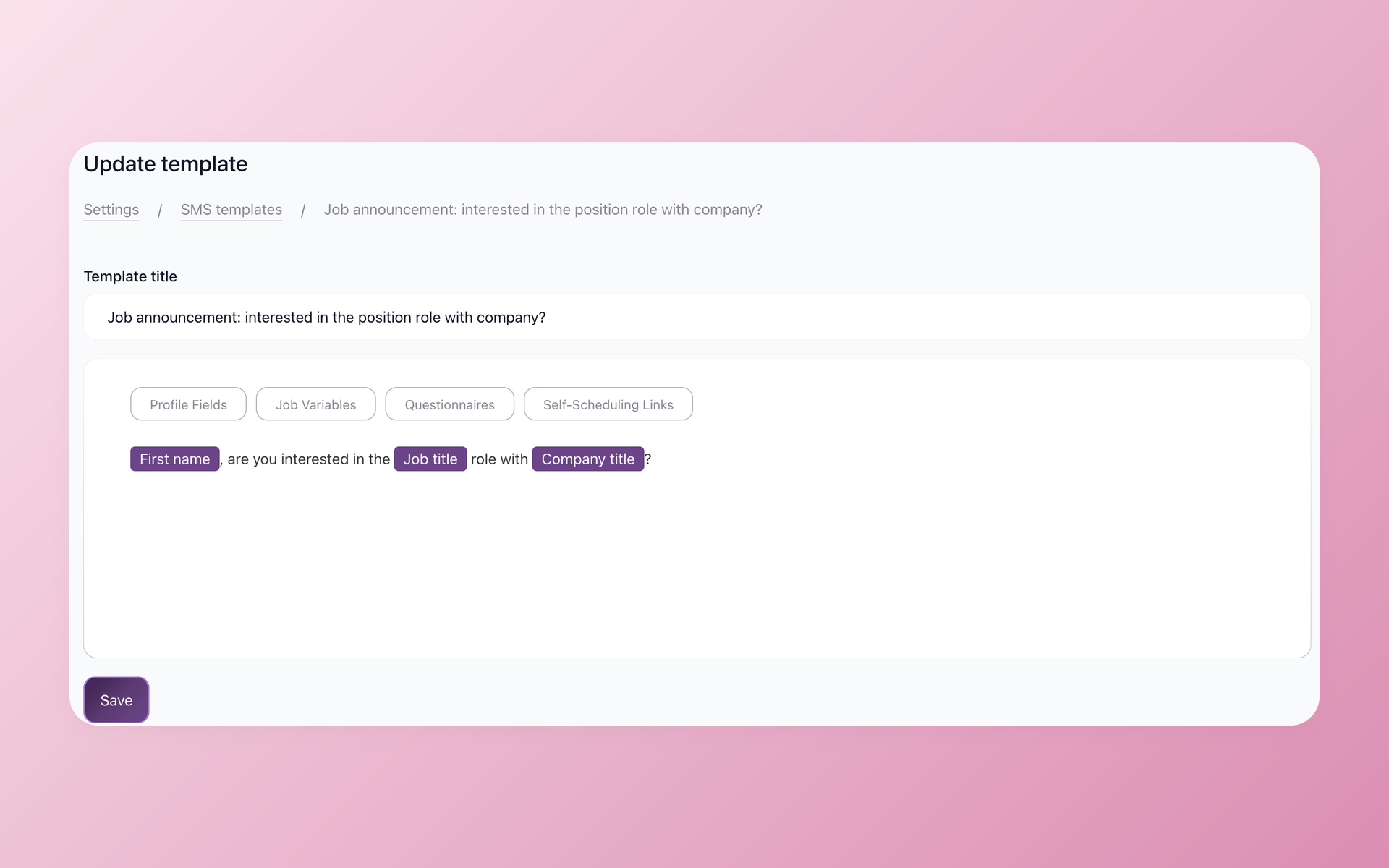
100Hires SMS template editor in Settings with candidate and job variables inserted into the message

Send texts that feel personal without retyping them

Save your screening, scheduling, and follow-up texts as SMS templates in Settings, then drop in candidate and job variables so each message reads like you wrote it for that person. Inside a Nurture campaign the right template goes out at each step, so the team reuses approved wording instead of every recruiter writing their own version.

  • Reusable SMS templates, saved once in Settings
  • Candidate and job variables for real personalization
  • One approved set of wording for the whole team
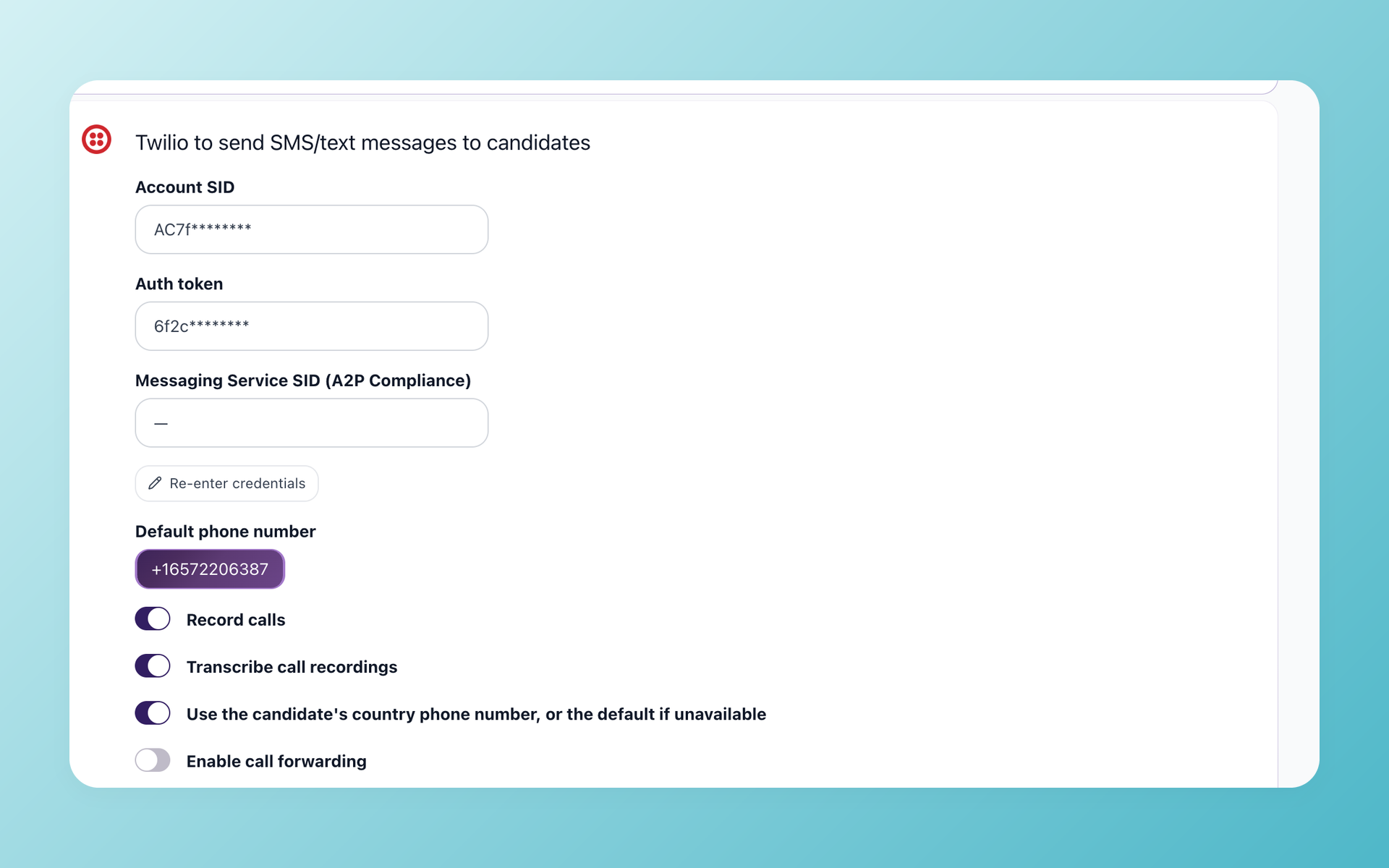
100Hires Twilio integration settings for sending texts, calls, and voicemail from a registered work number

Get recruiters off their personal phones

100Hires texts, calls, and voicemail drops go through your connected Twilio work number, not anyone's personal cell, so every message is logged and your team keeps one shared number. For US texting the integration supports A2P 10DLC registration, and you control consent and opt-out on your own carrier account. Our support team helps you get the number set up.

  • One registered Twilio work number for texts, calls, and voicemail
  • Supports A2P 10DLC registration for US texting
  • You control consent and opt-out on your carrier account

Text your candidates from inside your ATS

Reach people on the channel they answer and keep the whole conversation in one place. Free 14-day trial.

How 100Hires compares to a typical ATS

Most applicant tracking systems still send email only, or treat SMS as a paid add-on bolted on through a separate tool.

100Hires builds texting into the same automated sequences, the same candidate record, and the same pipeline you already work in, so a dedicated text recruiting platform is not a second subscription you have to buy and wire up.

100Hires
From $49 per month
Typical ATS
Paid add-on
Free 14-day trial
Try the full platform before you commit, no credit card
-
SMS inside automated sequences
Text, email, and voicemail steps in one campaign
Email only or add-on
Two-way replies on the candidate record
Saved next to the resume, emails, and notes
-
Ringless voicemail step
-
Personalization tokens in texts
Candidate and job variables in SMS templates
Limited
Send schedule in the candidate's time zone
-
Reply auto-moves the candidate to a chosen stage
Manual
Text from your own Twilio number
Twilio bills your SMS usage directly, no second platform
Paid add-on or none
One timeline: texts, calls, emails, notes
Separate tools
Atiq Arshad
Technical Recruiter @Kidan

It solved all of my recruitment problems and offered all of the features I was looking for. It can automate most of my recruitment processes.

Source: G2
Philipp Maschelski
Talent Acquisition Partner @G42

I'd happily recommend it to my industry peers. I'm able to use the platform with ease and don't have to think twice what function to use.

Source: Capterra
Teodora Franich
HR Manager @TeachMeSkills

The system is very user-friendly. Even people with no experience will find it easy to understand its functionality.


Source: G2
Capterra Shortlist 2026 Capterra Best Ease of Use 2026 Capterra Best Value 2026 Software Advice Front Runners 2026 Software Advice Most Recommended 2026 G2 Leader Winter 2026 G2 Users Love Us 2026
4.7
4.8
based on 1,300+ reviews
Text recruiting FAQ
+ What is text recruiting software?
Text recruiting software lets recruiters reach candidates by SMS instead of relying on email and phone tag, usually with templates, automated follow-ups, and a record of every message. In 100Hires, texting is built into Nurture campaigns, so SMS runs as an automated step alongside email and voicemail and every reply is saved on the candidate record.
+ How does texting work in 100Hires?
You add an SMS step to a Nurture campaign in 100Hires, pick a template and a send schedule, and the platform texts the candidate and follows up only if there is no reply. SMS, email, and ringless voicemail steps live in the same sequence, and inbound replies land on the candidate record for the whole team to see.
+ Do I need Twilio, and who pays for the texts?
Yes. 100Hires sends SMS and calls through your own connected Twilio number, and your Twilio account is billed directly for message usage. Bringing your own number means the work number stays yours and every message is logged in 100Hires. You can check current plan details at https://100hires.com/pricing.
+ Is text recruiting TCPA and 10DLC compliant?
Compliance depends on how you run your outreach, and 100Hires gives you the pieces to do it right: texting runs on your own registered Twilio number, the integration supports A2P 10DLC registration for US SMS, and you control consent and opt-out on your carrier account. Our support team helps you set up the registration, and you remain responsible for consent the same way you would with any business texting.
+ Can candidates text back?
Yes, texting in 100Hires is two-way. When a candidate replies, the message is recorded on their Discussion timeline next to their resume, emails, and notes, and you can set a rule so a reply moves the candidate to the next stage automatically instead of waiting for someone to notice it.
+ How is this different from a dedicated text recruiting platform or bulk SMS tool?
A standalone texting platform is a second tool to buy, wire up, and check separately from your ATS. In 100Hires the texts, replies, calls, emails, and pipeline stage all live on one candidate profile, because SMS is part of the recruiting sequences you already run rather than a separate bulk SMS tool.
+ Can I schedule texts and automate follow-ups?
Yes. Every SMS step in a 100Hires Nurture campaign has its own delay and send window, the whole sequence runs in the candidate's time zone, and follow-up steps fire only when there is no reply. You can also trigger a campaign when a candidate enters a stage, so a candidate stuck in a stage gets a nudge text without anyone remembering to send it.
+ Can I text candidates from my computer instead of my personal phone?
Yes. 100Hires sends every text from your shared work number, so recruiters reach candidates from the desktop without handing out a personal cell number, and the conversation stays on the candidate profile when that recruiter is out or moves on.
23,000+ recruiters & business owners read this newsletter

The hiring playbook, in your inbox

One email a week - benchmarks, AI screening tactics, and short interview templates from the 100Hires team. No product pitches.

Start texting candidates this week

Build texting into your next recruiting campaign and reach candidates where they actually reply. Free 14-day trial.

We use cookies to offer you our service. By continuing to use this site, you consent to our use of cookies as described in our policy











