SECURITY FOR HEALTHCARE HIRING

HIPAA-Ready Applicant Tracking System

Keep candidate records locked to the people who need them, hold every applicant's history in one place, and remove that data cleanly when the time comes, instead of scattering it across inboxes, drives, and shared spreadsheets.
4.7
4.8
based on 1,300+ reviews
100Hires roles and per-job access settings for a healthcare hiring team

What HIPAA-ready means here, and what it does not

HIPAA-ready means 100Hires gives your hiring team real security controls that fit healthcare recruiting: role-based access, per-job visibility, candidate activity history, configurable retention, and clean deletion. It does not mean a compliance certificate.

One scoping note: 100Hires is built for recruiting data, so you should not store patient records, medical files, or other protected health information in it. Keeping PHI in the systems built for it is the right scope for a hiring tool.

Compliance is a status your organization holds, supported by tools, not granted by them. What 100Hires gives you is control over your candidate data. What stays with you is your HIPAA program and the call on which data belongs in a hiring tool at all.


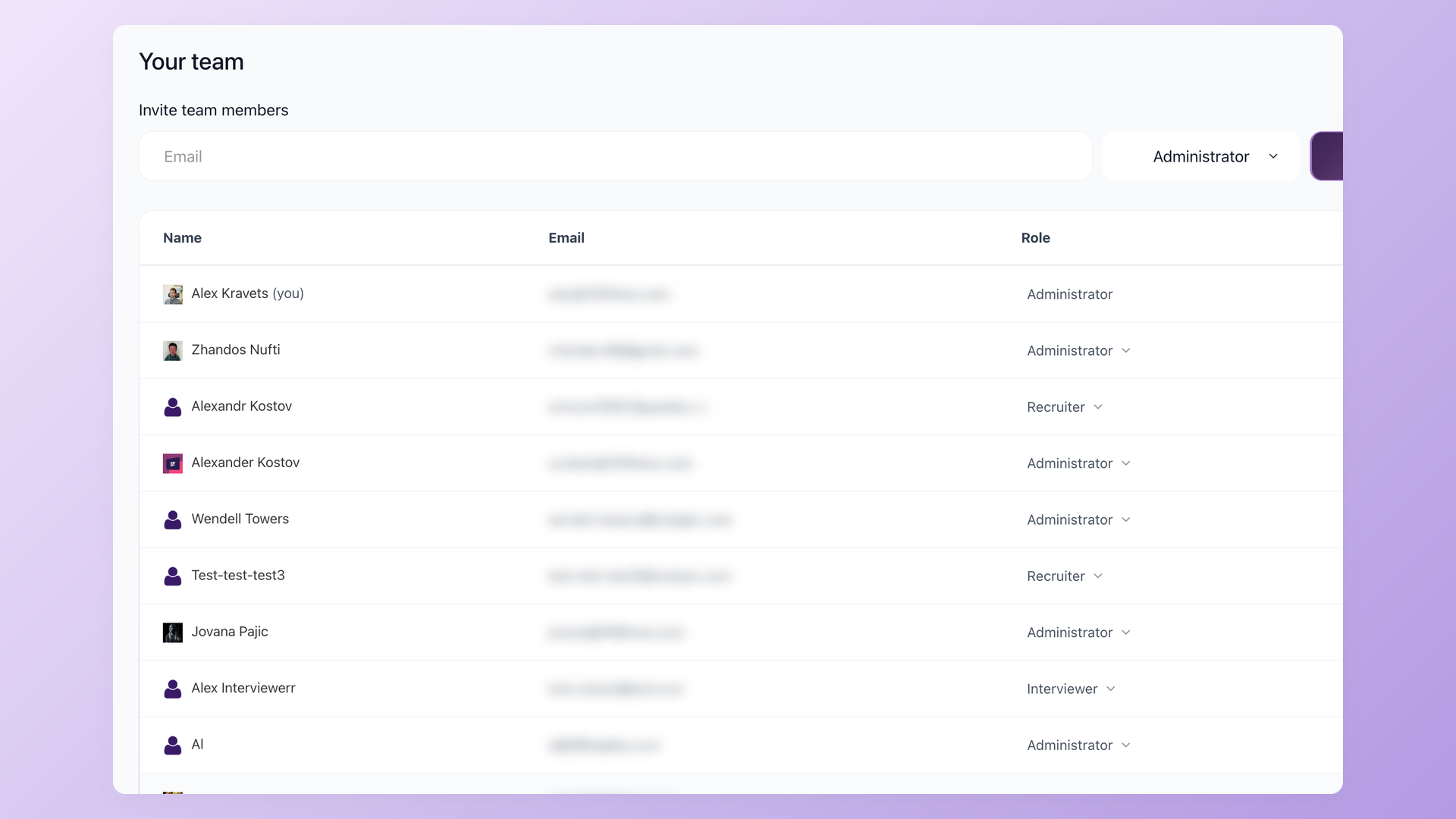
100Hires roles and permissions settings

Decide who on your team sees each candidate

Healthcare teams work by need-to-know. 100Hires matches that with three roles, Administrator, Recruiter, and Interviewer, plus per-job access, so an interviewer sees only the candidates for the reqs they are assigned to, not your whole pipeline.

  • Administrator, Recruiter, Interviewer roles
  • Per-job visibility, scoped to assigned reqs
  • Permission matrix per role
  • Interviewers never see the whole pipeline
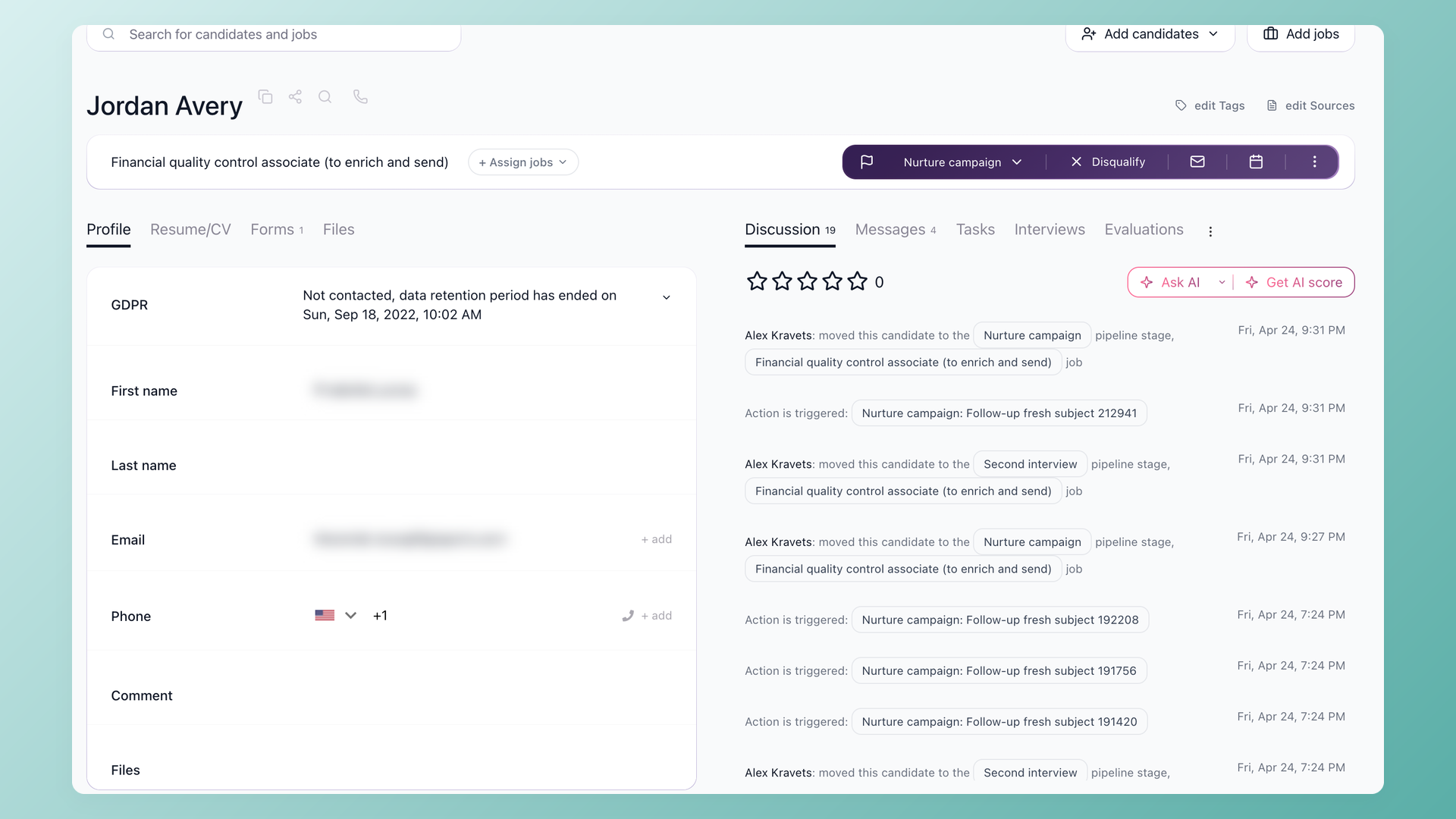
100Hires candidate record with activity history

Keep every candidate's history in one record

Each candidate sits in one record in 100Hires, with their application, notes, and a running activity history in one place. When a security review asks where a candidate's data lives, you point to one record instead of five inboxes and a shared drive.

  • One record per candidate
  • Running activity history
  • Application and notes in one place
  • No reconstructing from inboxes
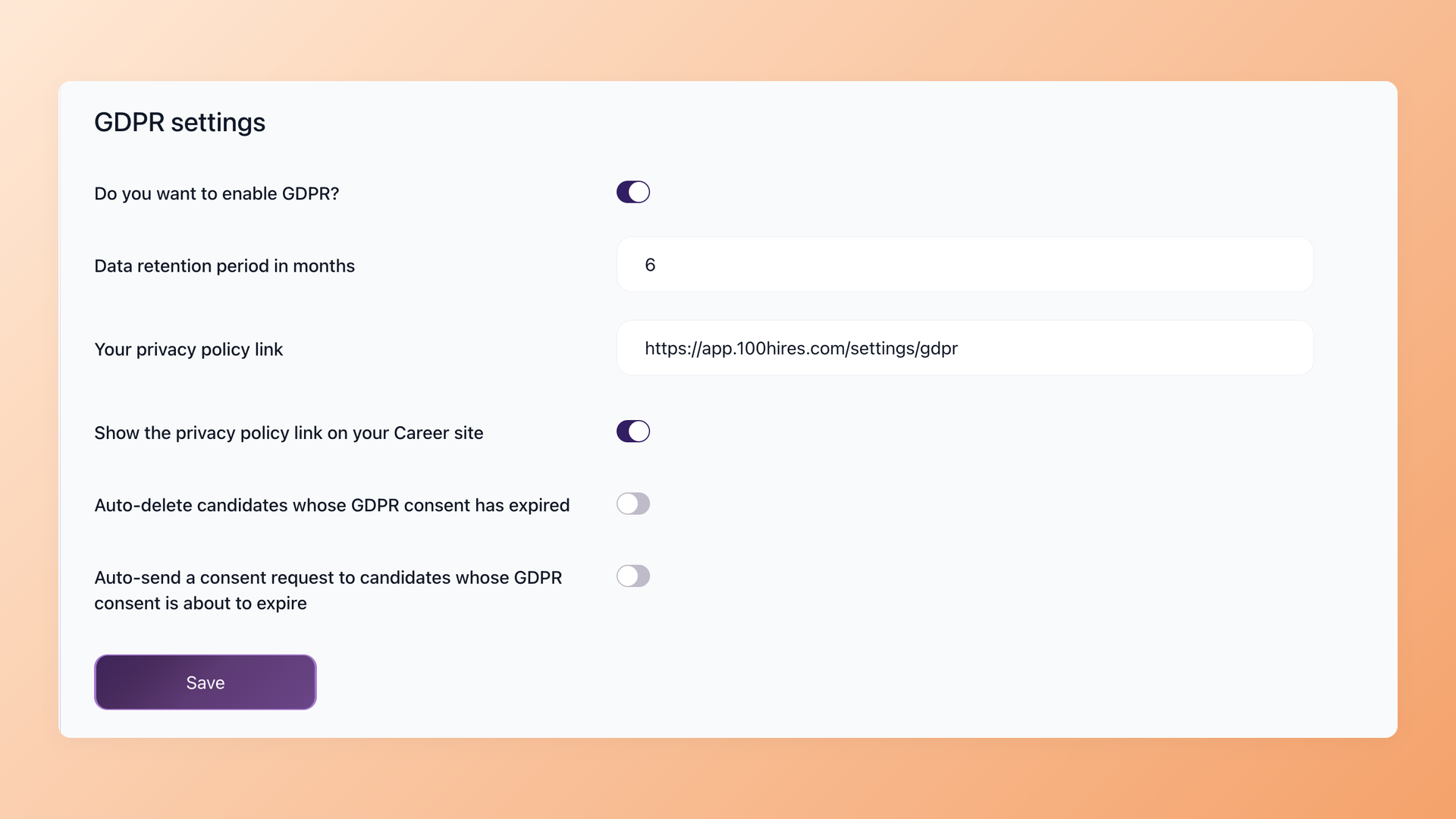
100Hires data retention and erasure settings

Remove a candidate's data cleanly when you should

100Hires gives you configurable data retention and one-click erasure of a candidate, so a deletion ask from a rejected applicant is a setting, not a scramble. You can also export your candidate data to CSV.

  • Configurable retention windows
  • One-click candidate erasure
  • CSV export of your candidate data

Get candidate data out of inboxes and shared spreadsheets

Most teams run early hiring on email, Google Drive, group chats, and a spreadsheet someone owns until it breaks. That is where applicant data leaks: a forwarded resume, a shared link that never expires, a tab with the wrong sharing setting.

The fix is not better spreadsheet hygiene, it is one system that tracks every candidate with access control around the data.

100Hires encrypts data in transit with TLS 1.2 or higher and runs on provider-certified infrastructure: Amazon Web Services in the US, which holds SOC 2 Type II and ISO 27001 certification, and Hetzner in the EU, whose data centers hold ISO 27001 certification.

Its sub-processors are published, and the AI features do not train any vendor model on your candidate data.

Healthcare hiring also screens hard requirements up front, like licenses, work authorization, and clearances. You can capture those with knockout questions on the application form, so the answers attach to the candidate record instead of a side thread.

Bring your security review to a demo

Walk through roles, per-job access, retention, and deletion with our team, and get straight answers on what 100Hires does and does not cover for healthcare hiring.

How 100Hires compares to a typical ATS on candidate-data control

The security questions a healthcare team asks are less about feature counts and more about control: who sees what, what is logged, and how data leaves. Here is how 100Hires lines up against a typical ATS on that surface.

100Hires
Typical ATS
Who sees each candidate
Role-based plus per-job access, scoped to assigned reqs
Often less granular; access model varies by vendor
Candidate history
One record with a running activity history
Varies by vendor
Retention and deletion
Configurable retention, one-click erasure, irreversible deletion on account cancellation
Often manual; varies by vendor
Leaving cleanly
CSV export of your candidate data
Export options vary by vendor
Data handling transparency
Published sub-processors, no AI training on your data, US hosting on SOC 2 and ISO 27001-certified infrastructure, EU hosting on ISO 27001-certified data centers
Varies by vendor

Does a hiring tool even fall under HIPAA

Usually not, and it is worth knowing why before you gate your hiring software on it. HIPAA binds covered entities like providers and health plans, and their business associates.

Health information an employer holds about applicants and employees for hiring generally sits outside HIPAA's definition of protected health information.

That is the case for what a normal hiring process collects in 100Hires: resumes, contact details, work history, interview notes, and evaluations.

The careful move is to keep it that way. Run hiring in your ATS and keep actual patient records and medical files in the systems built to hold them. The US Department of Health and Human Services explains how this applies to employers at HHS.gov.

Questions healthcare teams ask us
+ Is 100Hires HIPAA-ready or HIPAA-compliant?
100Hires is HIPAA-ready, which here means it gives your team security controls that support healthcare recruiting: role-based access, per-job visibility, candidate activity history, configurable retention, and one-click erasure. 100Hires is not HIPAA-certified and does not sign a Business Associate Agreement today. Compliance is a status your organization holds, supported by tools like 100Hires, not granted by them.
+ What is the difference between HIPAA-ready and HIPAA-compliant?
HIPAA-compliant describes an organization that meets HIPAA's administrative, physical, and technical safeguards, usually backed by a Business Associate Agreement. HIPAA-ready describes a tool whose controls can support that work. 100Hires sits in the second group: it gives you the access controls, retention, and deletion to handle hiring data carefully, while compliance itself stays with your organization.
+ Can we store PHI or medical records in 100Hires?
No. 100Hires is built for recruiting data such as resumes, contact details, interview notes, and evaluations, and our terms ask you to keep patient records, medical files, and other protected health information out of the platform. Keeping PHI in the systems built for it is both safer and the correct scope for a hiring tool.
+ Does HR or recruiting even need to be HIPAA compliant?
Usually not. HIPAA binds covered entities and their business associates, and health information an employer holds for hiring and employment generally falls outside HIPAA's protected health information. Healthcare teams still want strong control over candidate data, which is what 100Hires gives you without claiming a compliance status it does not hold.
+ Where is our candidate data stored, and who can access it?
100Hires hosts candidate data on Amazon Web Services in the US, which holds SOC 2 Type II and ISO 27001 certification, and Hetzner in the EU, whose data centers hold ISO 27001 certification. 100Hires publishes its sub-processors. On your side, role-based access and per-job visibility decide who sees each candidate, and the AI features do not train any vendor model on your data. For details on our internal data-handling, ask our team during your security review.
+ Can I control which recruiters and interviewers see each candidate?
Yes. 100Hires has three roles, Administrator, Recruiter, and Interviewer, plus per-job access, so you decide who sees which candidates. An interviewer assigned to two reqs sees only those candidates, not your whole pipeline, which matches the need-to-know model healthcare teams already work by.
+ How long is candidate data kept, and can we delete it on request?
You control it. 100Hires offers configurable data retention and one-click erasure of a candidate, so a deletion ask from a rejected applicant is a setting rather than a manual cleanup. If you cancel your account entirely, data is kept for six months for reactivation, then irreversibly deleted, with a certificate of destruction available on request. You can also export your candidate data to CSV.
+ What certifications does 100Hires have, and does it support SSO or MFA?
100Hires runs on infrastructure from AWS, which holds SOC 2 Type II and ISO 27001 certification, and Hetzner, whose data centers hold ISO 27001 certification. Sign-in today is by email or Google and LinkedIn login; enterprise SSO and customer-facing MFA are not available. If those are hard requirements for your security review, raise them with our team on a demo.
23,000+ recruiters & business owners read this newsletter

The hiring playbook, in your inbox

One email a week - benchmarks, AI screening tactics, and short interview templates from the 100Hires team. No product pitches.

Atiq Arshad
Technical Recruiter @Kidan

It solved all of my recruitment problems and offered all of the features I was looking for. It can automate most of my recruitment processes.

Source: G2
Philipp Maschelski
Talent Acquisition Partner @G42

I'd happily recommend it to my industry peers. I'm able to use the platform with ease and don't have to think twice what function to use.

Source: Capterra
Teodora Franich
HR Manager @TeachMeSkills

The system is very user-friendly. Even people with no experience will find it easy to understand its functionality.


Source: G2
Capterra Shortlist 2026 Capterra Best Ease of Use 2026 Capterra Best Value 2026 Software Advice Front Runners 2026 Software Advice Most Recommended 2026 G2 Leader Winter 2026 G2 Users Love Us 2026
4.7
4.8
based on 1,300+ reviews

Hire for healthcare without losing control of candidate data

Start free and see how role-based access, activity history, and clean deletion fit your hiring, or book a demo to walk your security review through it.

We use cookies to offer you our service. By continuing to use this site, you consent to our use of cookies as described in our policy