
Recruitment Automation Tools & Software
Stop spending hours on manual follow-ups, scheduling, and resume screening. 100Hires automates email outreach, contact enrichment, interview scheduling, and AI resume scoring.






screening candidates
response rates
time to fill
per hire
Recruitment automation tools take the admin work off recruiters
Recruitment automation tools handle the repetitive parts of hiring - follow-ups, screening, scheduling, enrichment - so recruiters spend their week evaluating people, not moving data.
Most recruiting teams still run hiring out of spreadsheets, copy-pasted emails, and three or four disconnected tools.
The result is predictable: slow time-to-fill, candidates that fall through the cracks between stages, and recruiters spending more of their week on follow-ups and scheduling than on actually talking to people.
Recruitment automation software changes that math. The repetitive steps run on triggers you define, time-to-fill drops, and nobody sits forgotten in a stage - while your team focuses on evaluation and closing offers.
What recruitment automation tools should cover: 6 areas
Automation means different things to different vendors - a single trigger email earns the label as often as a full sourcing engine does. A recruitment automation platform worth paying for covers six areas.
Sourcing: finding contact details for people who never applied. In 100Hires, the enrich automation fills in personal email, phone numbers, and LinkedIn profile the moment a sourced candidate enters the pipeline, so outreach never stalls on missing data.
Outreach and engagement: the follow-up grind. Nurture campaigns run the scheduled chasers a recruiter would otherwise send by hand, so passive candidates hear from you more than once without anyone keeping a spreadsheet of who to ping next.
Screening: the biggest time sink at volume. Knockout questions disqualify applicants who miss hard requirements, and AI Score grades everyone else against criteria you wrote, so manual review starts at the top of a ranked list.
Scheduling: the email ping-pong that adds days to every hire. With interview scheduling software built in, candidates book straight into open calendar slots through self-scheduling links instead of trading availability over email.
Job posting: one role, many boards. 100Hires publishes a job to multiple job boards in one batch, so distribution takes minutes instead of a morning of separate logins.
Analytics: knowing what worked. Pipeline and source reporting shows where candidates stall and which channels produce hires, so the next sourcing dollar goes where hires actually came from.
What 100Hires automates across your hiring pipeline
100Hires bundles AI scoring, multi-step email sequences, contact enrichment, and stage-based triggers into one ATS. No add-on subscriptions, no extra dashboards, and no separate per-feature pricing tiers.
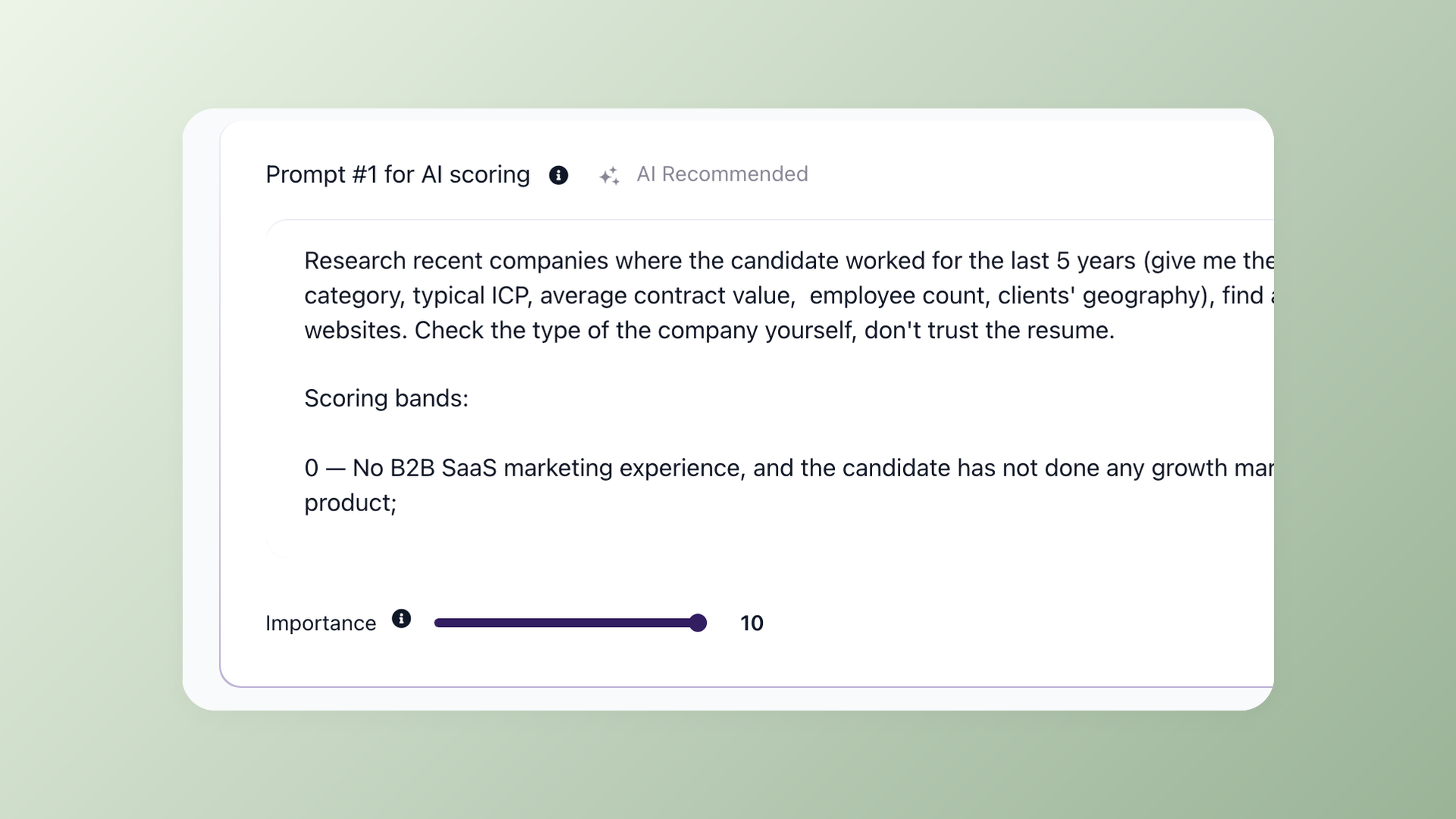
Write the scoring prompts. The AI grades every candidate against them
Each job gets its own AI Scoring tab where you write the prompts the AI uses to grade candidates. Describe what to research, define the 0-100 scoring bands explicitly, and set importance weights. The AI reads the full record - resume, application answers, discussion notes, email history - then returns a score and the reasoning behind it.
- Custom prompts and importance weights per job, edited in plain English or any other language
- Premium model can pull external info (LinkedIn, GitHub, web) before scoring
- Set thresholds to auto-advance top scorers or auto-disqualify poor matches
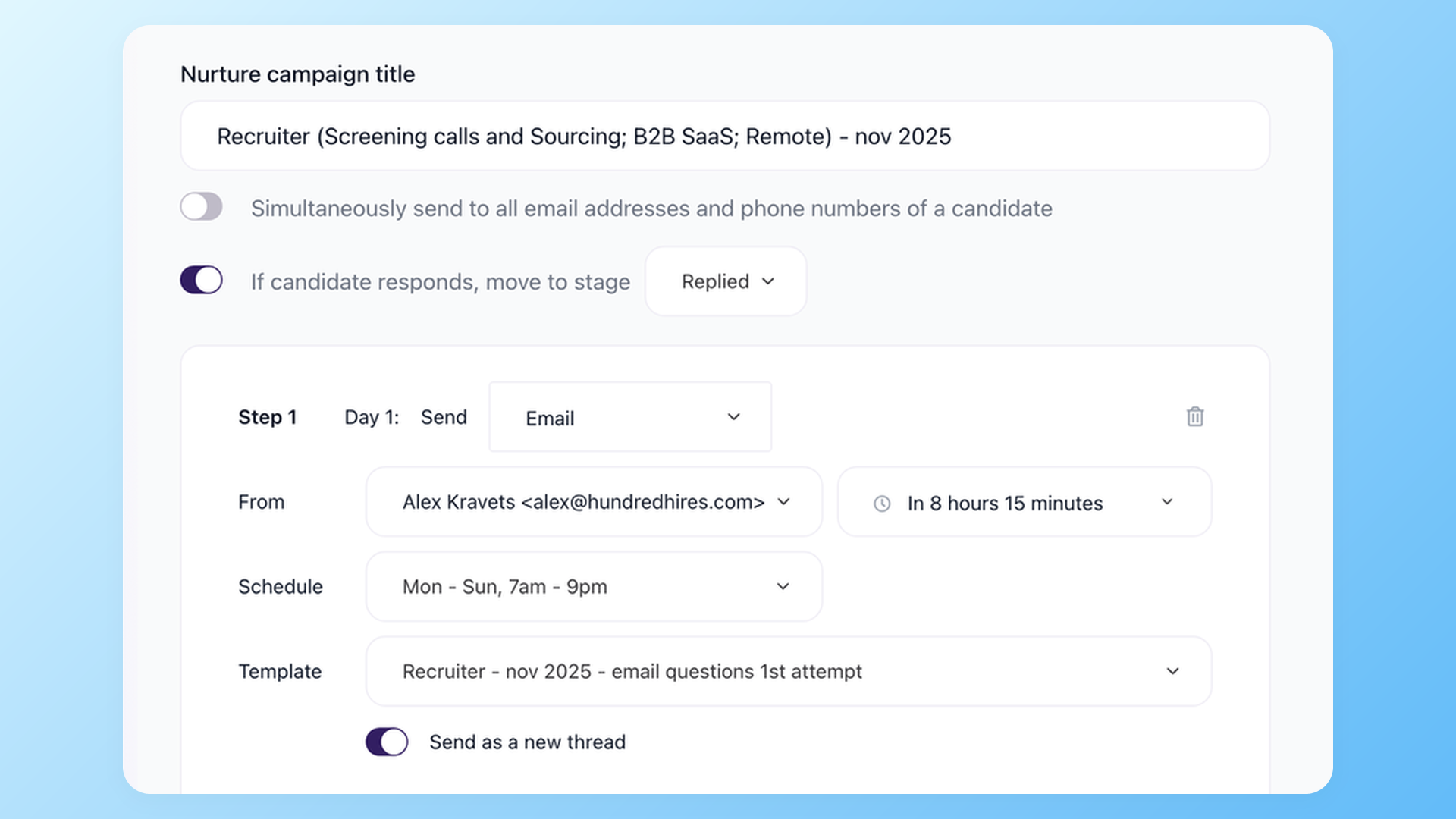
Build nurture campaigns that auto-cancel when a candidate replies
Configure each step with its own delay, send window (e.g. Mon-Sun, 7am-9pm), template, and sender. Set a destination stage and the moment a candidate responds, the rest of the sequence is cancelled and they move to that stage automatically. Built-in email warmup protects sender reputation without a separate tool.
- Per-step delay, send-time window, and email template
- Auto-move to a destination stage on reply - no manual triage
- Per-recruiter sender rotation with built-in email warmup
Multi-step outreach is its own discipline: the automated candidate engagement page covers sequences, texting, and voicemail in depth.
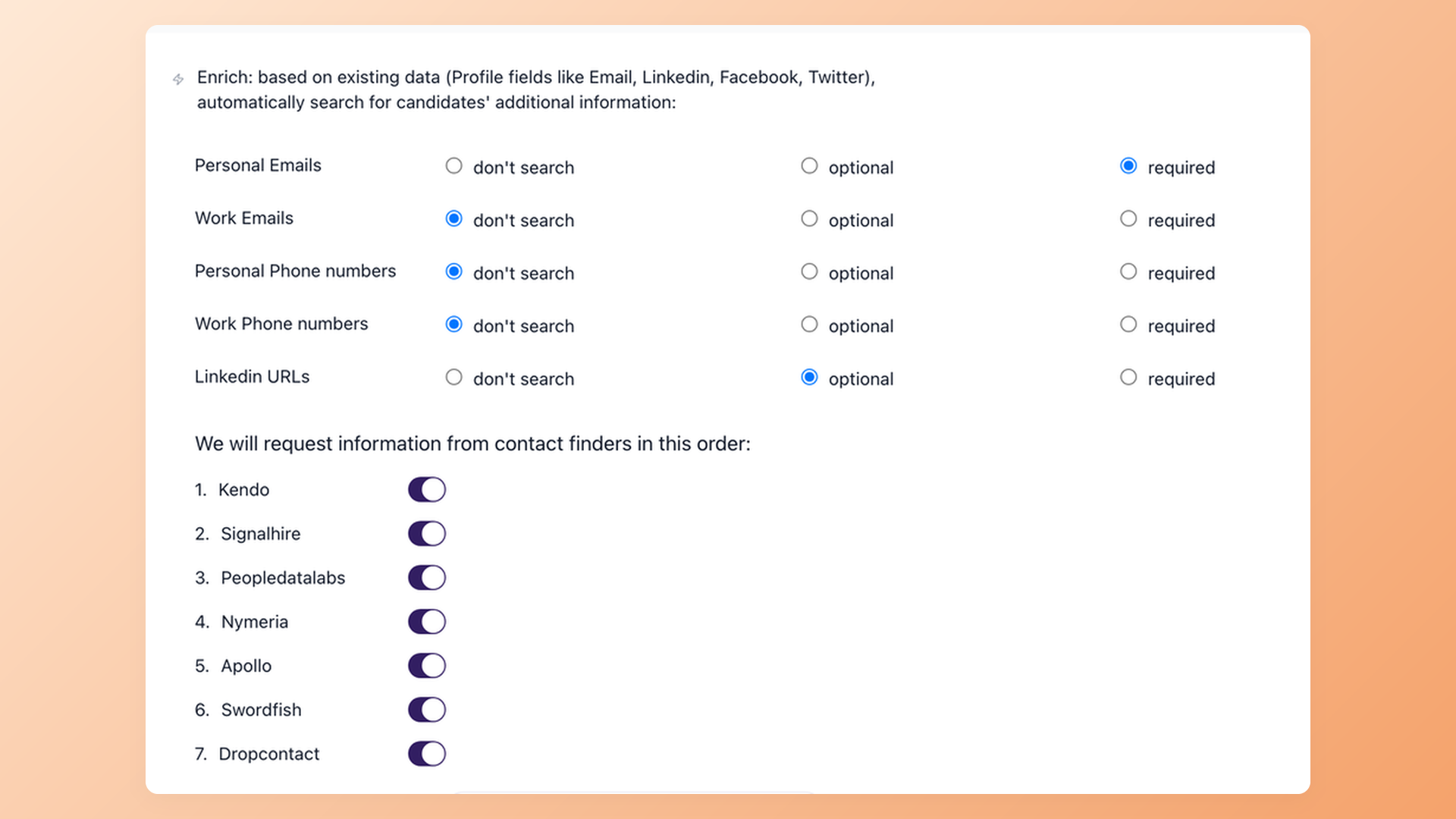
Find personal email for every sourced candidate through a 7-provider waterfall
When a candidate lands in the Sourced stage, the enrich automation fires automatically. Pick which fields are required (personal email, LinkedIn URL, phone numbers) and which are optional. The platform queries 7 contact-finder providers in order and stops when the required field is found, so you save credits or maximize coverage.
- Per-field control: required, optional, or skip - configured once per workflow
- Provider waterfall across Kendo, Signalhire, Peopledatalabs, Nymeria, Apollo, Swordfish, Dropcontact
- Stop on first match to save credits, or query all providers to maximize coverage
One platform instead of a five-tool automation stack
Ask practitioners how they run recruiting automation today and the answer is a stack, not a tool: one product for sourcing, an enrichment credit pool, a sequencer, a scheduler, and a workflow platform wiring it all together.
The stack works - and then the complaints start. Recruiters log into more platforms than they can keep track of, per-seat costs pile up, and every handoff between tools is a place where candidates quietly leak out of the process.
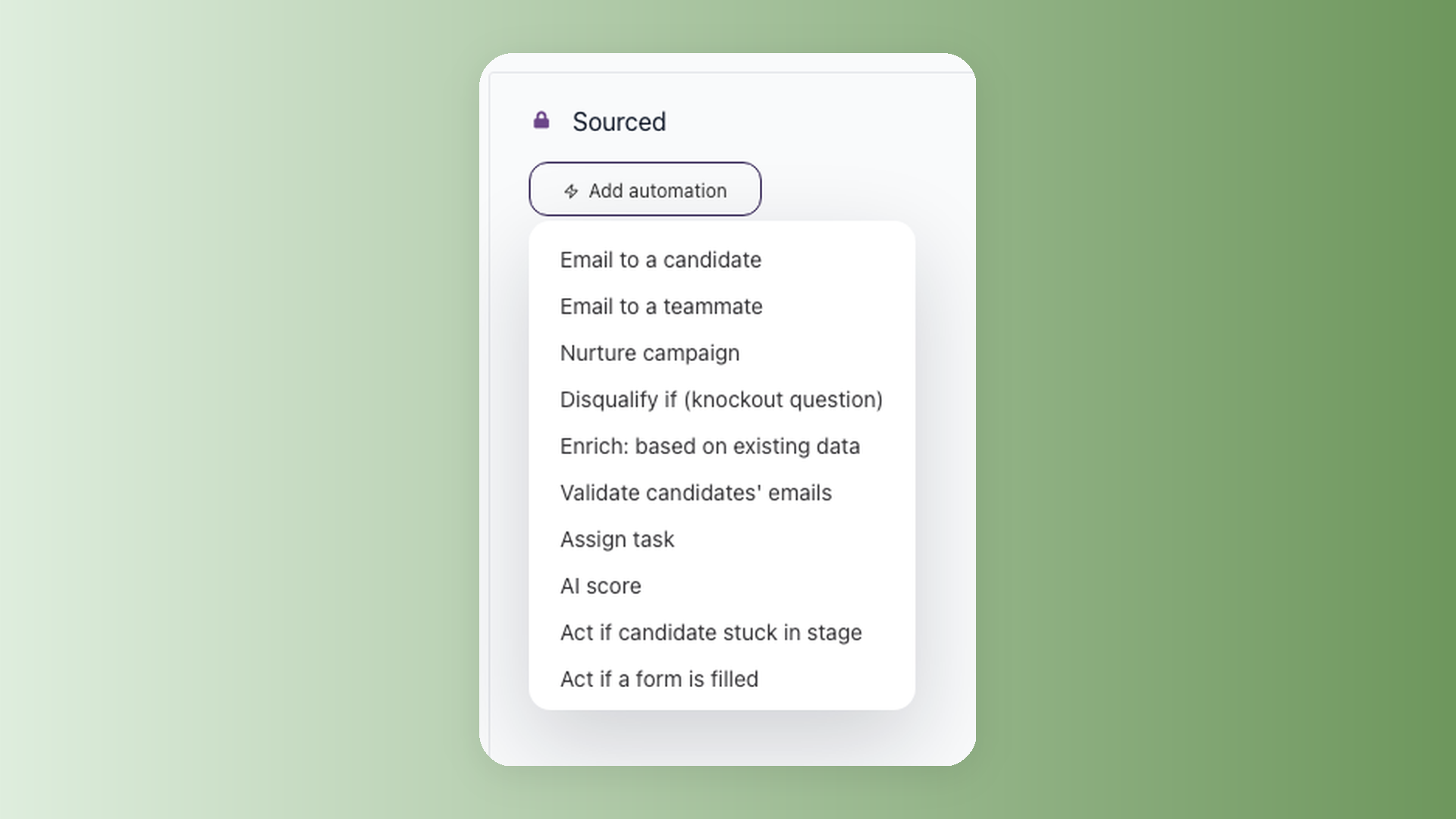
100Hires runs the same source, enrich, score, sequence, and schedule chain natively in one ATS - and automation here is not a vague label. There are exactly 10 automation types you can attach to any pipeline stage.
The 10 types: Email to Candidate, Email to Teammate, Nurture Campaign, Disqualify If, Enrich Based on Existing Data, Validate Candidate's Emails, Assign Task, AI Score, Act If Candidate Is Stuck, and Act If Form Is Filled.
If a step is not on that list, 100Hires does not automate it. Everything that is on the list runs without a recruiter pushing it.
How 100Hires compares to typical recruitment automation software
Most applicant tracking systems offer basic automation as a baseline and gate the useful parts behind enterprise tiers with annual contracts.
100Hires includes AI scoring on every paid plan, with contact enrichment and multi-channel outreach available on higher tiers - self-serve, with monthly billing available.
 100Hires
| Workflow stage | What was manual | 100Hires automation |
|---|---|---|
| Sourcing | Searching personal email through 5+ contact-finder tools | 7-provider waterfall finds personal email, LinkedIn URL, and phone numbers automatically when a candidate lands in the Sourced stage |
| Screening | Reading 600 resumes before lunch | AI Scoring grades every applicant 0-100 against the prompts you wrote for that role |
| Outreach | Sending each follow-up email by hand | Nurture campaigns with per-step delays, send windows, and auto-cancel when the candidate replies |
| Interview | Digging through notes and transcripts to recall who said what | AI Copilot analyzes interview transcripts, discussion notes, emails, evaluations, and application answers to answer questions about any candidate |
| Communication | Writing every rejection from scratch | AI Email Composer drafts in your voice from a saved prompt library |
How to choose recruitment automation tools
Start with team shape. A solo recruiter, an agency running outbound at volume, and an in-house TA team automate different things - the agency lives in sequences and enrichment, the in-house team in scheduling and handoffs. Buy for the workflows you run.
Agencies automating outreach across client mandates: our staffing agency software page covers the agency-specific setup.
Then check which plan the automation actually sits on - this is where hiring automation software burns buyers.
Manatal gates workflow automation to its Enterprise tier at $35+ per user per month. Teamdash sells AI screening as a paid add-on. Loxo puts outreach automation behind its sales-gated Professional tier. The headline feature and the entry price are often not the same product.
Favor scoring you can argue with. A score that shows its reasoning beats a black-box pass or fail, because a recruiter can read why a candidate ranked fifth and disagree with it.
Weigh the candidate experience. Over-automated screening - AI-led interviews with nobody on the other end, chaser sequences that ignore replies - pushes away exactly the candidates you are competing for. Automation should remove admin work, not human contact.
And count the tools you can retire. The honest ROI of consolidation is subscriptions cancelled: if one platform covers sourcing, outreach, screening, scheduling, and posting, the stack it replaces was four or five products.
Where 100Hires lands on that checklist: AI resume scoring ships on every paid plan and every score shows its reasoning - that is the AI recruiter design - with monthly billing available. What each plan includes is on the pricing page.

It solved all of my recruitment problems and offered all of the features I was looking for. It can automate most of my recruitment processes.

I’d happily recommend it to my industry peers. I’m able to use the platform with ease and don’t have to think twice about which function to use.

The system is very user-friendly. Even people with no experience will find it easy to understand its functionality.
How StratifyIQ ramped offshore teams 3x faster with 100Hires
StratifyIQ replaced WizeHire and built 15-person technical teams across the US, Philippines, and India. Custom evaluation forms, unlimited job postings, and same-day support response let them screen high volumes without hiring more recruiters.







The hiring playbook, in your inbox
One email a week - benchmarks, AI screening tactics, and short interview templates from the 100Hires team. No product pitches.