
Indeed integration that puts every applicant inside a real ATS
Post to Indeed without leaving 100Hires, let AI score and rank the flood into a real shortlist, and see what Indeed actually produced next to every other board.
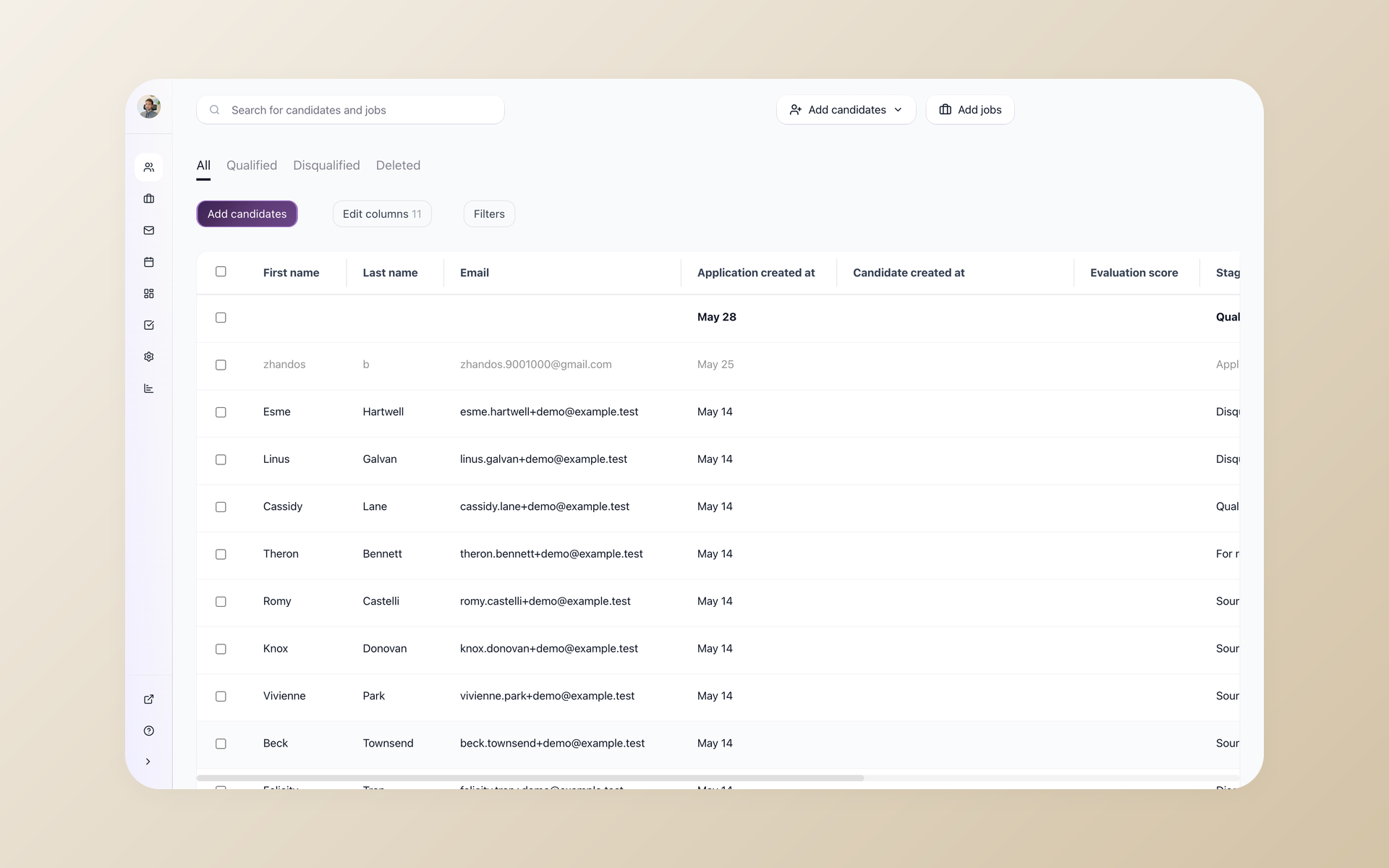






100Hires connects to Indeed so you publish jobs to the world's biggest job board from inside your ATS, and every applicant flows straight into your pipeline.
Indeed is one of 13 named boards 100Hires posts to, with no per-board fee and no second dashboard to babysit. This page covers how the Indeed integration works day to day, what stays free, what costs money, and what happens after Indeed sends you applicants.
Indeed sends you reach, not a shortlist
Indeed's reach is the whole point and also the problem. Post one role and you can get far more applications than you can read, most of them nowhere near the requirements and a handful worth a call. The screening burden lands on you.
And if Indeed is also where you track and message people, your hiring data sits on a board you do not control, so the day its algorithm or pricing shifts, your pipeline shifts with it.
An Indeed ATS integration fixes both halves. Indeed keeps sending volume, while a real ATS catches it, lets AI score and rank it down to a shortlist, and keeps the candidates as yours.
That AI layer is the main reason to route Indeed through 100Hires rather than live in Indeed's own tools. Here is how it works.
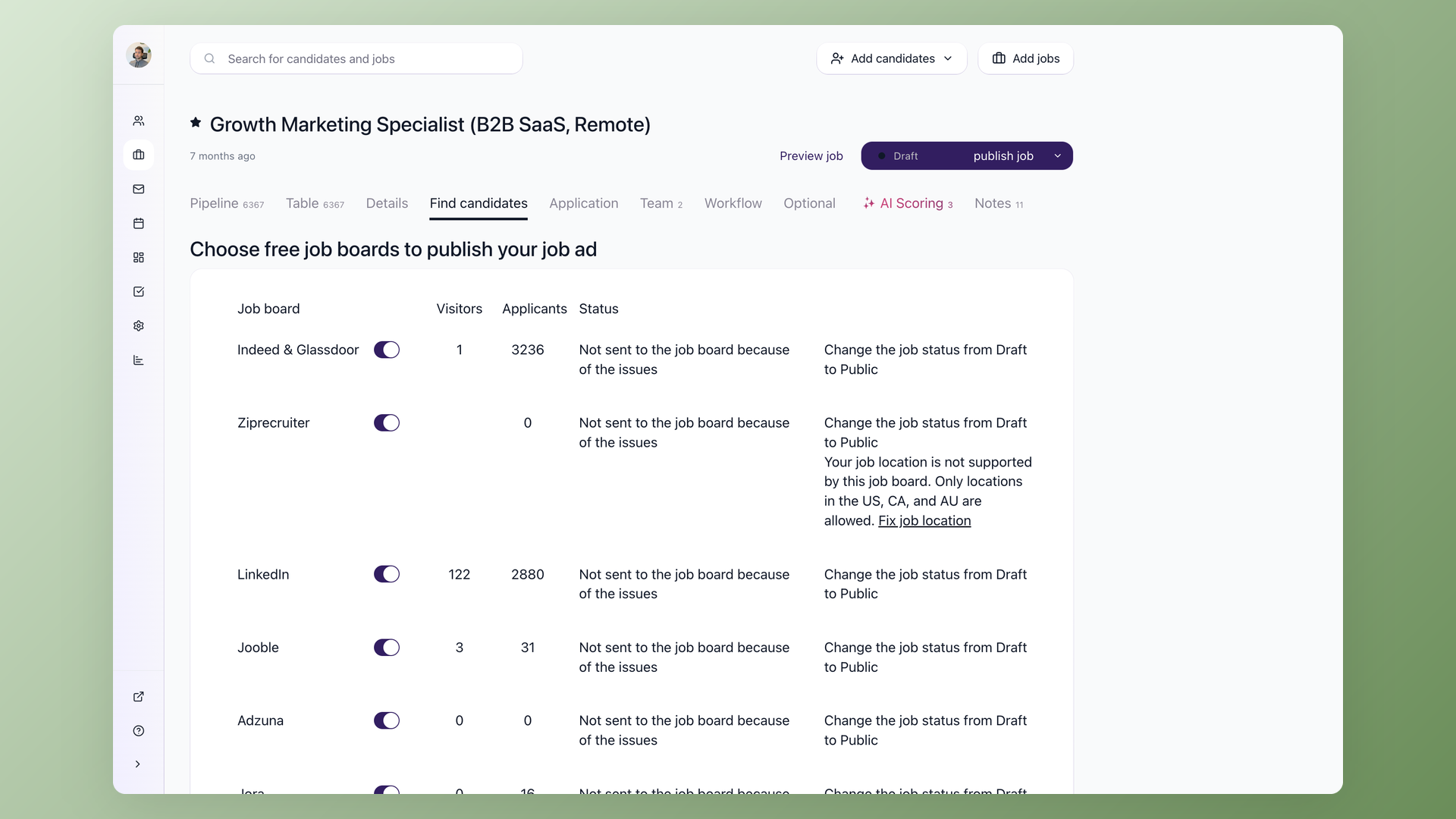
Send a job to Indeed without opening Indeed
Open a job, go to the Find candidates tab, and flip the Indeed and Glassdoor toggle. 100Hires sends the free organic listing to Indeed through its job feed, typically within an hour on an active paid plan once your company is verified, with no copy-pasting and no reformatting. Indeed reviews and ranks it on its side like any organic post, and each board shows its own live visitor and applicant counts right there, so you watch Indeed perform without leaving the job.
- Find candidates tab, one toggle per job
- Indeed and Glassdoor share a single switch
- Free organic listing, no per-board fee
- 12 more boards on the same screen
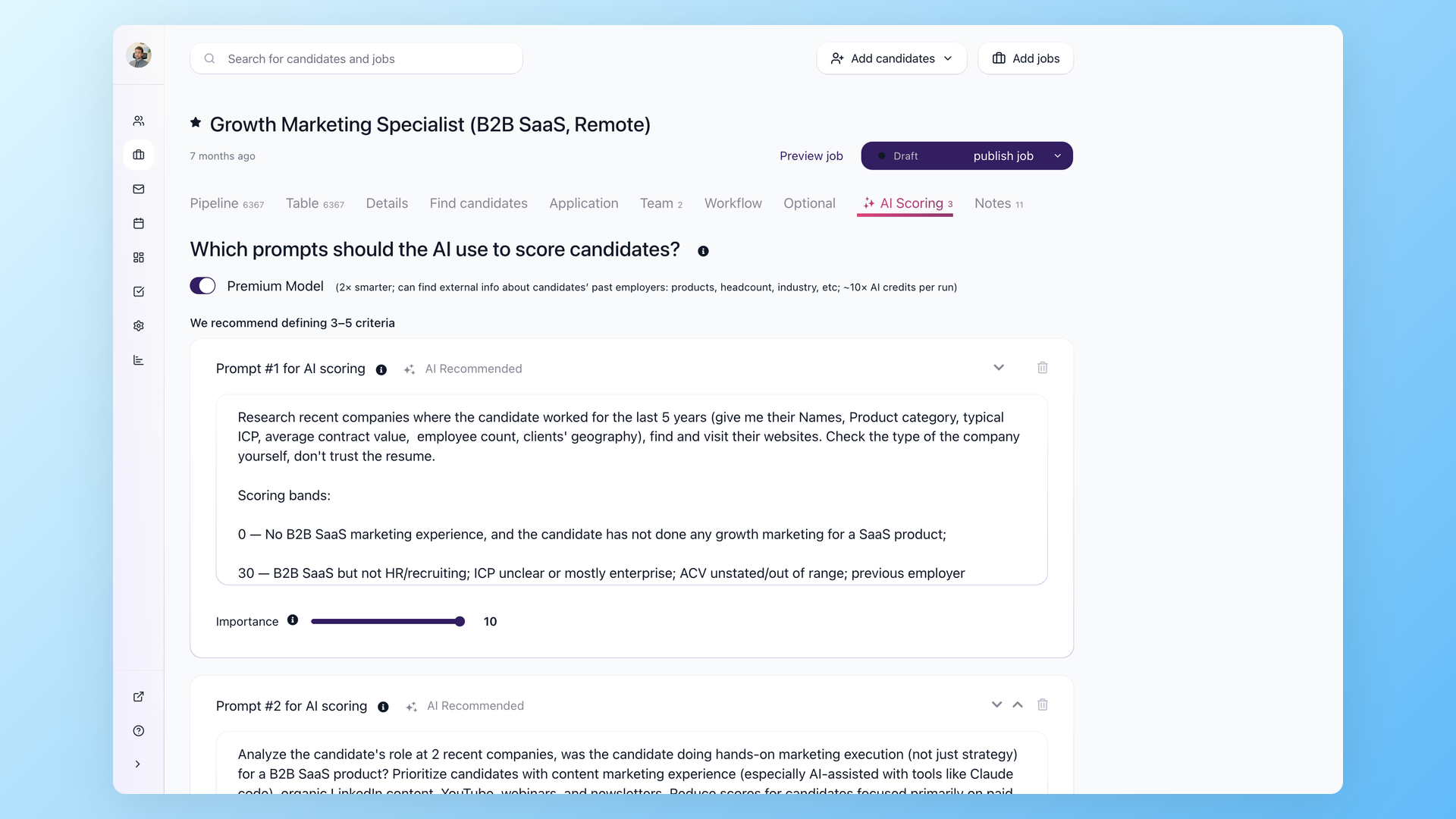
Let AI rank the Indeed flood before you read a thing
Every Indeed applicant lands in your 100Hires pipeline with its source set to Indeed, so nothing gets re-keyed by hand. Knockout questions auto-reject anyone who misses a hard requirement the moment they apply, then AI Score rates everyone left from 0 to 100 with a written reason and can auto-disqualify anyone below your threshold. The strongest people sit at the top before you open a single resume, so the flood arrives already triaged.
- AI Score rates every applicant 0 to 100 with reasoning
- Auto-disqualify below a score threshold you set
- Knockout questions reject hard-requirement misses on apply
- Source set to Indeed automatically, no retyping
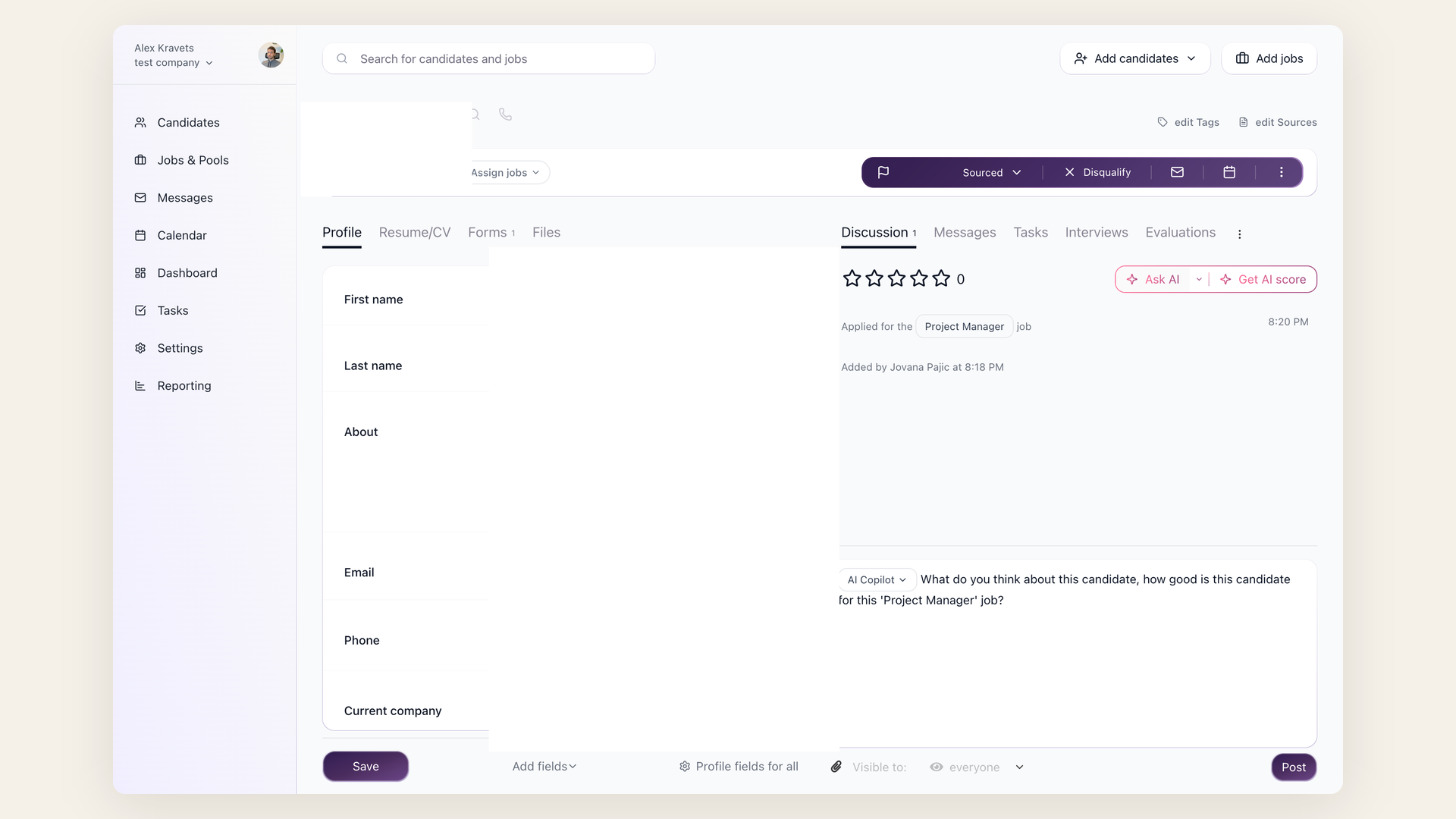
Ask AI about any applicant, then let it write the reply
Open any Indeed candidate and the AI Copilot reads their resume, your job description and your private Job Notes, then answers in plain language: is this person a fit, what is missing, what to probe on a screen. When you decide to reach out, the AI Email Composer drafts a personalized message from the same context, so you go from a 0 to 100 score to a sent email without leaving the candidate.
- AI Copilot reads resume, job and private Job Notes
- Plain-language fit summary whenever you ask
- AI Email Composer drafts the outreach for you
- Save your own prompts for the questions you always ask
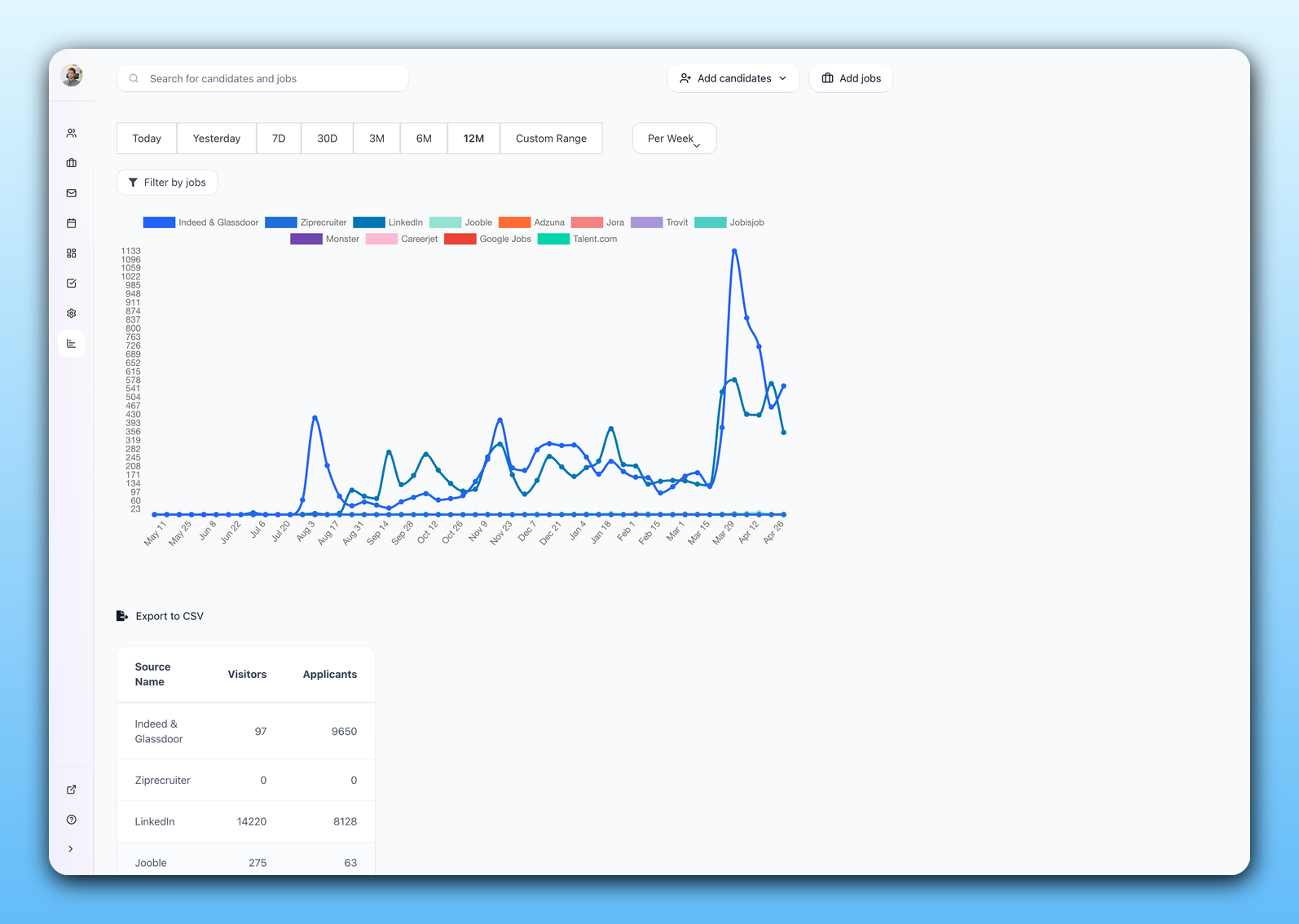
Know whether Indeed actually produced hires
The Sources report breaks every applicant and hire down by board, so you see what Indeed actually produced next to LinkedIn, Glassdoor and the rest. Instead of guessing, you keep the boards that turn into hires and drop the ones that only burn budget. The same live counts show on the job itself in the visitor and applicant columns.
- Per-board applicants and hires in the Sources report
- Indeed measured against every other board
- Live visitor and applicant counts per job
- Keep what hires, cut what only clicks
What is free, what costs money, and who bills you
Posting to Indeed through 100Hires does not quietly turn into a bill. The organic listing is part of your plan; sponsoring is an optional, separate spend that goes to Indeed, not to us. The table makes the split clear.
| Free organic listing | Sponsored on Indeed | |
|---|---|---|
| Cost to post | Included in your 100Hires plan, no per-board fee | A budget you set with Indeed, billed per click or per started application |
| Who bills you | Nobody extra, it is part of 100Hires | Indeed bills you directly, never 100Hires |
| Placement | Indeed reviews it, then it shows in search and sinks as it ages | Indeed pins it higher in results while the budget runs |
| Set up where | The Indeed and Glassdoor toggle in 100Hires | Sponsor job in your Indeed employer dashboard |
| Best for | Steady roles and most everyday hiring | Urgent or hard-to-fill roles you need filled fast |
Three Indeed rules decide whether a free listing goes live. Use a specific city, because state-wide or country-wide jobs must be sponsored. Keep a job up at least 30 days in one location, since reposting sooner counts as location blasting.
And free posting is for direct employers, not staffing agencies.
Indeed may also ask for sponsorship on jobs that reach it through an ATS or feed while you post directly on Indeed too. To sponsor, sign in to your Indeed employer dashboard with the same email as your 100Hires account and click Sponsor job; nothing changes in 100Hires.
The 100Hires help center covers posting jobs to Indeed and sponsoring a job on Indeed. Indeed explains its billing in how pricing works on Indeed, and our Indeed job posting cost guide covers real budgets.
Does Indeed have its own ATS, and why route through 100Hires
Indeed gives you built-in tools to collect and message applicants, which is fine for a single one-off hire. But Indeed is a job board first.
Teams that run real hiring on it hit the same wall: no searchable candidate database to re-engage later, thin tools for a multi-stage pipeline, and a funnel that depends on one board's rules.
With the 100Hires Indeed integration you get Indeed's reach plus an ATS that is yours: pipeline stages, Evaluation Forms your whole team scores on, self-scheduling links, nurture campaigns, and a candidate database you keep.
Candidates apply through Indeed Apply, with screener questions built from your job's application form, so nobody fills out a second form.
When you move, contact or disqualify someone in 100Hires, the status syncs back to Indeed as well. Indeed finds the people; 100Hires is where you decide.
100Hires and Indeed versus Indeed's built-in tools
 100Hires
Where 100Hires is not the answer: if you make a single hire a year, Indeed's own tools may be enough, and sponsored placement is always paid to Indeed at rates Indeed sets. 100Hires runs the organic posting and everything after the click.
To push the same role to every board at once, read posting a job to multiple job boards, or see the guide to multiposting and Satellite Jobs for cloning one role across cities.
The same screen also lists the role on Google through the Google for Jobs integration. Our guide to the best job posting sites for employers shows where Indeed fits among the other boards.

It solved all of my recruitment problems and offered all of the features I was looking for. It can automate most of my recruitment processes.

I’d happily recommend it to my industry peers. I’m able to use the platform with ease and don’t have to think twice about which function to use.

The system is very user-friendly. Even people with no experience will find it easy to understand its functionality.







 4.7
4.7
 4.8
4.8
The hiring playbook, in your inbox
One email a week - benchmarks, AI screening tactics, and short interview templates from the 100Hires team. No product pitches.