
Developer Portal — MCP
100Hires ATS MCP Server
The 100Hires ATS MCP Server is the official remote Model Context Protocol server for 100Hires, an AI-native applicant tracking system (ATS). It connects 100Hires to Claude, ChatGPT, Cursor, and any MCP-compatible AI assistant, giving them secure access to 136 tools for candidates, jobs, applications, and interviews — driven entirely by natural-language prompts.
https://mcp.100hires.com/mcp
- MIT License
- Glama.ai verified
- Official MCP Registry
Recruiting MCP, ATS MCP, hiring AI integration — bring your applicant tracking system into Claude, ChatGPT and Cursor with secure OAuth 2.1. Building a direct integration instead? See the 100Hires REST API documentation. New to 100Hires? Start a 14-day free trial.
What is MCP?
Model Context Protocol is an open standard from Anthropic that lets AI assistants connect to external systems through a uniform interface — think of it as USB-C for AI tools.
Hosts
AI assistants and IDEs that talk to MCP servers — Claude (web, Desktop, Code), ChatGPT, Cursor, VS Code, Codex, Windsurf, Zed.
Clients
The transport layer inside the host that speaks MCP over Streamable HTTP or stdio.
Servers
100Hires MCP server — exposes 136 tools backed by the public REST API, secured by OAuth 2.1.
100Hires runs a remote MCP server, not a local one.
There’s nothing to install, deploy or update on your machine — every client, including Claude Desktop and Cursor,
points at https://mcp.100hires.com/mcp and authorizes via OAuth.
New tools and bug fixes land server-side and reach all your assistants the next time they call tools/list.
What you can ask
Ten real prompts that work today, in plain English.
- “Show me candidates who applied this week for the Senior PM role”
- “Move all rejected candidates from this job to the talent pool”
- “Schedule a 30-minute interview with Sarah next Tuesday for the Backend Engineer role”
- “Draft a follow-up email to candidates who haven't replied in 5 days and send it”
- “Open a new Senior Product Designer job in New York and publish it to LinkedIn”
- “Find every LinkedIn candidate with Python on their resume and tag them 'pythonista'”
- “What's on my interview calendar tomorrow?”
- “How many candidates do we have at each stage in the Sales Rep pipeline?”
- “Reject everyone still in 'Phone Screen' for the Marketing Manager job with reason 'No response'”
- “Pull the resume and last 3 notes for the candidate I interviewed yesterday”
Quickstart
From zero to your first MCP prompt in under five minutes.
-
Prerequisites
A 100Hires account on any plan, including the 14-day free trial. The MCP endpoint is available to every workspace.
-
Pick your AI client
One-click install for Cursor and VS Code; copy a snippet for everything else. All clients connect to
https://mcp.100hires.com/mcpover Streamable HTTP; stdio-only clients use themcp-remoteshim.Open 100Hires in ChatGPTOr in ChatGPT go to Settings → Apps and find 100Hires in the directory.
Click Connect, sign in, and click Allow.
In claude.ai, open the sidebar and click Customize.
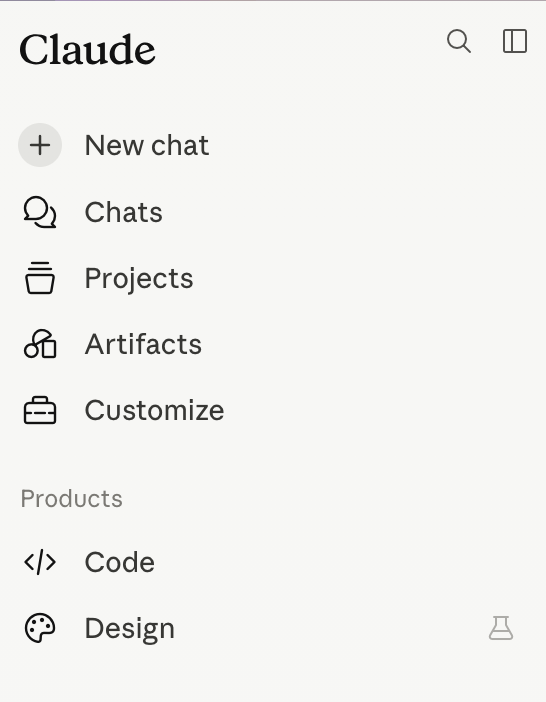
Step 1 — open the sidebar → Customize. Go to Connectors, click +, and choose Add custom connector.
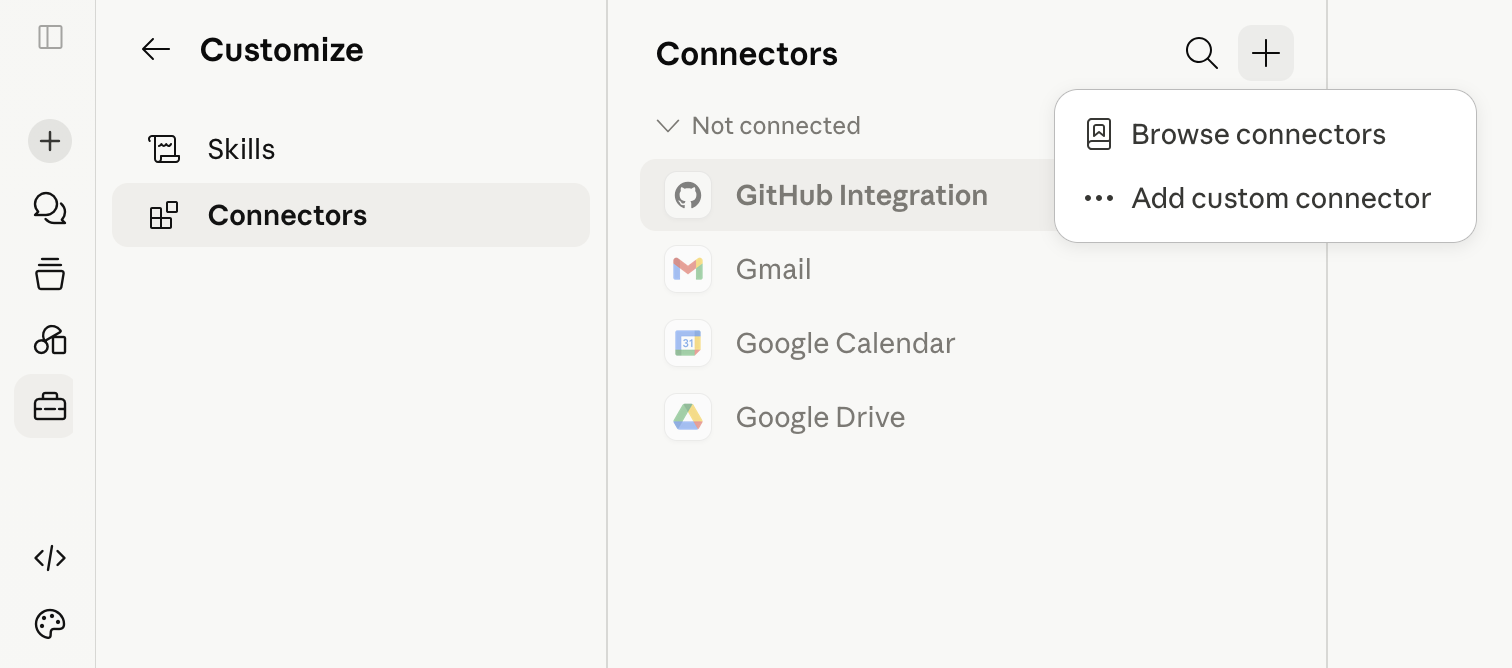
Step 2 — Connectors → + → Add custom connector. In the Add custom connector dialog, fill in:
- Name:
100Hires - Remote MCP server URL:
https://mcp.100hires.com/mcp - Click Add.
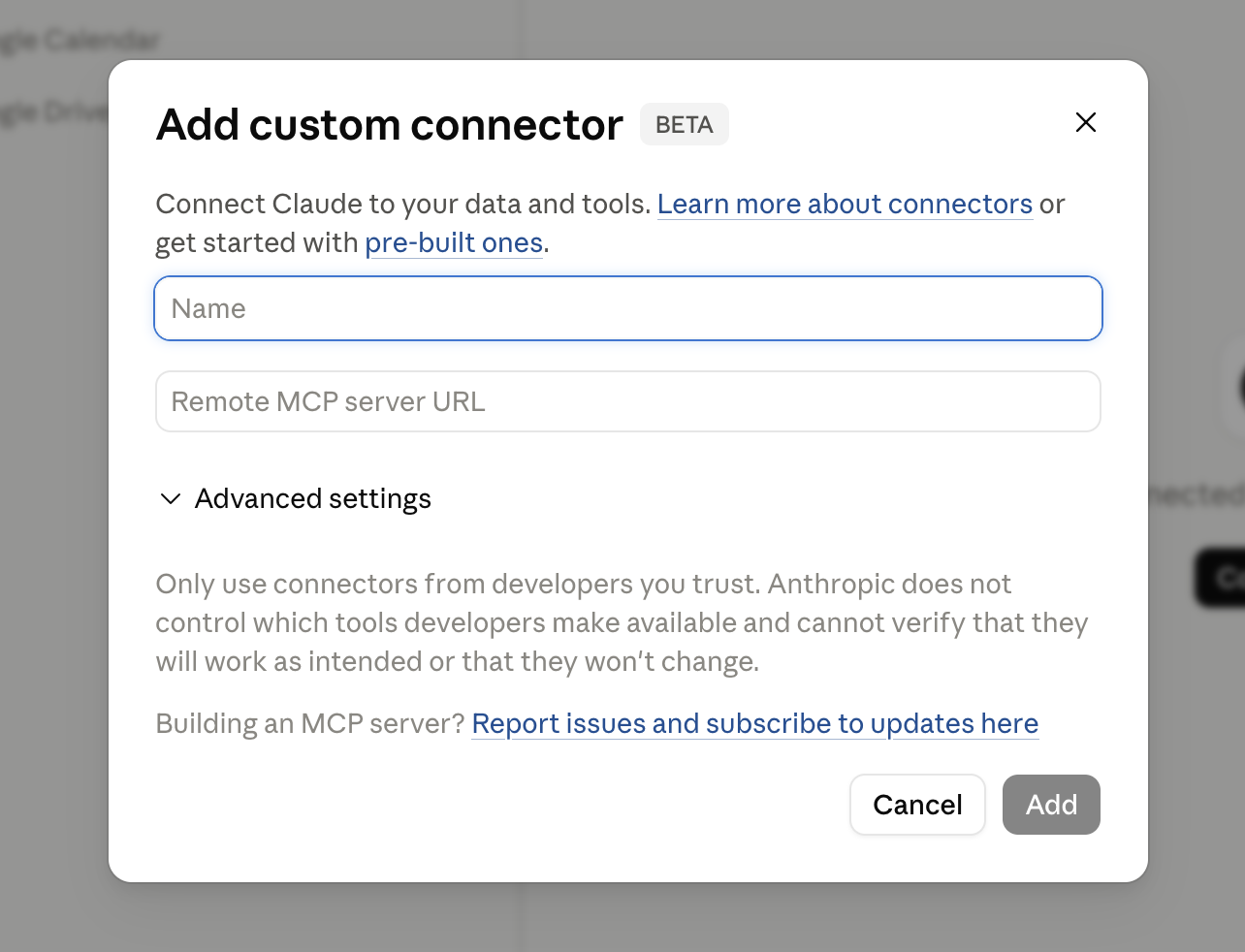
Step 3 — fill in the form and click Add. Claude opens the 100Hires consent screen. Sign in, click Allow, and you’re connected.
Install in CursorClick Install in Cursor to add 100Hires MCP automatically. Or paste the snippet below into
~/.cursor/mcp.json.Install in VS CodeOpens VS Code and registers the server. Or paste the snippet into
.vscode/mcp.jsonin your workspace.Add the snippet to your Claude Desktop config and restart the app:
- macOS:
~/Library/Application Support/Claude/claude_desktop_config.json - Windows:
%APPDATA%\Claude\claude_desktop_config.json
Run this in your terminal:
OpenAI Codex CLI — add the server, then run
codex mcp login 100hiresto authorize.From OpenAI Responses API
Connect 100Hires MCP headless from your own scripts, backends, and AI agents — no desktop client required. Pass the server as a tool with
type: "mcp"and the OpenAI platform calls the endpoint directly. The example exposes only the read-onlyhires_list_jobstool and skips approval for that tool — add more tools toallowed_toolsonly after deciding which actions require approval.Requires an OAuth access token — your app obtains it via the OAuth 2.1 flow (see Authentication). OpenAI does not store the token: send it with every request and refresh it yourself when it expires (access tokens live 1 hour).
from openai import OpenAI

client = OpenAI()

response = client.responses.create(
    model="gpt-5",
    tools=[{
        "type": "mcp",
        "server_label": "100hires",
        "server_url": "https://mcp.100hires.com/mcp",
        "authorization": "YOUR_OAUTH_ACCESS_TOKEN",
        "allowed_tools": ["hires_list_jobs"],
        "require_approval": "never"
    }],
    input="List all open jobs in 100Hires"
)

print(response.output_text)
From Anthropic Messages API
Connect 100Hires MCP headless from the Anthropic SDK — the MCP connector lets the Messages API call the server for you via
mcp_servers, no local MCP client needed. The connector runs tools without approval prompts, so the example enables only the read-onlyhires_list_jobstool — extend the allowlist inconfigsdeliberately.Requires an OAuth access token — your app obtains it via the OAuth 2.1 flow (see Authentication). Anthropic does not store the token: send it with every request and refresh it yourself when it expires (access tokens live 1 hour).
import anthropic

client = anthropic.Anthropic()

response = client.beta.messages.create(
    model="claude-opus-4-8",
    max_tokens=16000,
    messages=[{"role": "user", "content": "List all open jobs in 100Hires"}],
    mcp_servers=[{
        "type": "url",
        "url": "https://mcp.100hires.com/mcp",
        "name": "100hires",
        "authorization_token": "YOUR_OAUTH_ACCESS_TOKEN"
    }],
    tools=[{
        "type": "mcp_toolset",
        "mcp_server_name": "100hires",
        "default_config": {"enabled": False},
        "configs": {"hires_list_jobs": {"enabled": True}}
    }],
    betas=["mcp-client-2025-11-20"]
)

for block in response.content:
    if block.type == "text":
        print(block.text)
For stdio-only clients (Zed, Windsurf, n8n, older builds) use the
mcp-remoteshim. It’s a third-party open source bridge: github.com/geelen/mcp-remote.Full list of MCP-compatible clients: modelcontextprotocol.io/clients.
- Name:
-
Authorize
Your client opens the 100Hires consent screen. Sign in, review the requested scope, click Allow. Tokens are stored on the client; 100Hires never sees its credentials.
-
Verify
Ask your assistant: “List all open jobs in 100Hires.” If you get a list back — you’re wired up. If not, see FAQ.
-
Next steps
Tools
Keep human confirmation on for destructive tools. Feedback: [email protected].
-
hires_add_candidate_tagsAdd tags to a candidate.
Parameters (2)
-
idrequired - Candidate id or alias
-
tagsarray required - —
-
-
hires_add_hiring_team_memberAdd a company user to the job's hiring team.
Parameters (2)
-
idrequired - Job id or alias
-
user_idnumber required - —
-
-
hires_advance_applicationAdvance an application to the next stage in workflow order; no stage_id needed.
Parameters (2)
-
idnumber required - —
-
includestring - Embed: candidate, cv.text, job. Pass candidate,job so the widget can link to the candidate and job pages
-
-
hires_batch_add_tagsAdd tags to up to 100 candidates; returns per-item results.
Parameters (2)
-
idsarray required - Candidate ids
-
tagsarray required - —
-
-
hires_batch_create_messagesCreate up to 100 scheduled messages in one request; items are processed independently, one failure does not stop the others.
Parameters (1)
-
messagesarray required - —
-
-
hires_batch_job_boardsGet board publication states for several jobs at once.
Parameters (1)
-
jobsarray required - Job ids
-
-
hires_batch_move_applicationsMove up to 100 applications to a stage in one request; per-item results, partial success allowed.
Parameters (2)
-
idsarray required - Max 100
-
stage_idnumber required - —
-
-
hires_batch_publish_to_boardsQueue several jobs for publication on the given boards.
Parameters (2)
-
jobsarray required - Job ids
-
boardsarray - e.g. indeed, linkedin
-
-
hires_batch_reject_applicationsReject up to 100 applications in one request, optionally with a reason; per-item results, partial success allowed.
Parameters (2)
-
idsarray required - Max 100
-
rejection_reason_idnumber - From hires_list_rejection_reasons
-
-
hires_batch_remove_from_boardsDeactivate publication of several jobs on the given boards.
Parameters (2)
-
jobsarray required - Job ids
-
boardsarray - e.g. indeed, linkedin
-
-
hires_batch_remove_tagsRemove tags from up to 100 candidates; returns per-item results.
Parameters (2)
-
idsarray required - Candidate ids
-
tagsarray required - —
-
-
hires_cancel_all_notification_messagesCancel all scheduled notification emails of a candidate; sent ones are unaffected.
Parameters (1)
-
candidate_idrequired - Candidate id or alias
-
-
hires_create_applicationLink an existing candidate to a job, creating an application.
Parameters (5)
-
candidate_idrequired - Candidate id or alias
-
job_idnumber required - —
-
stage_idnumber - Defaults to the first stage
-
cvobject - —
-
includestring - Embed: candidate, cv.text, job
-
-
hires_create_candidateCreate a candidate, optionally with an application (job_id, stage_id) and resume text. Parse an attached resume yourself and pass the text via resume_text; never inline binary data.
Parameters (13)
-
company_idnumber - —
-
first_namestring - —
-
last_namestring - —
-
emailstring - Used for deduplication
-
phonestring - —
-
profileobject - Profile answers keyed by question text or question_id
-
job_idnumber - Creates an application for this job
-
stage_idnumber - Initial stage; requires job_id
-
citystring - Also used to resolve timezone
-
statestring - —
-
countrystring - Name or ISO code
-
timezonestring - IANA, e.g. America/Los_Angeles; resolved from city and country if omitted
-
resume_textstring - Plain text extracted from the resume; stored as a text/plain attachment. No binary or base64.
-
-
hires_create_companyCreate a client company; provisions its public career site (slug) and public branding (name, logo).
Parameters (8)
-
namestring required - —
-
company_owner_emailstring required - —
-
company_owner_namestring required - —
-
websitestring - —
-
urlstring - Company profile URL
-
company_owner_phonestring - —
-
is_staffing_agencyboolean - —
-
logoobject - —
-
-
hires_create_email_templateCreate an email template. Subject and body accept placeholders such as {{first_name}}; get the exact tags from hires_list_template_placeholders and hires_prepare_template_placeholders.
Parameters (4)
-
namestring required - —
-
subjectstring required - Placeholders allowed
-
bodystring required - HTML; placeholders allowed
-
company_idnumber - —
-
-
hires_create_formCreate an application form, optionally attaching existing questions.
Parameters (3)
-
namestring required - —
-
company_idnumber - —
-
questionsarray - Question ids to attach
-
-
hires_create_interviewSchedule an interview for an application. The location is matched to an existing record or created.
Parameters (6)
-
idnumber required - —
-
start_timenumber required - Unix seconds
-
end_timenumber required - Unix seconds, after start_time
-
interviewer_idsarray required - Interviewer user ids
-
locationstring - Free text
-
includestring - Embed: candidate, application, job
-
-
hires_create_jobCreate a job. Required: status, title, description, location_country; location_city unless is_remote is true.
Parameters (30)
-
company_idnumber - —
-
form_idnumber - Omitted = new form named after the job
-
statusstring required - From hires_list_statuses, e.g. Draft, Public
-
titlestring required - —
-
internal_titlestring - Hiring team only
-
internal_job_idstring - External reference id
-
descriptionstring required - HTML allowed
-
language - Job page locale, e.g. de-DE; null = follow the career site language. Values: hires_list_languages
-
resume_field_statusstring - —
-
location_citystring - Required unless is_remote; empty = nationwide remote posting on Indeed
-
location_countrystring required - —
-
location_statestring - —
-
location_street_addressstring - —
-
location_full_addressstring - —
-
location_postal_codestring - —
-
salary_minnumber - —
-
salary_maxnumber - —
-
salary_currencystring - ISO code, e.g. USD
-
salary_periodstring - —
-
is_remoteboolean - Remote job; with empty city, state and postal code Indeed posts it nationwide
-
employment_type_idnumber - From hires_list_employment_types
-
department_idnumber - From hires_list_departments
-
category_idnumber - From hires_list_categories
-
education_level_idnumber - From hires_list_education_levels
-
experience_level_idnumber - From hires_list_experience_levels
-
workflow_idnumber - Omitted = new workflow named after the job
-
parent_job_idnumber - Parent job; makes this a satellite job
-
knockout_questionsarray - Yes/No screening questions added to the application form
-
ai_scoring_criteriaarray - AI scoring criteria for ranking applicants
-
includestring - Embed: workflow, hiring_team, pipeline_stages
-
-
hires_create_job_webhookRegister an HTTPS webhook for this job's events. Returns signing_secret once; use it to verify the x-hires-signature-v2 header.
Parameters (2)
-
idrequired - Job id or alias
-
urlstring required - HTTPS URL on a public host (no localhost, private or link-local IPs)
-
-
hires_create_noteCreate a discussion note for a candidate, with optional visibility (all or private) and @mentions that email the mentioned users.
Parameters (6)
-
candidate_idrequired - Candidate id or alias
-
bodystring required - HTML allowed
-
user_idnumber - Author; defaults to the authenticated user
-
visibilitystring - all (default) or private
-
mention_user_idsarray - Mentioned users get an email
-
includestring - Embed: user (author), candidate. Pass candidate so the widget can link to the candidate profile
-
-
hires_create_nurture_campaignCreate a nurture campaign with ordered steps (email, sms, voicemail, move_to_next_stage, assign_tag, assign_task), optionally triggered by a workflow stage.
Parameters (11)
-
company_idnumber - —
-
titlestring required - —
-
workflow_idnumber - Workflow the campaign is bound to
-
stage_idnumber - Stage that triggers the campaign
-
delay_timenumber - Delay before the first step, seconds (max 86400); wins over relative_days + relative_time if both are sent
-
relative_daysnumber - Days after the trigger for the first step; use with relative_time
-
relative_timenumber - Time of day for the first step, seconds from midnight
-
timezonestring - IANA timezone, e.g. America/New_York
-
send_to_allboolean - Send to all candidates in the stage, not only new ones (default false)
-
response_move_to_stage_idnumber - Stage to move a candidate to when they reply
-
stepsarray required - Executed in order. Each field names the step types that use it and whether it is required there.
-
-
hires_create_questionCreate a reusable question; options apply to select/multiselect types.
Parameters (4)
-
textstring required - —
-
typestring required - From hires_list_question_types
-
company_idnumber - —
-
optionsarray - Answer options for select/multiselect types
-
-
hires_create_webhookCreate a company-scoped webhook. signing_secret is returned once; use it to verify the x-hires-signature-v2 header on deliveries.
Parameters (2)
-
idnumber required - Company id
-
urlstring required - HTTPS URL on a public host (no localhost, private or link-local IPs)
-
-
hires_delete_applicationPermanently delete an application.
Parameters (1)
-
idnumber required - —
-
-
hires_delete_candidatePermanently delete a candidate.
Parameters (1)
-
idrequired - Candidate id or alias
-
-
hires_delete_companySoft-delete a company; its public career site goes offline.
Parameters (1)
-
idnumber required - —
-
-
hires_delete_email_templateSoft-delete an email template; automations that used it cannot pick it for new actions.
Parameters (1)
-
idnumber required - —
-
-
hires_delete_formDelete an application form.
Parameters (1)
-
idnumber required - —
-
-
hires_delete_jobDelete a job.
Parameters (1)
-
idrequired - Job id or alias
-
-
hires_delete_job_webhookDelete a job webhook.
Parameters (2)
-
idrequired - Job id or alias
-
webhook_idnumber required - —
-
-
hires_delete_messageCancel a scheduled message before it is sent.
Parameters (1)
-
idinteger required - —
-
-
hires_delete_noteDelete a note.
Parameters (1)
-
idnumber required - —
-
-
hires_delete_notification_messageCancel a scheduled notification email; sent messages cannot be canceled.
Parameters (1)
-
idinteger required - —
-
-
hires_delete_nurture_campaignSoft-delete a nurture campaign; running executions stop.
Parameters (1)
-
idnumber required - —
-
-
hires_delete_questionDelete a reusable question from the catalog.
Parameters (1)
-
idnumber required - —
-
-
hires_delete_webhookDelete a company-scoped webhook.
Parameters (2)
-
idnumber required - Company id
-
webhook_idnumber required - —
-
-
hires_disqualify_candidateReject all active applications of a candidate; returns the affected application ids.
Parameters (2)
-
idrequired - Candidate id or alias
-
reasonsarray - Rejection reason ids from hires_list_rejection_reasons
-
-
hires_download_attachmentDownload an attachment (resume, candidate or application file, mail attachment, call recording) by the url another tool returned. Returns file_name, mime_type, size and base64 data; files over 25 MB are rejected.
Parameters (1)
-
urlstring required - Absolute url from another tool's response; must be on the 100Hires API host
-
-
hires_get_ai_scoreGet the AI score of an application with per-criterion scores, justifications and follow-up questions; null score until scored.
Parameters (1)
-
idnumber required - —
-
-
hires_get_applicationGet an application with its stage, status and rejection context.
Parameters (2)
-
idnumber required - —
-
includestring - Embed: candidate, cv.text, job
-
-
hires_get_billingGet billing and feature flags of the current company.
-
hires_get_candidateGet a candidate with application summaries.
Parameters (1)
-
idrequired - Candidate id or alias
-
-
hires_get_candidate_resumeGet a candidate's primary resume: uuid, download url, file metadata, type. include=text_content adds the parsed plain text.
Parameters (2)
-
idrequired - Candidate id or alias
-
includestring - text_content: add the parsed plain text
-
-
hires_get_career_jobGet a public job with salary, education and experience levels; 404 for draft, archived or internal jobs.
Parameters (2)
-
company_slugstring required - —
-
idnumber required - —
-
-
hires_get_career_site_settingsGet career site settings: language is the locale the public site renders in (null = en-US); a job may override it with its own language field.
Parameters (1)
-
company_idnumber - Omit for the API key's own company
-
-
hires_get_companyGet a company profile with owner details.
Parameters (1)
-
idnumber required - —
-
-
hires_get_email_templateGet an email template with its subject and body.
Parameters (1)
-
idnumber required - —
-
-
hires_get_evaluationGet a filled evaluation form: evaluator, summary score and text, answers.
Parameters (1)
-
idnumber required - —
-
-
hires_get_formGet a form with its questions and their statuses.
Parameters (1)
-
idnumber required - —
-
-
hires_get_interviewGet an interview by id.
Parameters (2)
-
idnumber required - —
-
includestring - Embed: candidate, application, job
-
-
hires_get_jobGet a job by id or alias.
Parameters (2)
-
idrequired - Job id or alias
-
includestring - Embed: workflow, hiring_team, pipeline_stages
-
-
hires_get_messageGet a scheduled message with sender account, schedule timestamps and cancelability.
Parameters (1)
-
idinteger required - —
-
-
hires_get_noteGet a note with its author and visibility.
Parameters (2)
-
idnumber required - —
-
includestring - Embed: user (author), candidate
-
-
hires_get_notification_messageGet a notification email (e.g. a rejection email): subject, body, sender, recipient, schedule. Ids come from hires_list_candidate_messages.
Parameters (1)
-
idinteger required - —
-
-
hires_get_nurture_campaignGet a nurture campaign with all steps and schedule settings.
Parameters (1)
-
idnumber required - —
-
-
hires_get_questionGet a question with its type and options.
Parameters (1)
-
idnumber required - —
-
-
hires_get_userGet a user by id. Its default_mail_account_id can serve as from_account_id when sending emails.
Parameters (1)
-
idnumber required - —
-
-
hires_get_workflow_stagesGet the stages of one workflow.
Parameters (2)
-
idnumber required - Workflow id
-
company_idnumber - —
-
-
hires_hire_applicationMark an application as hired: status becomes hired and hired_at is set.
Parameters (2)
-
idnumber required - —
-
includestring - Embed: candidate, cv.text, job
-
-
hires_list_application_attachmentsList an application's attachments with file metadata and download URLs.
Parameters (1)
-
idnumber required - —
-
-
hires_list_application_evaluationsList filled evaluation forms of an application with evaluator, summary score (strong-yes to strong-no) and summary text.
Parameters (2)
-
idnumber required - —
-
viewstring - summary replaces summary_text with a 200-char summary_text_preview
-
-
hires_list_application_stage_historyChronological stage transitions of an application, including the initial assignment: from/to stage, moved_at, moved_by_type (system, user, automation), moved_by_user_id and source. Prefer it over candidate activities for stage reports.
Parameters (1)
-
idnumber required - —
-
-
hires_list_applicationsList applications across accessible jobs with filters by candidate, job, stage, status, AI score and dates. Each item embeds its current stage, so a pipeline view needs no extra job call.
Parameters (13)
-
company_idnumber - —
-
candidate_idnumber - —
-
job_idnumber - —
-
stage_idnumber - Best combined with job_id
-
statusstring - —
-
created_after - Unix seconds or ISO-8601
-
updated_after - Unix seconds or ISO-8601; for incremental sync
-
ai_score_minnumber - —
-
ai_score_maxnumber - —
-
sortstring - Default -created_at
-
includestring - Embed: candidate, cv.text. Pass candidate for pipeline rendering (names instead of ids)
-
pagenumber - —
-
sizenumber - —
-
-
hires_list_boardsList job boards available for publishing.
-
hires_list_candidate_activitiesList a candidate's timeline events. Prefer size <= 10. event_type values: comment, copilot_response, stage_moved, automation_action_triggered, assign_job, enrichment, call, validate_emails, profile_mutation, qualification, assign_tags, assign_sources, candidate_rate.
Parameters (7)
-
idrequired - Candidate id or alias
-
pagenumber - —
-
sizenumber - Default 20, max 100
-
event_typestring - Comma-separated; values listed in the tool description
-
since - Inclusive; Unix seconds or ISO-8601
-
until - Inclusive; Unix seconds or ISO-8601
-
viewstring - summary replaces copilot text, call transcription and comment body with 200-char *_preview fields
-
-
hires_list_candidate_filesList a candidate's files (resume and other documents): uuid, download url, file metadata, type.
Parameters (1)
-
idrequired - Candidate id or alias
-
-
hires_list_candidate_interviewsList a candidate's interviews across all applications.
Parameters (3)
-
idrequired - Candidate id or alias
-
pagenumber - —
-
sizenumber - —
-
-
hires_list_candidate_messagesList a candidate's email history; is_scheduled=1 returns only pending scheduled messages. Prefer size <= 10.
Parameters (5)
-
idrequired - Candidate id or alias
-
pagenumber - —
-
sizenumber - —
-
is_schedulednumber - —
-
viewstring - summary omits the HTML body and attachment metadata
-
-
hires_list_candidate_tagsList a candidate's tags.
Parameters (1)
-
idrequired - Candidate id or alias
-
-
hires_list_candidatesList candidates filtered by job, stage, email, name, LinkedIn or dates. Prefer size <= 10.
Parameters (13)
-
company_idnumber - —
-
job_idnumber - —
-
stage_idnumber - Pipeline stage id; combine with job_id
-
emailstring - Exact match
-
qstring - Partial match on name or email
-
full_namestring - —
-
linkedinstring - LinkedIn profile URL or alias
-
created_after - Unix seconds or ISO-8601
-
updated_after - Unix seconds or ISO-8601; for incremental sync
-
includestring - Embed: applications (job titles and stages)
-
pagenumber - —
-
sizenumber - —
-
viewstring - summary omits the profile answers array
-
-
hires_list_career_jobsList public jobs of a company career site, filterable by department, employment type, city and country.
Parameters (7)
-
company_slugstring required - —
-
department_idnumber - —
-
employment_type_idnumber - —
-
citystring - Exact match
-
countrystring - Exact match
-
pagenumber - —
-
sizenumber - —
-
-
hires_list_categoriesList global job categories.
-
hires_list_companiesList companies accessible to the partner API key.
Parameters (2)
-
pagenumber - —
-
sizenumber - —
-
-
hires_list_company_id_mail_accountsList mail accounts of all users in a given company (own or client).
Parameters (3)
-
idnumber required - —
-
pagenumber - —
-
sizenumber - —
-
-
hires_list_company_mail_accountsList mail accounts of all users in the current company; use to resolve from_account_id for messages.
Parameters (2)
-
pagenumber - —
-
sizenumber - —
-
-
hires_list_departmentsList departments of the company.
Parameters (1)
-
company_idnumber - —
-
-
hires_list_education_levelsList education level values.
-
hires_list_email_templatesList email templates of a company.
Parameters (4)
-
company_idnumber - —
-
pagenumber - —
-
sizenumber - —
-
viewstring - summary omits the HTML body
-
-
hires_list_employment_typesList employment types (full-time, part-time, contract, etc.).
-
hires_list_experience_levelsList experience level values.
-
hires_list_formsList application forms of a company.
Parameters (4)
-
company_idnumber - —
-
pagenumber - —
-
sizenumber - —
-
viewstring - summary omits the questions array
-
-
hires_list_hiring_teamList users on the job's hiring team.
Parameters (1)
-
idrequired - Job id or alias
-
-
hires_list_interviewsList interviews filtered by job, application, candidate, interviewer, date or timestamps. Pass include=candidate so the agenda widget can link cards to candidate profiles.
Parameters (11)
-
company_idnumber - —
-
job_idnumber - —
-
application_idnumber - —
-
candidate_idnumber - —
-
interviewer_user_idnumber - —
-
datestring - YYYY-MM-DD, UTC
-
created_after - Unix seconds or ISO-8601
-
updated_after - Unix seconds or ISO-8601; for incremental sync
-
includestring - Embed: candidate, application, job
-
pagenumber - —
-
sizenumber - —
-
-
hires_list_job_boardsList job boards the job is published to, with their state.
Parameters (1)
-
idrequired - Job id or alias
-
-
hires_list_job_webhooksList webhooks subscribed to this job's events.
Parameters (1)
-
idrequired - Job id or alias
-
-
hires_list_jobsList jobs filtered by status, creation/update time, department or search query.
Parameters (11)
-
company_idnumber - —
-
statusstring - From hires_list_statuses, e.g. Public, Draft, Archived
-
created_at_start - Unix seconds or ISO-8601
-
created_at_end - Unix seconds or ISO-8601
-
updated_after - Unix seconds or ISO-8601; for incremental sync
-
department_idnumber - From hires_list_departments
-
qstring - Search title or internal title
-
includestring - Embed: workflow, hiring_team, pipeline_stages
-
pagenumber - —
-
sizenumber - —
-
viewstring - —
-
-
hires_list_languagesList career site locales (e.g. de-DE) accepted by language parameters; is_default marks the one used when none is picked.
-
hires_list_messagesList outbound messages (sent and scheduled) of one mail account; received mail is not included.
Parameters (7)
-
from_account_idinteger required - Mail account id from hires_list_company_mail_accounts or hires_list_user_mail_accounts
-
statusstring - Default: all
-
date_frominteger - Unix seconds; filters on scheduled/sent time
-
date_tointeger - Unix seconds
-
pageinteger - —
-
sizeinteger - Default 20
-
viewstring - —
-
-
hires_list_notesList discussion notes of a candidate.
Parameters (5)
-
candidate_idrequired - Candidate id or alias
-
includestring - Embed: user (author), candidate
-
pagenumber - —
-
sizenumber - —
-
viewstring - summary replaces the body with a 200-char body_preview
-
-
hires_list_nurture_campaignsList nurture campaigns with their steps.
Parameters (3)
-
company_idnumber - —
-
pagenumber - —
-
sizenumber - —
-
-
hires_list_originsList candidate origin values.
-
hires_list_question_typesList supported question types.
-
hires_list_questionsList the reusable question catalog of the company.
Parameters (3)
-
company_idnumber - —
-
pagenumber - —
-
sizenumber - —
-
-
hires_list_rejection_reasonsList rejection reasons configured for the company.
Parameters (1)
-
company_idnumber - —
-
-
hires_list_sourcesList candidate sources of the company.
Parameters (1)
-
company_idnumber - —
-
-
hires_list_statusesList job status labels (draft, published, on_hold, closed, archived).
-
hires_list_tagsList all tags of the company.
Parameters (1)
-
company_idnumber - —
-
-
hires_list_template_placeholdersList email template placeholders; pass the chosen one to hires_prepare_template_placeholders to get its HTML tag.
Parameters (6)
-
company_idnumber - —
-
typestring - —
-
is_notificationnumber - 1 includes notification-only system placeholders (default 0)
-
qstring - Label substring, case-insensitive
-
pagenumber - —
-
sizenumber - —
-
-
hires_list_user_mail_accountsList a user's connected mail accounts; use one as from_account_id when sending messages.
Parameters (3)
-
idnumber required - User id
-
pagenumber - —
-
sizenumber - —
-
-
hires_list_usersList company users with their roles.
Parameters (3)
-
company_idnumber - —
-
pagenumber - —
-
sizenumber - —
-
-
hires_list_webhooksList company-scoped webhook subscriptions.
Parameters (1)
-
idnumber required - Company id
-
-
hires_list_workflow_stagesList pipeline stages, filtered by workflow or job.
Parameters (3)
-
company_idnumber - —
-
workflow_idnumber - Workflow id from hires_list_workflows
-
job_idnumber - Stages of the job's assigned workflow
-
-
hires_list_workflowsList workflows of the company with their stages.
Parameters (1)
-
company_idnumber - —
-
-
hires_move_applicationMove an application to a specific pipeline stage; stage ids come from the job's pipeline_stages.
Parameters (3)
-
idnumber required - —
-
stage_idnumber required - —
-
includestring - Embed: candidate, cv.text, job
-
-
hires_patch_messagePartially update a scheduled message before it is sent.
Parameters (10)
-
idinteger required - —
-
toarray - Recipient emails
-
subjectstring - —
-
bodystring - HTML
-
from_account_id - Default: API key owner's default mail account
-
ccarray - —
-
bccarray - —
-
scheduled_at - Unix seconds
-
reply_to_email_id - Mailbox message id to reply to
-
send_in_new_threadboolean - Send as a new thread
-
-
hires_prepare_template_placeholdersConvert a placeholder reference into the HTML tag to insert into an email template body.
Parameters (6)
-
typestring required - system, candidate_column, job_variable, questionnaire_link or scheduling_link
-
identifierstring - —
-
qas_profile_question_idnumber - Profile question id
-
form_question_idnumber - —
-
system_column_titlestring - —
-
job_variable_idnumber - —
-
-
hires_publish_to_job_boardQueue the job for publication on the given boards.
Parameters (2)
-
idrequired - Job id or alias
-
boardsarray - e.g. indeed, linkedin
-
-
hires_reject_applicationReject an application, optionally with a reason and without the rejection email.
Parameters (4)
-
idnumber required - —
-
rejection_reason_idnumber - From hires_list_rejection_reasons
-
suppress_notificationboolean - Skip the rejection email to the candidate
-
includestring - Embed: candidate, cv.text, job
-
-
hires_remove_candidate_tagRemove one tag from a candidate.
Parameters (2)
-
idrequired - Candidate id or alias
-
tagstring required - —
-
-
hires_remove_from_job_boardDeactivate the job's publication on the given boards.
Parameters (2)
-
idrequired - Job id or alias
-
boardsarray - e.g. indeed, linkedin
-
-
hires_restore_companyRestore a soft-deleted company; its public career site comes back online.
Parameters (1)
-
idnumber required - —
-
-
hires_rotate_job_webhook_secretRotate the signing secret; the new one is returned once, the old stays valid for a grace window.
Parameters (2)
-
idrequired - Job id or alias
-
webhook_idnumber required - —
-
-
hires_rotate_webhook_secretRotate a company webhook signing secret with zero downtime: the new signing_secret is returned once and the old one stays valid for a grace window.
Parameters (2)
-
idnumber required - Company id
-
webhook_idnumber required - —
-
-
hires_send_candidate_messageSchedule an email to a candidate; without scheduled_at it is sent 15 minutes after creation.
Parameters (11)
-
idrequired - Candidate id or alias
-
toarray required - Recipient emails
-
subjectstring required - —
-
bodystring required - HTML
-
from_account_id - Mail account id; default: the API key owner's default account
-
ccarray - —
-
bccarray - —
-
scheduled_at - Unix seconds; default: now + 15 min
-
application_id - —
-
reply_to_email_id - Mailbox message id to reply to
-
send_in_new_threadboolean - Start a new thread instead of replying
-
-
hires_set_job_statusChange job status (publish, unpublish, archive).
Parameters (3)
-
idrequired - Job id or alias
-
statusstring required - From hires_list_statuses, e.g. Draft, Public, Archived
-
includestring - Embed: workflow, hiring_team, pipeline_stages
-
-
hires_submit_career_applicationSubmit a career site application: creates the candidate and runs the pipeline automation.
Parameters (10)
-
company_slugstring required - —
-
job_idnumber required - —
-
first_namestring required - —
-
last_namestring required - —
-
emailstring required - —
-
phone - —
-
resume - —
-
linkedin_url - —
-
source - Source identifier
-
answers - Form answer objects
-
-
hires_submit_feedbackSubmit feedback about the API: missing features, issues, improvements. Rate limit: 5 per hour.
Parameters (5)
-
descriptionstring required - Max 2000 chars
-
endpointstring - e.g. /v2/candidates
-
issue_typestring - —
-
suggested_improvementstring - Max 2000 chars
-
contextobject - Any JSON, max 4 KB
-
-
hires_transfer_applicationTransfer an application to another job by creating a new application there, optionally at a given stage.
Parameters (4)
-
idnumber required - —
-
job_idnumber required - Target job
-
stage_idnumber - Stage on the target job; defaults to its first stage
-
includestring - Embed: candidate, cv.text, job
-
-
hires_unreject_applicationReopen a rejected application: status returns to active and rejected_at is cleared.
Parameters (2)
-
idnumber required - —
-
includestring - Embed: candidate, cv.text, job
-
-
hires_update_applicationUpdate application fields. stage_id performs a full stage transition with the target stage's automation, like hires_move_application.
Parameters (5)
-
idnumber required - —
-
stage_idnumber - Target stage; runs its workflow automation
-
is_disqualifiedboolean - —
-
cvobject - Replace or attach a CV
-
includestring - Embed: candidate, cv.text, job
-
-
hires_update_candidateUpdate candidate fields, profile answers or resume text. For an attached resume pass the parsed text via resume_text; never inline binary data.
Parameters (13)
-
idrequired - Candidate id or alias
-
first_namestring - —
-
last_namestring - —
-
emailstring - —
-
phonestring - —
-
profileobject - Profile answers keyed by question text or question_id
-
job_idnumber - Creates a new application for this job
-
stage_idnumber - Stage for that application; requires job_id
-
citystring - Also used to resolve timezone
-
statestring - —
-
countrystring - Name or ISO code
-
timezonestring - IANA, e.g. America/Los_Angeles; resolved from city and country if omitted
-
resume_textstring - Plain text extracted from the resume; stored as a text/plain attachment. No binary or base64.
-
-
hires_update_career_site_settingsSet the public career site language; job and company pages follow it unless a job overrides it.
Parameters (2)
-
company_idnumber - Omit for the API key's own company
-
language - Locale, e.g. de-DE; values from hires_list_languages. Omit to keep, null to reset to en-US
-
-
hires_update_companyUpdate a company profile, owner contacts or logo; name, slug and logo changes alter the public career site.
Parameters (9)
-
idnumber required - —
-
namestring - —
-
websitestring - —
-
urlstring - Company profile URL
-
company_owner_emailstring - —
-
company_owner_namestring - —
-
company_owner_phonestring - —
-
is_staffing_agencyboolean - —
-
logoobject - —
-
-
hires_update_email_templateUpdate an email template; omitted fields keep their values.
Parameters (4)
-
idnumber required - —
-
namestring - —
-
subjectstring - Placeholders allowed
-
bodystring - HTML; placeholders allowed
-
-
hires_update_formUpdate a form's name and question composition.
Parameters (3)
-
idnumber required - —
-
namestring required - —
-
questionsarray - Question ids to attach
-
-
hires_update_form_questionSet a question's status (required, optional, hidden) on a form.
Parameters (3)
-
form_idnumber required - —
-
question_idnumber required - —
-
statusstring required - —
-
-
hires_update_jobUpdate a job. Send only the fields to change.
Parameters (30)
-
idrequired - Job id or alias
-
form_idnumber - Application form to assign
-
statusstring - From hires_list_statuses, e.g. Draft, Public
-
titlestring - —
-
internal_titlestring - Hiring team only
-
internal_job_idstring - External reference id
-
descriptionstring - HTML allowed
-
language - Job page locale, e.g. de-DE; null = follow the career site language, omit = keep current. Values: hires_list_languages
-
resume_field_statusstring - —
-
location_citystring - Empty string clears it; remote without city = nationwide posting on Indeed
-
location_countrystring - —
-
location_statestring - —
-
location_street_addressstring - —
-
location_full_addressstring - —
-
location_postal_codestring - —
-
salary_minnumber - —
-
salary_maxnumber - —
-
salary_currencystring - ISO code, e.g. USD
-
salary_periodstring - —
-
is_remoteboolean - Remote job; with empty city, state and postal code Indeed posts it nationwide
-
employment_type_idnumber - From hires_list_employment_types
-
department_idnumber - From hires_list_departments
-
category_idnumber - From hires_list_categories
-
education_level_idnumber - From hires_list_education_levels
-
experience_level_idnumber - From hires_list_experience_levels
-
workflow_idnumber - Workflow to assign
-
parent_job_idnumber - Parent job; makes this a satellite job
-
knockout_questionsarray - Yes/No screening questions added to the application form
-
ai_scoring_criteriaarray - Diff-replace by id: with id update, without id create, absent ones are removed; [] detaches all; omit to keep
-
includestring - Embed: workflow, hiring_team, pipeline_stages
-
-
hires_update_messageReplace a scheduled message before it is sent; all required fields must be provided.
Parameters (10)
-
idinteger required - —
-
toarray required - Recipient emails
-
subjectstring required - —
-
bodystring required - HTML
-
from_account_id - Default: API key owner's default mail account
-
ccarray - —
-
bccarray - —
-
scheduled_at - Unix seconds
-
reply_to_email_id - Mailbox message id to reply to
-
send_in_new_threadboolean - Send as a new thread
-
-
hires_update_noteUpdate a note's body or visibility in place, without a new timeline item.
Parameters (4)
-
idnumber required - —
-
bodystring - HTML allowed
-
visibilitystring - all (default) or private
-
includestring - Embed: user (author), candidate
-
-
hires_update_notification_messageUpdate the subject, body or send time of a scheduled notification email; sent messages cannot be changed.
Parameters (4)
-
idinteger required - —
-
subjectstring required - —
-
bodystring required - HTML
-
scheduled_at - Unix seconds; omit to keep the current schedule
-
-
hires_update_nurture_campaignUpdate a nurture campaign. Send the full steps list: existing steps with their id, removed steps with is_deleted=true.
Parameters (11)
-
idnumber required - —
-
titlestring required - —
-
workflow_idnumber - Workflow the campaign is bound to
-
stage_idnumber - Stage that triggers the campaign
-
delay_timenumber - Delay before the first step, seconds (max 86400); wins over relative_days + relative_time if both are sent
-
relative_daysnumber - Days after the trigger for the first step; use with relative_time
-
relative_timenumber - Time of day for the first step, seconds from midnight
-
timezonestring - IANA timezone, e.g. America/New_York
-
send_to_allboolean - Send to all candidates in the stage, not only new ones (default false)
-
response_move_to_stage_idnumber - Stage to move a candidate to when they reply
-
stepsarray required - Executed in order. Each field names the step types that use it and whether it is required there.
-
-
hires_update_questionUpdate the text, type or options of a question.
Parameters (4)
-
idnumber required - —
-
textstring required - —
-
typestring required - From hires_list_question_types
-
optionsarray - Answer options for select/multiselect types
-
-
hires_upload_application_attachmentUpload a base64-encoded file as an application attachment.
Parameters (2)
-
idnumber required - —
-
fileobject required - —
-
-
hires_upload_attachmentUpload a base64 file as an attachment. voicemail: wav/mp3, max 20 MB, no object_id, the returned uuid serves as attachment_uuid in nurture voicemail steps. Returns uuid, url, file, relative_time.
Parameters (4)
-
categorystring required - Determines allowed extensions and the object_id owner type
-
company_id - Company that owns object_id; default: the authenticated company
-
object_id - Owner id per category: candidate, application, comment, job note or company; omit for voicemail
-
fileobject required - —
-
-
hires_upload_candidate_fileUpload a base64 file to a candidate. Hosts truncate tool arguments above ~20 KB, so for resumes prefer resume_text in hires_create_candidate or hires_update_candidate.
Parameters (2)
-
idrequired - Candidate id or alias
-
fileobject required - —
-
136 tools
Loading tools…
Tools list temporarily unavailable.
-
{{ tool.name }}{{ tool.description }}
Parameters ({{ toolParameters(tool).length }})
-
{{ param.name }}{{ param.type }} required - {{ param.description || '—' }}
-
No tools match {{ filterQuery }}.
{{ visibleTools.length }} of {{ tools.length }} tools
Authentication
OAuth 2.1 with PKCE and Dynamic Client Registration. Hosts onboard themselves — no API keys to copy and paste, no client secrets to leak.
Flow
AI client → GET  /.well-known/oauth-authorization-server   (RFC 8414)
          → POST /oauth/register                            (DCR, RFC 7591)
          → GET  /oauth/authorize  + PKCE                   (consent in 100Hires)
          → POST /oauth/token                               (code → access_token)
          → POST /mcp  Authorization: Bearer <token>
Client identity
Two ways to identify a client are supported: Dynamic Client Registration (RFC 7591) and, where the server
metadata advertises client_id_metadata_document_supported,
OAuth Client ID Metadata Documents:
the client uses the HTTPS URL of its metadata document as client_id, skips registration, and the
server fetches the document and matches redirect_uri against it. In both cases an https
redirect URI must point at a known AI client host; loopback and native-app redirects are always accepted.
Scopes
A single scope, mcp:full, mirrors the permissions of the authorizing user.
Token lifetime & refresh
- Access tokens expire after 1 hour.
- Refresh tokens are issued automatically; clients refresh transparently.
- Tokens are bound to the authorizing user and revoked when they leave the workspace.
Manage sessions
Settings → Integrations → Connected AI clients lists every active session: client name (from DCR), last used, IP, scope, and a one-click Revoke.
Safety
- Access is controlled by your API key permissions.
- Read operations are always safe.
- Destructive actions (delete, reject) require explicit IDs.
- Rate limiting with automatic retry is built-in.
- API key is never sent to third-party hosts.
Access model
Every token — OAuth or API key — is bound to a single 100Hires user. The MCP server only ever sees data that user could see in the UI; cross-company access is impossible. Sessions are listed under Settings → Integrations → Connected AI clients.
Destructive tools
These tools modify or remove data and always require explicit IDs — assistants cannot batch-delete by query:
hires_delete_*hires_reject_applicationhires_disqualify_candidatehires_batch_reject_applications
Best practices
- Don’t hand AI assistants a blanket “delete by filter” permission — keep human confirmation on for destructive tools.
- Use a separate token per client so you can revoke one without disrupting the others.
- Revoke unused sessions on a regular cadence.
- For CI, prefer a restricted API key over a personal token.
FAQ
I’m getting 401 Unauthorized or Internal server error
Your access token has likely expired or was revoked. Disconnect and reconnect the MCP server in your client.
Claude clients store tokens locally. To force a fresh OAuth flow:
rm -rf ~/.mcp-auth/100hiresI’m getting an error from the server
Email [email protected] with the failing tool name, the time of the request and the error message your client showed.
WSL / Windows quirks with npx mcp-remote
Run mcp-remote from the same shell as your client (e.g. WSL → WSL, not WSL → Windows host). Clear the on-disk token cache (~/.mcp-auth/100hires) when switching environments.
Does the server support Streamable HTTP?
Yes. Both application/json and text/event-stream responses are supported. If you’re reverse-proxying, set proxy_buffering off for the SSE path.