
Candidate Sourcing: Guide + Best AI Sourcing Tools 2026
Candidate sourcing is the proactive search for qualified people who haven't applied to your job yet. Unlike recruiting (which works applicants who came to you), sourcing means going out and finding the right people, usually before they're even job-hunting.
In 2026 a growing share of that search runs through AI sourcing tools, so this guide covers both: the sourcing fundamentals that still decide results, and an honest comparison of the best AI sourcing tools with real pricing and data-freshness trade-offs.
Most recruiters source on LinkedIn. But your ideal candidates are also on GitHub, Dribbble, AngelList, Stack Overflow, Behance, and a handful of other places where they spend their time.
A widely cited industry estimate puts the share of qualified candidates who aren't actively applying at around 70%, so a pipeline built only from inbound applications misses the strongest two-thirds of the market.
Recruiters routinely describe spending 10-15 hours a week on sourcing per role. Done well, that time fills the top of the funnel with people who actually fit; done badly, it produces a stack of bounced emails and ignored InMails.
This guide covers the difference between sourcing and recruiting, the seven-step workflow, eight strategies that work in 2026, a comparison of the best AI sourcing tools, when to pay for candidate sourcing services instead, and the cost math against LinkedIn Recruiter.
Sourcing vs. recruiting: what's the difference?
The hiring playbook, in your inbox
One email a week - benchmarks, AI screening tactics, and short interview templates from the 100Hires team. No product pitches.
People use the terms interchangeably, but sourcing and recruiting are distinct phases of the hiring funnel. A sourcer fills the pipeline. A recruiter moves candidates through it. In small teams the same person does both, but the activities still split cleanly.
| Aspect | Candidate sourcing | Recruiting |
|---|---|---|
| Goal | Build a qualified pipeline | Move candidates to offer and hire |
| Direction | Outbound (we reach out) | Inbound (they apply) |
| Stage | Top of funnel | Middle and bottom of funnel |
| Activities | Search, identify, contact | Screen, interview, assess, offer |
| Tools | Boolean search, Chrome extensions, contact enrichment, outreach sequences | ATS, scorecards, interview kits, calendars, offer letters |
| Output | Engaged passive candidates | Hired employees |
Sourcing tools and recruiting tools (ATS) solve different problems.
Most teams run 4-5 disconnected tools to cover both: LinkedIn Recruiter for search, a Chrome extension for capture, an enrichment platform for emails, an outreach sequencer for messaging, and a separate ATS for tracking. 100Hires recruiting software bundles all five.
How candidate sourcing works (7 steps)
Every sourcing motion follows the same arc, whether you're hiring one developer or building a 50-person sales team. The tools change, the steps don't.
1. Define the role and the must-haves
Title, skills, seniority, location, industry context, must-haves vs. nice-to-haves. Without this, every search returns noise. The hiring manager needs to sign off on the requirement bar before the first search runs, not after the first batch of profiles arrives.
2. Build a candidate persona
Where does this person work today? Which tools do they use? What conferences do they attend, which subreddits or Slack groups do they read? A persona document points the search at the right platforms.
A senior backend engineer lives on GitHub and Stack Overflow; a senior product designer lives on Dribbble and Behance; a senior sales rep is most easily reached on LinkedIn through a warm referral.
3. Find candidates on the platforms where they hang out
Run boolean searches on Google instead of LinkedIn directly to avoid the LinkedIn extension ban risk. Example: site:linkedin.com/in "Senior Python Developer" AND "Berlin" NOT "freelance".
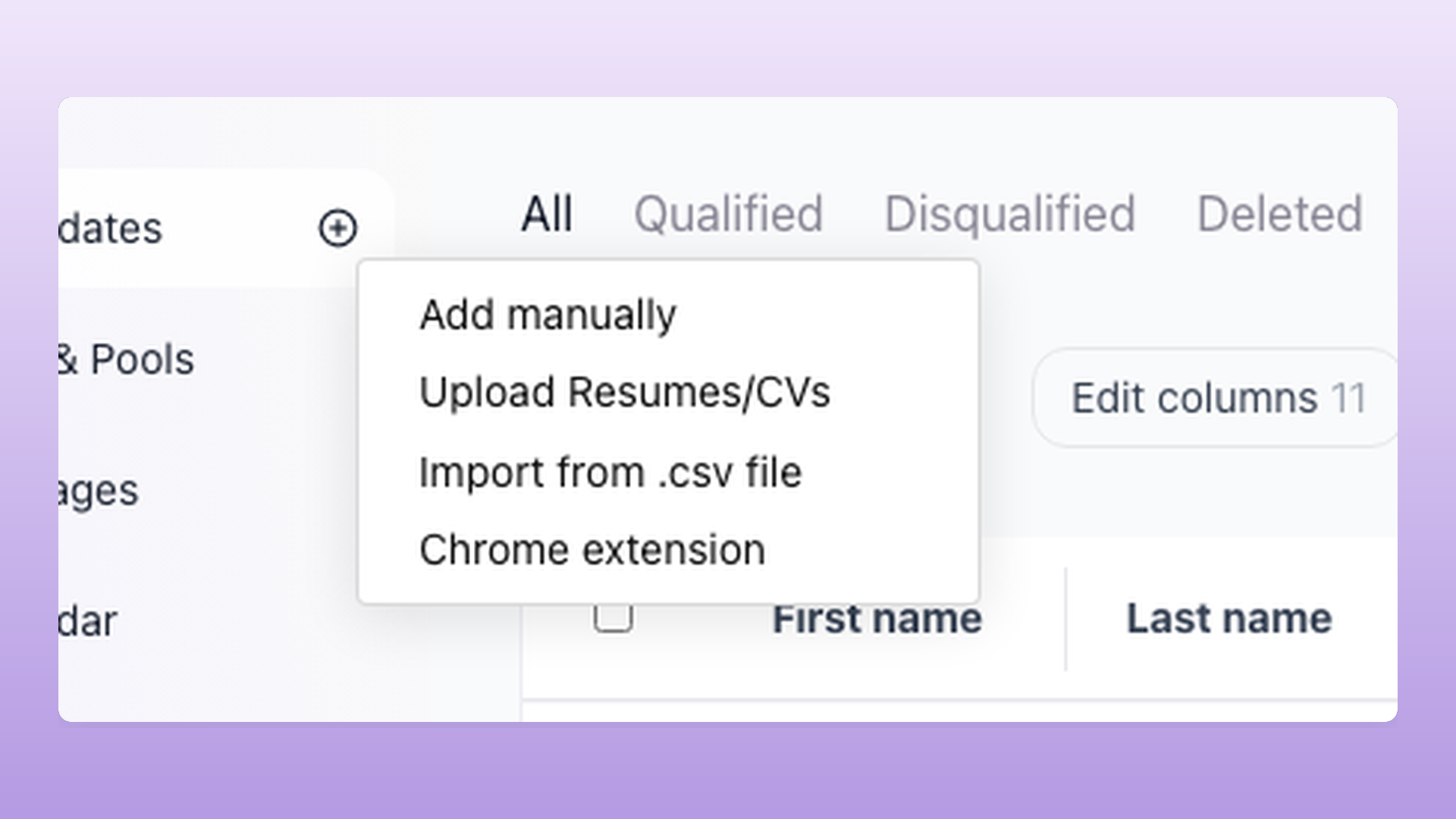
The 100Hires Chrome extension picks up candidates from the Google search results and from LinkedIn, Gmail, GitHub, Stack Overflow, AngelList, Dribbble, Behance, Medium, Facebook, Twitter, Meetup, Upwork, Xing, and Indeed in one click.
Each captured profile lands in the right job and stage in your ATS automatically. From there, AI Score ranks every captured candidate 0-100 against the role requirements, so your first manual review starts from a sorted list instead of a raw pile.
4. Enrich their contact info
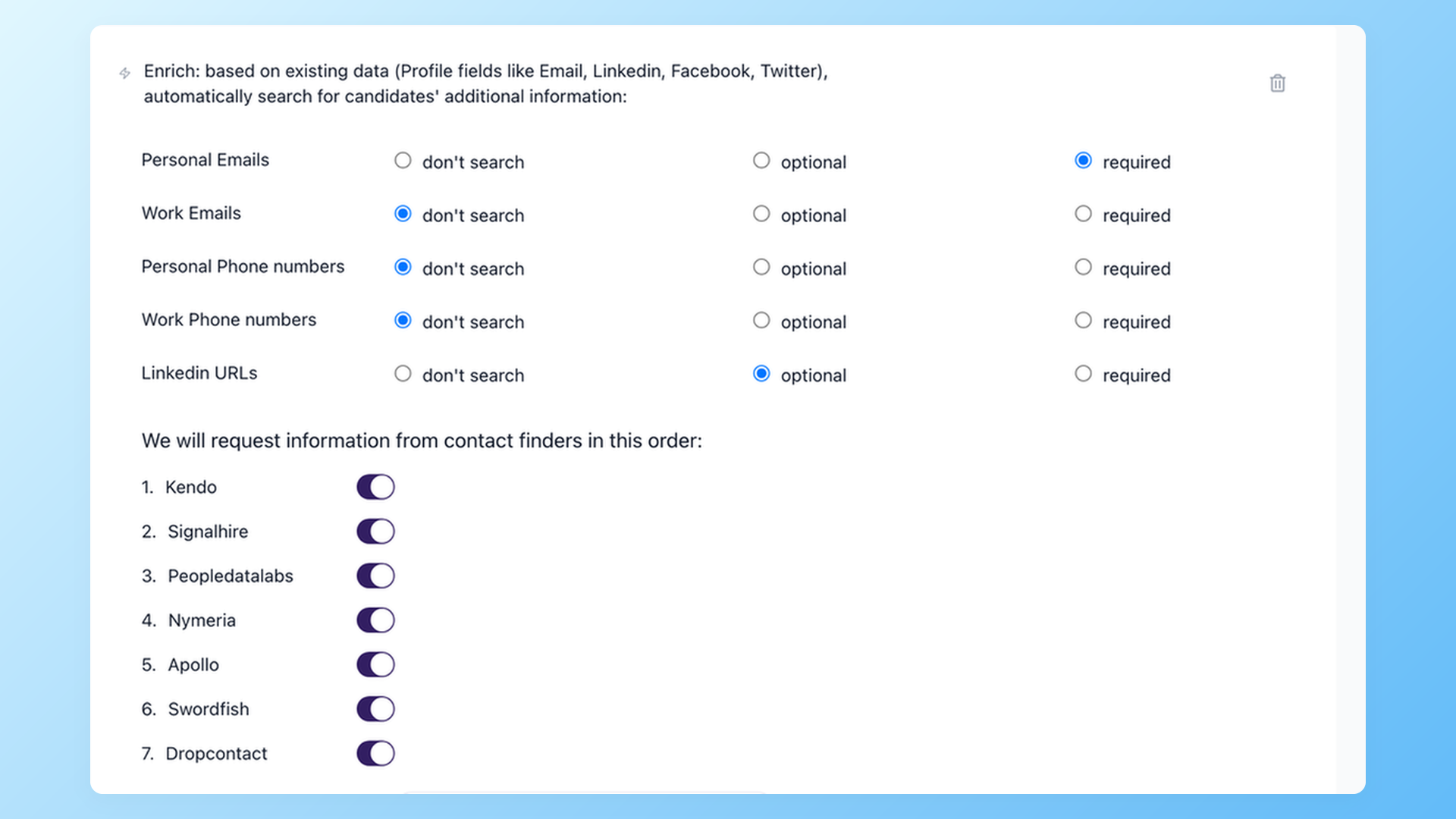
Pull personal emails, work emails, phone numbers, LinkedIn URLs. Single-source enrichment misses most personal emails because no one provider has comprehensive data across industries and seniorities.
100Hires lets you build an enrichment waterfall across seven providers (Apollo, Signalhire, Swordfish, Peopledatalabs, Nymeria, Kendo, Dropcontact). When the first provider doesn't return a personal email, the next one tries, and so on.
In our internal benchmark, the waterfall surfaced 37% more personal emails than single-provider lookup.
5. Validate emails before you send
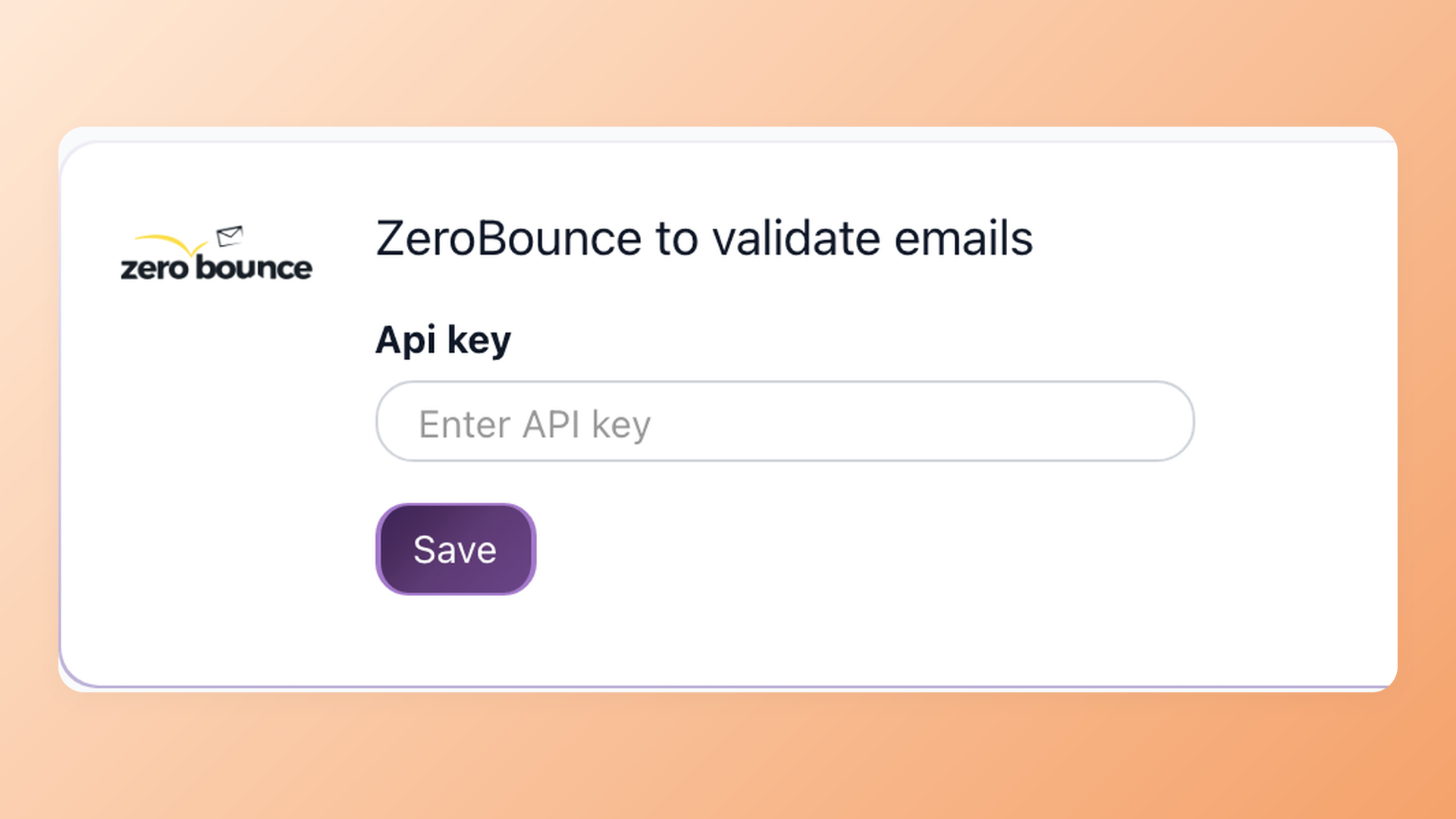
Bad emails kill sender reputation. Once your domain is flagged for repeated bounces, even your good messages stop landing in inbox. After enrichment, every email gets validated through the integrated ZeroBounce step inside 100Hires.
Candidates without a valid email get filtered out automatically; only verified addresses move into outreach.
6. Reach out with a personalized message
LinkedIn InMail response rates sit below 10% for many recruiters because most candidates don't check LinkedIn daily, and InMails are visually distinct from regular messages so candidates often perceive them as ads.
Top engineers and senior PMs in particular get InMail-bombed and stop opening any of them.
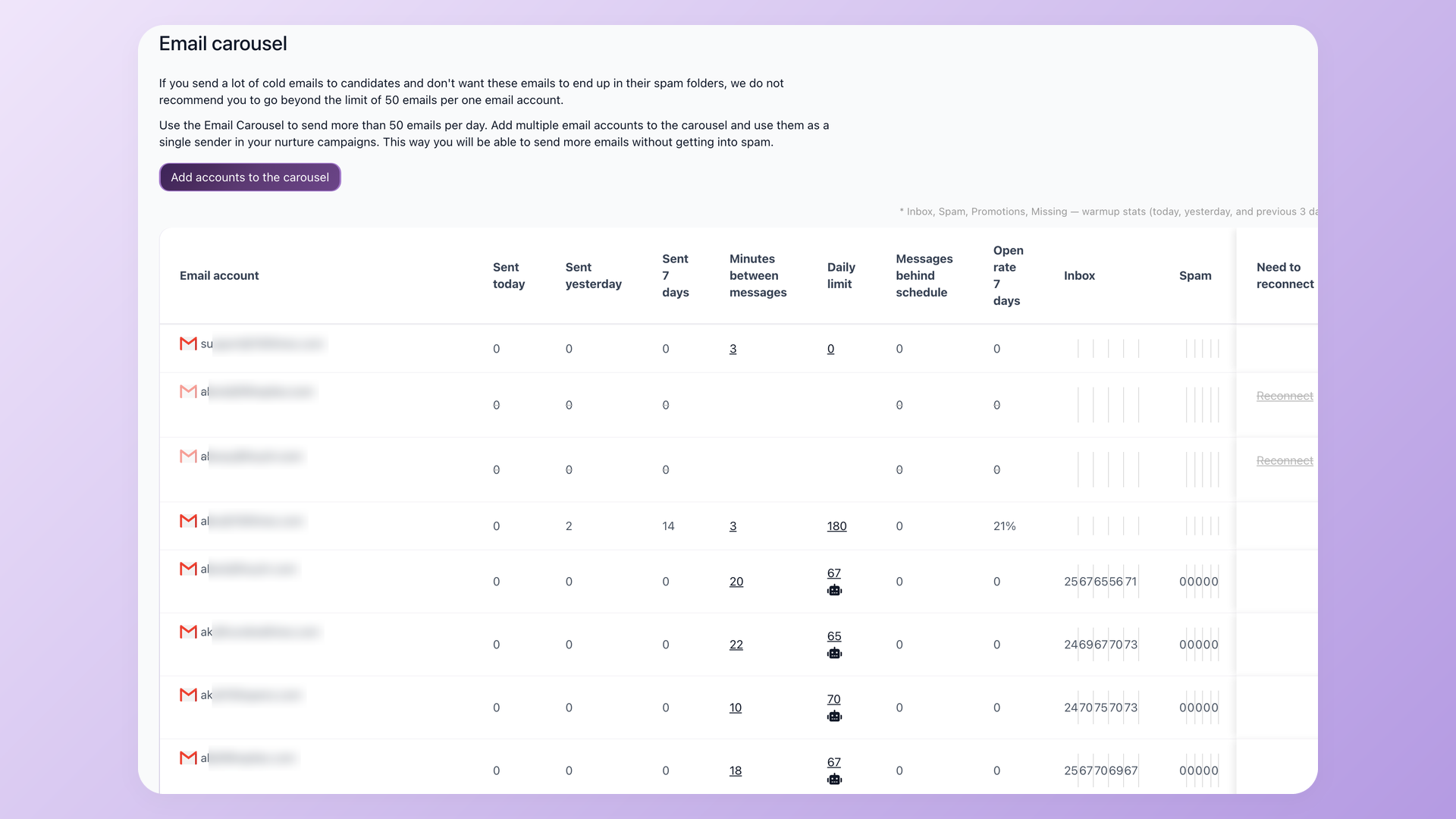
Personal email lands in a primary inbox you control. Subject line, sender domain, and follow-up cadence are all yours. When you reach those candidates at volume, 100Hires sends through the Email Carousel across multiple warmed-up mailboxes so your outreach stays out of spam.
7. Track responses and move qualified candidates into the interview pipeline
This is where sourcing hands off to recruiting, and where most teams lose data because they jump tools. In 100Hires, nurture campaign settings can move a candidate to a reply stage as soon as they respond, while keeping the full thread tied to the candidate record.
The recruiter sees the conversation alongside the candidate's resume, AI Score, and notes.
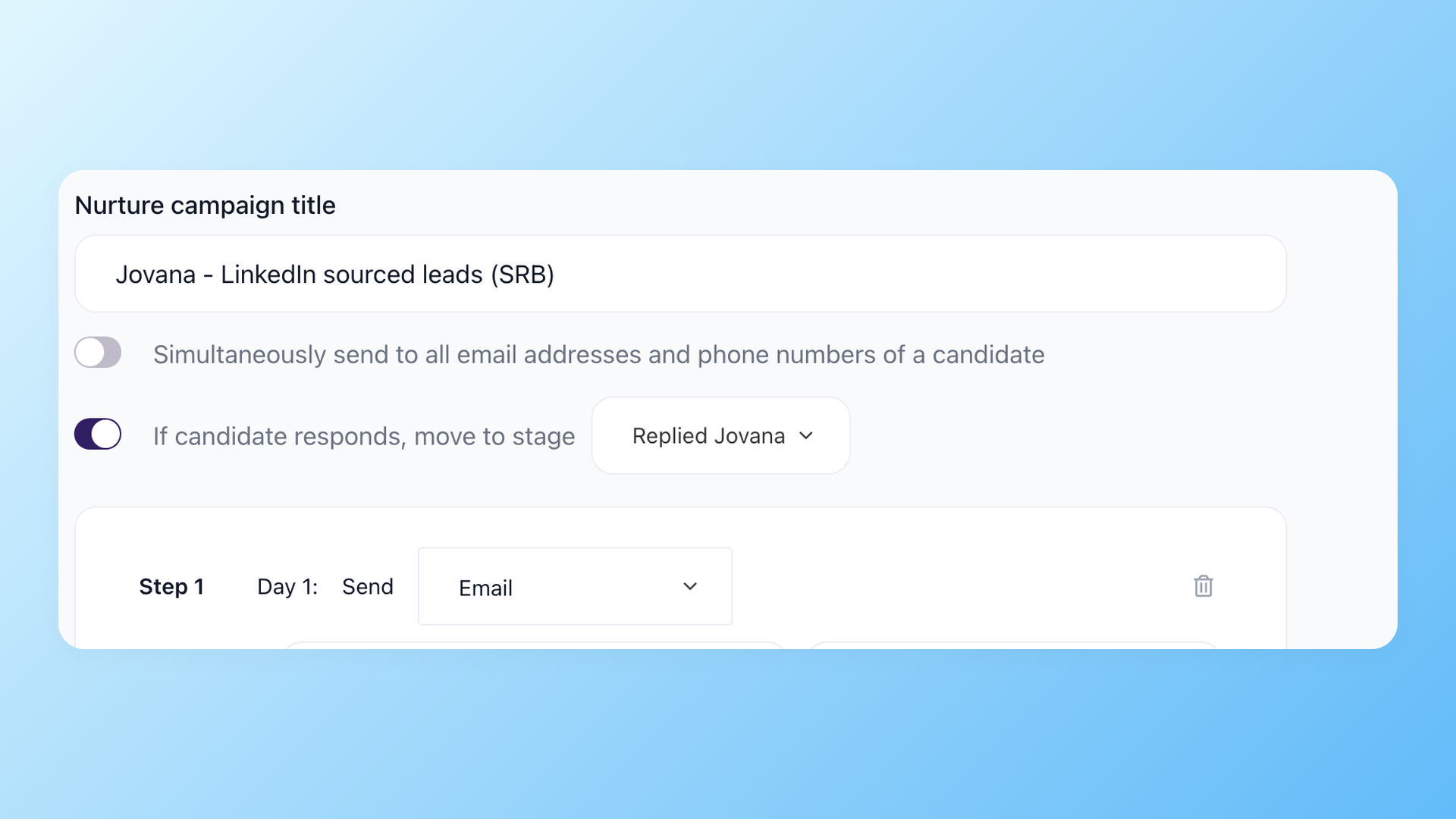
The candidate engagement tools behind that handoff - sequences, texting, voicemail drops, and reply routing - run inside the same ATS.
8 candidate sourcing strategies that work
Tactics vary by industry and seniority, but eight approaches show up consistently across recruiter playbooks.
1. Boolean search on Google and LinkedIn
Boolean search is the original sourcing skill. Combine job titles, skills, and locations with operators like AND, OR, NOT, and quotation marks to surface specific people. Run it on Google instead of LinkedIn directly to avoid extension bans, then import the profiles you find.
We built a free boolean search string generator if you want to skip the syntax.
2. LinkedIn sourcing without LinkedIn Recruiter
Most teams default to LinkedIn Recruiter, but the math is rough. Recruiter Corporate runs $10,800-$15,000 per seat per year. A team of 8 recruiters pays roughly $86,400-$120,000 a year.
The cheaper alternative: source on LinkedIn through a Chrome extension that imports profiles directly into your ATS, then reach candidates on personal email instead of InMail.
3. Resume database and talent pool
Your strongest source is often the candidates you already met. Silver-medal candidates from previous roles, past applicants who didn't quite fit then but might fit now, employee referrals that came in for closed jobs - all belong in a structured talent pool or resume database.
Most teams lose this signal because their ATS treats every job as a fresh start.
4. Employee referrals
Referrals are consistently among the highest-converting sources in industry research, and referred employees stay longer and ramp faster. Cash bonuses without a structured request flow rarely produce volume.
A talent pool inside your ATS makes it easy to ask employees "do you know anyone like this?" with the actual job context attached, instead of a generic "send me referrals."
5. Talent communities by persona
Different roles live on different platforms. Developers post on GitHub and Stack Overflow. Designers showcase on Dribbble and Behance. Startup operators are active on AngelList. Writers and PMs publish on Medium. Freelancers and contract specialists list on Upwork.
The 100Hires Chrome extension supports 14 of these platforms in one workflow.
6. X-ray search on Google
X-ray search uses the site: operator to query a specific platform's profile pages through Google's index instead of the platform's own (often weak) search.
Example: site:github.com "Python developer" "San Francisco" -intext:"hiring" finds GitHub users in SF who write Python and aren't posting jobs. Particularly useful for niche platforms whose native search misses results.
7. Conferences, meetups, and online communities
Conference speaker lists, Slack and Discord communities, and Meetup attendee lists are gold for senior and specialist talent who skip LinkedIn but show up where their profession gathers.
The catch is that this is one-to-one outreach, not a search engine, so it works best for hard-to-fill senior roles where the conversion bar is high. Track attendees in a CRM-style talent pool with the conference name, year, and notes from the conversation.
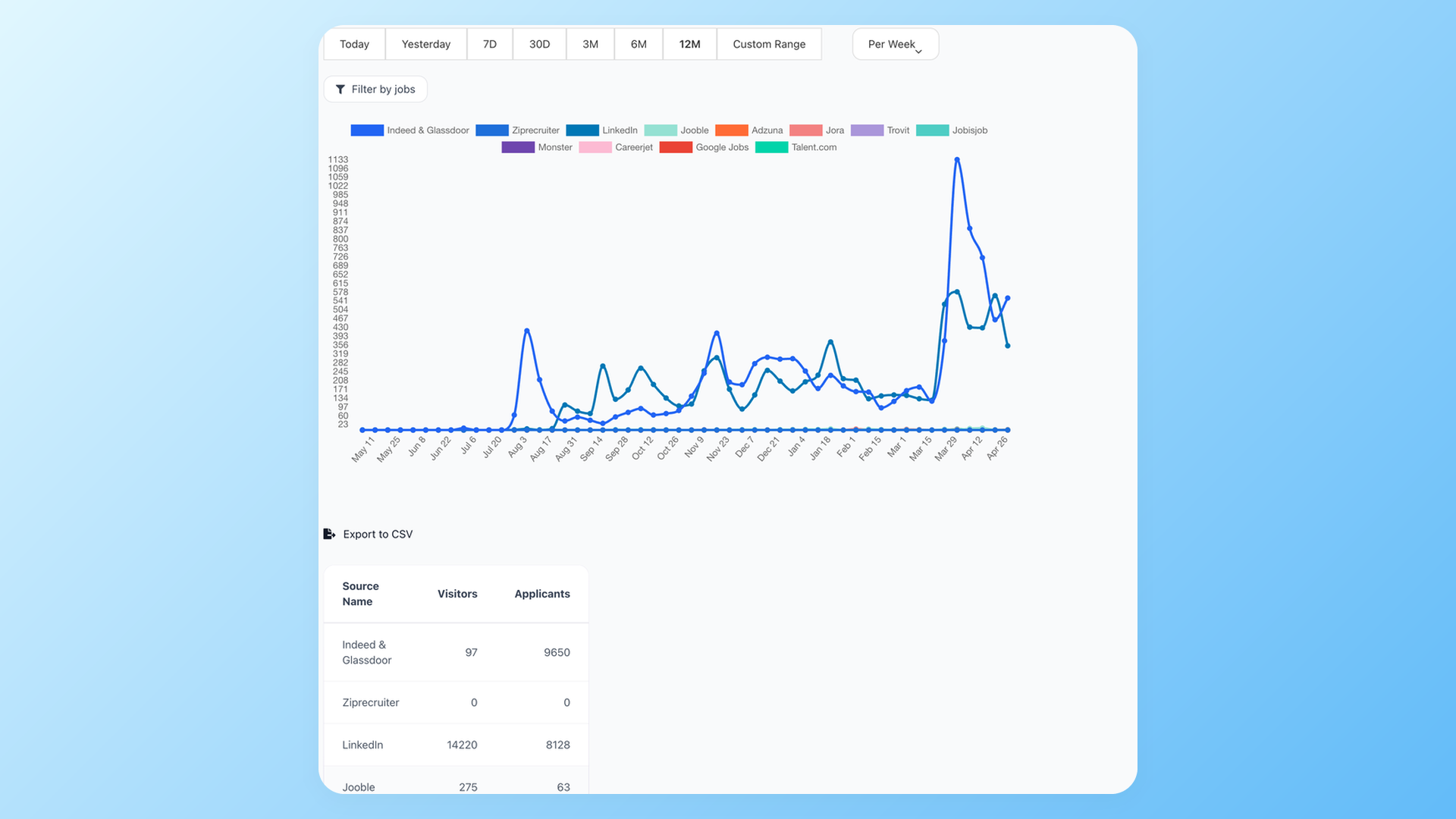
Track those sources in the ATS instead of a spreadsheet. 100Hires reporting shows visitors and applicants by source, so recruiters can see which channels create pipeline instead of just collecting profile lists.
8. AI-assisted sourcing
AI-assisted sourcing has grown from a Chrome-extension curiosity into its own tool category: natural-language search, agentic pipelines, automated candidate sourcing end to end.
It deserves more than a paragraph, so the full breakdown - which tools are worth it, what they really cost, and the risks recruiters keep reporting - lives in the best AI sourcing tools section below.
Best AI sourcing tools in 2026
AI sourcing tools (also sold as AI talent sourcing platforms) search large candidate databases with machine ranking, natural-language queries, and increasingly with autonomous agents that build the top of the funnel on their own.
What separates them is not the AI layer but the data underneath it.
Three ownership models exist. First-party platforms (LinkedIn Recruiter, Indeed Smart Sourcing) rank data candidates gave them directly. Scraped-database tools (SeekOut, hireEZ, Juicebox, Fetcher, Gem, Pin) run AI over profiles collected across the web.
Live-capture tools skip the stored database entirely and pull the profile at the moment you find it.
How we compared them: data ownership and freshness first, published pricing with its billing basis, recruiter reports from public forums, LinkedIn ban exposure, and fit by team size. All prices were pulled from official vendor pages on July 10, 2026.
At a glance
- LinkedIn Recruiter: the source itself; unmatched first-party graph, the highest per-seat cost in the category.
- Indeed Smart Sourcing: first-party resume database, strongest for US volume hiring; priced up sharply in 2026.
- SeekOut: enterprise specialty depth (security clearances, diversity filters); now has a self-serve tier.
- hireEZ: agentic cross-platform sourcing across 45+ networks for mid-market and enterprise teams.
- Juicebox (PeopleGPT): SMB-friendly natural-language search; scraped-data caveats apply.
- Fetcher: hands-off batches that pair AI search with human curation.
- Gem: AI sourcing plus rediscovery of candidates already sitting in your ATS and CRM.
- Pin: the newest entrant; recruiters describe it as a cheaper Juicebox with similar functionality.
LinkedIn Recruiter
Recruiter Lite officially costs $170 per month or $1,680 per year for a single seat; Corporate is quote-only, with 2026 buyer reports clustering at $10,800-$15,000 per seat per year before job slots.
It is first-party data, so profiles are as fresh as the platform itself - that part nobody disputes.
The complaints are price opacity (recruiters comparing notes in one thread reported quotes from $6,500 to $50,000 for similar packages) and InMail fatigue: response rates under 10% come up repeatedly, against roughly 30% for well-targeted personal email.
LinkedIn's own AI layer, Hiring Assistant, is a paid add-on on Corporate and RPS+ tiers and is not available on Lite.
Indeed Smart Sourcing
First-party in the same way: Indeed's resume database is data candidates uploaded and update themselves. The 2026 story is price.
The US Professional plan is now $520 per month or $4,992 per year (official US page), roughly a 4x jump from the ~$120 per month many teams were paying, and recruiters openly discussed cancelling when the change landed.
A cheaper Standard tier is not shown on the US page at all - the $120-125 per month figures floating around are regional (Canada) or search-summary numbers, and Indeed's own pages currently contradict themselves on them.
The new Sourcing Assistant automation is Professional-only, with a first-time, non-recurring trial allowance. A solid supplemental channel for US volume hiring; do the math against results before renewing.
SeekOut
The enterprise depth play: over 1 billion profiles by its own count, specialty filters for security clearances and diversity sourcing, and a new agentic positioning - it now markets SeekOut MCP, which runs SeekOut inside Claude, ChatGPT, or Copilot.
Two things changed in 2026: it published a self-serve tier, SeekOut Recruit Core, at $149 per month billed annually ($1,788 per year) or $179 month-to-month, while Team and Enterprise stay quote-only.
Most roundups still print "pricing on request." The recurring practitioner complaint is data lag: scraped profiles that run weeks old and no visibility into open-to-work status.
Strong for specialty enterprise searches, overkill for SMB pipelines - see our SeekOut alternatives review for the field.
hireEZ
hireEZ brands its platform agentic AI and backs it with an open-web model spanning 45+ platforms rather than one cached database.
Its EZ Agent makes the pitch concrete: screening a 500-candidate pool that would eat most of a recruiter's day (15-60 seconds per profile) happens in seconds, and the agent drafts replies for interested, not-interested, and contact-later responses.
Pricing became partly public in 2026: $494 per month for solo recruiters with a 7-day trial; enterprise remains quote-only, priced against the stack it replaces.
Longtime users report two frictions: contact-data accuracy declining over time and a steep renewal increase, with one reporting +50%. Head-to-head: SeekOut vs hireEZ.
Juicebox (PeopleGPT)
The tool that made natural-language sourcing mainstream: describe the candidate in plain English and it searches 800M+ profiles built from 30+ data sets (LinkedIn, GitHub, Crunchbase, Stack Overflow, and more).
Autopilot analyzes every profile in a pool against the role; Agents run top-of-funnel autonomously as a paid add-on.
It lists Ashby, Lever, and Greenhouse among 30+ ATS integrations and publishes a self-serve ladder: Starter $139 and Growth $199 per seat month-to-month, with an advertised annual discount whose exact figures the vendor's own page states inconsistently.
Recruiters like the speed and question the depth - results reportedly thin out after the first page - and a widely shared account-suspension story made LinkedIn ban risk part of every Juicebox conversation.
Fetcher
Fetcher is the hands-off option: AI search plus human curation deliver batches of vetted candidates to your inbox, which is also why some recruiters describe it as AI-assisted human sourcing rather than pure software.
The vendor's own math: an in-house hire that costs $4,000-6,000 to source lands around $1,200-1,600 through Fetcher. Its CTO is unusually candid about the ceiling, putting off-the-shelf AI at about 70% usable with a 30% tail that goes wrong without human oversight.
Read the pricing page carefully: it renders annual-billed rates by default ($379 per month Growth, $649 Amplify), while the month-to-month prices are $499 and $849, and the entry tier shows conflicting figures on the same page.
Gem
Gem approaches sourcing from the CRM side: its AI Sourcing Agent searches 800M+ external profiles, but the differentiated move is rediscovery - resurfacing past applicants and silver medalists already sitting in your ATS and CRM.
Standard pricing is quote-only; the only public number is the Startup Program at $130 per month billed yearly for companies with 1-10 employees (list price $270), with reduced rates advertised up to 100 employees.
Gem is also nearly invisible in practitioner video content - the YouTube sourcing conversation belongs to Juicebox, SeekOut, and hireEZ. Evaluating it against its own category? Start with our Gem competitors guide.
Pin
The newest name recruiters bring up unprompted: in alternative-hunting threads Pin comes up more often than several established tools, usually framed as most of Juicebox's functionality at a noticeably lower price, and reportedly stronger for non-technical roles.
It appeared in Google's AI Overview as a top pick for startups and SMBs during our July 2026 research. Treat the marketing claims accordingly: the 850M-profile database, free tier, and time-to-fill numbers come from the vendor and have not been independently verified.
Worth a look if you are choosing between lightweight AI sourcing tools and want a price check on Juicebox.
What recruiters actually say about AI sourcing tools
Strip away the vendor decks and the practitioner consensus across recruiting forums is remarkably consistent:
- The same data wears different UIs. An agency owner spending about $1M a year across LinkedIn Recruiter, Juicebox, SourceWhale, and niche tools put it bluntly: half of these tools resell the same scraped LinkedIn data, so every recruiter sees the same candidates.
- Data quality is the tax. Recruiters report roughly half of scraped contact data being unusable - around 50-60% of emails valid, phone numbers worse, and profiles lagging reality by weeks.
- Ban risk is structural, not vendor-specific. LinkedIn suspends accounts over third-party sourcing tools - it banned Apollo outright and reportedly tracks around 2,500 Chrome extensions. In the most-upvoted take on a widely shared suspension story, the liability sits with the user, not the tool.
- Renewal shock is a pattern. hireEZ raising a renewal by half, Indeed Smart Sourcing jumping roughly 4x: budget owners increasingly treat AI sourcing line items as annual re-decisions, not subscriptions.
- What actually sticks is narrow. First-pass filtering and ranking, boolean help, interview summaries, scheduling. Veterans keep saying no AI sourcing tool has beaten disciplined manual sourcing on final-shortlist quality - and even vendors partly agree: Fetcher's CTO calls off-the-shelf AI 70% usable, and says LLMs have not disrupted recruiting yet.
- The DIY fringe is real but fragile. Some agencies now build their own stacks (Claude Code plus data APIs like Crustdata or People Data Labs plus Clay) and report cutting most of their SaaS spend. The cautionary tale: one custom stack died within 18 months when its engineer left, with the hidden cost estimated at $500k in data plus $400k in engineering.
The takeaway: AI sourcing tools are accelerators, not replacements - and they are only as good as the freshness of the data they rank.
Which AI sourcing tool should you pick?
- You have enterprise budget and live in InMail: LinkedIn Recruiter is still the deepest first-party graph. Keep seats minimal - recruiters report cutting 60-70% of spend by keeping one or two Lite seats for graph access - and expect to negotiate everything else.
- You hire high volume in the US: Indeed Smart Sourcing's first-party resume database is the natural supplement. At the new $520 per month Professional price, measure results per contact before renewing.
- You want a scraped-database AI layer: SeekOut for enterprise specialty depth, hireEZ for cross-platform agentic workflows, Juicebox or Pin for SMB-friendly natural-language search, Fetcher for hands-off batches, Gem when the gold is already in your ATS. Whichever you pick, price in the data-quality tax and the LinkedIn ban exposure.
- You want sourcing inside the ATS, on live data: that is the approach we built 100Hires around (our product, so judge this branch accordingly). The Chrome extension captures profiles from LinkedIn, GitHub, and 12 other platforms at the moment you find them - no cached database to go stale - then the 7-provider enrichment waterfall finds personal emails, ZeroBounce validates them, and the Email Carousel sends from warmed-up mailboxes. AI Score ranks every candidate 0-100 with threshold automations (auto-advance above your bar, auto-reject below it), AI Copilot reads the full candidate record, and a native MCP server ships on every plan, so sourcing works inside Claude or ChatGPT too. Pro is $399 per month billed annually ($4,788 per year), flat for unlimited users.
| Tool | AI feature (official name) | Data source and freshness | Pricing (as published, 2026) | Best for |
|---|---|---|---|---|
| LinkedIn Recruiter | Hiring Assistant (paid add-on, Corporate/RPS+ only) | Live first-party LinkedIn graph | Lite $170/mo or $1,680/yr (official); Corporate quote-only, $10,800-$15,000/seat/yr per third-party buyer reports | Enterprise teams with InMail volume and budget |
| Indeed Smart Sourcing | Sourcing Assistant (inside Smart Sourcing) | Live first-party resume database (candidates self-update) | US Professional $520/mo or $4,992/yr (official); Standard shown only regionally ($120-125/mo CA); varies by region | High-volume US hiring off a resume database |
| SeekOut | SeekOut Recruit (agentic platform) + SeekOut MCP | Scraped database (1B+ profiles claimed); recruiters report weeks-old profiles | Recruit Core $149/mo billed annually ($1,788/yr) or $179/mo month-to-month; Team/Enterprise quote-only | Enterprise specialty searches (cleared, diversity) |
| hireEZ | AI Sourcing + EZ Agent | Open web + partner networks across 45+ platforms | Solo $494/mo (official, 7-day trial); enterprise quote-only | Mid-market and enterprise cross-platform sourcing |
| Juicebox (PeopleGPT) | PeopleGPT natural-language search + Autopilot + Agents | Scraped multi-source database (800M+ profiles, 30+ data sets) | Starter $139, Growth $199 per seat/mo month-to-month; annual discount advertised but vendor page states conflicting annual figures | SMBs and startups that want plain-English search |
| Fetcher | AI + human hybrid sourcing | Scraped database (~90-100M profiles) + human curation | Growth $499/mo month-to-month ($379/mo billed annually); Amplify $849/mo ($649/mo annually); entry tier from ~$115/mo (vendor page shows conflicting figures) | Small HR teams that want hands-off batches |
| Gem | AI Sourcing Agent | Scraped database (800M+) + your own ATS/CRM history | Quote-only; Startup Program $130/mo billed yearly (1-10 employees, list $270/mo) | Teams mining their existing ATS + funded startups |
| Pin | AI matching + multi-channel sequences (per vendor) | Proprietary database per vendor marketing (850M+ claimed, not independently verified) | Free tier + paid plans per vendor marketing (not independently verified) | Startups and SMBs price-checking Juicebox |
| 100Hires (our product) | AI Score (0-100, threshold automations) + AI Copilot | Live capture at search time via Chrome extension (no cached database) | Pro $399/mo billed annually ($4,788/yr), flat for unlimited users; $499/mo month-to-month; transparent self-serve pricing | SMBs and agencies that want sourcing + enrichment + outreach + ATS in one |
AI sourcing is one slice of the hiring stack.
For screening, scheduling, and the full-funnel picture, see our guide to the best AI recruiting software; for the manual-sourcing toolbox, the 8 best sourcing tools for recruiters; and for replacing the biggest line item, the 15 best LinkedIn Recruiter alternatives.
Candidate sourcing services: outsource it or run it inside your ATS?
Everything above assumes you run sourcing yourself. The other route is candidate sourcing services: paying an outside team to fill the top of your funnel. The market splits into three flavors, and they price very differently.
Sourcing-as-a-service firms (IQTalent, Rent A Sourcer) assign you a dedicated sourcer, billed hourly or by subscription rather than per hire.
RPO providers (Cielo, Randstad Sourceright, AMS) embed a recruiting function inside your company. Staffing and contingency agencies (Kforce, Robert Half) charge a percentage of first-year salary per placement.
Here is the first thing you notice when you research them: none of the five human-sourcing providers we reviewed publishes a rate. The software vendors ranking alongside them on the same search results do - Pin, for example, lists $100 per month on its own site.
Pin's published comparison of sourcing companies puts RPO contracts at roughly $100,000 per year (Cielo), per-hire RPO models at $3,000-$8,000 per hire (Randstad Sourceright, AMS), and contingency fees of 20-25% (Kforce) to 20-30% (Robert Half) of first-year salary.
Those are Pin's figures, not independently verified, but they are the only published numbers this corner of the market offers.
Sometimes that commitment is right. An outsourced sourcing service genuinely wins when you are filling executive or deeply niche roles where a specialist's network matters, or when nobody on your team has bandwidth to source at all.
It also fits a short burst of hiring, where you need pipeline for a one-time spike without adding headcount.
For ongoing hiring, the in-ATS alternative changed the math (our product, so judge accordingly). AI sourcing inside 100Hires puts every sourced candidate straight into your own pipeline.
The Chrome extension captures profiles at the moment you find them, the enrichment waterfall and validation run automatically, and outreach goes out from your own warmed-up mailboxes.
There is no end-of-engagement handover step, because every captured profile lands in your 100Hires job and pipeline stage from the start. And the pricing is public: Pro is $399 per month billed annually ($499 month-to-month), flat for unlimited users, not a per-engagement quote.
A quick decision framework:
- Choose a sourcing service if the role is executive or ultra-niche, you have zero internal sourcing time, or you need pipeline for a one-off hiring spike and can absorb custom-quoted or per-hire fees.
- Choose AI sourcing inside your ATS if you hire on an ongoing basis, want every sourced profile captured into your own system from day one, and would rather pay a flat, published price than a per-hire or per-engagement fee.
- Mix them when it makes sense: some teams outsource one impossible search while running day-to-day sourcing in their ATS.
100Hires vs. LinkedIn Recruiter: annual cost
For most SMB and agency teams the question is what LinkedIn Recruiter actually costs at team scale. Recruiter Corporate scales linearly per seat. 100Hires Pro is flat for unlimited users.
| Team size | LinkedIn Recruiter Corporate (annual) | 100Hires Pro (annual) | Annual savings with 100Hires |
|---|---|---|---|
| 3 active recruiters | $32,400-$45,000 | $4,788 | $27,612-$40,212 |
| 8 active recruiters | $86,400-$120,000 | $4,788 | $81,612-$115,212 |
Calculations use the public Recruiter Corporate range of $10,800-$15,000 per seat per year, which is third-party buyer data - LinkedIn publishes no official Corporate price.
What LinkedIn does publish: Recruiter Lite at $170/mo or $1,680/yr for a single seat ($270/mo or $2,670/yr per seat for 2-5 seats). Full breakdown including LinkedIn Recruiter Lite economics is in our LinkedIn Recruiter cost breakdown.
Frequently asked questions
What is the difference between recruiting and sourcing?
Sourcing is the proactive search for qualified candidates who haven't applied yet - top of the hiring funnel. Recruiting moves applicants through screening, interviews, and offers - middle and bottom of the funnel. A sourcer fills the pipeline, a recruiter closes it.
In small teams the same person does both, but the activities split cleanly. 100Hires combines sourcing and ATS in one tool, so the handoff between the two stages stays inside one workspace.
What is the difference between candidate sourcing and candidate screening?
Sourcing finds and contacts qualified people who haven't applied yet. Screening evaluates the people already in the funnel (applicants and sourced candidates) against the role's requirements. Sourcing is search and outreach.
Screening is review, scoring, and the first conversation. In 100Hires, the AI Score ranks every sourced candidate against the role requirements as soon as they enter the funnel, which speeds up the screening pass.
What does sourcing passive candidates mean?
Passive candidates aren't actively looking for a new job but could be open to the right offer. A widely cited industry estimate puts the share of qualified candidates who are passive at around 70%.
Sourcing passive candidates means proactively reaching them through LinkedIn, niche communities, or direct email rather than waiting for them to apply.
The 100Hires Chrome extension captures passive profiles from LinkedIn, GitHub, and 12 other platforms in one click into the right job and pipeline stage.
What is a Boolean search and how do recruiters use it?
A boolean search combines keywords with operators like AND, OR, NOT, and quotation marks to surface specific people on Google or LinkedIn. Example: site:linkedin.com/in "Senior Python Developer" AND "Berlin" NOT "freelance".
100Hires built a free boolean search string generator if you want to skip the syntax.
What are the Boolean operators recruiters use most?
AND (both terms must appear), OR (either term), NOT or - (exclude term), quotation marks (exact phrase), parentheses (group conditions), and site: (limit to one domain). Combine them: site:github.com ("Python" OR "Go") "San Francisco" -intext:"hiring".
The 100Hires boolean search string generator builds these patterns from a plain-text role description, no manual operator chaining.
What is the most effective way to source candidates?
For most SMB and agency teams, the highest-ROI workflow is: boolean search on Google to surface LinkedIn profiles, Chrome-extension capture into your ATS, multi-provider contact enrichment, email validation, then a multi-step email sequence with dynamic send limits and warmup.
Personal email lands in a primary inbox you control. Subject line, sender domain, and follow-up cadence are all yours, unlike inside the LinkedIn InMail product.
100Hires runs all five stages (capture, enrichment, validation, send, response tracking) on a single pipeline so the handoffs do not break the data.
How do you source candidates without LinkedIn Recruiter?
Run boolean searches on Google to find LinkedIn profiles in the regular SERP, import them into your ATS through a Chrome extension, enrich each with personal email addresses through a multi-provider waterfall, and reach out over email instead of InMail.
This is significantly cheaper than the $10,800+ per recruiter per year LinkedIn Recruiter Corporate charges. 100Hires bundles the Chrome extension, the 7-provider enrichment waterfall, ZeroBounce validation, and the email sequencer for $4,788 per year flat for the whole team.
What do AI sourcing tools actually do?
Three jobs, and the newest tools run them with agents. Search: natural-language queries over large profile databases (Juicebox PeopleGPT, Gem's AI Sourcing Agent, SeekOut Recruit).
Ranking: fit analysis over a whole pool, like Juicebox Autopilot or hireEZ's EZ Agent screening hundreds of profiles in seconds. And outreach automation.
The catch is still the underlying data: most of these tools rank scraped LinkedIn data that runs weeks old, and recruiters report only 50-60% of the emails being valid. AI-ranked stale data is still stale data.
100Hires takes the opposite approach: source live from LinkedIn, GitHub, and 12 other platforms through the Chrome extension at the moment of search, then enrich contact info through a 7-provider waterfall, so the AI Score ranks fresh data by definition.
Which 14 channels does the 100Hires Chrome extension work on?
LinkedIn, Gmail, GitHub, Stack Overflow, AngelList, Dribbble, Behance, Medium, Facebook, Twitter, Meetup, Upwork, Xing, and Indeed. One 100Hires extension, all 14 channels, one-click import into the right 100Hires job and pipeline stage.
Which 7 enrichment providers does 100Hires use in the waterfall?
100Hires queries seven contact-finder providers: Apollo, Signalhire, Swordfish, Peopledatalabs, Nymeria, Kendo, and Dropcontact. They run as a waterfall - when one provider doesn't return a personal email, the next one tries.
You can customize the order to prioritize the providers your roles convert best on.
Is contact enrichment available on all 100Hires plans?
The 100Hires 7-provider enrichment waterfall is a Pro-tier feature. Lower 100Hires plans support manual sourcing and basic candidate management without the automated enrichment workflow.
The Pro plan is $399 per month billed annually ($499 month-to-month), flat for unlimited users.
Does 100Hires validate emails before sending?
Yes. Inside 100Hires, after enrichment every email is validated through the integrated ZeroBounce step before any outreach sequence starts. Candidates without a valid email are filtered out automatically.
The email carousel also adjusts daily sending limits per account based on whether previous batches landed in inbox or spam, which protects sender reputation as you scale.
Which AI sourcing tool is best?
It depends on your branch. LinkedIn Recruiter if you have enterprise budget and need the first-party graph. Indeed Smart Sourcing for US volume hiring off a first-party resume database. SeekOut or hireEZ for enterprise-grade scraped-database depth.
Juicebox or Pin for SMB-friendly natural-language search. Fetcher for hands-off curated batches. Gem for rediscovering candidates already in your ATS.
If you want sourcing, enrichment, outreach, and the ATS in one tool working on live-captured data, that is what 100Hires (our product) is built for.
Are AI sourcing tools worth it?
For first-pass filtering at volume, usually yes: screening a 500-profile pool by hand takes most of a workday, and AI compresses it to minutes.
For the final shortlist, experienced recruiters keep reporting that disciplined manual sourcing still wins, and even vendors concede the limits - Fetcher's CTO puts off-the-shelf AI at about 70% usable.
Before paying, check three things: data freshness (scraped databases lag by weeks), LinkedIn ban exposure for any tool that touches the platform, and renewal terms.
Price jumps of 50% (hireEZ, user-reported) to roughly 4x (Indeed Smart Sourcing, 2026) are part of the category's pattern. That freshness check is also why 100Hires runs AI Score on live-captured profiles instead of a stored database.
How much do candidate sourcing services cost?
Almost no provider publishes a rate, so budget from published comparisons. Pin's comparison of sourcing companies lists RPO contracts around $100,000 per year, per-hire RPO models at $3,000-$8,000 per hire, and staffing-agency contingency fees of 20-30% of first-year salary.
Sourcing-as-a-service firms bill hourly or by subscription and quote per engagement. For comparison, AI sourcing inside 100Hires is a published flat price: Pro at $399 per month billed annually ($499 month-to-month) for unlimited users.
What is the difference between a candidate sourcing company and a staffing agency?
A sourcing company fills the top of your funnel: it finds, contacts and warms up qualified candidates, then hands them to your team to interview and close, usually billed hourly or by subscription.
A staffing agency runs the full cycle through placement and charges a contingency fee, commonly 20-30% of first-year salary per hire. If you run your own ATS like 100Hires, a sourcing company's output should arrive in your pipeline as regular candidates.
Who owns the candidate data when a sourcing engagement ends?
It depends on the provider's contract, so check before signing. Established sourcing-as-a-service firms hand over the candidate list when the engagement ends and treat that as a selling point.
When sourcing runs inside your own ATS there is no handover step at all: in 100Hires, every sourced profile, email and conversation is captured straight into your database as you work.
Try 100Hires for free
No credit card. 14-day trial. Forbes Advisor #1 ATS for SMBs.