
How to Post a Job on Indeed: Employer Guide 2026
As an employer, you post on Indeed by opening Jobs in your dashboard, clicking Post a job, and filling in a form that takes a few minutes.
This guide covers all three routes, the free posting limits and who they apply to, employer verification, and the fixes for a listing that never appears.
Indeed changed its free posting and staffing agency rules over the last couple of years. Plenty of advice still in circulation predates those changes.
Key takeaways
The hiring playbook, in your inbox
One email a week - benchmarks, AI screening tactics, and short interview templates from the 100Hires team. No product pitches.
- Direct posting is a short wizard. Sign in, open Jobs, click Post a job.
- Employers posting directly can publish three jobs free per calendar month, each live for up to 30 days, in the US, Canada, Great Britain, Germany, and the Netherlands.
- Jobs indexed from an ATS or career site sit outside that allowance. Indeed says they do not usually count toward the free limit, and separately that they may be sponsored-only.
- Staffing and recruiting firms sponsor everything, and being misread as an agency is a real failure mode.
- Verification, review status, and duplicate detection head Indeed's own list of reasons a job may not appear.
- Post directly on Indeed
- What free posting covers
- Distribute through your ATS
- Post on Indeed, apply on your site
- Getting verified
- Why your job is not showing
Three ways to get a job onto Indeed
Three separate mechanisms, three sets of rules. Pick your lane first.
| Mechanism | Who it fits | Free post allowance | Where applications land | What breaks |
|---|---|---|---|---|
| Posting directly on Indeed | One-off roles, employers with no ATS | Three free direct posts per calendar month | Your Indeed employer account | Verification holds, duplicate detection |
| Distributing through an ATS | Teams hiring continuously | Outside the direct allowance, and no free slot promised | Usually your ATS; Indeed says the destination depends on your integration | Single-source conflicts, feed not indexed yet |
| Apply URL | Employers who want people finishing on their own site | Generic applications may require sponsorship | Your own careers site | Tracking not installed, field not enabled |
Sponsoring is a fourth thing, sitting on top of any of them. With 100Hires, you configure and pay for sponsorship in the Indeed employer dashboard, never inside the ATS. Other systems have their own arrangements.
If you already run an ATS, Indeed answers the route question for you. Its aggregation policy says that when your ATS is integrated with Indeed, you must use that integration to post, under its single-source feed policy.
Route 1: post directly on Indeed
Indeed's own guide breaks this into five steps, and its support article on posting a job gives the same path from the dashboard: Jobs in the left menu, then Post a job at the top right.
This walkthrough covers the desktop web version. Three recordings of the wizard, filmed within seven months of each other, show three different screen orders, so treat this as the set of things Indeed asks rather than a fixed sequence.
Before you start
Check the Jobs tab in your employer dashboard first. Indeed may have already pulled the role from your career site or ATS, and then you manage or sponsor that listing instead of creating a second one.
Creating a new account starts with a surprise. In one recorded signup flow, Indeed asked for a phone number, an SMS code, a city, a minimum pay figure, and job titles of interest.
Those are questions for job seekers, and you are still in the right place. Answer them, and the employer profile form opens, asking for your company name, your name, and your phone number.
Phone verification at signup is separate from company verification, which comes later.
Step 1: click Post a job
Open Jobs and click Post a job. Indeed asks whether you want a brand new post or a copy of an existing one.
Some accounts show a country-and-language screen, with English and the United States selected by default. Labels shift between accounts, so look for the action rather than the exact string.
Step 2: enter your job details
Mostly typing, and fast if the details are settled first.
- Title and location: postal code, city, or remote
- Headcount and timeline: how many people, how soon you want them started
- Job type and schedule: full-time, part-time, permanent, fixed-term, temporary, plus shift and days
- Pay: a range, a starting figure, a maximum, or an exact rate, with period and expected hours
- Extras: supplemental pay such as bonus or commission, then benefits
One caveat on remote roles, from Workable's documentation for its own Indeed sync: remote jobs are not always eligible for free visibility, and a supported hybrid workplace type is the safer setting.
Step 3: add your job description
Write with Indeed's quality rules in mind. Real job titles only, kept short. No clickbait, emojis, or symbols. No pay or location in the title field, no repeated keywords, no competitor names.
Step 4: include applicant qualifications
Indeed's screening library covers commute or relocation, education, years of experience, language, and travel. Any question can be flagged as a deal breaker, so unqualified applicants drop out on their own.
One walkthrough claimed a cap of five questions, which no official source backs up.
Screening earns its keep. One recruiting commentator described a property-management opening pulling 214 applications, most from people with no relevant experience.
Step 5: choose to sponsor or post for free
After you review the summary and confirm the details, Indeed offers to sponsor the job. The free option sits below the paid one, so you scroll past the offer to find the option to decline.
Every recorded walkthrough flags this step, and some accounts follow with a second offer to get the job noticed.
Whether sponsoring is worth it is a budget question, and the numbers live in one place: what Indeed charges for sponsored jobs.
Then the Trust and Safety review
Indeed's own posting guide puts the review at 24 to 48 hours in most cases, with a confirmation email when the job publishes. One tutorial showed a job clearing in two to four hours, an anecdote rather than a service level.
Until it clears, the status reads Pending and the job stays out of search results.
What free posting on Indeed actually covers
Employers posting directly on Indeed get up to three free jobs per calendar month, each live for up to 30 days.
That number appears on several official pages, including Indeed's free-versus-sponsored page, and matches our own check of Indeed's free direct-posting rules.
Employers feel it from the receiving end. An employer in a December 2025 r/humanresources thread described losing high-volume free posting once the cap landed.
Scope matters as much as the number. The allowance covers direct posts in the US, Canada, Great Britain, Germany and the Netherlands, by employers anywhere in the world.
Free jobs in a listed group of other markets run up to 120 days instead, so a US plan built on that longer window will not hold. Indeed notifies you in the posting flow when you hit the monthly limit.
Thirty days of life is not thirty days of attention. Indeed's guide says free postings are most visible for their first two to three days, then fall back in results.
Jobs indexed from an ATS follow different rules
Indeed says two things here on two of its own pages, and the statements need to be read together.
Its posting guide says jobs pulled or indexed from your career site or ATS do not count toward the monthly free job limit in most cases.
Its employer FAQ says some jobs are sponsored-only, naming jobs aggregated from a career site, published from a data feed such as XML or an API, or published from an ATS. It reserves the right to require sponsorship for any job.
Taken together, these statements mean ATS-fed jobs do not usually count toward your three direct posts, and free visibility is not guaranteed either. Indeed hedges both sides, so treat the carve-out as the normal case rather than a promise.
The same caveat applies to jobs distributed through 100Hires, and we would rather say so up front.
Staffing and recruiting firms are excluded
For US employers hiring on behalf of other companies, free posting is unavailable and every listing must be sponsored. Workable's Indeed documentation dates that mandate to May 2, 2024, except in Japan, and our own sales calls describe the same rule.
Misclassification is the quieter failure mode. One of our customers watched Indeed read their in-house hiring as agency work, and employers in r/recruiting report the same. Verification is where you contest it, with no guaranteed outcome.
How sponsored jobs work, without the price tag
Sponsoring is not a listing fee. You pay based on performance, and Indeed charges you when job seekers interact with the post.
You pick a plan, and Indeed sets most of it. Standard uses Indeed's recommended budget, Premium is meant to bring applications in faster, and Custom lets you set your own budget within market limits.
The recommendation comes from job competitiveness, your hiring timeline, and job-seeker supply for that title. Employers in r/smallbusiness report that the suggested budgets run high, so they set lower amounts manually.
Two formulas cap your exposure. A continuous campaign caps weekly spend at 7.5 times the daily budget. A fixed-length campaign caps total spend at the daily budget times the number of days.
Now the confusing part, which we would rather flag than paper over. Indeed describes budgeting two different ways.
Its pricing hub says a daily budget typically charges you when job seekers click to view the job, and a monthly budget may charge when they start an application.
Its support article on managing sponsored budgets answers "Can I set a monthly budget?" with a flat no, and states that budgets are daily.
Both are official, and neither explains how the two models fit together. Check what your own budget screen offers before planning around either.
- Do not search for your own sponsored job. Clicking it spends your budget, and Indeed says so outright.
- Expect a validation invoice. First-time sponsors get one once the account balance crosses a threshold.
- Pausing is not canceling. A paused campaign is still a campaign.
For the figures and thresholds, see our breakdown of Indeed job posting cost.
Route 2: distribute through your ATS
Indeed treats this as a separate, documented path, and its main how-to article points ATS users to a different process in the first paragraph. Indeed calls the named mechanism Apply Sync Integration.
An ATS with an Indeed integration sends the job to Indeed through Indeed's own integration, so you publish once and stop maintaining two copies of the same role.
Three failure modes live on this route only. Workable documents all three for its own Indeed sync, and we see the same patterns in support:
- Source conflict. If the company already posted directly, or through another ATS, the one-source policy blocks the synced post until Indeed sets your ATS as the primary source.
- Duplicate flags. A job with the same title and location gets flagged before human review if you repost it as a new job instead of editing the existing one.
- Slow tickets. Workable says investigations into missing listings take five to seven days, so open one early.
One step is easy to miss. To see and sponsor 100Hires-posted jobs in your Indeed dashboard, ask 100Hires support to link the jobs to your employer account. Indeed receives the jobs through its Job Sync API, so this is an account-linking step, not a feed setup.
Once the jobs are linked, later jobs show up in the dashboard without another request. If your jobs appear as published in 100Hires but are missing from your Indeed dashboard, check that link first with how 100Hires distributes jobs to Indeed.
Route 3: post on Indeed, apply on your site
The third option keeps the listing on Indeed and moves the application to your own site through the Apply URL feature.
Indeed's conditions are specific: tracking has to be installed so it can identify the traffic it sent, and generic or non-specific applications may require sponsorship. Eddy's guide adds that the Application URL field has to be switched on by Indeed on request.
Getting your employer account verified
Verification is where good employers get stuck. Indeed offers four routes.
- ID.me: a government-issued ID, not available in Illinois, Texas, or Washington
- Work email: an address on your company's domain, matching the company website
- Call to verify: a conversation with Indeed's verification team
- Business documents: incorporation papers, a business license, liability insurance, a utility bill, a bank statement, a lease, or a tax permit
The list of documents Indeed rejects is the useful half. Indeed's Verification Center documentation rules out publicly available documents, EIN tax documents, and ACORD certificates of insurance.
There is a trap inside that first exclusion. Documents issued by a state with a public business registry can be rejected because they are publicly accessible, and Indeed lists roughly two dozen states.
Rejections are appealable through Indeed's Appeal Rejection page, the sanctioned route and the one to use first.
Expect friction. In one r/recruiting thread on verification, an employer got a different rejection reason each time, including a refusal over ACORD insurance they say they never uploaded.
A one-person trucking company in that thread sent carrier and insurance filings, then got denied partly for having no website.
What gets a job flagged or removed
Indeed's job posting standards decide what gets flagged. The usual first checks are a clear title and description without symbols or repeated keywords, one listing per role and location instead of copies, and pay and application details that match the job. Some categories, such as unpaid roles and business-opportunity listings, are not eligible at all.
Indeed can still remove a job or require sponsorship for reasons it does not explain. If a job already shows as flagged, sponsored only, or rejected, our guide to why Indeed flags a job and what each status means walks through each status and where to escalate.
Why isn't my job showing on Indeed
Work through these in order. All six come from Indeed's list of reasons a job may not show.
- Is your email verified? Jobs appear in search only once the account is verified.
- Is the account under review? Indeed names two causes: a possible quality-standards violation, or proof of identity.
- Sponsored with no card on file? Sponsored jobs need a payment method attached.
- Did someone pause or close it? Check the job status before anything else.
- Did it hit its daily limit? A sponsored job that has spent its daily budget reappears when the budget resets.
- Are several similar jobs live? Indeed shows the most relevant one and hides the rest.
If all six check out and the job still is not visible, the job's status in your Indeed dashboard tells you what kind of problem it is. Our guide to Indeed jobs that are flagged or must be sponsored explains Pending, Flagged, sponsored-only and Rejected, and how to escalate each.
What happens after you post
Publishing is the easy half. Sorting the applicants is the other one.
One prospect described their whole process as logging in to Indeed to review applicants, with no central place to rate them or move them through the pipeline.
Another was leaving a rival ATS because Indeed would not index its career page, making sponsorship the only way to get listed.
Before the pitch, the boundaries. If you hire once a year, Indeed's own tools are probably enough. You configure and pay for sponsored placement through Indeed rather than 100Hires, and staffing firms sponsor from their own Indeed accounts.
Publishing in 100Hires sends the job to Indeed through Indeed's Job Sync API after verification. That is a different mechanism from a direct free post, and it does not guarantee free visibility.
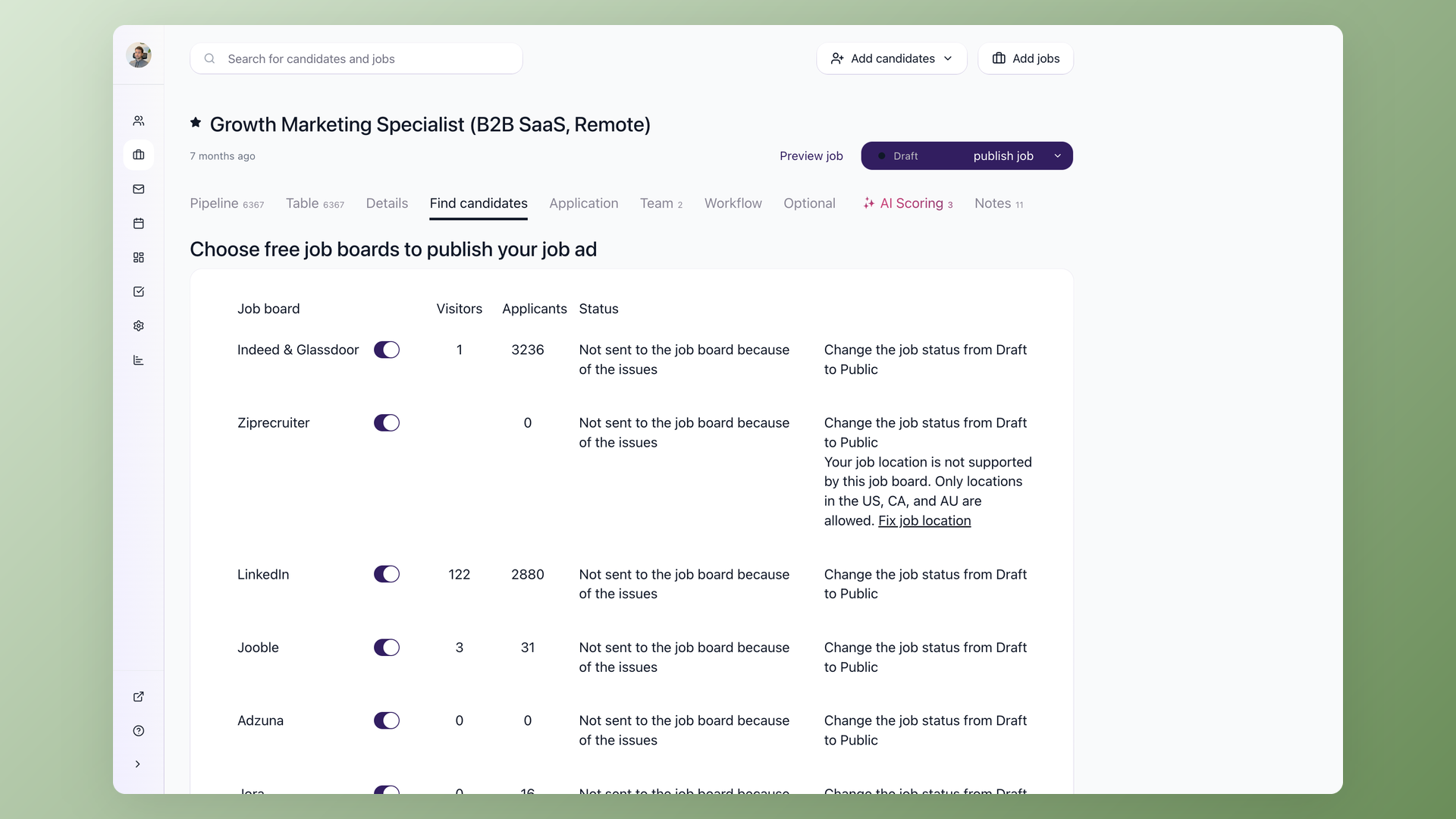
Open the job, go to Find Candidates, and turn on the shared Indeed and Glassdoor switch.
The same action can post the job to 13 job boards at once: Indeed, LinkedIn, ZipRecruiter, Glassdoor, Jooble, Adzuna, Jora, Trovit, Monster, CareerJet, Google Jobs, Talent.com, and Jobisjob.
Applicants complete Indeed Apply on Indeed, and each application arrives in 100Hires tagged with Indeed as the source. A Sources report breaks applicants and hires down by board.
Screening happens on arrival. Knockout questions reject applicants who miss a mandatory requirement as they apply, and AI Score rates the rest from 0 to 100 with a written reason.
To sponsor, sign in to Indeed with the same email address and find the job under All Jobs. Setting the job to any non-public status in 100Hires pulls it off Indeed without a separate login.
Frequently asked questions
Can I post a job on Indeed for free?
Yes, with limits. Posting directly on Indeed gets you three free jobs per calendar month, each live up to 30 days, subject to Indeed's terms and standards. Jobs distributed from an ATS, including 100Hires, do not usually count against that allowance and get no promised free slot.
How much does it cost to post a job on Indeed?
Free direct posts cost nothing. Sponsored jobs run on a pay-per-performance model, so there is no flat listing price. Every figure sits in our Indeed job posting cost breakdown. Sponsorship is paid to Indeed at its own rates, never billed by 100Hires.
Why won't Indeed let me post my job?
Indeed names an unverified email, an account under review, a sponsored job with no payment method, a paused job, a spent daily budget, and duplicate jobs. In 100Hires, the Find Candidates tab shows each board's publication status, so you can see where the issue is.
How long does Indeed take to approve a job post?
Indeed's guide says review takes 24 to 48 hours in most cases, with a confirmation email on publication. One tutorial showed a job approved in two to four hours, which is an anecdote. 100Hires sends the job to Indeed through Indeed's Job Sync API after you publish it, and Indeed's review decides when it appears.
Can staffing agencies post free jobs on Indeed?
Not in the US. Recruitment and staffing companies must sponsor their jobs to get any visibility, a change Workable's Indeed documentation dates to May 2, 2024, except in Japan. Agencies using 100Hires sponsor through their own Indeed accounts, and 100Hires does not bill them.
Can I post the same job to multiple locations on Indeed?
Employers report that one Indeed listing carries one location, and posting near-identical jobs by hand risks duplicate flags. 100Hires uses satellite jobs instead, so you can clone the role across every city where you hire and keep applicants in one pipeline.
Do I need an Indeed employer account to post through an ATS?
Not to get the job distributed. Our support team confirms 100Hires can send jobs to Indeed without you holding an Indeed account. You need an Indeed employer account to sponsor or manage the listing. If the jobs do not appear in that dashboard, ask 100Hires support to link them to the account.
Get your next role live
Three mechanisms, one outcome. Filling in the form takes minutes; staying visible is the part worth planning for. Posting directly? Get verified before you need to, so your first job is not sitting in a queue.
On a paid 100Hires plan, you can publish a job to Indeed and 12 other boards in one action, and applicants arrive in one pipeline instead of an inbox.
Start your free 100Hires trial to set up your pipeline and screening first.
Running other channels? Here is how to post a job on Facebook, and how to post a job on Google.
Try 100Hires for free
No credit card. 14-day trial. Forbes Advisor #1 ATS for SMBs.

