
Indeed Job Flagged? Causes and Fixes in 2026
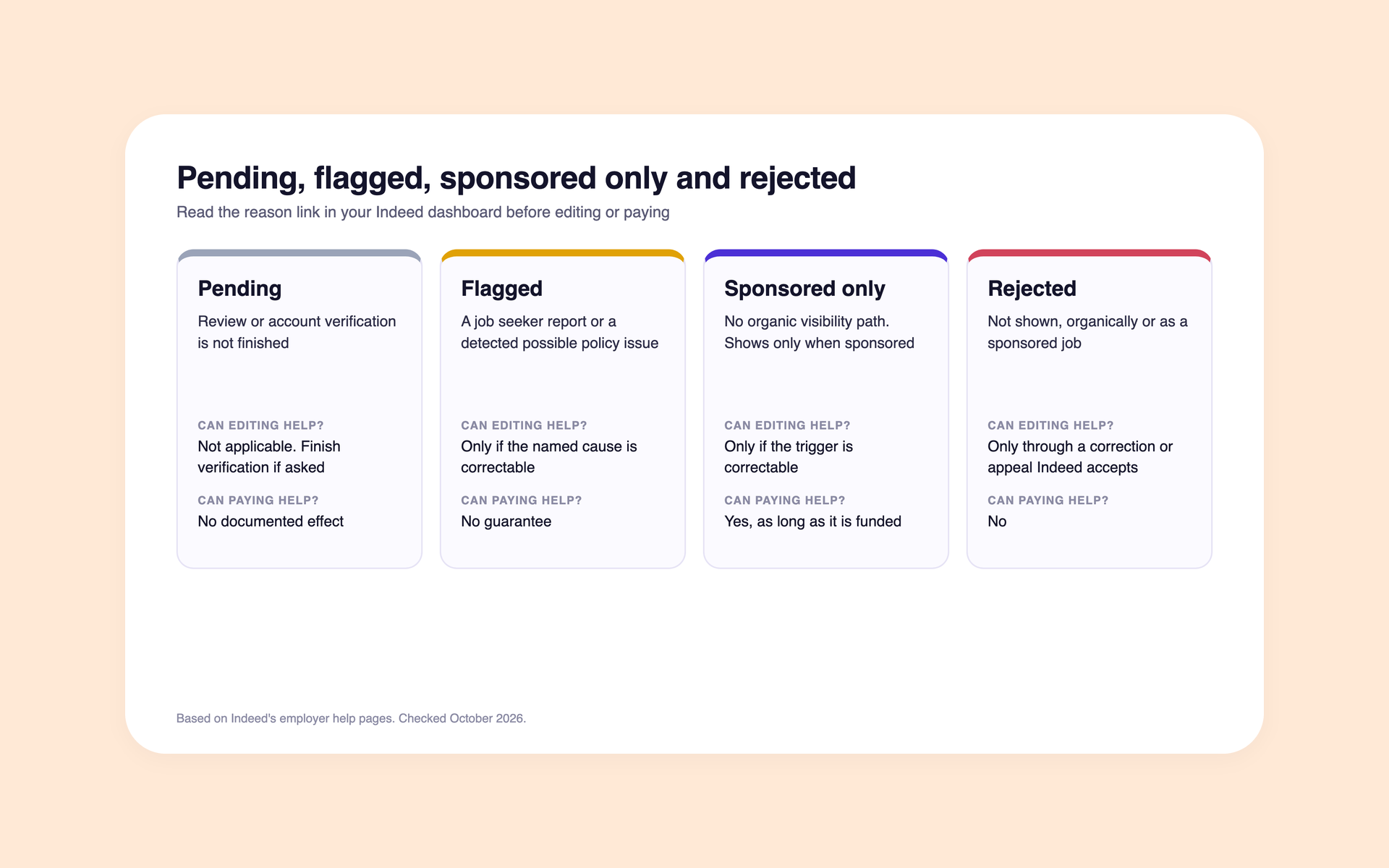
For employers: Indeed flags a job when a job seeker reports it or when its Trust and Safety team detects a possible policy violation.
A sponsorship requirement is a separate state. It depends on who posts the job, how it reaches Indeed, or what kind of job it is. Paying makes a sponsored-only job visible, but it does not guarantee that a policy flag clears.
One notice can mention both. Read the reason link in your Indeed dashboard before editing or paying.
This guide compares the pending, flagged, sponsored-only and rejected cases, then shows likely causes, next steps and escalation routes. Indeed's own guide to flagged jobs defines a flag. Its employer help and partner documentation describe the other conditions.
Last verified: October 2026 against Indeed's employer help pages.
Key takeaways
The hiring playbook, in your inbox
One email a week - benchmarks, AI screening tactics, and short interview templates from the 100Hires team. No product pitches.
- Read the reason link first. It sits under the job in your Indeed dashboard. Indeed may email you the reason and next steps.
- Edit in place, with no guarantee. If the reason names a correctable content or posting issue, edit the existing job instead of cloning it. An edit does not guarantee that Indeed will restore visibility.
- Sponsorship requirements often stem from who posted the job, the type of job, or how it reached Indeed. Misleading pay wording and unclear roles can trigger them too.
- Flagged jobs cannot be reopened, according to Indeed's guide to closing and pausing jobs.
- No step comes with a guarantee. Indeed reserves the right to remove a job or require sponsorship for any or no reason.
Pending, flagged, sponsored only, rejected: how to tell the four states apart
Indeed's own job statuses are Open, Paused and Closed. The four states below describe what Indeed's notices and documentation say about visibility. Most confusion comes from mixing them up, and each calls for a different next step.
| State | What it means | Can editing fix it? | Can paying fix it? | Where to verify |
|---|---|---|---|---|
| Pending | Review or account verification is not finished | Not applicable. Finish verification if Indeed asks | No documented effect | Indeed dashboard and email |
| Flagged | A job seeker reported the job, or Trust and Safety detected a possible policy violation | Only if the reason names a correctable title, description, location or application route | No guarantee | The reason link under the job and the email |
| Sponsored only | The job has no organic visibility path and shows only when sponsored | Only if the trigger is correctable, such as location, pay wording or duplicate sources | Yes, as long as it is funded | Indeed dashboard |
| Rejected | Indeed will not show the job, organically or as a sponsored job | Only if Indeed accepts a correction or an appeal | No | Dashboard and Indeed support |
Indeed's partner documentation uses four labels for a job's visibility: Organic, Sponsored only with spend, Sponsored only without spend, and Nowhere.
Nowhere covers one case: Indeed rejected the job and offers no sponsorship path. These labels come from Indeed's partner documentation. We did not find them documented for the employer dashboard.
Employers report notices that combine a flag with a requirement to sponsor the job, too. Indeed's pricing FAQ says some jobs are treated as sponsored only and that the product makes this clear when it happens.
A flagged job cannot be reopened. Editing helps only when the reason names something you can correct. No source shows how often an edit clears a flag.
Find your symptom: likely cause, what to check, what to do
Match what you see to a row. The causes come from Indeed's help pages unless a row says otherwise.
| Symptom | Likely cause | What to check | What to do | Where to escalate |
|---|---|---|---|---|
| Pending longer than expected | Review not finished, or the account needs verification | Verification prompts and the confirmation email | Finish verification with an accepted method | Indeed support |
| Flagged, with a reason link | A job seeker report or a detected policy issue | The reason link, the email, the title, description, location and apply route | Fix the named cause in the existing job. This does not guarantee restored visibility | Support case if you think it is a mistake |
| Flagged after reopening or reposting | Indeed's duplicate rules | Whether it copies a recent or open job | Do not repost the copy. Post only a role that is truly different | Support if it is not a duplicate |
| Several location versions flagged | Duplicate or location rules | Same title and description across nearby locations | Keep one accurate location per real opening. If the same role is open in more than one location, post it once per location. Use distinct titles only when the roles truly differ | Indeed support |
| A flag plus a requirement to sponsor | A sponsorship trigger, which is not always a violation | Account type, other routes to Indeed, pay wording, location, company name | Fix the trigger if you can, or decide whether to sponsor | Support case if you are misclassified |
| Rejected or removed | Business model not allowed, scam signals, or fees charged to job seekers | The dashboard notice and email | An edit will not fix a business-model removal. Correct factual errors if it was a mistake | Support case, or an account appeal |
| Account under review, documents requested | Verification or quality review | The verification prompt in your employer account and the document type asked for | Send an accepted document | Indeed support |
| Account disabled | An account-level decision | The email from Indeed | Appeal. Do not open a new account to get around it | Indeed's appeal page |
| Active in the dashboard, not found in search | Personalized results, similar jobs shown once, a generic company name, or a start date far away | The job URL, the company page, impressions and applies | First, check the job URL, the company page, and the job's impression and application counts. Merge true duplicates or fix a generic company name only if either applies | Support with job IDs and screenshots if impressions are zero |
| Posted through an ATS, missing from the Indeed dashboard | With 100Hires, the jobs are not linked to your Indeed employer account yet | Whether the job appears on your Indeed company page | With 100Hires, ask support to link the jobs to your employer account | ATS support, then Indeed |
| Feed jobs sponsored only | Indeed's single-source feed policy, scheduled by Indeed from March 31, 2026 | Whether jobs reach Indeed by feed when your ATS is integrated | Move the jobs to the ATS integration | Indeed account manager |
Before working through the table, rule out the basics: a verified email, a paused job, a spent budget or a missing card. Our guide on how to post a job on Indeed covers those first checks.
Why Indeed asks you to sponsor a job
Indeed lists several reasons a job needs sponsorship to show up. Several have nothing to do with how well the ad is written.
- Staffing and recruiting firms. Indeed may require them to sponsor jobs. Indeed says the rule applies in most markets and names Japan and Puerto Rico as exceptions. Check the notice in your dashboard instead of relying on a single effective date.
- Direct posts next to organic jobs. Indeed's Terms require sponsorship for jobs you post directly when your other jobs already get organic visibility through a feed, an API, a career site or an ATS.
- Feed jobs. Under Indeed's single-source feed policy, feed jobs that could come through an integrated ATS are sponsored only from March 31, 2026, according to Indeed's published schedule.
- Commission and pay. Commission-only jobs that are remote, or jobs with misleading pay, may need sponsorship. Guaranteed or inflated pay ranges require it.
- Grouped or vague postings. Posts that bundle many jobs, use a general application, or describe unclear roles may need sponsorship.
- Generic company names. Confidential or generic names may be hidden or shown less often.
- Legitimacy checks and discretion. Indeed may ask for sponsorship to confirm a job or employer is real, and it can require sponsorship for any or no reason.
Start with the triggers you can correct: the location, the pay wording, or roles that only look identical.
If the same job reaches Indeed through more than one source, consolidate it under your integrated ATS. That fixes a source conflict; it does not guarantee free visibility.
If Indeed classifies your account as an agency but you are a direct employer, open a support case and complete any verification Indeed asks for. Otherwise, the remaining choice is whether to sponsor the job on Indeed.
Three patterns recur across our sales calls and public employer reports: direct employers treated as agencies, insurance agencies hiring commission-only agents, and small employers told that a new listing needs sponsorship.
Renaming the company or hiding agency status is not a fix.
How to respond to a flagged job, step by step
Step 1: open the reason link and the email
Indeed may notify you with a message as you post, a notice on your Jobs page, and an email. Click the link under the job in your employer dashboard to see why and the possible next steps.
Step 2: find your row in the symptom table
Decide which state you are in before you change anything. A sponsorship trigger and a policy flag need different responses.
Step 3: edit the existing job, do not clone it
If the reason names a correctable content or posting issue, edit the existing job instead of cloning it. An edit does not guarantee that Indeed will restore visibility. A copy of an open job may be blocked, and a flagged job cannot be reopened.
Step 4: open a support case if you think it is a mistake
Send job IDs, screenshots and a note on what you changed. We found no reliable resolution time for flag reviews or appeals, so plan around the delay.
Step 5: handle account-level holds separately
If Indeed asks you to verify the account, follow its account verification guide and use a document type Indeed accepts. If the account is under review, contact Indeed support. The guide links the appeal page for a disabled account.
Keep three timelines apart. Indeed says that reviewing a new direct post may take 24 to 48 hours.
Linking ATS jobs to your Indeed dashboard is a separate step that 100Hires support usually coordinates in one to two business days. For flag reviews and appeals, we found no reliable timeframe.
Consider a hypothetical case: an employer posts the same warehouse role in four nearby towns, and some versions get flagged.
Use one accurate location per real opening. If the same role is open in more than one location, post it once per location, then wait for Indeed's review. This follows the location rule, but it may or may not restore visibility.
Common mistakes that make flags worse
- Reposting or cloning a flagged job. Indeed treats copies as duplicates, and repeated duplicate issues can cost free or organic visibility. Edit the original instead.
- Opening a new account after a ban. Indeed's Terms say you may not create multiple accounts. Use the appeal route.
- Renaming the company to look like a direct employer. Indeed's policy asks for a real, verifiable company name and says not to hide your identity. Verify the account you have.
- Judging visibility by searching for your own job. Indeed personalizes results. Check your Company Page and the job's impression and application counts instead.
- Rewriting the ad for days when the job is sponsored only. If the requirement is based on who submitted the job or how it reached Indeed, changing the wording will not affect it. Decide on sponsorship instead.
We reviewed 549 sales-call transcripts from June 2025 to October 2026 and 1,691 internal chat messages from January 2025 to October 2026. We found 13 sources about verification holds and 17 about suspensions, bans or account cut-offs.
Some came straight from customers and some were relayed by our team. These are source counts, not unique accounts or market estimates.
Checking job status from your ATS
Indeed's partner APIs expose fields for a job's lifecycle, rejection and sponsorship requirement. What each ATS shows on screen varies. Our guide to Indeed's partner APIs covers who can read those fields.
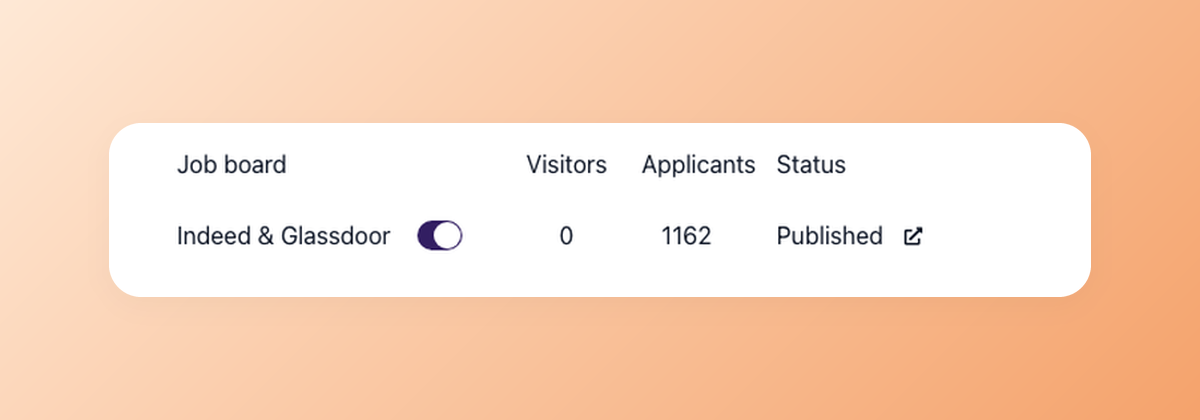
The Status column shows whether 100Hires delivered the job to each board. For flags, rejections and sponsorship requirements, the Indeed dashboard gives the definitive status.
In 100Hires, a job shows "Sent to the job board" once delivered and "Published" when there is a sign it is live. An Indeed link appears after the first Indeed applicant.
With 100Hires, you configure and pay for sponsorship in the Indeed employer dashboard, never inside the ATS.
100Hires support can link your 100Hires jobs to your Indeed employer account so they show up in your dashboard. 100Hires cannot unflag a job, decide an appeal or sponsor a job. Support can open a ticket with Indeed and send your evidence, and Indeed makes the decision.
100Hires assigns agency jobs an agency source type based on a company setting rather than detecting agency status automatically. Jobs generated in 100Hires for additional locations do not get around Indeed's duplicate or location rules.
Frequently asked questions
What does it mean when a job is flagged on Indeed?
It means a job seeker reported the job or Indeed's Trust and Safety team detected a possible policy violation. The job may be reviewed, hidden or removed. When you post through 100Hires, 100Hires delivers the job and Indeed's review happens after that.
Why does Indeed say my job must be sponsored?
Often it is about who posts the job, how it reaches Indeed or the job type: an agency account, a direct post next to feed or ATS jobs, a feed job, remote commission-only work, a grouped posting or a generic company name. Agencies using 100Hires sponsor in Indeed.
How do I unflag a job on Indeed?
Open the reason link, fix that cause in the existing job if it is correctable, and contact Indeed support if you think it was a mistake. There is no guaranteed timeline. 100Hires support can open a ticket with Indeed for jobs posted through 100Hires.
Can I repost a flagged job?
Indeed may block a copy of an existing job, and a flagged job cannot be reopened. Post a new job only when the role is truly different. In 100Hires, edit the existing job rather than cloning it.
How do I get my Indeed employer account back?
Use Indeed's appeal process with an accepted verification method. Indeed's Terms bar multiple accounts, and 100Hires cannot reverse an Indeed account decision. Include the notice and your documents in the appeal, and keep 100Hires job IDs for a support case.
Can my ATS tell me whether Indeed flagged a job?
It depends on the ATS. Indeed's partner APIs expose rejection and sponsorship fields, but screens vary. In 100Hires, the board status shows delivery, so check the Indeed dashboard for flags after your jobs are linked.
Next step
Read the reason link, decide whether you can fix the issue or need to make a sponsorship decision, and make sure each job reaches Indeed through only one route. To see how 100Hires posts to Indeed and tracks applicants by source, book a demo.
Try 100Hires for free
No credit card. 14-day trial. Forbes Advisor #1 ATS for SMBs.

