
How to post a job on Google: step-by-step employer guide for 2026
You searched for how to post a job on Google, opened the page, and there was no upload button. You are not missing a setting. That button does not exist.
Google for Jobs is a search feature, not a job board. There is no account to log into and no form to submit. Google reads job listings from pages that carry a specific kind of code, then shows them in the jobs box on Search.
So the real task is getting your job onto a page Google can read. Two routes do that: post through an applicant tracking system or job board that already feeds Google, or add the code to your own careers site by hand.
This guide walks both, shows a working code example, and covers what to do when a job refuses to appear. It is written for employers and recruiters, not job seekers.
Key takeaways
The hiring playbook, in your inbox
One email a week - benchmarks, AI screening tactics, and short interview templates from the 100Hires team. No product pitches.
- No direct posting portal exists. Google pulls jobs from pages with JobPosting structured data. You never post "to Google" directly.
- The listing itself is free. If someone charges you specifically to appear in Google's jobs box, they are reselling a free doorway.
- Two routes in. An ATS or job board that already integrates, or JobPosting markup on your own site.
- Eligibility is not placement. Correct markup makes you eligible; Google still decides what to show and when.
- Most failures are fixable. Expired jobs, content that does not match the markup, and missing apply options cause the majority of no-shows.
Can you post a job directly on Google
No. There is no employer account, no login, and no way to manage a listing inside Google for Jobs. Google's own employer page frames it as two paths in: you either mark up jobs on your site, or use a third party that already participates.
Google frames it as two paths. In its words, "ATS providers, job boards, and employers can use job posting structured data to directly integrate with Google," and separately, you can "check to see if your job provider is already participating." Both lead to the same jobs box.
Neither involves posting a listing to Google itself.
Why bother when it is this indirect? Reach. The jobs box sits at the top of Search for millions of role queries, and it costs nothing to appear. Google cites ZipRecruiter seeing organic conversion from Google grow 4.5x after integrating with the job search experience.
One more thing to set straight now: the listing is free, but the tools around it are not always free. That distinction matters, and it gets its own section below.
How a job actually gets into Google's job results
Google reads a block of code called JobPosting structured data. It lives on the web page that describes a single job, and it tells Google the title, the company, the location, the salary, and the rest in a format machines can parse.
Most guides say "structured data" and stop there. The precise name is JobPosting, and it follows the schema.org standard that Google documents in detail. Get the required fields right and your page becomes eligible for the jobs box.
Eligible is the key word. Google is clear that the required properties make your content "eligible for display," not guaranteed to show. Placement depends on the searcher's query, your page quality, and Google's own call.
Think of the markup as the entry ticket, not the seat assignment.
You may have heard that schema is not a ranking factor. That debate misses the point here. JobPosting markup is not a generic ranking boost. It is the eligibility requirement for one specific search feature.
Skip it and you cannot appear in the jobs box at all, however strong your SEO is elsewhere.
The markup also has to be discovered. Google finds it by crawling your page, which you can speed up with a sitemap or the Indexing API. More on that timing question later.
Route 1: post through an ATS or job board that already integrates
This is the simplest route for most employers, though it is not the only one. If your ATS or job board already participates in Google for Jobs, the platform writes the JobPosting code for you. You publish a job the way you always do, and eligibility happens in the background.
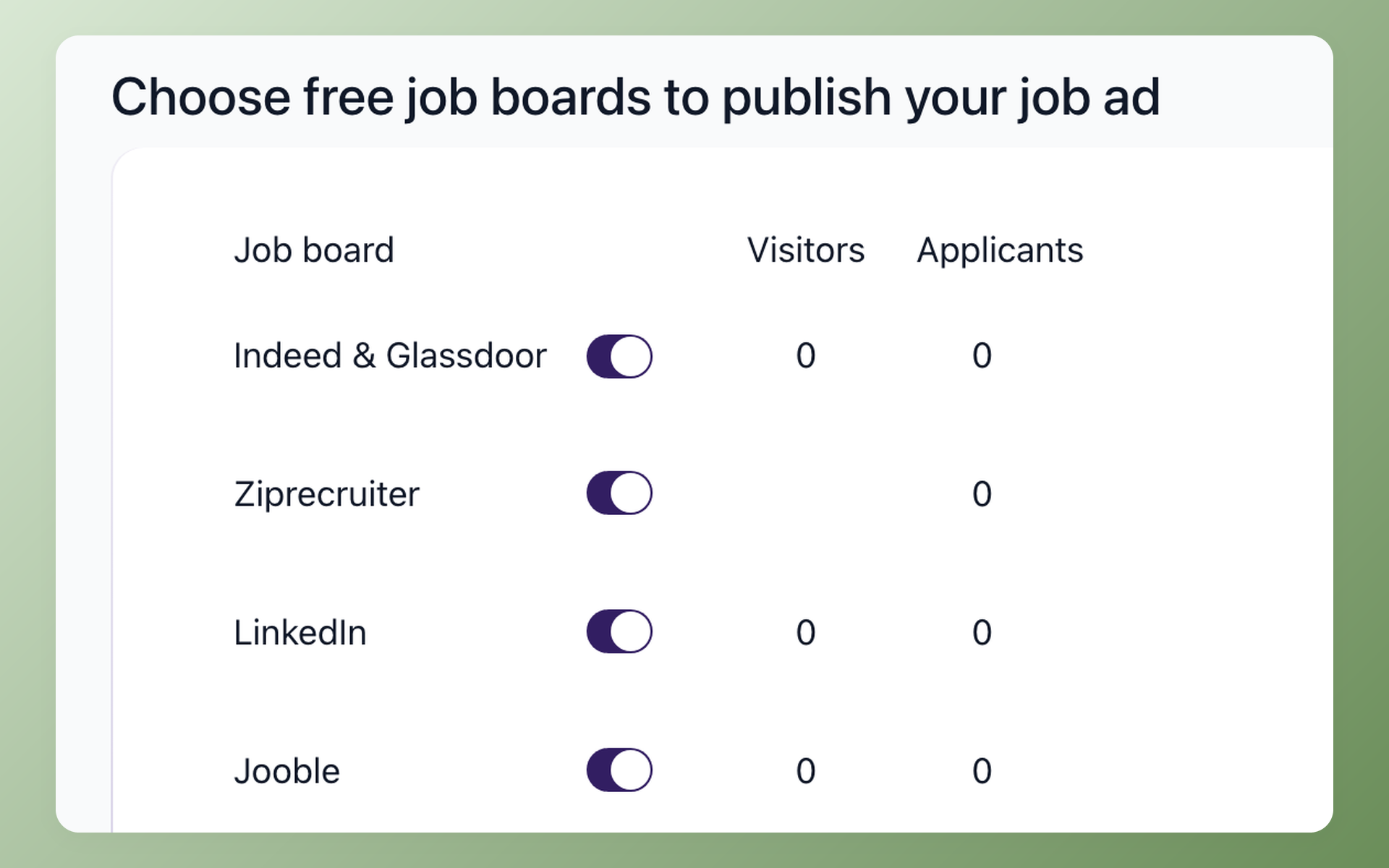
Here is what that looks like in 100Hires. When you publish a role, Google Jobs sits in the same job-board list as Indeed, LinkedIn, and ZipRecruiter. Select it, and the job's hosted careers page carries valid JobPosting markup automatically.
No Google account, no code, no schema generator, no separate submission.
That is the part no competitor walkthrough actually shows: what "the ATS emits the schema" means in practice. You can see how 100Hires handles Google Jobs eligibility automatically and keeps every applicant in one place after Google sends them your way.
Manual markup vs an ATS that emits it
The trade is effort against control. Doing it by hand gives you full control of every field; an ATS trades some of that for speed and fewer mistakes.
| Task | By hand | Through 100Hires |
|---|---|---|
| Write the JobPosting code | You write and maintain the JSON-LD | Generated from the job you already filled in |
| Validate the markup | Test each page yourself | Emitted from a pre-validated template |
| Signal changes to Google | Update your sitemap or ping the Indexing API | Handled when you edit or close the job |
| Track status | Watch Search Console on your own | Job status lives in the ATS |
The job-board sub-route works too. Posting to a board that participates gets you into Google through the board's pages. There is a catch worth knowing about.
Recruitment SEO specialists warn that some syndication partners alter your job title, company name, or location just enough to slip past Google's de-duplication.
Their copy of your listing can outrank your own, and the apply button routes candidates to a paid board, so you pay for applicants you could have had for free.
The fix is to treat your own careers site as the canonical source and let it be Google's first point of discovery.
Be honest about scale here. For most roles, Google for Jobs is a free incremental channel, not your primary pipeline. It is worth the setup, but the bulk of hires still come from the big boards.
A few niche ATS vendors advertise Google indexing as a headline feature, which tells you it is a real buying consideration, not a gimmick.
A quick sense of the effort gap. Say you have 10 open hourly roles. Hand-marking each job page, validating it, and resubmitting on every edit is real work; plan on roughly 30 to 60 minutes per page once you include testing.
Through an ATS that emits the markup, that per-job overhead is close to zero. The trial even lets you test this before paying, which the next section covers.
Route 2: add JobPosting structured data to your own careers site
If you run your own careers pages and want direct control, you add the markup yourself. Here is the full sequence.
- Give each job its own crawlable page. One job per URL, publicly reachable, not blocked by robots.txt and not behind a login. Markup on a listing or index page does not qualify.
- Add the JobPosting JSON-LD. Drop a script block into the page head. A simplified version of Google's own example is below.
- Fill the required fields, then the useful extras. Five properties are required; a handful more improve how the listing displays.
- Handle remote roles correctly. Fully remote jobs use jobLocationType set to TELECOMMUTE plus applicantLocationRequirements, instead of a physical address. Mixing a street address into a 100 percent remote job is a common validation error.
- Validate before you publish. Run the page through Google's Rich Results Test. Fix every error it flags.
- Get it discovered. Submit or update your sitemap in Search Console. For faster crawling of job pages specifically, the Indexing API is an option, covered next.
- Keep it clean. When a job closes, remove the page (return 404 or 410), set validThrough to a past date, or strip the markup. Schema consultants say stale jobs left live are one of the most frequent penalty triggers they see.
Here is a simplified JobPosting block adapted from Google's documentation. Keep the structure, swap in your details.
<script type="application/ld+json">
{
  "@context": "https://schema.org/",
  "@type": "JobPosting",
  "title": "Warehouse Associate",
  "description": "<p>Full job description, in HTML, covering duties, hours, and requirements.</p>",
  "datePosted": "2026-07-18",
  "validThrough": "2026-09-18",
  "employmentType": "FULL_TIME",
  "hiringOrganization": {
    "@type": "Organization",
    "name": "Your Company",
    "sameAs": "https://www.yourcompany.com"
  },
  "jobLocation": {
    "@type": "Place",
    "address": {
      "@type": "PostalAddress",
      "streetAddress": "123 Main St",
      "addressLocality": "Austin",
      "addressRegion": "TX",
      "postalCode": "78701",
      "addressCountry": "US"
    }
  },
  "baseSalary": {
    "@type": "MonetaryAmount",
    "currency": "USD",
    "value": {
      "@type": "QuantitativeValue",
      "value": 22.00,
      "unitText": "HOUR"
    }
  }
}
</script>
The five required properties are title, datePosted, description, hiringOrganization, and jobLocation. Recommended additions like validThrough, baseSalary, employmentType, and directApply are worth including because they make the listing richer and more likely to display well.
Published salary in particular tends to help.
Two field-level details save the most rework. The description must be HTML and Google reads only paragraph and list tags inside it, so skip headings and bold. And the title should be the job title alone, not the posting headline.
In Google's own example, "Market Specialist, French speaker" works, while "Apply now for IT job -FRENCH speaker in Bucharest" does not.
Fair warning on the DIY route: hand-written JSON is where the errors happen. Recorded walkthroughs of "post to Google in 15 minutes" routinely run far longer once syntax slip-ups and required-versus-recommended confusion set in.
If that list of steps looks like a lot, that is exactly the work the ATS route absorbs.
How do you post a job on Google for free
Appearing in Google's jobs box costs nothing. There is no paid placement inside the feature itself. Google does sell job ads through Google Ads, but that is a separate product from the free organic jobs box this article is about.
So anyone charging you specifically to "post your job on Google" is charging for access to a free doorway. What legitimately costs money is the machinery around it: job-board fees, an ATS subscription, or a developer's time to write and maintain the markup.
That is a value question, not a Google fee.
If you want to see Google-sourced applicants before spending anything, the 100Hires 14-day trial posts to job boards, Google Jobs included, capped at 10 candidates from external job boards combined across all jobs in your account.
That is enough to watch the channel work on a live role. Create a free 100Hires account and publish a job to see it.
Indexing API vs sitemap: how fast will your job show up
Once your markup is live, Google still has to crawl the page. Two paths speed that up, and they suit different situations.
Sitemap. The default. List your job URLs in a sitemap, submit it in Search Console, and Google crawls them on its normal schedule. Fine for most employers, and you should keep a sitemap regardless for full-site coverage.
Indexing API. Google's fast lane, and it is unusually generous here.
The Indexing API can only be used for pages with JobPosting or live-video markup, and Google recommends it over sitemaps for job URLs because it "prompts Googlebot to crawl your page sooner." Job postings are the rare content type Google gives a privileged crawl API.
Use it only as documented. Google's John Mueller has warned repeatedly on r/TechSEO that spammers try to push unsupported content through the API, so stick to job pages. Google's documented default quota is 200 requests per day, and you can batch up to 100 calls in one request.
Practitioners add a caveat worth passing along: getting Indexing API access is no longer instant. One job-board SEO consultant reports the approval process now takes several weeks and can be refused, with sitemaps and internal linking as the fallback.
Treat that as a field report, not official policy, and budget for a wait.
What about actual timelines? Google publishes no guaranteed window, so treat vendor "live in 24 to 48 hours" claims as best case.
| Route | Typical time to appear | Confidence |
|---|---|---|
| Participating board or ATS | Often a day or two | Vendor-claimed |
| Own site plus sitemap | Days to weeks | Practitioner reports vary widely |
| Own site plus Indexing API | Fastest crawl once approved | Approval wait applies |
Why isn't my job showing up on Google
Valid markup that passes every test and still does not appear is a frustration recruiters run into often. Work through these checks in order before you assume Google is broken.
- Is the page live and crawlable? Confirm it is public, not on a staging domain, not blocked by robots.txt, and not behind a login wall.
- Does the markup validate? Run the Rich Results Test again. Zero errors is the bar, not "mostly passing."
- Is the job expired? A validThrough date in the past, or a stale posting left live, removes it from results. Stale jobs are also a frequent trigger for a manual penalty.
- Does the visible page match the markup? If your JSON-LD says one salary, title, or location and the page shows another, that is Google's content-does-not-match-structured-data violation.
- Check Search Console. The enhancement report shows indexing status, and the Manual Actions section flags Spammy Structured Markup if you have been penalized.
- Is a duplicate outranking you? Search your own job title in the jobs box and see whose listing shows and where Apply points. If a board's copy won, route back to the canonical-career-site fix above.
- Only then, wait. If everything checks out, it may be crawl timing. See the timelines table above for what waiting realistically means.
One tempting shortcut to avoid. Some guides tell you to bump the datePosted date every month and resubmit so the job looks fresh.
If the visible posting has not actually changed, that is precisely the content-does-not-match-structured-data violation, and it risks a manual penalty rather than a ranking boost.
Google lists a handful of other policy faults worth a scan: markup on listing pages instead of single jobs, a missing apply option, an incorrect logo (the image width-to-height ratio must sit between 0.75 and 2.5), and location errors.
Its documentation names each one with the exact Search Console message and fix.
Frequently asked questions
What is Google for Jobs and how is it different from a job board?
Google for Jobs is a search feature, not a board you post to. It gathers job listings that carry JobPosting structured data and shows them in an enriched box at the top of Google Search. There is no separate account or upload step. That is exactly why an ATS like 100Hires matters here: its hosted careers pages are built to carry the markup Google reads, so your role becomes eligible for that box without you touching code, and correct markup earns eligibility, not automatic placement.
How much does it cost to post a job on Google?
The listing in Google's jobs box is free; there is no paid placement inside the feature itself. Costs come from the wrapper around it, like a job board or ATS subscription, or developer time to write the markup. Google Ads for jobs is a separate paid product. With 100Hires, the 14-day trial posts to job boards including Google Jobs, capped at 10 candidates from external job boards combined across all jobs in your account, so you can test Google-sourced applicants before paying.
How long does it take for a job to appear on Google?
Google publishes no guaranteed window. Through a participating board or ATS it is often a day or two; on your own site via sitemap it can be days to weeks; the Indexing API prompts faster crawling once you have access. 100Hires publishes the job's hosted careers page immediately, so Google can pick it up on its next crawl rather than waiting on a manual submission you have to remember.
Do I need the Indexing API to get my jobs on Google?
No. A sitemap is enough for most employers, and Google crawls job pages from it on its normal schedule. The Indexing API is a faster lane reserved for job and live-video pages, but it now involves an approval process that can take weeks. 100Hires customers skip this decision entirely, because the platform handles discovery of the careers pages it hosts.
Does posting on Indeed or LinkedIn put my job on Google?
Sometimes, but do not rely on it. Job boards move in and out of Google's job results as partnerships change, and posting to a board is not the same as your own careers page being eligible. Check whether a given board currently feeds Google before counting on it. With 100Hires you get both at once: your job goes out to major boards and your hosted careers page is built to be eligible in its own right, so you are not dependent on any single board's arrangement with Google.
Get your next job in front of Google
Two routes, one outcome. Mark up your own careers pages with JobPosting data and manage the testing and crawling yourself, or let an ATS emit the markup and handle discovery for you. Both make you eligible for the free jobs box that sits above the fold on Search.
If you are going the DIY way, start today: paste the code example above into one job page and run it through the Rich Results Test.
If you would rather have it handled, publishing a job and picking Google Jobs from the board list takes a few minutes. Start your free 100Hires trial and put your next role in front of Google.
Try 100Hires for free
No credit card. 14-day trial. Forbes Advisor #1 ATS for SMBs.

