Recruitment software features: a buyer's checklist by hiring stage
The feature list a vendor demos is rarely the feature list you use on a Tuesday.
This is a checklist of the recruitment software features that actually matter, organized by hiring stage and split into must-have versus nice-to-have. Every feature comes with a quick way to test it in a demo.
It is written for in-house teams hiring five to fifty roles a quarter, not staffing agencies with a dedicated recruiting-operations hire.
The one promise most vendor guides skip: we flag where a feature is overhyped or quietly locked behind a higher plan, not just list it. If you want the product side first, the recruitment software hub covers what an all-in-one system looks like.
Key takeaways
The hiring playbook, in your inbox
One email a week - benchmarks, AI screening tactics, and short interview templates from the 100Hires team. No product pitches.
- A real feature checklist covers six stages: sourcing, screening, scheduling, collaboration, automation, and reporting.
- Buy for the stage where your process is weakest, not for the longest feature list. Length rarely wins.
- Watch the growth tax: automation, advanced reporting, API access, and single sign-on cluster at the top tiers across most vendors.
- Your first fork is not "which features" but "dedicated ATS or the recruiting module bundled in my HRIS," decided by headcount and hire volume.
- Make each vendor configure one of your real workflows in the demo instead of running a generic tour.
The decision to make before any feature list: dedicated ATS or bundled HRIS module
Before you compare features, answer a bigger question. Do you need a standalone applicant tracking system at all, or does the recruiting module inside your HRIS or payroll suite already cover it?
Small in-house teams answer this in a telling way. In the recruiting threads aimed at SMB owners, tools like BambooHR, Rippling, and UKG dominate the conversation, while dedicated ATS brands barely come up.
Commenters treat the bundled module as good enough under roughly 50 employees and start eyeing dedicated platforms or a PEO around 100 to 120. Those are community rules of thumb from specific threads, not a study, so hold them loosely.
The trap has a second form. On recruiting-operations podcasts, leaders describe the stack as inherited rather than chosen: pick SAP and you get SuccessFactors by default.
The SMB version of this trap is smaller in scale but works the same way: whatever vendor runs your payroll quietly decides your recruiting tool.
The tradeoff is honest either way. A bundled module gives you one login and one bill with thinner recruiting depth. A dedicated system gives you a purpose-built pipeline, sourcing, and reporting, plus one more tool to run.
If hiring is occasional and low volume, the bundled module is often fine. Once hiring becomes a repeatable, multi-stage motion with real applicant volume, the stage features below start to earn their keep.
Our applicant tracking system guide covers vendor selection criteria in more depth.
How to read this checklist
Two tiers run through every stage. A must-have is a feature whose absence forces manual work or loses candidates at that stage. A nice-to-have delivers real value but only under certain conditions: high volume, a bigger team, or specific role types.
Nice-to-haves are also where the price usually jumps.
Keep one framing in mind. An applicant tracking system is plumbing, not a decision-maker. The coordination of the workflow is the core value you cannot skip. The "smart" scoring on top is the part buyers tend to over-trust or overpay for, so it has to clear a higher bar.
The table below is built to copy into your own vendor comparison. The last column is the point: a concrete action to run in the demo so you test the feature instead of trusting the slide.
100Hires shows up in examples because we build an ATS, so read those as disclosed, not neutral.
| Feature | Stage | Tier | How to verify it in the demo |
|---|---|---|---|
| One-click multi-board posting | Sourcing | Must-have | Post one job and confirm it reaches every board you care about without re-entering it |
| Resume parsing into structured fields | Sourcing | Must-have | Upload a messy resume and check which fields populate correctly |
| Custom screening or knockout questions | Screening | Must-have | Build one disqualifying question and watch a failing applicant get routed out |
| Boolean or filtered candidate search | Screening | Must-have | Run a real search string against a sample database and judge the results |
| Transparent AI scoring | Screening | Depends | Ask the vendor to show the exact criteria behind one candidate's score |
| Candidate self-scheduling | Scheduling | Must-have | Send yourself a scheduling link and book plus reschedule end to end |
| Two-way calendar sync | Scheduling | Must-have | Connect a test calendar and confirm availability updates both directions |
| Structured scorecards | Collaboration | Must-have | Create a scorecard, submit as two users, and check whether scores can be hidden until submission |
| Role-based permissions | Collaboration | Must-have | Add an interviewer and confirm they see only their assigned job |
| Stage-triggered candidate emails | Automation | Must-have | Move a test candidate a stage and watch the status email fire |
| Source and funnel reporting | Reporting | Must-have | Open the source report and ask how fresh the numbers are |
| Custom BI-style dashboards | Reporting | Nice-to-have | Ask the refresh latency and whether custom reports cost extra |
Which sourcing and job-distribution features actually matter
Sourcing is where the busywork lives, so this is where automation pays back fastest.
Sourcing must-haves
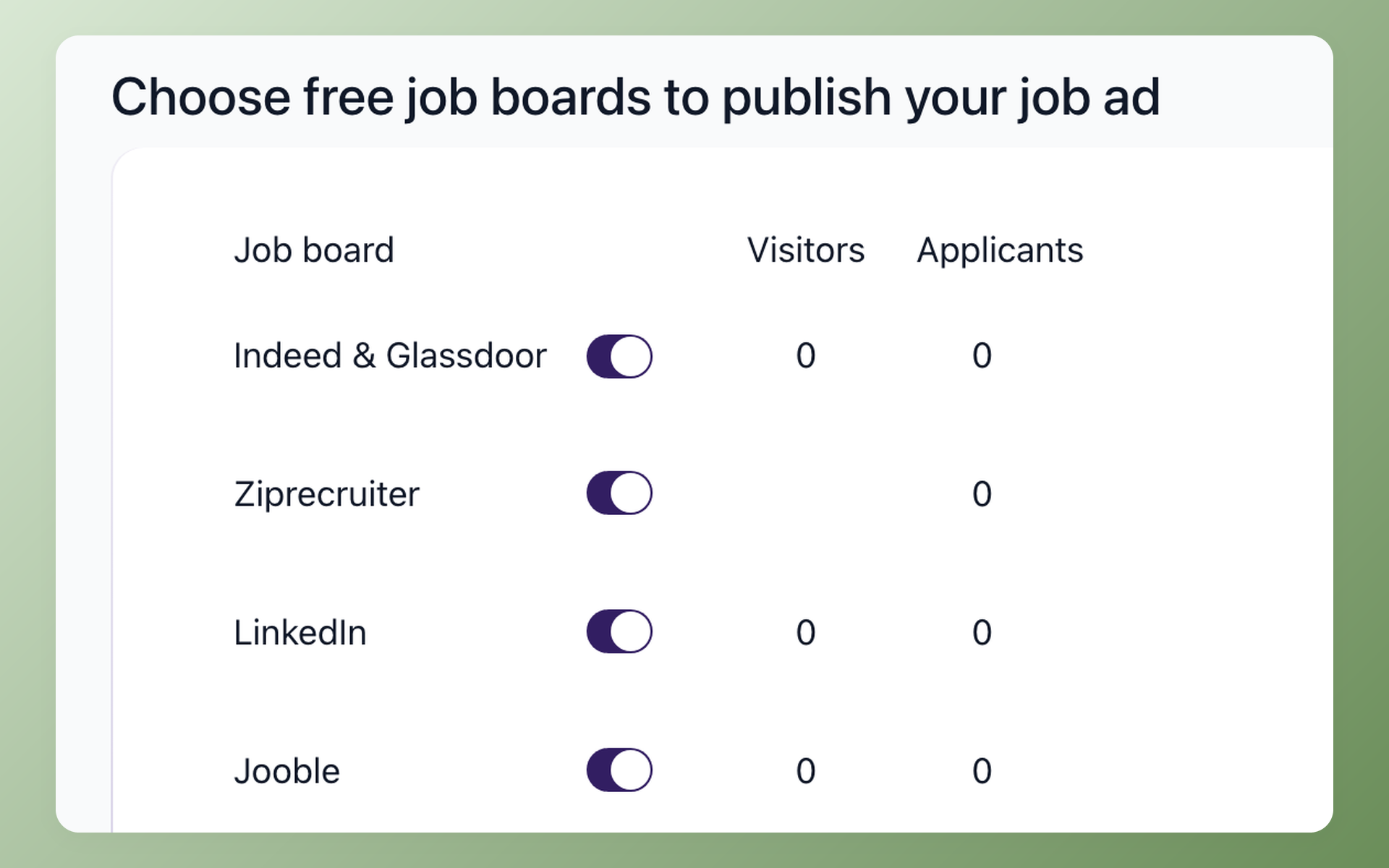
- One-click multi-board posting. Posting the same job into five separate dashboards is the first chore an ATS should kill. Confirm the boards you rely on are included, not sold as extras.
- A branded, mobile-friendly careers page. Most applicants arrive on a phone, so a clean apply flow protects your conversion rate before screening even starts.
- Resume parsing and normalized intake. Recruiters who screen by hand describe the same daily grind: renaming files, redacting personal details, opening the occasional background check someone uploaded by mistake. A decent parser turns that chaos into structured fields.
Sourcing nice-to-haves and the separate-tool reality
Chrome-extension capture from LinkedIn, contact enrichment, multi-location posting, and talent-pool nurture all add genuine value once your volume justifies them. None is a reason to switch systems on its own.
One honest caveat. Dedicated sourcing tools like LinkedIn Recruiter and Gem are a separate purchase, and experienced recruiters treat them that way. Do not expect an ATS to replace them. It captures and organizes what you find; heavy outbound sourcing still lives in its own tool.
In 100Hires, sourcing runs through job-board toggles for Indeed, LinkedIn, Glassdoor, ZipRecruiter, Jooble, Adzuna, Jora, Trovit, and CareerJet, plus trackable links that report visitors and conversion per source.
Bulk resume upload parses candidates into your configured fields, and a seven-provider enrichment waterfall on the Pro plan fills in missing email and phone data. You can post to job boards in one action rather than logging into each one.
Screening features that save the most time, and the AI ones that do not
Screening is where the strongest opinions show up, and they cut against the marketing.
Screening must-haves: real questions and real search
Custom screening and knockout questions do most of the actual filtering.
One recruiter who screens high volume estimates that roughly nine in ten candidates fail to answer two or three well-designed questions substantively, which is what makes the questions, not the software, the real triage.
On a sales call, one prospect flipped auto-disqualification from "a preference" to "a necessity" the week a single posting drew about 200 weekend applications.
Boolean and filtered search over your candidate database is the other must-have. Recruiters call missing search a dealbreaker, not a minor gripe, because filters and search strings are still how they find the right person fast.
Set the work-authorization question up carefully. Ask whether someone is legally authorized to work in your country, never about visa status, and lean on the EEOC guidance on pre-employment inquiries for the wording.
Where AI screening earns its place, and where it does not
Here the practitioner view is blunt. Recruiters describe AI candidate matching as something they turn on and then use precisely never, while crediting plain automation like scheduling links and follow-up reminders with real time savings.
AI that just processes more applications faster tends to produce more low-intent applicants and faster auto-rejections, not better hires.
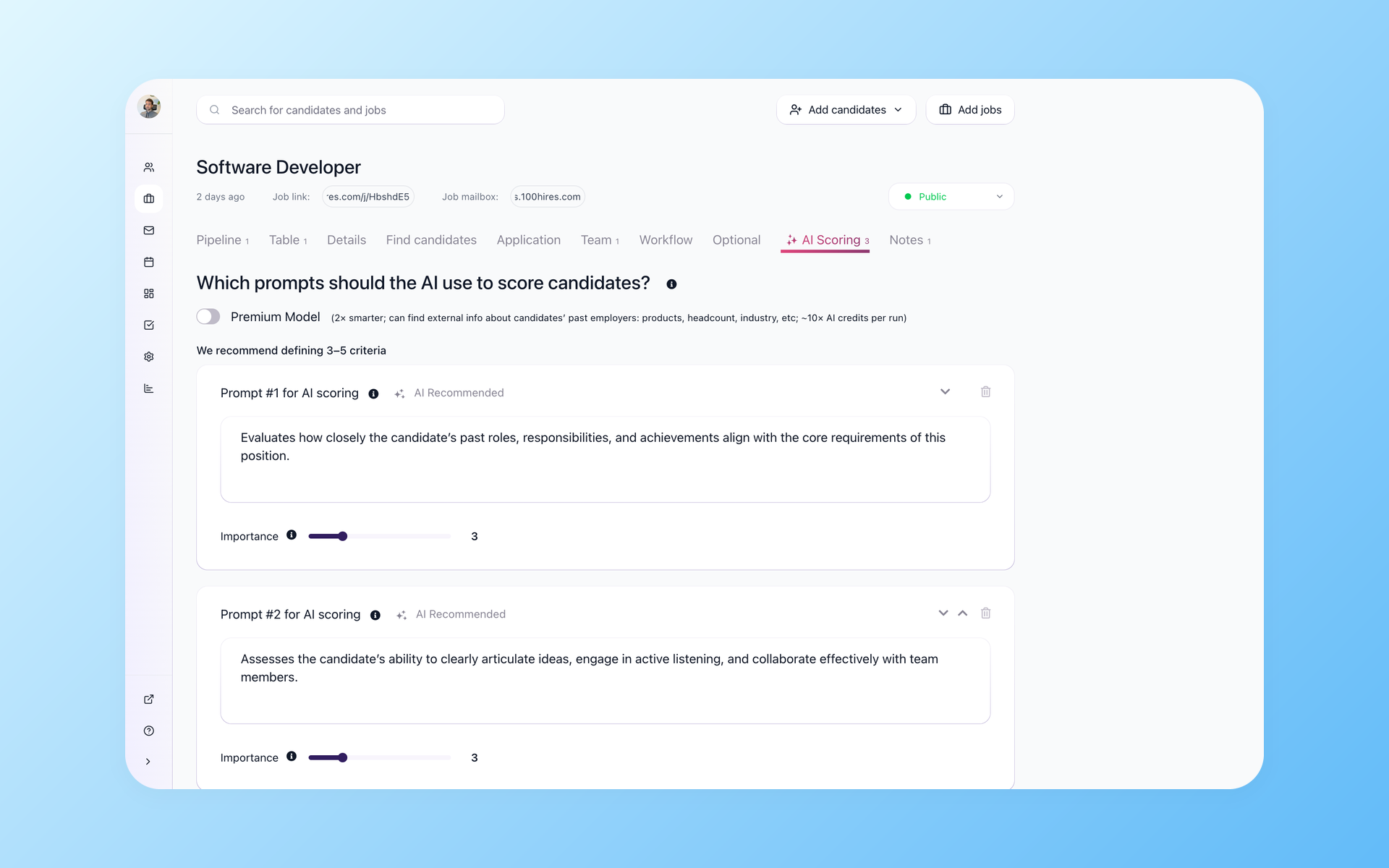
AI scoring earns a spot only when it is transparent. A score nobody can explain is a score nobody uses. If you cannot see the criteria and the weight behind a number, treat it as a nice-to-have at best and keep a human in the loop.
100Hires handles this stage with knockout questions that auto-disqualify on yes or no answers, though those start on the Advanced plan rather than the entry tier.
Its AI Score shows a 0 to 100 result per criterion so you can see why a candidate ranked where they did, and questionnaires sent after the application let you dig deeper without hurting apply-flow conversion. The resume screening page walks through a full AI-assisted pass.
Scheduling features worth checking in the demo
Scheduling looks simple until you are three reschedules deep across two time zones.
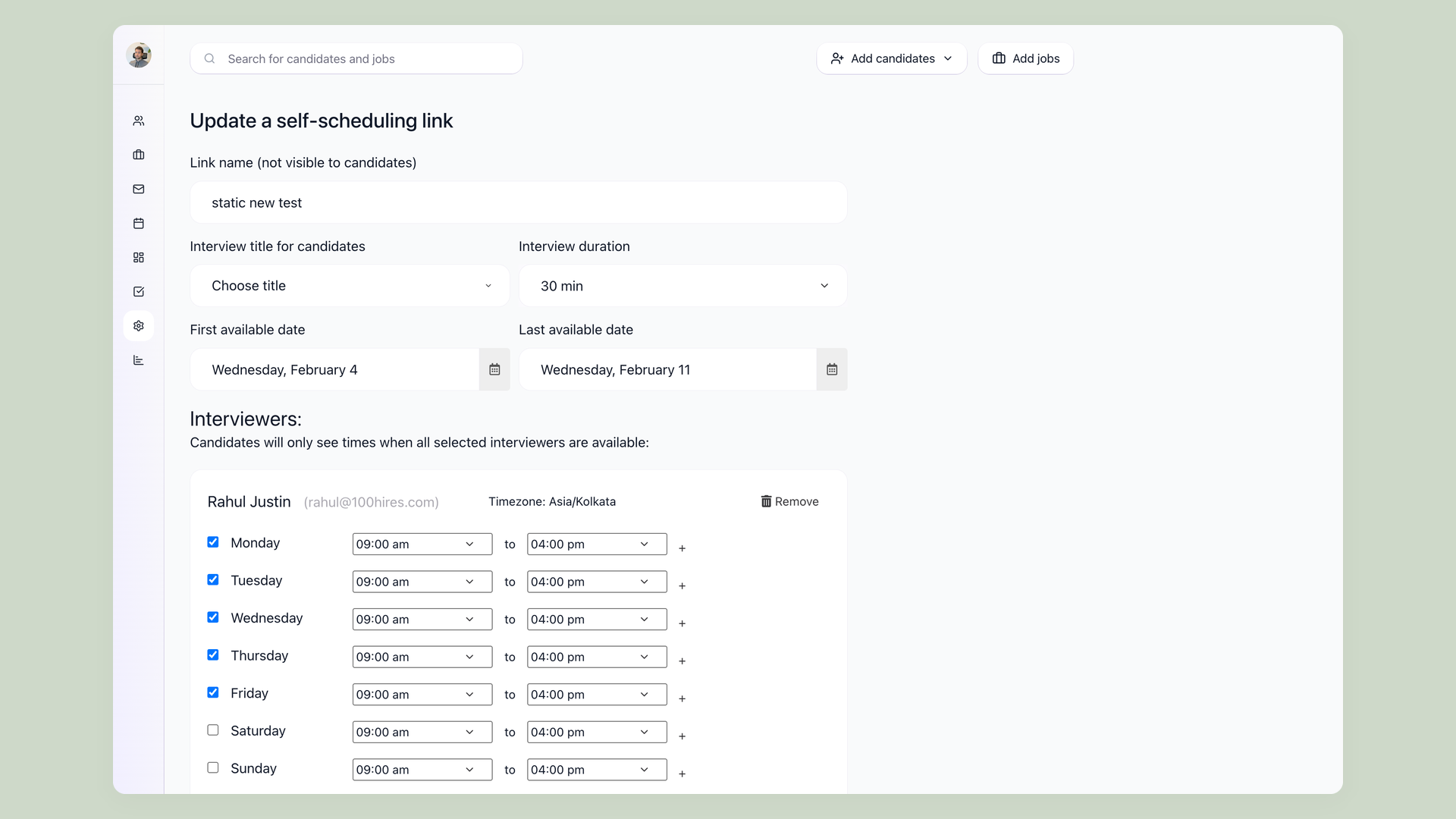
Candidate self-scheduling is the must-have, and vendor help docs treat it as standard rather than premium. Greenhouse, Workable, and Breezy all document candidates picking a slot from live interviewer availability, with two-way calendar sync as the prerequisite underneath.
When recruiters vent about time-zone scheduling turning into calendar hell, the consensus fix is exactly this: let candidates self-book from what is actually open.
Watch one distinction that marketing pages blur. Greenhouse's own docs separate a self-schedule request, a single slot for a one-on-one, from an availability request, which coordinates multiple slots across a panel. Treat those as two capabilities.
There is a security angle too. A generic shared booking link can be reused by anyone, and recruiters report strangers, including a rejected candidate, booking unwanted meetings off a leaked link.
Scheduling tied to a specific candidate record inside the ATS avoids that, which is a real argument for native scheduling over a bare Calendly link.
Panel load-balancing and built-in video interviews are the nice-to-haves here, and the video piece often carries a cost: Workable sells video interviews as a paid add-on on its Standard plan and only bundles them higher up.
100Hires covers the stage with self-scheduling links, two-way Google and Outlook sync, and an interviews view that handles panels and creates Zoom rooms automatically.
The interview scheduling page shows the flow.
Collaboration features: scorecards, permissions, and blind review
Collaboration features decide whether your hiring team actually agrees on candidates or just argues about them later.
Structured scorecards are the must-have, and there is evidence behind them.
A panel using a structured scorecard is roughly twice as predictive of job performance as the same panel chatting freely, per the Schmidt and Hunter meta-analysis, with a later re-examination by Sackett and colleagues tempering the exact numbers.
Vendor docs back this as a baseline: Greenhouse, Workable, Breezy, and Manatal all document scorecards as standard, and Greenhouse's docs name bias prevention as the reason you can hide interviewers' scores from each other until they submit.
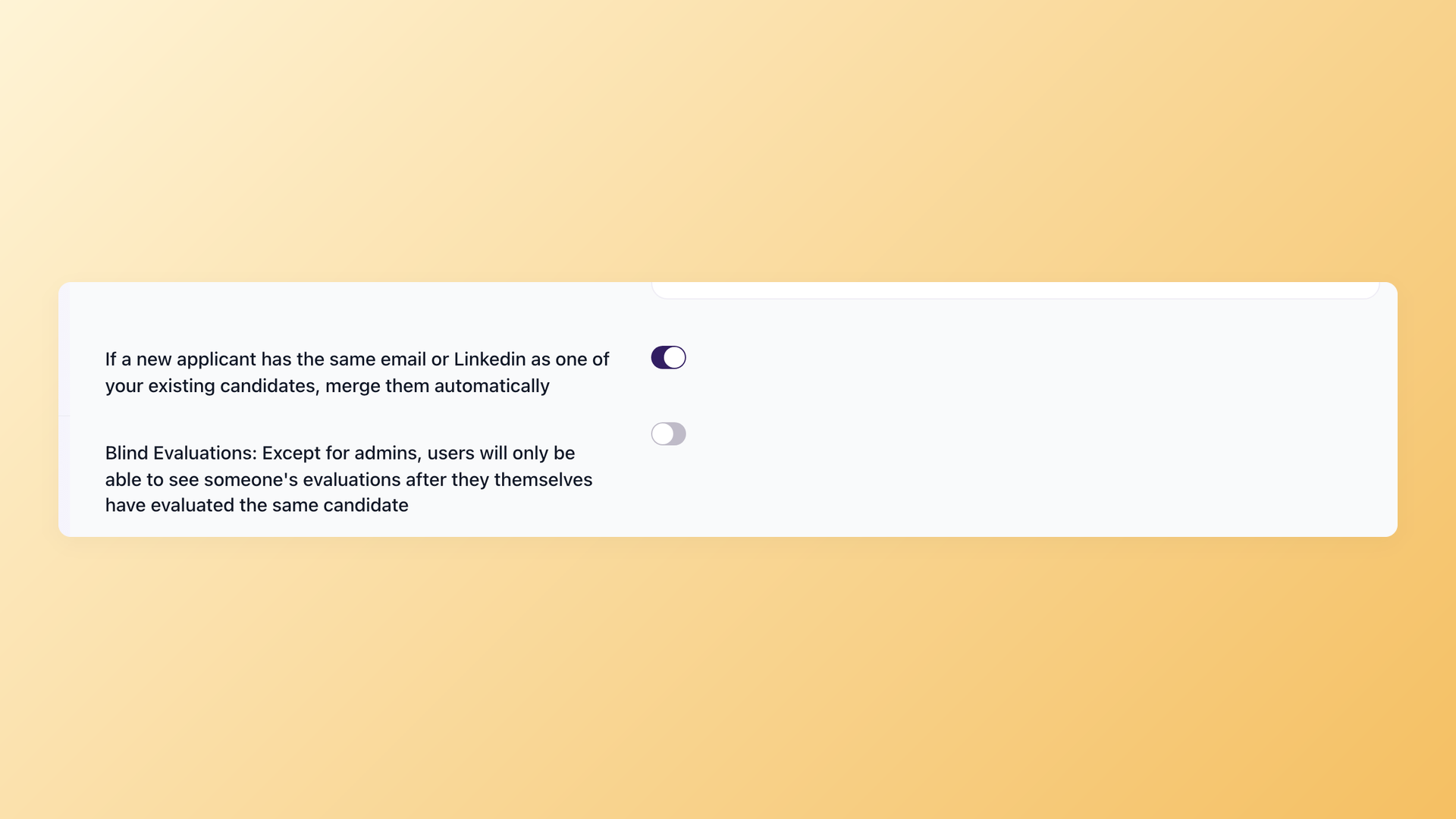
Role-based permissions with per-job hiring teams are the other must-have, so an interviewer sees only the roles they are on. Blind review leans must-have too.
One recruiter described wanting exactly that, scoring interviews without seeing other scores to prevent bias, and doing it in Excel for lack of a tool.
One honest limit: the tooling alone does not fix lazy feedback. When interviewers are not bought in, you still get one-word comments or something run through a chatbot, so pair the feature with a process that rewards good interviewing.
Approval chains for jobs and offers are the nice-to-have that hardens into a requirement as your process grows, and vendors gate them accordingly. Breezy holds job and offer approvals to its Business tier.
Watch the scorecard tier trap. Breezy ships a basic scorecard free but reserves custom scorecards for its Growth, Business, and Pro plans, the same feature name at very different prices.
100Hires covers this stage with evaluation forms that email interviewers reminders until they respond, role-based permissions, a blind-evaluation toggle where admins are exempt, and @mentions in candidate notes.
The interview scorecard page has the research and the setup.
Automation features: the time-savers versus the "automation" label
"Automation" is a marketing word before it is a feature, so look at what actually runs.
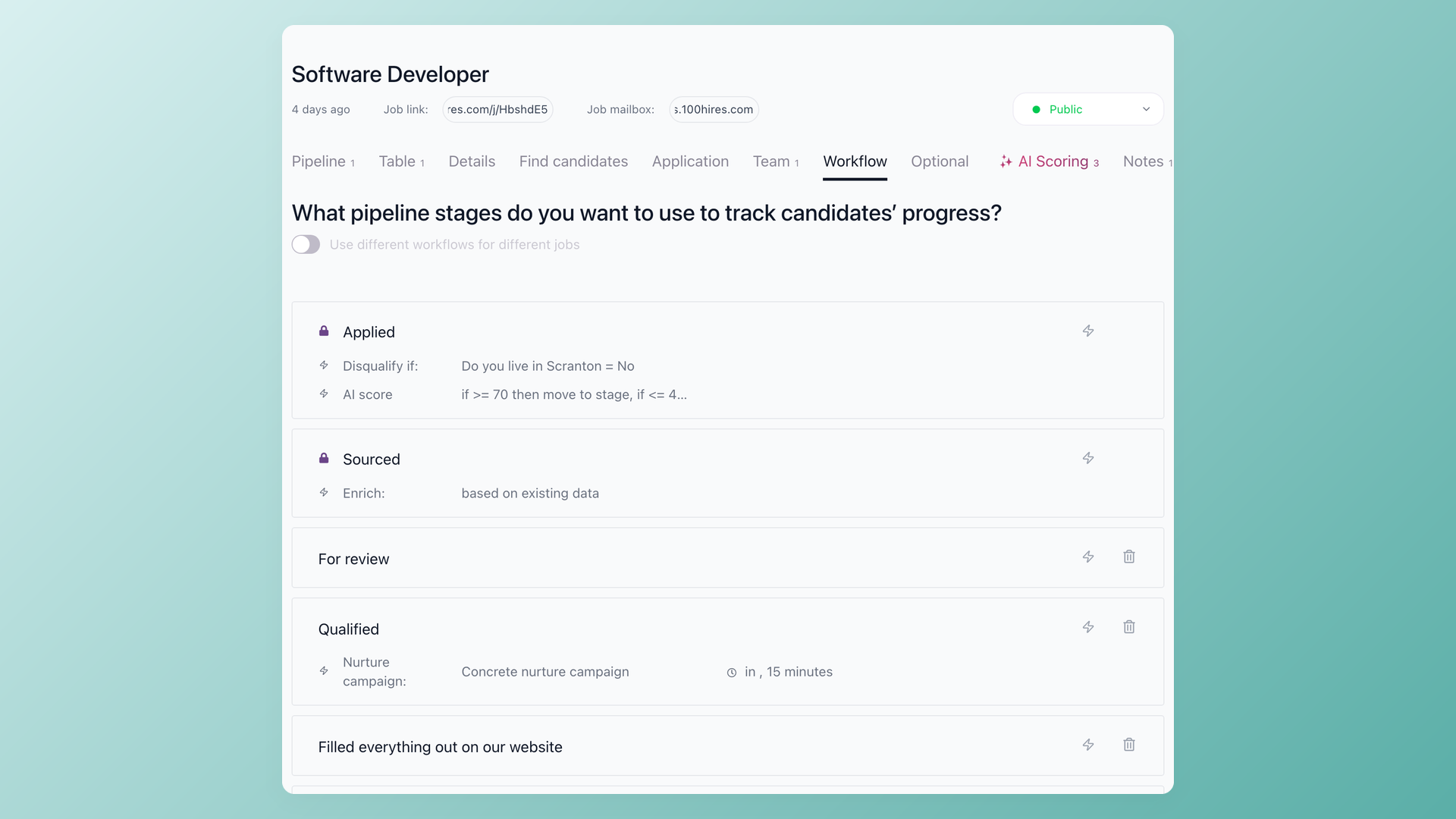
The must-have is unglamorous: stage-triggered candidate emails so an application received, a rejection, or an interview invite goes out without you remembering. This is the automation practitioners praise unprompted, and its absence is what candidates feel as silence.
Auto-disqualify wiring belongs here too, as the automation side of your knockout questions.
Multi-step nurture sequences, texting, AI email drafting, and Zapier or API access are the nice-to-haves. Texting deserves special care because the same word is sold four different ways.
Workable makes it a paid add-on on Standard and bundles it higher up, Zoho Recruit reserves it for its top Enterprise tier, Breezy sells it as a metered add-on on any plan including free, and JazzHR runs it as a separate consumption-priced product outside the plan ladder.
Verify the mechanism, not the word.
The bigger warning: the "automation" feature itself tends to sit near the top of the price ladder.
Manatal gates workflow automation to Enterprise and holds API access one tier higher still, Zoho reserves recruitment automation for Enterprise, and JazzHR puts configurable task automation on Plus and up. Workable is the contrast case, shipping automated actions on every plan.
Brand-new AI-assistant connectors, like plugging Claude or ChatGPT into a job board, are the least proven of all; one industry-news host covering the launches called their near-term value genuinely unproven.
100Hires takes a different line on the AI question. Its AI features, including AI Score, the AI Copilot, and the AI Email Composer, are available from the entry Start plan, with usage metered by monthly operations rather than locked behind a premium tier.
Workflow automations come in on the middle Advanced plan, where several competitors hold their named automation feature at the top. You also get ten pipeline automation types, nurture campaigns, Twilio calls and SMS, and a full API with webhooks.
The recruitment automation page covers the setup.
Reporting features: presence is not the bar, usability and latency are
Reporting quietly graduated from nice-to-have to must-have, and the buyers who realize it late feel it most.
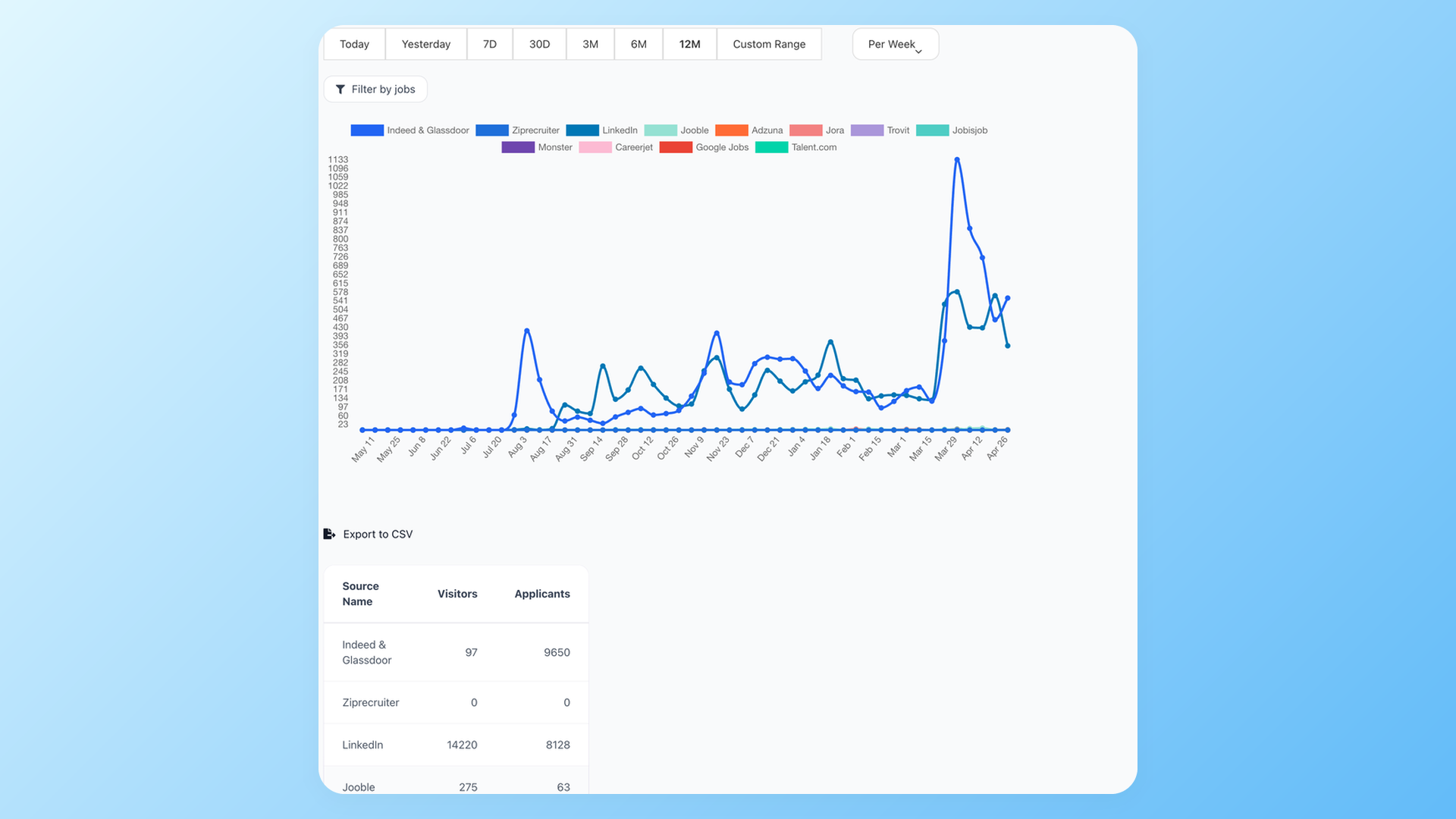
The must-haves are source-of-hire, time-to-hire, and pipeline-funnel views with CSV export. The demand is loud in practice.
In the LinkedIn sample we reviewed, the highest-engagement posts about tooling were not about sourcing or AI.
They were about escaping spreadsheet-stitched reports for a live dashboard, with one talent leader describing how a funnel of over 7,000 applicants down to 23 hires became visible only after the switch.
Review sites echo it: weak reporting is among the most-mentioned complaints for JazzHR, Breezy, and Greenhouse.
Custom BI-style dashboards are the nice-to-have, with two catches. They tend to be gated, with JazzHR flagging advanced visual reporting as an add-on even on its Pro plan and Zoho reserving advanced analytics for Enterprise.
They can also be slow: one Lever reviewer noted native dashboards refreshing every four to six hours. So the sharper demo question is not "do you have reporting" but "how fresh are these numbers and does a custom report cost extra."
100Hires ships seven report types, including source breakdown, time to hire, disqualification reasons, and current pipeline, each exportable to CSV. The recruitment analytics page shows the dashboards.
The overbuying trap: features you pay for and never use
The bigger risk for most SMB buyers is not under-buying. It is overbuying.
Call it the growth tax. Automation, advanced reporting, API access, and single sign-on cluster at the top tiers across Manatal, Zoho Recruit, Breezy, JazzHR, and Greenhouse.
The advertised entry price rarely contains the features you actually came for, so price the tier that holds your must-haves, then model your cost at both twice and half your current headcount before you sign.
Read the fine print, not the plan name. JazzHR's own page says its Pro tier "adds" eSignatures and advanced visual reporting, while the comparison grid right below tags both as add-ons. Trust the grid.
Sprawl is the other tax. On recruiting-operations podcasts, a leader's single biggest win from adding an ops role was auditing which paid modules nobody was using, not buying anything new. The advice that follows is to adopt one tool at a time.
The cautionary tale making the rounds is an SMB owner who signed a headcount-tiered contract that would not flex down when the team shrank, then spent months fighting the bill. That was an HRIS, not an ATS, but the buyer psychology is identical.
A note on fairness. We leave Ashby out of the pricing comparison above because it publishes no public plan-feature page to cite, not because it looks good or bad. Keeping the comparison to vendors with verifiable pricing is the honest way to run it.
Three demo habits protect you from all of this. Put one or two working recruiters on the vendor call, since the person who lives in the tool spots what a buyer misses. Ask the vendor to configure one of your real workflows instead of a generic tour.
And verify your two or three critical integrations live, because published integration lists go stale; one Lever reviewer found working integrations missing from the vendor's own page.
Compliance and AI governance: the checklist column buyers skip
AI screening is now a governance question, not just a capability, and it belongs on the checklist.
Regulators are catching up. The EU AI Act classifies using AI to screen CVs, rank candidates, or match people to jobs as high-risk, and while the main high-risk obligations were pushed back to December 2027, candidate-disclosure and AI-literacy duties already apply.
Talent leaders now frame the buying decision as whether they could defend a feature to a regulator or a candidate, pointing to real litigation over automated screening as the reason to care.
Three questions, borrowed from a recruiting-technology podcast, make good demo material: what human decisions will this AI replace, how often will we audit and recalibrate it, and who is responsible if it causes harm.
Add candidate transparency to the list, since if AI touches your hiring, applicants deserve to know rather than find it buried in a policy. If a tool offers demographic tagging or "diversity alert" features, treat those as a legal review item before you buy.
The practical compliance features are data retention and consent controls. 100Hires handles GDPR with configurable retention from one to sixty months, automatic consent renewal, and right-to-be-forgotten removal.
Its per-criterion AI Score plus blind evaluations give you an AI story you can actually explain.
What 100Hires includes at each stage, and where it falls short
Mapped to the six stages, here is what 100Hires covers:
- Sourcing: job-board posting, trackable links, and enrichment
- Screening: knockout questions, transparent AI Score, and questionnaires
- Scheduling: self-scheduling links and calendar sync
- Collaboration: scorecards, permissions, and blind evaluations
- Automation: ten pipeline actions and nurture campaigns
- Reporting: seven exportable report types
Two things set the pricing model apart. AI features are available on every paid plan, metered by usage rather than gated behind a premium tier. Workflow automations arrive on the middle Advanced plan, where many competitors hold them at the top.
The honest limits matter as much as the strengths. 100Hires has no built-in AI interview notetaker yet, a feature most large competitors already ship, so if live interview transcription is core to you, look elsewhere for now.
There is no native HRIS integration, which means relying on a Zapier bridge when someone is hired. The integration library is about 19 connections, not a sprawling marketplace.
The Start plan caps at 100 candidates a month and does not include knockout questions, which begin on Advanced.
Pricing runs Start at $49 a month billed annually or $99 monthly, Advanced at $199 or $249, and Pro at $399 or $499, with an Enterprise tier available on a custom quote rather than a published price. Reviewers rate it 4.8 on G2 and 4.9 on Capterra.
You can browse the full set on the features page or start a trial, which can post to job boards during the free period.
Start a free 100Hires trial and test these features against your own roles.
Frequently asked questions
What are the key features of recruitment software?
The features that matter fall into six hiring stages: sourcing (multi-board posting, resume parsing), screening (knockout questions, transparent AI scoring), scheduling (candidate self-scheduling, calendar sync), collaboration (scorecards, permissions), automation (stage-triggered emails), and reporting (source and funnel analytics). 100Hires covers all six in one candidate record, so you are not stitching separate tools together.
What is recruitment software?
Recruitment software is a system that organizes hiring, from posting jobs and collecting applicants to screening, scheduling interviews, and reporting on results. An applicant tracking system like 100Hires is the common form, keeping every candidate in one place instead of across inboxes and spreadsheets.
What are the 7 stages of recruitment and how do they map to features?
The classic seven stages run from planning and sourcing through screening, interviewing, evaluation, offer, and onboarding. This checklist groups the software features that support them into six practical buckets: sourcing, screening, scheduling, collaboration, automation, and reporting. 100Hires maps a feature to each, so the workflow stays inside one system from first application to hire.
What is the difference between an ATS and a CRM in recruiting?
An applicant tracking system manages candidates who apply to a specific job, moving them through pipeline stages. A recruiting CRM manages relationships with candidates you source and nurture over time, before any role opens. 100Hires combines both sides, pairing pipeline tracking with enrichment and nurture campaigns so you can source and track in one place.
How much do recruitment software features cost?
Core features like posting, parsing, and pipeline tracking ship cheaply, but automation, advanced reporting, API access, and single sign-on usually cluster at the top tiers, so the real cost is the plan that holds your must-haves. 100Hires runs $49, $199, and $399 a month billed annually across its Start, Advanced, and Pro plans, with AI metered by usage rather than gated behind a premium tier.
Pick the stage where your hiring hurts most, verify each feature in the demo, and keep an eye on the growth tax. Start your free 100Hires trial to put this checklist to work.
Try 100Hires for free
No credit card. 14-day trial. Forbes Advisor #1 ATS for SMBs.

