
Does Indeed Have an API? Indeed API Guide 2026
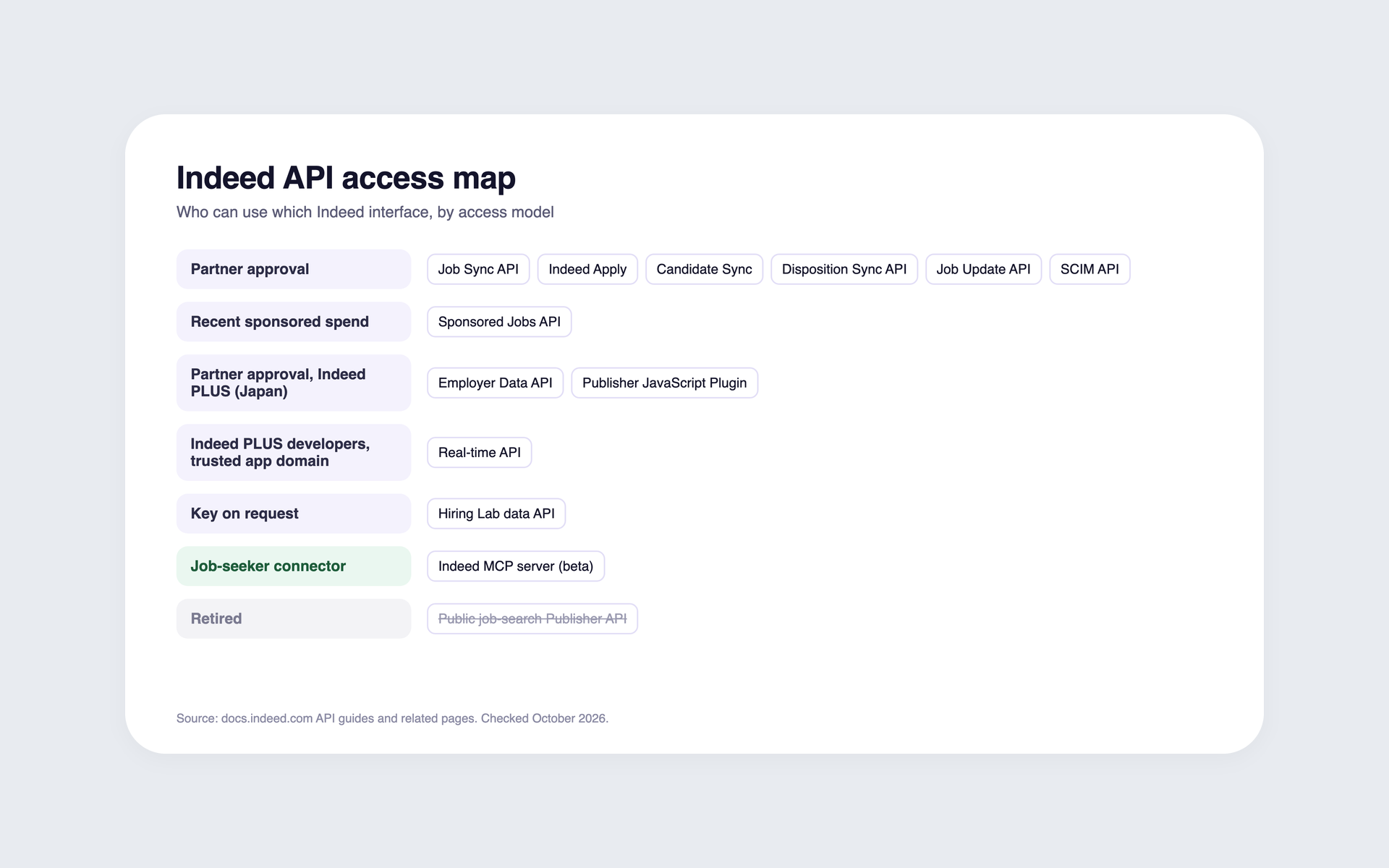
Yes, Indeed has several APIs, but none of them is a self-serve public API for individual job listings or for posting jobs.
Posting and application APIs need Indeed's partner approval. The Sponsored Jobs API needs recent sponsored spend. The Hiring Lab data API issues keys on request, and the Indeed MCP server is a connector for job seekers, not an employer API.
Search results mix retired Publisher API tutorials, current partner APIs, and third-party scraping products.
So start with what you need. If you want individual public job listings, Indeed offers no self-serve official route, and its Terms forbid scraping. If you want to send jobs to Indeed, you either become a partner or post through an ATS that already is one.
Last verified: October 2026 against docs.indeed.com.
Key takeaways
The hiring playbook, in your inbox
One email a week - benchmarks, AI screening tactics, and short interview templates from the 100Hires team. No product pitches.
- No self-serve public API exists for individual job listings or for posting jobs.
- Posting and application APIs need partner approval, which Indeed grants case by case.
- Indeed's July 31, 2026 release notes say the Job Sync API is available to direct employers. Its integration guide still lists a Developer Agreement and Indeed's approval.
- Job Sync and Job Update calls are free. Indeed states no call price for Indeed Apply or Disposition Sync. Sponsored Jobs API usage has a conditional per-call cost.
- The old public job-search API is retired. Tutorials built on it no longer work.
- Without partner status, employers and platforms post through an integrated ATS's API.
Indeed API and integration access map
Indeed's interfaces fall into five access models. The table lists the main interfaces Indeed documents in its API guides and related pages.
| Interface | What it does | Access and eligible users | Cost | Status |
|---|---|---|---|---|
| Job Sync API | Creates, updates, expires and checks job postings | Partner approval. ATS partners, and direct employers per Indeed's July 31, 2026 release notes | Free | Current |
| Job Sync XML feed | Sends jobs to Indeed as an XML feed | Partner or account manager. Feed senders | Not published | Current |
| Indeed Apply | Runs the apply flow and sends applications to the partner | Partner approval. ATS partners, employers, agencies and third parties | Not published | Current |
| Candidate Sync | Registers employers, sends candidate applications to Indeed and retrieves candidate information from Indeed | Partner approval | Not published | Current |
| Disposition Sync API | Sends hiring-stage updates from the ATS to Indeed | Partner approval. Required for Indeed Apply Sync partners | Not published | Current |
| Job Update API | Lets ad agencies update jobs an ATS created | Partner approval. Ad agencies | Free | Current |
| Real-time API | Streams server-sent events, such as chat messages, to front-end apps (Indeed PLUS) | Indeed PLUS developers, with the app's domain registered as trusted | Not published | Current |
| SCIM API | Provisions users | Partner approval | Not published | Current |
| Sponsored Jobs API | Manages sponsored campaigns in code | Customers who sponsored a job in the last three calendar months | Conditional per-call cost | Current |
| Employer Data API | Creates and updates employer entities on Indeed and Indeed PLUS | ATS partners only. Not available to direct employers | Not published | Current |
| Publisher JavaScript Plugin | Job search widget for publishers (Indeed PLUS, Japan) | Indeed partners only | Not published | Current |
| Hiring Lab data API | Aggregated labour-market data | Key on reviewed request | Not published | Current |
| Indeed MCP server | Lets a signed-in job seeker search jobs from an AI assistant | Job-seeker connector, not an employer API | Not published | Beta |
| Public job-search Publisher API | Former public job search | Not available today | Not applicable | Retired |
This is the main set Indeed documents as of October 2026. Indeed keeps its API catalog, MCP page, Sponsored Jobs docs and Indeed PLUS pages separately, and the Indeed PLUS pages add front-end plugins, so check them before you build.
Job Sync is a GraphQL API. It creates, updates, expires and checks the status of job postings, and Indeed presents it as the way to integrate without building an XML feed.
You cannot use both routes in the same app. Partner Console does not offer Job Sync to an app that already sends jobs through an Indeed Apply multisource or single-source XML feed.
Data flows in both directions. Indeed Apply delivers applications to your jobs into a partner system, and Candidate Sync exchanges candidate data between your system and Indeed. Disposition Sync sends hiring stages back to Indeed. It is not a way to get candidate data.
Disposition Sync takes up to 25 updates per request. Indeed requires it of Indeed Apply Sync partners, and a partner that skips it risks losing access to Indeed Apply.
The Job Update API matters most to ad agencies. After December 31, 2026, it becomes their only way to manage integrated-ATS jobs on Indeed, as Indeed's single-source feed policy explains. The ATS still controls when a job is created and when it expires.
The Indeed MCP server serves job seekers inside AI assistants. Employers cannot use it to post jobs.
Choose the right Indeed API route for your build
The right route depends on what you are building and what you need from Indeed.
| You are | What you want | Realistic route |
|---|---|---|
| A developer | Individual public job listings | No self-serve official route. Indeed's Terms forbid scraping. Third-party job-data vendors exist, so check their terms before you rely on them |
| A researcher | Labour-market data | Request a Hiring Lab data API key |
| A direct employer | Post your own jobs | An integrated ATS, or a Job Sync integration request that Indeed must approve |
| An ATS vendor | Post jobs for your clients | Apply to the partner program. Indeed Apply and Disposition Sync must be available before Indeed accepts the integration |
| An ad agency | Manage client jobs and campaigns | Job Update API, for jobs each client has authorized you to update |
| A platform for many employers | Post jobs under each client's name | The partner path, or an integrated ATS's partner API that supports separate client company accounts |
The first split is between data and posting. Getting jobs out of Indeed and sending jobs into Indeed are different problems. Indeed supports the second through its partners. It offers no self-serve route for the first.
Direct employers gained an option when Indeed's July 31, 2026 release notes made the Job Sync API available to them. Indeed's integration guide lists the same steps as the partner path: a Developer Agreement, an app in Partner Console and Indeed's approval.
The Indeed Apply Policy says Indeed Apply and Disposition Sync must be available before Indeed accepts ATS, employer or third-party job integrations.
Indeed's support FAQ says direct employers who own their feed can skip Disposition Sync if they do not want to share disposition signals with Indeed.
ATS vendors have one more layer. Only ATS platforms can join Indeed's tiered partner program, and tiered status needs at least 55% adoption of Indeed's quality signals.
Platforms that post for many employers cannot borrow a client's key, as the next section explains. They either secure their own approval or post through an integrated ATS whose partner API can manage separate client company accounts.
Forum threads from teams in this spot repeat two questions. Developers ask how to mirror Indeed jobs on their own site. Would-be posters ask how long Indeed's API approval takes.
Platforms often need distribution rather than another ATS. In a September 2026 sales call, one staffing-platform team said it had been talking to Indeed for about two years before routing jobs through another vendor's white-label integration.
Indeed partner access, approval, and authentication
Indeed's employer APIs are not self-serve. Once Indeed approves you as a partner, it provisions OAuth client credentials in its Partner Console. The path looks like this:
- Apply through Indeed's partner site. Indeed reviews each integration case by case and says it cannot guarantee a partnership with every interested party. It has deferred some requests and says it is adding capacity.
- Sign the Developer Agreement that comes with the application. It bans scraping and permanent databases of job-seeker content, so read it before you design how you store data.
- Get credentials for an app in Partner Console. Client credentials let your app act for itself, and employer authorization lets it act for an employer's account where the employer consents. Access tokens last one hour, so plan for token refresh.
- Build and pass review. Indeed says a Job Sync or Indeed Apply integration usually takes about six weeks, covering setup, testing, review with Indeed and deployment. Indeed gives no timeline for partner approval.
One more rule trips up agencies and contractors. Indeed's guide for direct employers says only the party building the integration can request and hold the key.
Its Indeed Apply Policy adds that Indeed must approve any third party that builds an integration for an employer.
In practice, a developer cannot apply on a client's behalf and hand over the credentials. The builder is the applicant, and Indeed decides whether that builder may work for the employer.
ATS partners carry extra duties. Indeed Apply and Disposition Sync must be available before Indeed accepts the integration, and Job Sync is the posting interface.
A Job Sync integration has to cover every public job for each participating client. A client can stay out of the integration, but then you must expire and stop sending all of that client's jobs. Visibility can drop if an update does not arrive within 15 minutes.
For an ATS multisource feed, Indeed asks the ATS to support at least ten clients, charge them for the product and offer no free tier or trial that allows job posting.
The Job Sync terms impose a similar restriction: the integration may include only paid clients' jobs and no jobs from free trials.
Indeed API costs and billing rules
Job Sync and Job Update calls are free, and they do not count toward Sponsored Jobs API limits. Indeed states no call price for Indeed Apply or Disposition Sync, and it does not charge employers for using an ATS integration.
The Sponsored Jobs API is where cost comes in, and the common "$3 per call" summary oversimplifies it. Indeed's usage policy assigns an API-call cost of $3 per call, or EUR 3 in EU markets.
When Indeed calculates your bill, you pay only the amount by which your monthly API-call cost exceeds your qualifying monthly sponsored spend. The first $50 of API-call cost each month is waived.
So a team whose sponsored spend is larger than its API-call cost pays nothing for the calls. A team that makes many calls but spends little on sponsored jobs pays the difference.
The rule applies from December 1, 2024 in the US and from February 1, 2026 in the other markets the policy names. Access needs a sponsored job in the last three calendar months.
A 2024 industry summary described a flat $3 charge on every call from October 1, 2024. Neither the flat charge nor that date matches Indeed's current policy.
Older sponsored interfaces are gone. Indeed ended its legacy Sponsored Jobs API on January 1, 2022 and its Sponsored Jobs XML integration on March 31, 2022.
Getting Indeed job listings without an official API
Indeed's public job-search API, the old Publisher API, is not available today. Its developer pages redirect to the partner site, and Indeed's own sample search call returns an access error for an ordinary client.
Search results disagree on this point. Some pages say Indeed offers free developer APIs, and others say Indeed discontinued its API. Both are half right: the public search API is gone, and the partner APIs cover the jobs you post and the applicants to those jobs.
Indeed's Terms of Service forbid crawling, scraping and automated access, including AI agents, beyond what robots.txt allows. The Developer Agreement bans scraping and permanent databases of job-seeker content.
Many "Indeed API" results are scraping products, and using them leaves you responsible for the risk of violating Indeed's Terms.
Indeed offers two official alternatives, and neither is a bulk listings feed: the Hiring Lab data API for aggregated labour-market data, and the MCP server for a signed-in job seeker.
If you need job-market data without scraping Indeed, the options are narrow: a third-party job-data vendor whose terms you have checked, Hiring Lab's aggregated data, or the data on your own jobs and applicants in your ATS.
100Hires does not provide Indeed listing data either.
Post jobs to Indeed through an integrated ATS's API
For employers and platforms without partner status, the practical route is to use an ATS that already has an Indeed integration. 100Hires publishes this guide and is one of the ATSs integrated with Indeed. Here is the flow with the 100Hires API.
- Create the job with
POST /jobs. - Set it to Public with
PATCH /jobs/{id}/status. - Enable Indeed as a job board with
POST /jobs/{id}/job-boards. - Receive each new application by webhook, signed with
x-hires-signature-v2(HMAC-SHA256). - Read the board status with
GET /jobs/{id}/job-boards.
The standard 100Hires API is included with every paid plan and uses Bearer keys scoped to one user and one company. The keys become active once the company is verified. Multi-client endpoints for white-label partners are a separate extension issued during partner onboarding.
New keys default to 100 requests per 10 minutes, and support can raise the limit. The OpenAPI spec listed 93 paths and 139 operations in October 2026. Full details are in the 100Hires API documentation.
Worked example: a platform with 12 client brands
Say you run a scheduling app for 12 franchise locations, each hiring under its own name. You want their jobs on Indeed without sending your users to another tool.
The partner API creates a separate company account for each location. That keeps every job tied to the brand that is actually hiring.
Your backend creates each job through the API, sets it to Public and enables Indeed as a job board. Applications come back to your app by webhook, with the applicant's answers and resume attached.
Two things stay outside your app. Each location sponsors jobs in its own Indeed account if it wants paid reach, and Indeed's dashboard remains the place to see flags or sponsorship requirements.
Under the hood, 100Hires uses Indeed's Job Sync API, Indeed Apply and Disposition Sync. Jobs distributed from an ATS, including 100Hires, do not usually count against Indeed's free direct-post allowance and are not guaranteed a free listing.
This route has firm limits. 100Hires does not create sponsored campaigns, so you sponsor in Indeed's dashboard. Its API reports delivery status for each board, and flags and sponsorship requirements are in the Indeed dashboard.
It does not use the Job Update API and does not provide Indeed listing data. It cannot tell sponsored applicants from organic ones, and it cannot send Indeed applicants to an outside application form. This setup uses a separate company account for each client brand.
Common Indeed API mistakes
- Following old tutorials. Guides built on Publisher API search parameters, such as a keyword and a location in the query string, describe an API you cannot use today.
- Expecting a self-serve key. Employer APIs start with partner approval and a Developer Agreement, not a sign-up form. Plan to wait for approval, with no fixed timeline, before you can test authenticated calls.
- Requesting a key for a client. Indeed's Indeed Apply guide says only the party building the integration can hold the key, and Indeed must approve a third party that builds for an employer.
- Building Job Sync alone. The Indeed Apply Policy requires Indeed Apply and Disposition Sync before Indeed accepts a job integration, so plan for all three. Direct employers who own their feed can skip Disposition Sync if they do not want to share disposition signals with Indeed.
- Reading Disposition Sync as a data source. It sends hiring stages to Indeed. It does not hand you candidates. Applications to your own jobs arrive through Indeed Apply.
- Budgeting a flat $3 for every Sponsored Jobs API call. The cost applies only above your qualifying sponsored spend, after a $50 monthly waiver.
- Assuming an API route means free visibility. No route guarantees it. See why Indeed flags a job or makes it sponsored only.
Frequently asked questions
Does Indeed have a public API?
Not a self-serve one for listings or posting. Indeed's posting and application APIs need partner approval, and other interfaces have their own access rules. 100Hires is an integrated ATS that uses Indeed's Job Sync API, Indeed Apply and Disposition Sync.
Can I get Indeed job listings through an API?
Not through a self-serve official API. The public Publisher search API is not available today, and Indeed's Terms forbid scraping. 100Hires does not provide Indeed listing data either; it posts your jobs and returns the applications submitted to them.
How do I post jobs to Indeed through an API without being a partner?
Use the API of an ATS that holds an Indeed integration, or, as a direct employer, submit a Job Sync integration request and wait for Indeed's approval. With 100Hires, you create the job, set it to Public and enable Indeed as a job board through the API.
Is the Indeed API free?
Job Sync and Job Update calls are free. Sponsored Jobs API calls carry a cost that applies only above your qualifying sponsored spend, after a $50 monthly waiver. The 100Hires API is included with paid plans, with no per-request fee.
How long does it take to become an Indeed partner?
Indeed decides case by case and gives no approval timeline. It says an integration usually takes about six weeks, covering setup, testing, review and deployment. Platforms can post through 100Hires in the meantime.
Can I sponsor Indeed jobs through an API?
Only through the Sponsored Jobs API, which needs a sponsored job in the last three calendar months. 100Hires does not create sponsored campaigns; you sponsor jobs posted through 100Hires in your Indeed dashboard.
Can my software see whether Indeed flagged a job?
Indeed's Job Sync status data includes rejection and sponsorship-required fields, but what each ATS exposes varies. The 100Hires API reports delivery status for each board, so check the Indeed dashboard for flags.
Where to go next
If you need public Indeed listing data, neither 100Hires nor Indeed's employer APIs provide it. If you need to publish your own jobs, compare applying for direct Job Sync access with posting through an integrated ATS.
If you are choosing a posting route, read how Indeed's single-source feed policy treats feeds, agencies and integrated ATSs.
If you run a platform that needs to post jobs for many employers, book a 100Hires demo to see per-client accounts in action.
Try 100Hires for free
No credit card. 14-day trial. Forbes Advisor #1 ATS for SMBs.

