
How to post a job on LinkedIn in 2026: free posts, promoted jobs, and the one-job limit
To post a job on LinkedIn, click the Jobs icon at the top of your homepage, hit Post a job, type the job title, and continue. LinkedIn drafts the description with AI, and you edit it before publishing.
LinkedIn allows one active free job at a time, pauses it around day 14, and closes it at day 30 unless you promote it.
Most guides still show the older manual-only screens. This 2026 walkthrough follows LinkedIn's current documentation and explains the free vs promoted choice and every limit you need to plan around.
Key takeaways
The hiring playbook, in your inbox
One email a week - benchmarks, AI screening tactics, and short interview templates from the 100Hires team. No product pitches.
- The current flow: Jobs icon > Post a job > enter the title > let AI draft the post or write it yourself
- Free means limited: $0, one active free job at a time, a 14-day active window, auto-close at day 30, and typically 10 to 30 applicants
- Promotion is one-way: a promoted job can never go back to free
- The 7-day repost rule: closing a free job and reposting the same title within 7 days forces you into promotion
- Agencies pay: staffing and recruiting agencies cannot post free jobs on LinkedIn at all
What you need before you post
LinkedIn checks a few things before your job ever goes live. Sorting them out first can prevent your post from being rejected.
A real-name personal profile. Jobs on LinkedIn are posted by individual member accounts, not by companies. Your profile must use your real name; profiles set up under a company name or a pseudonym cannot post jobs.
The job then gets associated with your company Page. Only the member who posted the job can see its applicants, so decide up front which team member will manage the post and its applicants.
A company Page. Free job posts must be tied to your company's LinkedIn Page. If your business does not have one yet, create it before you start the wizard, not midway through.
Verification. Expect a possible one-time credit-card check on a free post. There is no charge, though a temporary authorization hold may appear and is released automatically.
When LinkedIn's trust signals about a new account are weak, it may offer a second path: verify your identity with a government ID through CLEAR, DigiLocker, or Persona instead of promoting the job.
One hard gate up front: staffing and recruiting agencies cannot post free jobs on LinkedIn. If you hire for clients rather than for your own payroll, every post is a promoted post.
With the account squared away, the wizard itself is the easy part.
How to post a job on LinkedIn step by step
Here is the full sequence, per LinkedIn's own posting instructions.
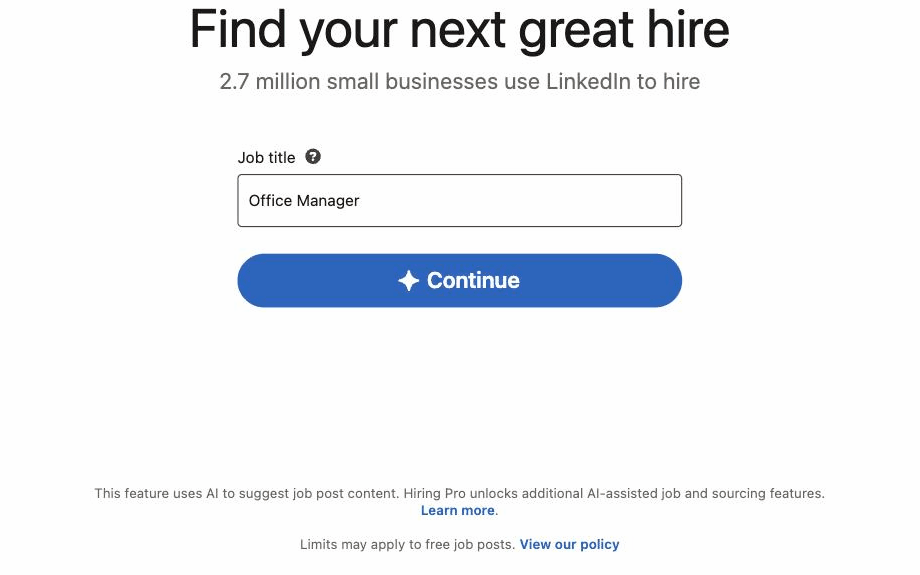
- Click the Jobs icon at the top of your LinkedIn homepage.
- Click Post a job. If you qualify for the free tier, you may see a Post a free job button instead.
- Enter the job title, then continue. When we walked this flow in August 2026, one Continue button carried us straight into an AI-drafted post. LinkedIn's help pages describe a two-option version of the same step, Start hiring with AI or Start with my job description, and mobile shows Write with AI or Write on my own. The labels vary by account, the destination does not.
- Review the drafted description. LinkedIn writes a first version from the title and your Page, and a Draft with AI button in the editor re-runs it. Hiring Pro is not a separate purchase; it activates inside this flow, and on promoted jobs it also helps source candidates and review applicants.
- Select your company so the post ties to your Page. A free post cannot exist without this association.
- Set the workplace type and location. On-site and hybrid roles need a city or metro area; listing only a country is valid only for remote roles.
- Rewrite what the draft got wrong. Salary range, benefits, and your actual hiring process are the parts the generated version will not know.
- Configure the screening. LinkedIn's current docs indicate one screening question comes free, with more available on promoted posts. Choose how applications arrive: LinkedIn's native flow, your email, or an external site. You can auto-reject applicants who miss must-have qualifications.
- Choose free or promoted, then publish. The next section covers this decision in detail.
- Complete verification if asked. A one-time card check may appear on free posts. There is no charge, although a temporary authorization hold may appear.
Before you hit publish, give the post one last pass: the exact job title, a valid location for the workplace type, the apply route you actually monitor, and screening questions that will not reject the people you want.
The AI branch is recent. Most tutorials and written guides, including several updated this year, still show the older manual-only screens. If a walkthrough never mentions the choice between AI drafting and manual writing, it predates the current flow.
Other ways to post a job on LinkedIn
From your company Page. Some admins start from the Page's Create button rather than the personal Jobs tab. The entry point differs; a similar posting flow follows.
The #Hiring share. This one announces the role to your network rather than creating a separate listing.
From the homepage: Start a post > the More icon > Share that you're hiring > select your organization > create a new job or pick an existing one > edit the pre-filled text > Post.
It adds the #Hiring frame to your profile photo. Two catches: you need to be a Page super admin or a listed current employee of the organization, and some companies require work-email verification first.
A member can share at most 10 job posts they did not create, per LinkedIn's #Hiring documentation.
Recruiter and Job Slots. Companies on a corporate contract post through Recruiter instead of the flow above. That is a separate product, and LinkedIn's own FAQ is direct about it: you do not need Recruiter to post a job.
Hiring beyond LinkedIn? The same series covers how to post a job on Facebook.
Free vs promoted: how to decide
Both options create the same listing. The difference is reach, applicant volume, and what happens to the post over time, per LinkedIn's free vs promoted comparison.
| Criterion | Free post | Promoted post |
|---|---|---|
| Concurrency | One active free job at a time | Not restricted by the one-free-job rule |
| Active period | 14 days, then pauses; closes at day 30 | Until you close it, with a 6-month auto-close |
| Applicant flow | Typically 10 to 30, then the post stops surfacing | Unlimited application evaluations |
| Candidate tools | 25 recommended profiles, one top-fit evaluation, an AI interview preview | Up to 350 invites, 5 InMails per day, 40 AI video interviews |
| Reversibility | Can be promoted later | Can never go back to free |
On budgets, the short version: promoted jobs run on either a daily average budget, where actual daily spend fluctuates under a weekly ceiling of 7x your daily figure, or a total budget that pauses the job once consumed.
For real numbers and scenarios, see our breakdown of how much a promoted LinkedIn job actually costs.
The free option is not always available. LinkedIn may withhold the free option for high-demand roles and locations; its support team's stated reason is that a free post would not get enough visibility to draw applicants.
If LinkedIn considers a new account's trust signals weak, it may ask you to promote the job or verify your identity. And agencies, as covered above, always pay.
Three warnings before you click Promote:
- Promotion is one-way. Per LinkedIn's billing FAQ, a promoted job cannot be demoted; the only route back is closing it and posting a fresh free job.
- Promoted trials convert. When a promoted free trial ends, close the job or billing begins on your budget.
- Billing runs until you close. An open promoted job keeps charging up to its 6-month auto-close.
The one-free-job limit and what happens after you post
A free LinkedIn job has a lifecycle, documented in LinkedIn's free job post rules:
- Days 0 to 14: the post is active and surfaces in search
- Around day 14: it pauses; you choose to promote or close
- Day 30: if never promoted, it closes on its own
- Any day: once the applicant limit is reached, the post stops surfacing, calendar or not
LinkedIn says the limit is typically 10 to 30 applicants, depending on the role. Practitioners report different caps, which supports a role-dependent range rather than one fixed number.
Why your free button vanished. If you go to post a second job and see only a promote option, this is the one-free-job rule at work.
LinkedIn allows one active free job at a time; close or promote the first and the free option may become available again, subject to eligibility and the rolling 30-day limit.
This rule explains most confusion about why the free posting option disappeared.
The 7-day repost rule. Closing a free job and reposting it does not reset the clock. The same title from the same company within 7 days is ineligible for free posting and forces promotion.
After 7 days that rule no longer blocks a free post, though the other eligibility limits still apply.
Posting one job at a time becomes cumbersome when you are hiring for several roles. More on that shortly.
Common mistakes employers make on LinkedIn job posts
Not reading the budget rules before promoting. One HR practitioner wrote on Reddit that they received an invoice far above what they expected after only a few days. Review the budget note and cost guide above before you promote.
Letting a promoted trial roll into billing. The close control lives under "edit or close your job post." Employers who treat a trial's end date as a soft deadline get charged. Put the date in your calendar and close the job on time.
Getting flagged by content rules. One employer reported that LinkedIn repeatedly rejected a post after interpreting a citizenship requirement as discriminatory; each rejection came with a 7-day posting suspension.
LinkedIn's enforcement ladder moves from notice to temporary suspension to permanent restriction. Prefer neutral phrasing such as "legally authorized to work in the United States," and review the EEOC's guidance on pre-employment inquiries before adding screening wording.
One commenter suggested that routing applicants to an external Google Form can trigger a takedown, but this is not a confirmed rule. Native apply flows avoid the question entirely.
Assuming only your company can post under your name. In a widely shared Reddit thread, a Page owner found a job posted under the company's name that the owner could view but not manage.
A commenter attributed this to Recruiter-license access and pointed to Page-level email-domain restrictions as a safeguard.
Expecting free-post reach to hold. High-demand roles may see no free option at all, and when a free post does run, its applicant cap can fill within days. Free is a solid test channel for one role; it is not a volume strategy.
Post to LinkedIn and 12 other job boards from one place
First, what an ATS does not do: it does not change LinkedIn's review rules. Eligibility and verification still apply to every job.
The path is different, though. Jobs submitted through 100Hires reach LinkedIn as organic listings through the integration, not through the one-free-job flow above.
LinkedIn alone limits you to one free job at a time. 100Hires does not, and posting a job to LinkedIn from 100Hires is free.
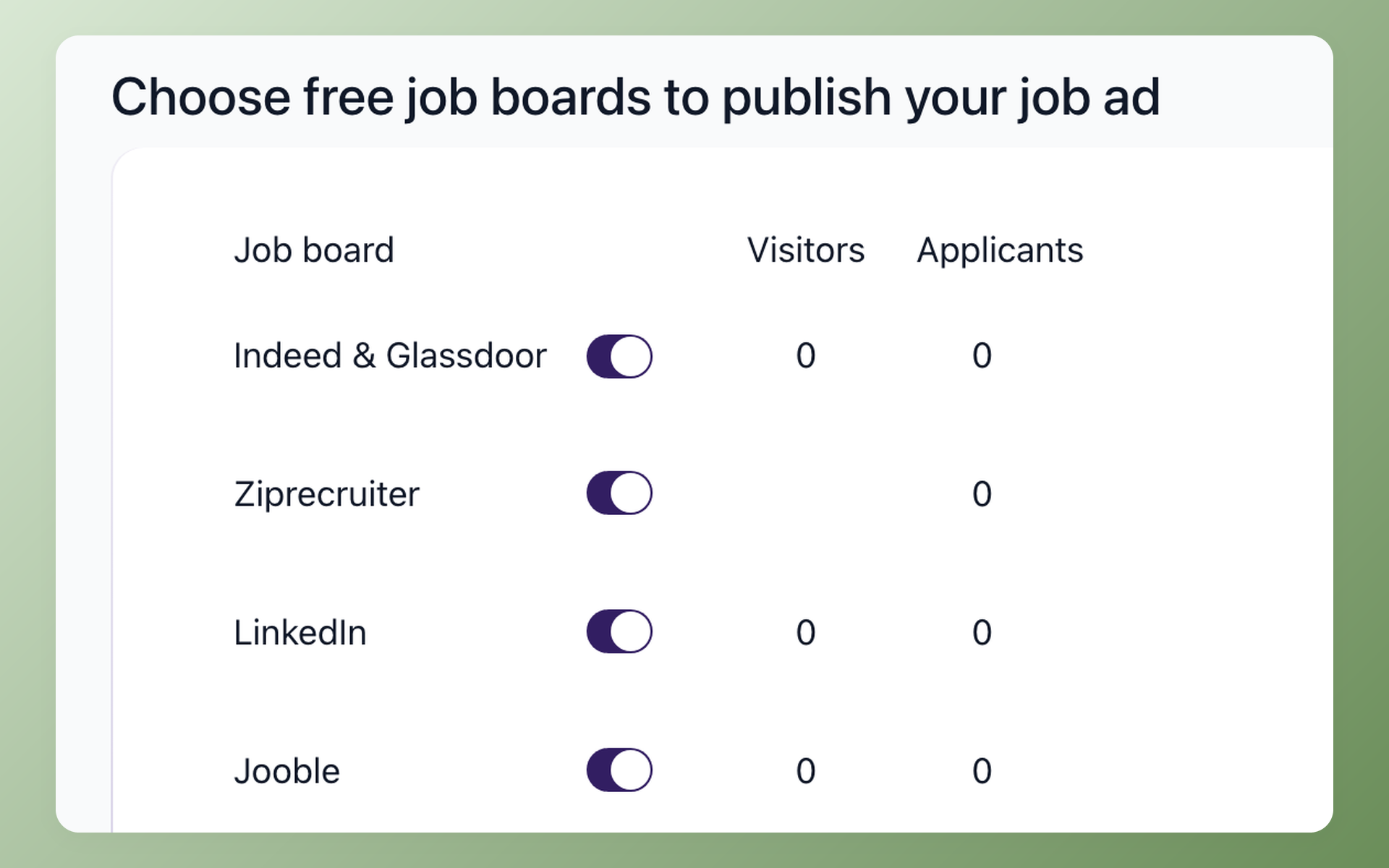
- Post once, distribute wide. In 100Hires you open the job, go to the Find Candidates tab, and toggle on each board you want. The platform validates the posting and submits it to 13 named job boards, LinkedIn among them.
- One-time LinkedIn setup. Add your LinkedIn Company URL and Company ID under Settings > Company Settings before the first submission; LinkedIn rejects jobs without them. The Company ID locks after initial setup and changes only through support, so enter it carefully. Jobs need Public status to distribute; Draft, Unlisted, Internal Use, and Talent Pool jobs stay put. The full checklist lives on our LinkedIn integration page.
- Lifecycle from the ATS. Edits to a live LinkedIn job take up to 24 hours to propagate, so finalize the posting before you publish. To pull a job off LinkedIn, set it to Archived or Filled in 100Hires.
A few timing details are worth knowing. New-account verification can take up to 72 hours on a free trial.
Paid accounts get priority clearance, with no published time-to-live figure. Either way, wait a day before checking a fresh posting; if a job still is not showing, our LinkedIn posting guide walks through the usual causes.
Applications from the boards you enable land in one 100Hires pipeline, where AI Score ranks them, instead of scattering across inboxes. Start a free trial to try it: 14 days, no credit card, plans from $49/mo.
Frequently asked questions
Can I post a job on LinkedIn for free?
Yes, with limits: one active free job at a time, a limited number per rolling 30-day window, a 14-day active period, auto-close at day 30, and typically 10 to 30 applicants. Staffing agencies are excluded, and a one-time card verification may apply. Posting through 100Hires is free and not capped at one LinkedIn job at a time, though every job still passes LinkedIn's own eligibility and review checks.
Why can I only see the option to promote my job?
You already have an active free job. LinkedIn allows one at a time, so a second posting only shows the promote path until you close or promote the first; the free option may then become available again, subject to eligibility and the rolling 30-day limit. Teams juggling several openings post them to LinkedIn and 12 more boards from 100Hires for free instead of queuing behind the one-job limit.
How long does a LinkedIn job posting stay up?
A free post runs 14 days, then pauses, and closes at day 30 unless promoted. A promoted post runs until you close it, with a 6-month auto-close. In 100Hires you manage the same job's board submissions from the Find Candidates tab, one place instead of a login per site.
Can I switch a promoted job back to free?
No. Promotion is one-way; the route back is closing the job and posting a new free one. Mind the 7-day rule: the same title from the same company within 7 days forces promotion again. Decide free vs promoted before you publish the LinkedIn listing; tools like 100Hires do not change that LinkedIn-side choice.
Why is LinkedIn asking for my credit card for a free job?
It is a one-time fraud-prevention check. There is no charge; a temporary authorization hold may appear and is released automatically. 100Hires cannot bypass LinkedIn verification, so complete the request in your LinkedIn account.
Can staffing agencies post jobs on LinkedIn for free?
No. LinkedIn requires staffing and recruiting agencies to use promoted posts. Agencies running their roles through 100Hires still distribute to the other named boards, with each board applying its own rules, so LinkedIn's paid requirement does not decide the whole distribution list.
How do I announce a job posting on LinkedIn?
Use the #Hiring share: Start a post, click the More icon, choose Share that you're hiring, select your organization, pick or create the job, and post. You need Page super admin status or listed current employment, and you can share at most 10 jobs you did not create. Pair the announcement with a trackable apply link from 100Hires so those applicants land in the same pipeline as the rest.
Should I post my job on LinkedIn or Indeed?
It depends on the role and the volume you need. LinkedIn's own figure, from its Global data as of July 2023, is that 83% of posted jobs get a qualified candidate within 24 hours; treat that as a vendor claim. Our Indeed vs LinkedIn comparison breaks down cost and candidate quality by role type. With 100Hires you post to both at once and let the source report settle the question with your own data.
Post your job to LinkedIn and 12 more boards in one click
Try 100Hires for free
No credit card. 14-day trial. Forbes Advisor #1 ATS for SMBs.

