
LinkedIn job posting cost in 2026: free vs promoted - 100Hires
An eligible free LinkedIn job post costs $0. A promoted job has no universal public price. LinkedIn uses variable, marketplace-based pricing and a budget selected by the employer.
We verified the rules and public prices in this guide on July 18, 2026. Below, you can compare free and promoted posts, choose between daily and total budgets, and model the cost of promoting 1, 5, or 10 jobs.
The short planning example is simple: LinkedIn shows that a selected $10 daily budget running for 30 days costs $300 or less for one job, depending on reach. That is a budget example, not a fixed LinkedIn job posting rate or minimum price.
- Free: $0 for one eligible active job, subject to posting, duration, application, and verification limits.
- Promoted: variable spend controlled with a daily average or total budget.
- Not included: LinkedIn Recruiter, Recruiter Lite, InMail, and contract Job Slots are separate products with separate costs.
How much does it cost to post a job on LinkedIn?
The hiring playbook, in your inbox
One email a week - benchmarks, AI screening tactics, and short interview templates from the 100Hires team. No product pitches.
The LinkedIn job post cost depends first on which posting product you use. Only the eligible free option has a universal dollar answer.
| LinkedIn hiring option | Public price | How the cost works | Main limit |
|---|---|---|---|
| Eligible free job | $0 | No promotion budget | One active free job, plus current eligibility and visibility limits |
| Promoted self-serve job | Variable | Employer selects a daily average or total budget; marketplace delivery determines how far it goes | Each promoted job has its own budget |
| Job Slots | Not publicly shown | Contract and volume pricing | Quote required |
| Recruiter, Recruiter Lite, and InMail | Separate products | Sourcing seats and messaging, not job-post promotion | Outside this cost comparison |
This is why searches for a LinkedIn job posting fee or LinkedIn job posting rates produce conflicting numbers. A recommendation displayed inside one employer account is not a public price list for every role and location.
Ask for the right LinkedIn cost object
Searches for job posting cost on LinkedIn, LinkedIn job postings cost, cost to post job on LinkedIn, LinkedIn post a job cost, posting a job on LinkedIn cost, and cost of LinkedIn job posting often mix four products.
Before requesting a quote, state whether you mean a free post, promoted self-serve job, Job Slot, or Recruiter seat. Free can be $0 when eligible; promoted pricing is variable.
Compressed searches such as LinkedIn jobs posting cost, LinkedIn post job cost, job posting on LinkedIn cost, posting job on LinkedIn cost, posting jobs on LinkedIn cost, and how much to post job on LinkedIn do not identify a different fee.
Free and promoted LinkedIn job posts are different products
A free post can test demand for one role. Promotion adds reach and removes several free-post constraints. It creates a variable media budget.
What an eligible free LinkedIn job post includes
LinkedIn currently allows a maximum of one active free job at a time and limits how many free posts an employer can create within a 30-day window. A free post can remain active for up to 14 days, then closes after 30 days if it is not promoted.
Free posts have an application limit of typically 10 to 30 applications, depending on the role. Some jobs may be ineligible for free posting or may require identity or company verification.
What a promoted LinkedIn job post changes
Promotion can place the role in more candidate recommendations, search results, feeds, and email placements. It does not use the free-post application cap, and employers can promote several roles at once with a separate budget for each one.
A promoted post can run until you close it, its total budget is consumed, or it reaches LinkedIn's maximum duration of up to six months. To switch back to free, close it and create a new eligible free post.
The one-free-job rule matters as soon as several vacancies overlap. An employer with five open jobs cannot run five free self-serve posts at the same time.
The choices are to promote some roles, rotate the free slot, stagger openings, or distribute through an ATS and other organic channels.
| Factor | Free post | Promoted post |
|---|---|---|
| Promotion spend | $0 | Variable selected budget |
| Active-job limit | One active free job | Multiple promoted jobs |
| Application limit | Typically 10 to 30, role-dependent | No free-post cap |
| Visibility | Searchable but declines over time | Additional paid placements |
| Budget controls | Not applicable | Daily average or total budget |
| Switch back to free | Already free | Close and repost |
LinkedIn promoted-job pricing is variable and marketplace-based
LinkedIn promoted jobs use an auction-based marketplace. The platform forecasts candidate activity and delivers the post within the budget you choose.
Your LinkedIn job advertising costs can change with the role title, job location, competition for similar candidates, prior promotion activity, applicant forecasts, and desired reach. That is why LinkedIn does not publish one universal LinkedIn job ad cost.
Auction-based pricing does not require employers to place manual bids. You choose the budget and LinkedIn handles pacing and delivery inside its marketplace.
The reach estimate shown before launch is a forecast. It does not promise that a fixed amount buys a fixed number of applicants.
You can select a budget below the recommendation shown in your account. Lower budgets can reduce delivery, and LinkedIn says some assisted features may no longer be available.
Do not treat a third-party daily range or broad cost-per-click range as LinkedIn's fixed starting price. LinkedIn's current pages make the variable model clear, but some explanations use views and clicks differently.
The recommendation in your account can still be useful for planning reach. Save it with the role, location, date, and expected outcome, then compare it with the amount you actually select. That record prevents a recommendation from becoming an undocumented company-wide rate.
For employer decisions, keep five metrics separate: views, clicks, completed applications, qualified applicants, and hires. A low cost for the first two can still create expensive screening work.
Daily average and total budget controls work differently
Both controls limit spend, but they create different pacing and monitoring needs.
Daily average budget
A daily average is not a guaranteed same-dollar charge every day. Spend can move above or below the selected average as candidate activity changes. The weekly maximum is up to seven times that daily average.
For example, selecting a $10 daily average creates a weekly ceiling of up to $70. That is budget pacing, not a statement that promotion costs $10 per day for every employer.
Unused budget can roll into later pacing. If you edit the daily setting, LinkedIn says the highest amount selected during that day can determine that day's charge, so record changes and monitor the campaign after every edit.
Total budget
A total budget is the cleaner control when finance needs a hard ceiling. Promotion pauses when that selected amount is consumed, and LinkedIn says charges do not exceed the budget, excluding applicable taxes.
| Control | Best fit | What to monitor | Primary risk |
|---|---|---|---|
| Daily average | Ongoing campaigns with active monitoring | Daily changes and the 7x weekly ceiling | Assuming every day will match the selected average |
| Total budget | One-off campaigns and fixed approvals | Spend remaining and applicant quality | Using the full cap before enough qualified applicants arrive |
Realistic LinkedIn cost scenarios for 1, 5, and 10 jobs
Scenario assumption: you select a $10 daily average for each promoted job and run it for 30 days. This matches LinkedIn's official one-job example.
The formula is selected daily average multiplied by days multiplied by promoted jobs. Every result below is a selected-budget ceiling before tax, not an average LinkedIn price, minimum, quote, forecast, or guarantee.
| Promoted jobs | Selected budget per job | Selected duration | Combined selected ceiling |
|---|---|---|---|
| 1 | $10 daily average | 30 days | $300 or less |
| 5 | $10 daily average | 30 days | $1,500 or less, derived |
| 10 | $10 daily average | 30 days | $3,000 or less, derived |
One-job scenario
For one low-urgency role, test the eligible free post first. If the free limits are too restrictive, a selected $300 total cap creates a clear maximum for promotion. Close the post when the role is filled instead of letting the remaining period run automatically.
Five-job scenario
Five simultaneous promoted jobs using the selected example budget create a combined ceiling of $1,500 before tax. Treat each $300 cap as a separate decision.
You might promote the hardest or most urgent roles, use organic distribution for the others, and move budget only after comparing qualified applicants.
Ten-job scenario
Ten jobs create a selected ceiling of $3,000 before tax in this example. At that volume, staggered start dates and role-level stop conditions matter. A single combined ceiling on a planning sheet does not replace the separate budget configured for each promoted post.
You can produce the same ceiling with a $300 total budget per job. The difference is control: a total cap creates a harder stop; daily pacing gives the platform more flexibility within its weekly limit.
Actual spend can be lower if you close a job early, fill the role, pause weak delivery, or stagger five or ten openings. When estimating how much to post a job on LinkedIn, write down the selected budget, duration, job count, and stop condition before publishing.
Keep that plan beside the invoice and campaign results. For each role, record the posting status, selected control, approved amount, dates, applications, qualified applicants, interviews, and hires.
This turns a variable platform charge into a repeatable budgeting process without pretending the marketplace has become fixed.
Build one budget decision for each vacancy
Several open roles do not need identical caps. Set one decision record per vacancy, then roll those choices into the portfolio total.
- Mark the role that can use the single eligible free slot.
- Rank the remaining roles by urgency, difficulty, and proven source results.
- Give each promoted role its own approved ceiling and close condition.
- Choose a total budget for strict control or a daily average for monitored pacing.
- Move future spend toward roles and sources that produce qualified applicants.
The ten-job $3,000 scenario shows the selected ceiling when all ten jobs use the same example budget. It is not a recommendation to promote every role.
A real portfolio can mix one free LinkedIn post, organic distribution for every eligible role, and paid promotion for a smaller urgent set. Add only the selected caps for the jobs you promote.
LinkedIn configures each promoted post separately, so a planning-sheet total does not create a shared platform wallet. A role that closes early may finish under its cap; another job cannot assume access to that unused amount unless you change its own budget.
This role-level method gives finance a portfolio ceiling and gives recruiters clear stop rules. It keeps the selected-budget math useful without turning a variable auction into a false rate card.
Measure cost per qualified applicant, not just cost per click
A dashboard cost per click or application is only one step in the hiring funnel. It does not show whether the candidate met the basic requirements.
- Cost per view or click: promotion spend divided by the platform interaction.
- Cost per application: promotion spend divided by completed applications.
- Cost per qualified applicant: spend divided by candidates who pass your agreed screen.
- Cost per hire: channel spend divided by accepted hires, before recruiter time and other costs.
Track these by job and week. If applications rise but qualified applicants do not, review the title, location, requirements, and pay before increasing the budget.
The BLS Occupational Employment and Wage Statistics can help US employers check whether a title and wage assumption match the market.
Here is arithmetic, not a market average. If a campaign spends $300, receives 30 applications, and produces 10 qualified applicants, the cost is $10 per application and $30 per qualified applicant.
Compare the cost per qualified applicant across sources before increasing the promotion budget.
In two 2025 customer interviews recorded by 100Hires, one recruiter described more than 200 applications spilling into weekend work. Another managed 30 open roles and could not clear every candidate queue alone.
That is the operational cost behind fragmented applicant flows. Promotion spend is only one line in the hiring budget.
Job posting costs do not include LinkedIn Recruiter or InMail
A promoted job buys inbound visibility. Recruiter, Recruiter Lite, and InMail support outbound candidate search and messaging, so their prices should not appear in a LinkedIn job-posting calculation.
Job Slots are separate. They provide reusable posting inventory through a contract, but LinkedIn does not show one public fixed Job Slot price. Hiring Pro combines hiring capabilities around job posts, yet it does not create a universal self-serve promotion rate.
If you are budgeting sourcing seats or messages, use our separate guide to LinkedIn Recruiter costs. Keep those numbers out of the job-post budget so finance can see what each purchase actually buys.
Compare the same 1, 5, and 10-job scenarios with 100Hires plans
These costs are not directly comparable. LinkedIn promotion is a media budget for paid reach. 100Hires prices an ATS subscription that includes organic job distribution and applicant management.
The table uses current 100Hires plans and assumes that 1, 5, or 10 jobs are active at the same time for one month. Annual-equivalent prices require annual payment.
| Plan and limits | 1 active job | 5 active jobs | 10 active jobs |
|---|---|---|---|
|
Start Displayed: $99 monthly, or $49/month billed annually Derived annual total: $588 Up to 3 jobs, 100 candidates, 1 user |
$99 monthly, or $49 annual-equivalent per active job | Not supported: Start includes up to 3 jobs | Not supported: Start includes up to 3 jobs |
|
Advanced Displayed: $249 monthly, or $199/month billed annually Derived annual total: $2,388 Unlimited jobs, candidates, and users |
$249 monthly, or $199 annual-equivalent per active job | Same plan price Derived per active job: $49.80 monthly, or $39.80 annual-equivalent |
Same plan price Derived per active job: $24.90 monthly, or $19.90 annual-equivalent |
|
Pro Displayed: $499 monthly, or $399/month billed annually Derived annual total: $4,788 Unlimited jobs, candidates, and users |
$499 monthly, or $399 annual-equivalent per active job | Same plan price Derived per active job: $99.80 monthly, or $79.80 annual-equivalent |
Same plan price Derived per active job: $49.90 monthly, or $39.90 annual-equivalent |
|
Enterprise Pricing and limits: not publicly shown Custom scope |
Quote required | Quote required | Quote required |
The per-active-job figures are calculated by allocating the plan price across active jobs; they are not extra fees. Advanced and Pro cost the same within each billing option whether 1, 5, or 10 jobs are active.
- Start: fits one to three simultaneous jobs when its 100-candidate and one-user limits work. It cannot support the five- or ten-job comparison.
- Advanced: keeps the displayed plan price constant across all three scenarios; jobs, candidates, and users are unlimited.
- Pro: keeps one plan price across the scenarios. Choose it for the broader Pro plan scope shown on the pricing page. It does not discount LinkedIn promotion.
- Enterprise: requires a quote, so no numeric comparison is honest until the employer receives one.
Organic LinkedIn distribution is included in the applicable 100Hires plan. If you promote the post, LinkedIn bills that media spend separately. Never subtract the ATS subscription from the promoted-post scenario or describe the subscription as paid LinkedIn reach.
Distribute beyond LinkedIn and manage applicants in one ATS
LinkedIn can remain a useful channel without owning the entire funnel. The practical alternative is to publish broadly, compare source quality, and manage every applicant in one workflow.
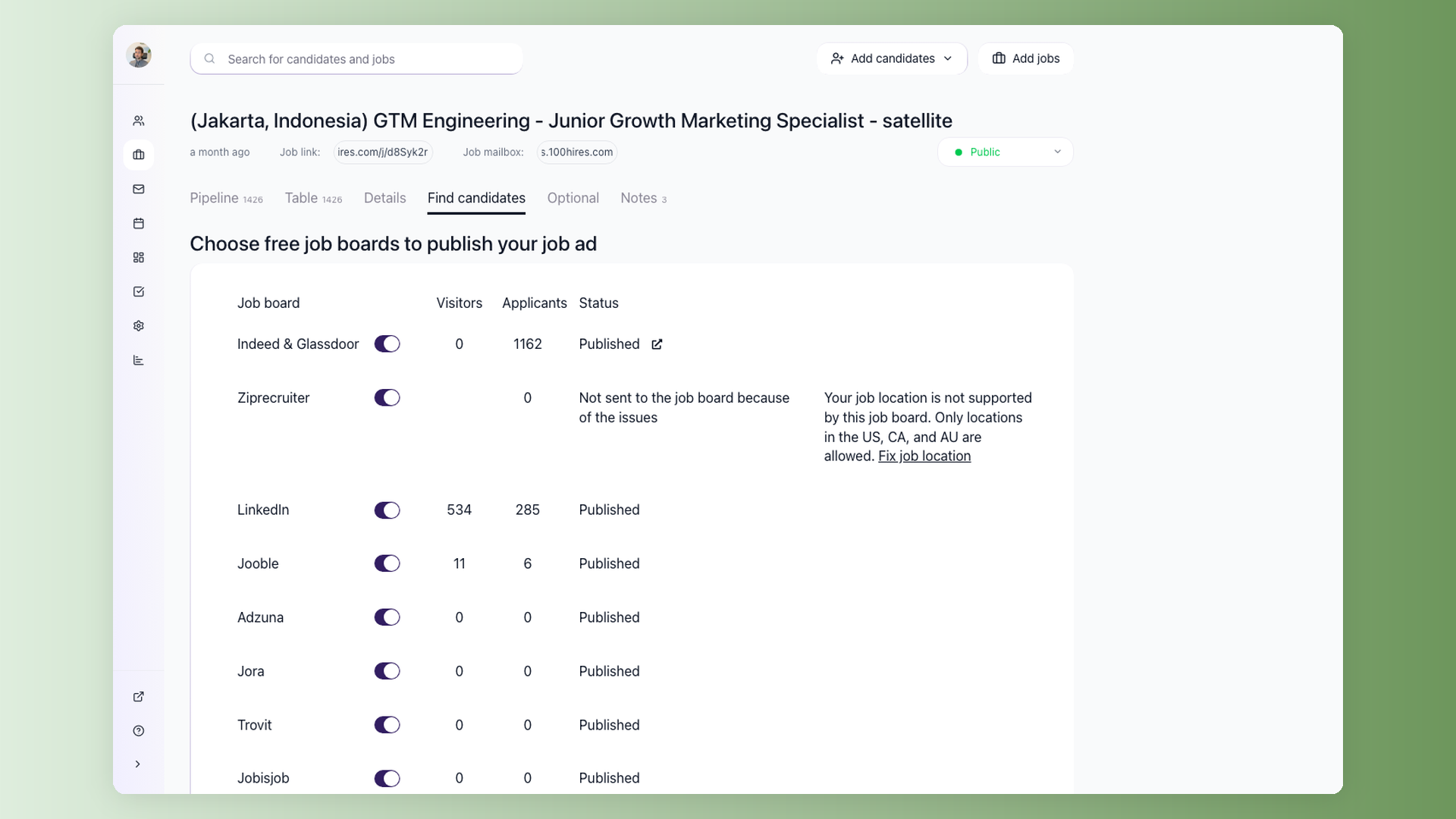
100Hires combines multi-board distribution with source-aware applicant tracking, so employers can compare what LinkedIn and other channels send into one ATS. You can distribute organic jobs to 13 job boards, turn boards on or off, and monitor publication status.
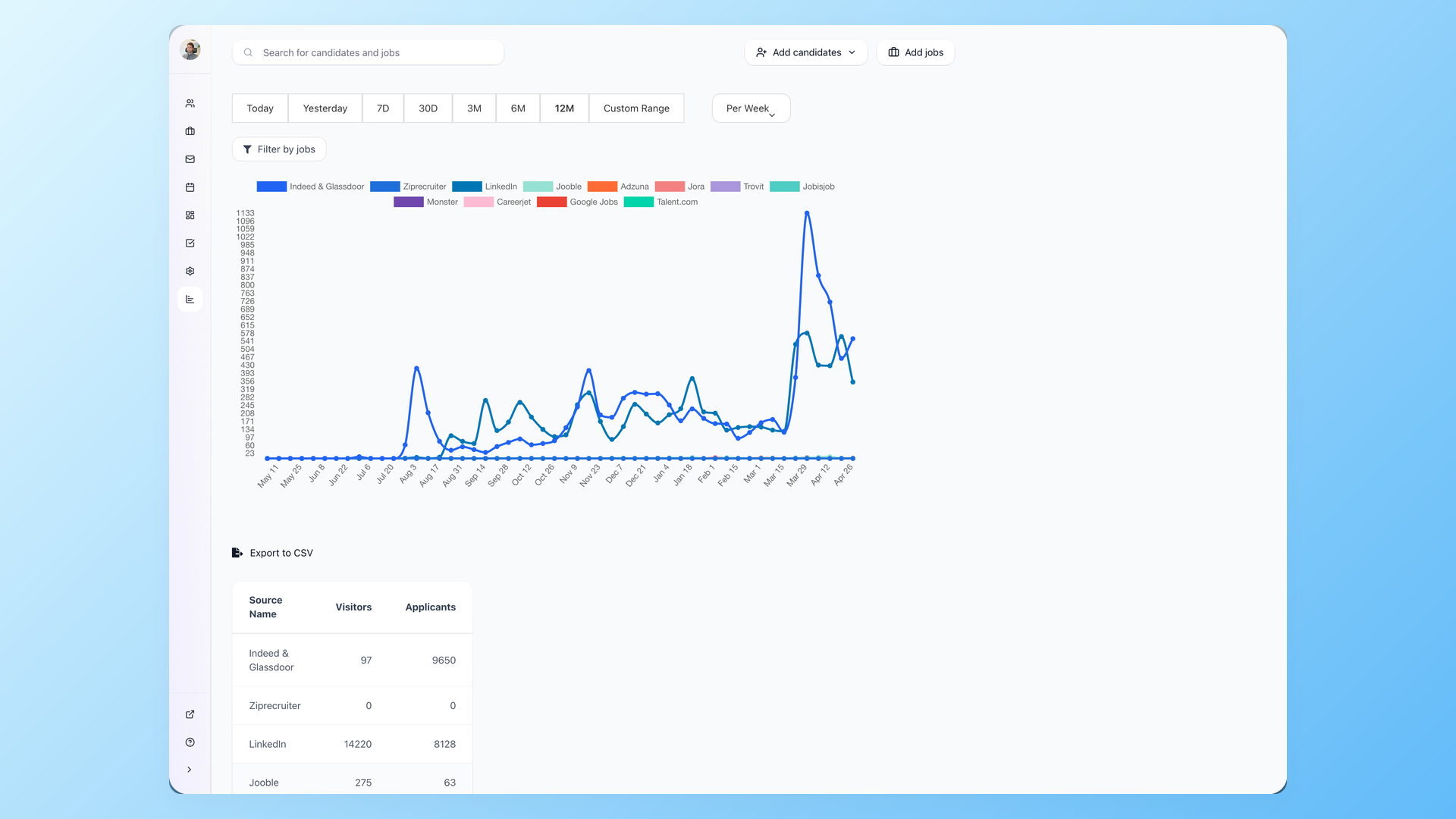
Trackable links extend attribution to channels outside the built-in list. Source reports then compare visitors, candidates, conversion, and pipeline outcomes instead of leaving each channel in a separate dashboard.
When applicant volume rises, a shared pipeline keeps stage decisions, notes, evaluation forms, and communication together.
AI Scoring can help prioritize applications against configured criteria. It does not guarantee candidate quality and should not replace human review.
If a role performs poorly on LinkedIn, compare it with other boards and sourcing methods before adding budget. Our guide to alternatives to a LinkedIn-only recruiting stack explains when another channel or workflow may fit better.
100Hires is not a substitute for paid promotion and cannot guarantee that every board accepts or displays every role. Its value is broader organic distribution, applicant management, and source evidence for the next budget decision.
Control LinkedIn job advertising costs before raising the budget
Use a repeatable checklist before accepting a recommendation or extending a campaign.
- Try the eligible free option for one low-urgency role when its limits fit.
- Fix the title, location, pay, requirements, and application friction before buying more reach.
- Choose a total budget when a hard financial ceiling matters.
- Start with a business-approved cap, not the platform recommendation by default.
- Review qualified applicants and interviews instead of views or clicks alone.
- Pause or close weak campaigns before they consume the full selected amount.
- Compare channels and use source results to set the next budget.
A smaller budget can reduce delivery, so the goal is not always to spend less. The goal is to set a ceiling you understand and spend enough to gather evidence about qualified candidates for the next decision.
LinkedIn job posting cost FAQ
Is LinkedIn job posting free?
Yes, one eligible active LinkedIn job can be posted for $0, subject to current posting, duration, application, and verification limits. 100Hires can distribute an organic role to LinkedIn and other job boards from one ATS, but it does not remove LinkedIn's eligibility rules.
How much is a LinkedIn job posting?
An eligible free post costs $0. A promoted post has variable pricing based on the budget you select and marketplace delivery. 100Hires keeps applicants and source results together; LinkedIn bills any optional promotion separately.
How much does it cost to post jobs on LinkedIn?
There is no universal price. A selected $300 cap per job sets ceilings of $300, $1,500, and $3,000 for 1, 5, and 10 jobs before tax. These are planning scenarios, not LinkedIn rates. 100Hires supplies the ATS and organic distribution layer, not paid media.
What is the LinkedIn job posting fee?
LinkedIn does not apply one universal fee to every promoted self-serve job. Spend depends on the budget you select and how LinkedIn delivers the job through its marketplace. 100Hires pricing is separate and covers its ATS plan, organic distribution, and applicant workflow.
What are LinkedIn job posting rates?
LinkedIn does not publish one universal rate card for self-serve promoted jobs. Account recommendations and third-party cost-per-click ranges are not fixed platform-wide rates. 100Hires source reporting helps employers compare channel outcomes after applicants enter the ATS.
Can I set a total budget for a LinkedIn job ad?
Yes. A total budget creates the clearest hard ceiling and promotion pauses when it is consumed. Taxes may be additional. 100Hires can track the applicants and source outcomes in one pipeline, but LinkedIn controls and bills the promotion budget.
Are LinkedIn Recruiter and InMail included in the job-post price?
No. Recruiter, Recruiter Lite, and InMail are separate sourcing and messaging products. 100Hires can manage sourced and inbound candidates in the same ATS, but those LinkedIn product costs should not be mixed into a promoted-job budget.
Does 100Hires include paid LinkedIn promotion?
No. Applicable 100Hires plans include organic job distribution and applicant management. If you choose to promote a job on LinkedIn, LinkedIn bills that media spend separately. 100Hires helps compare sources and manage the resulting applicants in one workflow.
Plan from a ceiling, then measure the funnel
The honest LinkedIn job posting pricing answer is $0 for one eligible free role and variable spend for promotion. Use a total budget when you need a hard ceiling, and judge performance by qualified applicants and hires.
For several openings, keep LinkedIn in a measured multi-channel mix instead of treating it as the whole hiring system. Start a 100Hires trial to distribute jobs and manage applicants in one ATS.
Try 100Hires for free
No credit card. 14-day trial. Forbes Advisor #1 ATS for SMBs.

