
LinkedIn x-ray search: copy-paste boolean strings that still work in 2026
Recruiters are quietly going back to Google to search LinkedIn, because LinkedIn's own search keeps getting worse.
This guide gives you ready-to-paste x-ray strings for finding LinkedIn profiles through Google, a simple method to build your own quickly, and a straight answer on what still works in 2026 after LinkedIn narrowed what Google can index.
If you pay for LinkedIn Recruiter and feel the search got clumsier, or you cannot justify the seat at all, x-ray search is the free workaround.
Results are shallower than they were two years ago, but the technique is far from dead. The copy-paste templates start a couple of scrolls down.
Key takeaways
The hiring playbook, in your inbox
One email a week - benchmarks, AI screening tactics, and short interview templates from the 100Hires team. No product pitches.
-
X-ray search means using Google's
site:operator to search the public LinkedIn profiles Google has indexed, instead of searching inside LinkedIn. - It works on a free LinkedIn account and sidesteps the search limits tied to paid seats.
- LinkedIn narrowed what Google indexes in early 2024, so results are thinner than before, but public-profile x-ray still surfaces people.
- Copy-paste templates are below, followed by a 5-step method so you can build strings for any role.
- X-ray finds the people. Importing and contacting them is where a tool like 100Hires saves you the hours.
What is LinkedIn x-ray search, and how is it different from a boolean search
The two terms get mixed up constantly, even by experienced sourcers, so let us settle it in one breath.
-
Boolean is the logic:
AND,OR,NOT, quotes, and parentheses. It controls what you search for. -
X-ray is the
site:operator. It controls where Google looks.
X-ray search combines both: boolean logic aimed at site:linkedin.com/in. You are not searching LinkedIn's database. You are searching Google's copy of the public profiles LinkedIn chooses to publish, which is a deliberately trimmed version of the full profile.
Boolean is the logic, x-ray is the location
Here is one string with the two parts labeled, so the split stops being abstract:
site:linkedin.com/in   ("product manager" OR "product owner")   "fintech"   "London"
   ^ x-ray (where)       ^ boolean (what: title synonyms)         ^ skill      ^ location
The goal is not to memorize strings. It is to understand the pattern so you can build one for any role in a minute or two. That is what the rest of this guide teaches.
Copy-paste LinkedIn x-ray search templates
Paste any of these into Google, then swap the bracketed parts for your role, skills, and city. Every string here uses correct syntax, which matters more than it sounds: a single stray space after the colon breaks the operator (more on that in the mistakes section).
Prefer to skip the typing? Our free boolean search string generator builds one from a job title, and the free tools at the top of Google (RecruitEm, Recruitment Geek) do the same. The templates below give you more control.
The base template every recruiter should know
site:linkedin.com/in ("Job Title" OR "Synonym") ("Skill" OR "Certification") "City" -intern -recruiterThis shape is the community standard. Different sourcers, working different roles in different countries, keep arriving at the same skeleton independently, which is a good sign it works. Learn this one and the rest are variations.
Templates by role
Filled-in examples across common verticals. Copy, then edit the quoted terms.
Software engineer
site:linkedin.com/in ("software engineer" OR "backend developer") (Python OR Go) "Austin" -intern -recruiter

Sales
site:linkedin.com/in ("account executive" OR "sales manager") ("SaaS" OR "B2B") "Chicago" -jobs -hiring

Registered nurse
site:linkedin.com/in ("registered nurse" OR "RN") ("ICU" OR "critical care") "Phoenix" -jobs -staffing

Product manager
site:linkedin.com/in ("product manager" OR "product owner") ("fintech" OR "payments") "New York" -intern -recruiter

Financial analyst
site:linkedin.com/in ("financial analyst" OR "FP&A") ("CFA" OR "modeling") "Boston" -intern -jobs

Marketing manager
site:linkedin.com/in ("marketing manager" OR "growth marketer") ("SEO" OR "demand generation") "Denver" -jobs

Data scientist
site:linkedin.com/in ("data scientist" OR "machine learning engineer") ("PyTorch" OR "TensorFlow") "Toronto" -intern -recruiter

DevOps engineer
site:linkedin.com/in ("DevOps engineer" OR "SRE" OR "platform engineer") ("Kubernetes" OR "Terraform") "Remote" -recruiter

Customer success manager
site:linkedin.com/in ("customer success manager" OR "CSM") ("SaaS" OR "onboarding") "Atlanta" -jobs

Accountant
site:linkedin.com/in ("accountant" OR "controller") ("CPA" OR "GAAP") "Dallas" -intern -jobs

UX designer
site:linkedin.com/in ("UX designer" OR "product designer") ("Figma" OR "design system") "Seattle" -intern

Mechanical engineer
site:linkedin.com/in ("mechanical engineer" OR "design engineer") ("SolidWorks" OR "CAD") "Detroit" -intern -jobs
Three advanced variants worth knowing
Once the base pattern feels natural, these three moves cover most of what you will reach for. Note that intitle: and inurl: are not in Google's official operator documentation, but sourcers rely on them because they still work in practice.
Target a specific current employer
site:linkedin.com/in "software engineer" "Stripe" "San Francisco"

Target the profile headline text with intitle
site:linkedin.com/in intitle:"data engineer" "Chicago"

Narrow to senior and leadership titles
site:linkedin.com/in ("engineering manager" OR "head of engineering") "fintech" "London" -recruiter
Exclusion terms that clean up your results
The minus operator removes noise. Google officially supports it, and while LinkedIn's own search does not officially support it, that is one more reason to run the search on Google. Stack a few of these onto any string, then read what each one does in the list below:
-
-intern -student -traineedrops junior noise -
-recruiter -"talent acquisition"drops other recruiters -
-jobs -directory -companydrops job posts and company pages -
-"open to work"drops active job seekers, if you want passive candidates only
One caution: over-excluding buries real candidates. Add exclusions one at a time and watch the result count, rather than pasting all of them at once.
Narrowing a search that returns too many results
When a string returns thousands of hits, do not rewrite it from scratch. Stack one term at a time and check after each addition:
- Start with the title only:
site:linkedin.com/in "data analyst" "Toronto" - Add one must-have skill:
... ("SQL" OR "Tableau") - Check the results, then add one exclusion:
... -intern - If a step drops results to zero, remove the last term you added. That is the block that over-restricted.
How to build your own x-ray string in 5 steps
Templates get you moving. This method makes you independent of them, so you can build a string for any role, in any market, without hunting for an example first.
Step 1: set the location with site:linkedin.com/in
Start every LinkedIn x-ray with site:linkedin.com/in. The /in path targets member profiles, so keep it when you want people rather than company pages or posts.
To focus on one country, try adding the country subdomain, for example site:uk.linkedin.com/in, and compare it against the plain site:linkedin.com/in to see which returns more for your market.
Step 2: add the job title with synonyms
Wrap exact titles in quotes and group variants with OR inside parentheses: ("software engineer" OR "backend developer"). Think in candidate language, not job-description language.
A posting says "cloud platforms," but people write AWS, Azure, or GCP on their profiles. Search the words candidates actually use.
Step 3: layer in must-have skills
Add skills in their own parentheses group so the logic stays clean: (Python OR Django). Keep boolean operators uppercase.
Google is forgiving about case, but the uppercase habit saves you when you take the same string to LinkedIn or Bing, where lowercase and/or get treated as ordinary words.
Step 4: exclude the noise
Trim with the minus operator: -intern -student -recruiter -jobs. Each exclusion removes a category of false positives. Add them gradually. If your result count collapses, you have excluded a term that legitimate candidates also use.
Step 5: test, read the snippets, and refine
Run the search and read the Google snippets before you open anything. The snippet usually shows details like the person's headline and location, so you can often pre-qualify without clicking.
That habit also saves you clicks and review time if you are working from a paid LinkedIn seat. Zero results? Remove the last term you added and try again.
Google x-ray search beyond LinkedIn
The same site: trick works anywhere candidates leave a public footprint. For technical roles especially, LinkedIn is often the weaker source.
Source developers on GitHub and Stack Overflow
Engineers show their actual work on GitHub and answer questions on Stack Overflow, which is a stronger signal than a headline. Filter out the repository and issue pages so you land on people:
site:github.com ("machine learning" OR "ML engineer") "San Francisco" -intitle:repositories -intitle:issues

site:stackoverflow.com/users ("python" OR "django") "Berlin"
Find resumes and portfolios with filetype
The filetype: operator pulls documents people posted publicly. Expect fewer and often older results, and screen out templates and samples:
filetype:pdf ("resume" OR "CV") "data engineer" "Seattle" -template -sample -jobDoes x-ray work on Bing or DuckDuckGo?
Officially, yes. Both document the site: operator. In practice, Google stays primary. Bing caps a query at its first 10 terms, so long recruiter strings silently lose their tail, and recruiters report mixed results there.
DuckDuckGo even notes that some of its own advanced syntax does not run reliably. Treat Bing and DuckDuckGo as backups worth a try when Google feels thin, not as the main engine.
Does LinkedIn x-ray search still work in 2026?
Short answer: it was tightened, not killed, and results vary by search.
In early 2024, LinkedIn narrowed several profile fields in what Google indexes publicly, which two well-known sourcing experts, Jan Tegze and Irina Shamaeva, both documented at the time.
That change is why x-ray can feel shallower than it did a few years ago: at the time it left less profile text in Google's copy to match against. How much you see today varies by profile and query, since each member also controls how much of their profile is public.
Yet recruiters keep using it successfully. Practitioners on r/recruiting report through 2025 that a plain site:linkedin.com search on Google still surfaces people that LinkedIn's own search misses entirely.
The "x-ray is dead" headline is not new either. It resurfaces every couple of years, going back to 2016, and the technique keeps outliving the obituary.
One more thing worth knowing: when a result looks stale, that is expected. LinkedIn says its public profiles can take weeks or months to refresh in search engines, and it does not control that timing.
A profile you find through x-ray may show an older title until the crawl catches up.
Common LinkedIn x-ray search mistakes
Most failed x-ray searches come down to a handful of repeat errors. Fix these and your hit rate jumps.
-
A space after the colon.
site: linkedin.combreaks the operator. It has to besite:linkedin.comwith no space. Google says so directly, and yet you will see the broken version published on high-ranking pages. -
Lowercase operators. Google tolerates them, but the safe habit is uppercase
AND,OR,NOT, because LinkedIn and Bing require it. -
Missing parentheses. Without them,
ORscrambles your logic and the search matches things you never intended. - Searching job-description language. Candidates write "AWS," not "cloud platforms." Search their words, not the posting's.
- Buzzword boolean. Stringing together generic keywords everyone has on their profile returns everyone. Use terms that actually separate your target from the crowd.
-
A typo in the domain path.
/ilinstead of/insilently searches the wrong thing. Double-check the path. - Over-excluding. Ten minus terms can bury the exact people you want. Add exclusions one at a time.
From search results to hired: the sourcing workflow
Here is the honest limit of x-ray on its own. It finds the right people, but then you open each profile one by one, copy the details, and go hunting for contact info.
One recruiter put it plainly: you still had to open up every profile, and it was not that efficient. Another described it as roughly four times the work to get the same number of replies.
That manual grind is the gap a tool fills. Full disclosure, 100Hires is our product, so here is exactly how it fits, limits included.
- Run your x-ray string on Google as usual.
- The 100Hires Chrome extension captures candidates straight from the search results page, across 14 sources including LinkedIn, GitHub, and Stack Overflow.
- Each capture lands in your ATS tagged with its source and deduplicated, so two recruiters do not work the same person by accident.
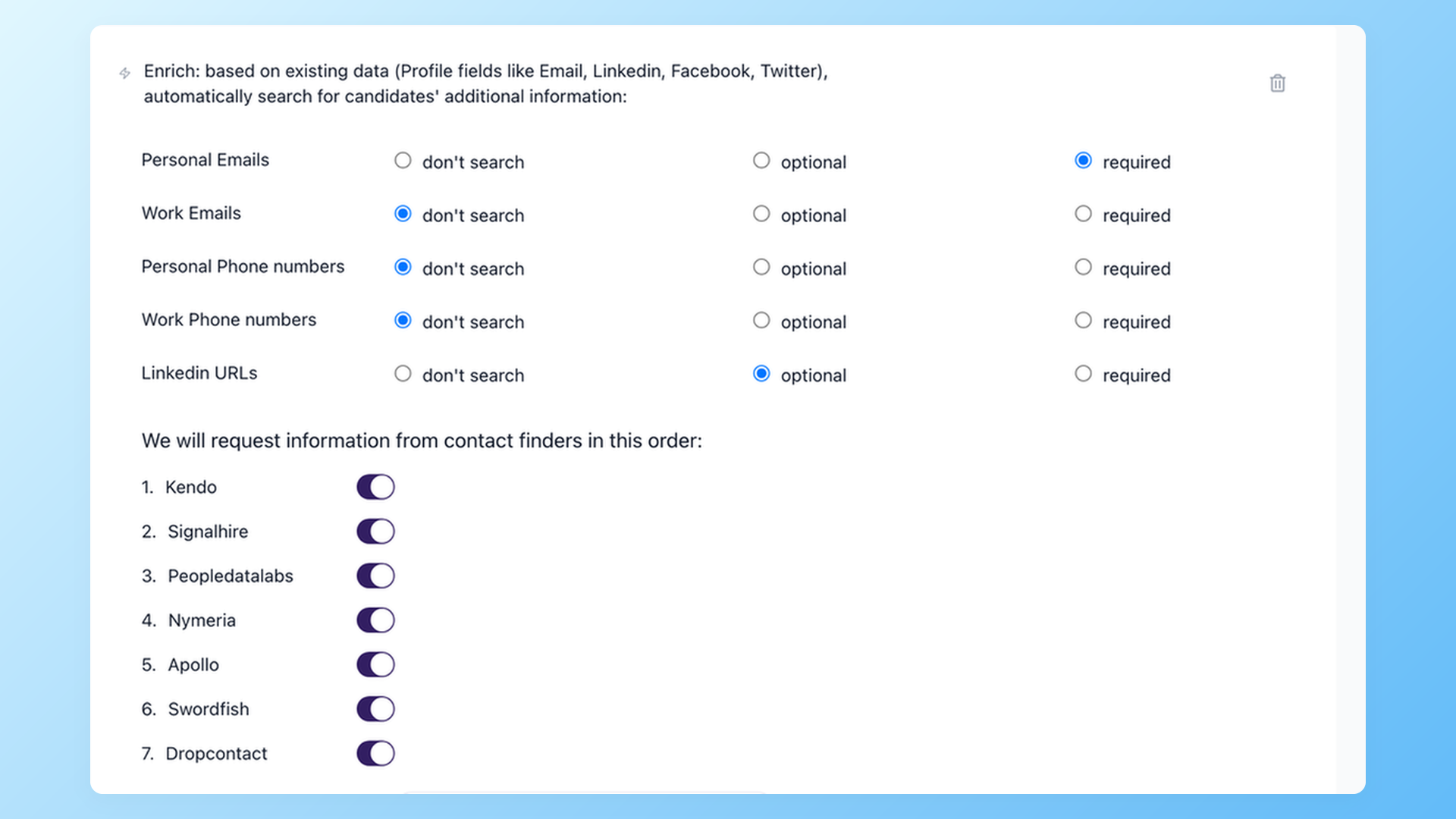
- On the Pro plan, an enrichment step runs seven data providers in sequence to find personal emails, then validates them before you send.
- You reach out from the same system that holds the candidate.
The limits, stated plainly: 100Hires has no boolean search box of its own, so the operators run on Google, not inside the app. The extension captures what is visible on the page, so hidden personal emails are a separate enrichment step on the Pro plan.
Manual x-ray vs x-ray with a capture tool
| Step | 100Hires | Manual x-ray only |
|---|---|---|
| Find the candidate | Google x-ray string | Google x-ray string |
| Capture the details | One click from the results page | Open each profile, copy by hand |
| Avoid duplicates | Auto dedupe and source tagging | Track it yourself in a sheet |
| Find an email | 7-provider enrichment (Pro plan), then validation | Separate lookup tool, or guess |
| Track in a pipeline | Already in the ATS | Copy into a spreadsheet or CRM |
You can learn the strings for free and keep it fully manual. A tool just removes the copy-paste hours. Start a free 100Hires trial if you want to try the capture side.
For a wider look at the category, see our roundup of sourcing tools for recruiters and our candidate sourcing guide.
Is x-ray search against LinkedIn's rules?
X-ray search reads Google's public index. You are not running an automated scraper inside your LinkedIn session, which is the activity recruiters have reported getting their accounts restricted for when they lean on some on-platform browser tools.
Because the search happens on Google, x-ray is lower-risk than in-session scraping.
Lower-risk is not risk-free. LinkedIn's terms on data collection are broader than just in-app automation, so read them and use judgment.
Recruiters sourcing contact details in Europe also raise data-handling and GDPR questions, so know the rules for your jurisdiction. This is context, not legal advice.
Can AI write your boolean strings now?
Yes, and plenty of recruiters already do it. Paste a job description into ChatGPT, or into our free boolean search string generator, and you get a working string back quickly. Treat it as a first draft, then tighten the synonyms and exclusions by hand.
Some AI-sourcing vendors now pitch boolean and x-ray as legacy skills that semantic search replaces. It is a real pitch worth watching, though the bolder claims about how much talent boolean misses are vendor marketing, not measured data.
Meanwhile, sourcers are actively teaching and sharing x-ray strings right now, so the skill is not going anywhere yet. Knowing how to build a string by hand still makes you faster and less dependent on any one tool.
Frequently asked questions
What is an x-ray search on LinkedIn?
An x-ray search uses Google's site: operator to find the public LinkedIn profiles Google has indexed, instead of searching inside LinkedIn. You combine site:linkedin.com/in with boolean terms for titles, skills, and location. Tools like the 100Hires Chrome extension then capture those results straight from the Google page into your ATS.
Is LinkedIn x-ray search free?
Yes. X-ray search runs on Google and works with a free LinkedIn account, so it costs nothing and sidesteps the search limits on paid seats. The catch is the manual work of opening profiles and finding contact details, which is the part 100Hires automates with one-click capture and enrichment.
Why did my LinkedIn x-ray search stop working?
LinkedIn narrowed which profile fields Google can index in early 2024, so searches can return less than they used to, and public profiles can take weeks or months to refresh in Google. The technique still works, though how much you see varies by profile and query. If results dry up, simplify the string and search the terms candidates actually write. 100Hires then captures the profiles your search does surface, straight from the results page.
Does x-ray search work on Bing?
Bing officially supports the site: operator, so x-ray works there, but it caps a query at the first 10 terms, so long strings lose their tail. Google stays the primary engine for most recruiters, and it is where the 100Hires extension captures candidates straight from the results page.
Do I still need LinkedIn Recruiter if I can x-ray search?
Many recruiters treat x-ray as a free complement rather than a full replacement, reaching for it on hard-to-fill roles or when candidates are not active on LinkedIn. If you want to reduce your reliance on the seat, pairing free x-ray with a capture-and-enrich tool like 100Hires handles much of the sourcing and outreach you would otherwise run inside LinkedIn Recruiter.
How do I contact candidates I find with x-ray search?
Public profiles rarely show an email, so you need an enrichment step. 100Hires captures the candidate from the search results, then on the Pro plan runs seven data providers in sequence to find and validate a personal email, so you can reach out from the same system that holds the candidate.
Learn the strings, then let the software handle the capture-and-contact grind. Start your free 100Hires trial and put your next x-ray search to work.
Related 100Hires resources: Explore chrome extension for recruiters.
Try 100Hires for free
No credit card. 14-day trial. Forbes Advisor #1 ATS for SMBs.

