
JobAdder vs Bullhorn: Agency Pricing and Fit (2026) - 100Hires
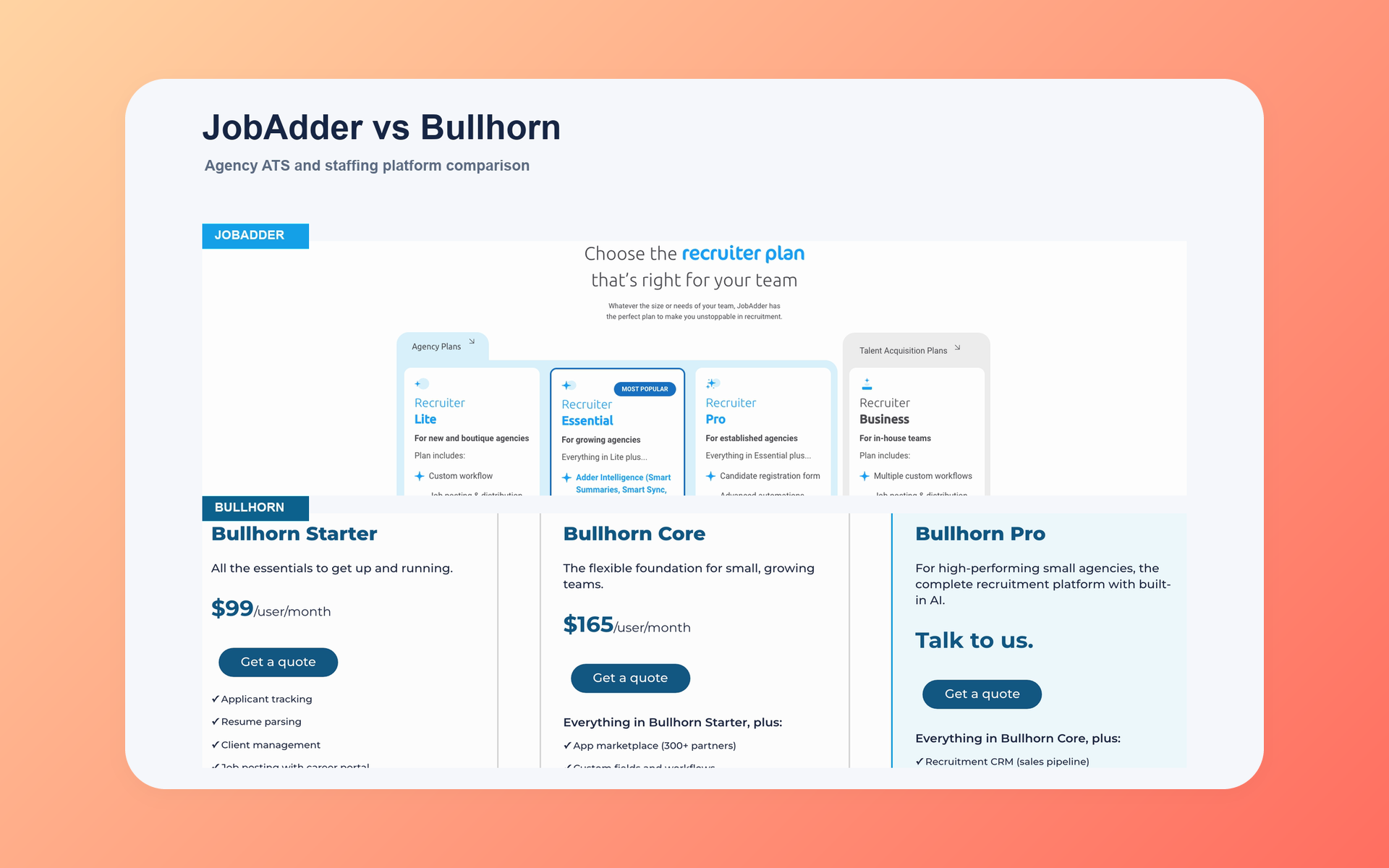
JobAdder is the default for an approachable, recruiter-led agency front office and temp-placement coordination.
Bullhorn fits teams that need broader staffing-operation paths, from small-agency entry plans to enterprise product families.
That choice is not simply small versus large: the decisive question is which purchased package must own timesheets, invoicing, pay-and-bill, payroll, VMS, and workforce work after placement.
This comparison maps current package boundaries, public price units, implementation questions, and the conditions that make either system a sensible fit.
JobAdder vs Bullhorn direct verdict
The hiring playbook, in your inbox
One email a week - benchmarks, AI screening tactics, and short interview templates from the 100Hires team. No product pitches.
Choose JobAdder when recruiter adoption, candidate and client work, job posting, and coordinated placements form the center of the agency. Use connected payroll, billing, and specialist staffing systems for the parts outside JobAdder’s documented workflow.
Choose Bullhorn when the purchased scope must reach deeper into recruitment sales, VMS, onboarding, middle office, pay-and-bill, invoicing, or workforce management.
| Decision point | JobAdder | Bullhorn |
|---|---|---|
| Default fit | Recruiter-led agency front office with permanent, contract, or temp-placement coordination | Enterprise or operations-heavy staffing model with broader post-placement paths |
| Core buying logic | Keep recruiting, client work, posting, and placement coordination approachable | Connect the front office to deeper CRM, VMS, middle-office, pay-and-bill, invoicing, and workforce paths |
| Pricing visibility | Named tiers, but dollar prices are not publicly shown | Starter at $99/user/month and Core at $165/user/month; higher scope is quote-led |
| Key boundary | Temp features do not prove native payroll or a full pay-and-bill ledger | Specialist products are not automatically included in Starter, Core, Pro, or standard Bullhorn One |
| Decision rule | Use it when full back-office execution can stay elsewhere | Use it when the purchased Bullhorn scope must own or tightly connect work after placement |
Headcount can affect budget and administration, but it does not settle the choice. A smaller temp firm may need deeper operations, and a larger search firm may still center its work on the recruiting front office.
For permanent placement, compare recruiter speed and client visibility. For temp staffing, trace a worker from accepted placement through approved time, corrected invoices, gross pay, payroll, and reporting. The second test can reverse the verdict.
At a glance, with ownership disclosed
100Hires publishes this comparison and is our own product. We include it as a disclosed candidate-side and recruiting-front-office reference, not as a scored winner.
| Criteria | 100Hires | JobAdder | Bullhorn |
|---|---|---|---|
| Best fit | Lean candidate-side or front-office work when staffing operations requiring payroll, VMS, or workforce records live elsewhere. | Recruiter-led agencies seeking ATS/CRM plus permanent, contract, or temp-placement coordination | Operations-heavy firms needing broader CRM, VMS, middle-office, pay-and-bill, invoicing, or workforce paths |
| Recruiting strengths | AI Score, AI Copilot, AI Email Composer, sourcing, nurture, enrichment, and automation | Candidate and job management, client work, posting, workflows, reporting, and temp coordination | ATS and client management, with Pro and separate products extending CRM, AI, automation, analytics, and staffing operations |
| Package reality | Company plans have different limits. API access is included; multiple-company management is documented, while white-label workflows use a partner API extension. | Lite, Essential, Pro, Business, and separate add-ons; dollar prices are not publicly shown | Starter, Core, Pro, specialist products, Bullhorn One, and Recruitment Cloud are not one universal bundle |
| Required limitation | No verified native payroll, staffing timesheets, shift scheduling, invoicing, VMS, out-of-the-box client portal, placement accounting, or full staffing sales CRM. 100Hires does include interview scheduling. | No proof of native payroll, a full pay-and-bill engine, placement accounting, or named VMS automation | No proof that the whole ecosystem shares one price, package, implementation scope, or payroll model |
The 100Hires column is a scope reference, not a claim of parity. 100Hires does not replace either vendor’s verified staffing-operation paths.
The 100Hires reference is most relevant when candidate work can be separated from staffing transactions. If one purchase must cover worker time, invoices, pay, and VMS activity, compare the exact JobAdder and Bullhorn configurations instead.
JobAdder vs Bullhorn pricing in 2026
Comparing prices requires a package map. The manifest below uses the same seven fields for every plan or product and keeps missing values visible.
For 100Hires, monthly and annual-equivalent prices are displayed values. Annual totals are derived. Bullhorn annual totals are not calculated since its commitment cadence is not publicly shown.
A public price unit reveals the charging unit, not the usable package. Read every row with its scope, limits, billing basis, and evidence status before comparing totals.
For readability, quote-led specialist products with the same missing price fields are grouped by family. Each named product still requires its own written scope and price.
Complete price-parity manifest
| Vendor and plan/product | Monthly price unit | Annual-equivalent monthly | Annual total | Scope and limits | Billing basis | Displayed versus derived |
|---|---|---|---|---|---|---|
| 100Hires Start | $99/month | $49/month | $588/year | 3 jobs; 100 candidates; 1 user; 100 AI credits | Per-company USD base plan; monthly or annual billing | Monthly and annual-equivalent displayed; annual total derived |
| 100Hires Advanced | $249/month | $199/month | $2,388/year | Unlimited jobs, candidates, users; 300 or 1,000 monthly AI credits by billing choice | Per-company USD base plan; monthly or annual billing | Monthly and annual-equivalent displayed; annual total derived |
| 100Hires Pro | $499/month | $399/month | $4,788/year | Enrichment, email tools, onboarding; data migration for annual contracts; 3,000 or 5,000 monthly AI credits | Per-company USD base plan; monthly or annual billing | Monthly and annual-equivalent displayed; annual total derived |
| 100Hires Enterprise | not publicly shown | not publicly shown | not publicly shown | Security, governance, approvals, BI, custom work | Custom proposal; cadence not publicly shown | not publicly shown |
| JobAdder Recruiter Lite | not publicly shown | not publicly shown | not publicly shown | Up to 5 users; no API or sandbox | Custom proposal; annual contract billed monthly or annually available | not publicly shown |
| JobAdder Essential | not publicly shown | not publicly shown | not publicly shown | 6 to 20 users; standard automation/analytics; API; temp pooling | Custom proposal; annual contract billed monthly or annually available | not publicly shown |
| JobAdder Pro | not publicly shown | not publicly shown | not publicly shown | 21+ users; advanced automation/analytics; reports; CSM; sandbox | Custom proposal; annual contract billed monthly or annually required | not publicly shown |
| JobAdder Recruiter Business; Dedicated IP address, API + Sandbox, Single sign-on, Broadbean, Smart forms, and Hiring Manager Portal add-ons | not publicly shown | not publicly shown | not publicly shown | Bespoke in-house plan; six separately listed add-ons with custom pricing | Custom proposal; cadence not publicly shown | not publicly shown |
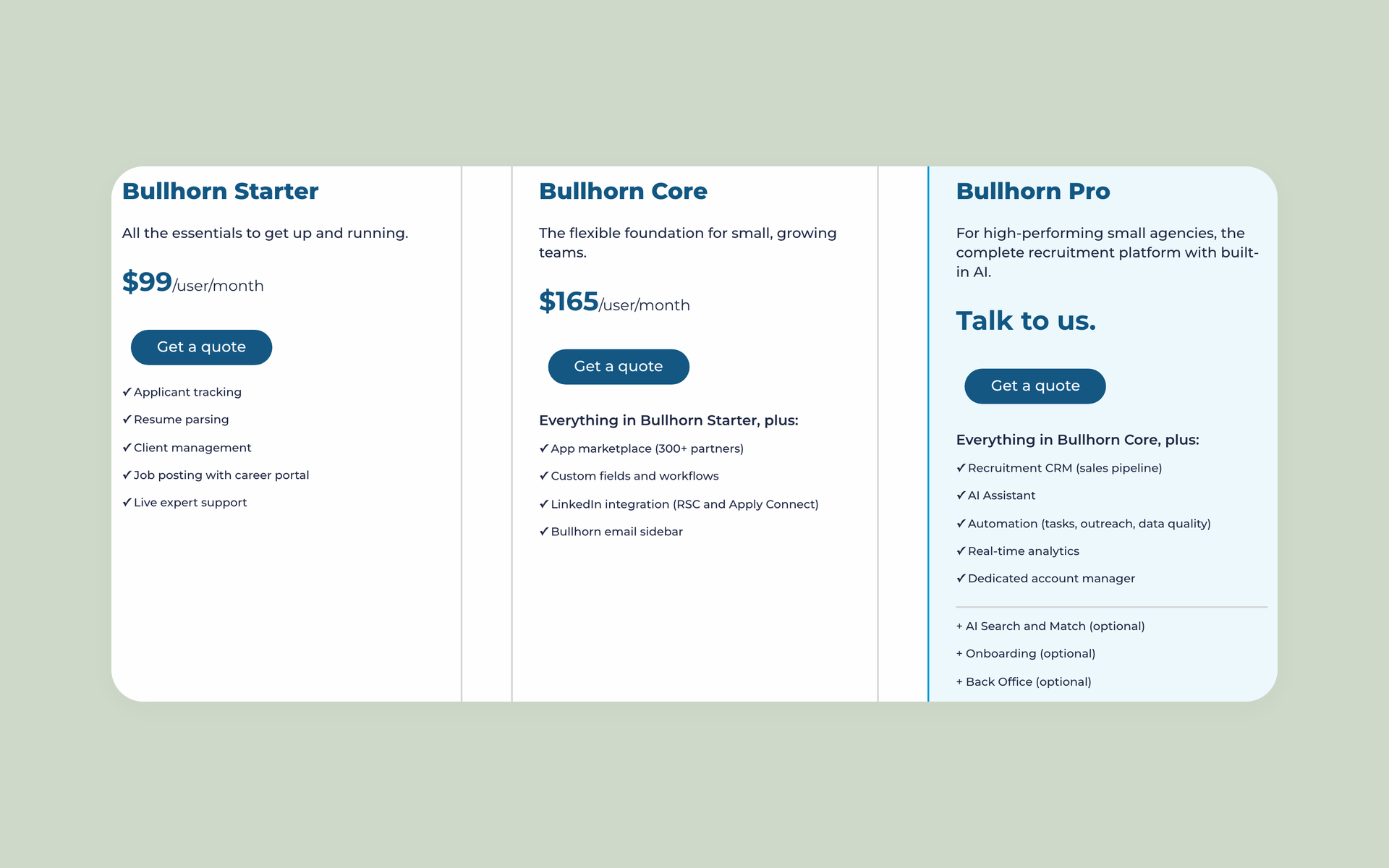
| Bullhorn Starter | $99/user/month | not publicly shown | not publicly shown | ATS, client management, posting, career portal | Displayed unit; commitment/cadence not public | Monthly unit displayed |
| Bullhorn Core | $165/user/month | not publicly shown | not publicly shown | Starter plus Marketplace/workflow scope | Displayed unit; commitment/cadence not public | Monthly unit displayed |
| Bullhorn Pro | not publicly shown | not publicly shown | not publicly shown | Recruitment CRM, AI Assistant, automation, analytics | Custom proposal; cadence not publicly shown | not publicly shown |
| Bullhorn Amplify Digital Workers and Amplify Search & Match | not publicly shown | not publicly shown | not publicly shown | Separate AI products; prerequisites apply | Add-on/specialist basis; cadence not public | not publicly shown |
| Bullhorn Recruitment Automation, Analytics, and Messaging | not publicly shown | not publicly shown | not publicly shown | Separate products; standard Bullhorn One does not bundle Analytics, Automation, VMS Sync, productivity apps, Onboarding365, or Bullhorn Onboarding | Add-on/specialist basis; cadence not public | not publicly shown |
| Bullhorn VMS Automation and Onboarding | not publicly shown | not publicly shown | not publicly shown | Named VMS/onboarding paths; exclusions apply | Add-on/specialist basis; cadence not public | not publicly shown |
| Bullhorn Middle Office, Pay & Bill, Back Office, and Bullhorn One Front-to-back | not publicly shown | not publicly shown | not publicly shown | Time, approvals, invoicing, gross-pay paths; not one bundle | Product/package basis; cadence not public | not publicly shown |
| Bullhorn Recruitment Cloud ATS, Bullhorn Recruitment Cloud Front Office, Bullhorn Recruitment Cloud Workforce Edition, and Bullhorn Recruitment Cloud 360 | not publicly shown | not publicly shown | not publicly shown | Separate Salesforce family; 360 and workforce paths | Separate-suite basis; cadence not public | not publicly shown |
100Hires prices shown on the pricing page exclude applicable taxes. Its current page shows a 14-day recruiting-product trial with no credit card; the page does not advertise staffing back-office functionality.
The live 100Hires pricing page and its USD pricing data are owned-product evidence for those figures. They do not prove cross-product package parity.
Package price is not total cost
A seat price or company plan is one cost input. Ask for the price of required tiers, specialist products, implementation, migration, data cleanup, training, partner tools, integrations, support, and administration.
JobAdder’s public pages omit dollar prices, but disclose contract options: Lite and Essential can use annual contracts billed monthly or annually, while Pro requires an annual contract billed monthly or annually.
Confirm the selected JobAdder term, add-ons, services, and renewal basis in the proposal. Bullhorn’s proposal should price each named product separately.
Product architecture starts with the front office
The recruiting front office finds, screens, contacts, and places candidates. Staffing operations begin when the firm must govern time, payroll, pay-and-bill, invoicing, VMS, compliance, and workforce work after placement.
That boundary matters more than a long feature list. A buyer comparing staffing agency software should mark the system of record for each handoff.
Draw the process from client request to final payment. Mark where candidate data becomes placement data, where approved time becomes an invoice, and where gross pay becomes payroll. Every unowned handoff creates manual work or integration risk.
JobAdder organizes work around recruiters
Recruiter Lite, Essential, and Pro follow an agency ATS/CRM model. Business is presented as a bespoke plan for in-house teams. Essential and Pro add progressively deeper automation, analytics, API, reporting, and sandbox scope.
Current JobAdder pages document timesheets, invoicing, payroll and billing integrations, and back-office workflows. They do not establish that JobAdder alone is a payroll processor or a complete native pay-and-bill ledger, and they do not name a native VMS product.
Bullhorn spreads breadth across product families
Starter and Core cover front-office foundations. Pro adds recruitment CRM, AI Assistant, automation, analytics, and an account manager. Deeper staffing work appears in separate products, Bullhorn One, and Recruitment Cloud.
Standard Bullhorn One excludes several named products. A broad family label never proves one entitlement, price, or implementation scope.
ATS, CRM, sourcing, client work, and outreach
Daily records reveal more than category labels. Map candidates, jobs, applications, placements, activities, submissions, client contacts, approvals, messages, and reports before comparing feature names.
ATS and recruitment CRM are different claims
JobAdder’s agency tiers cover candidate, job, client, placement, activity, workflow, and reporting records. Bullhorn includes ATS and client management in entry plans, with deeper recruitment sales CRM made explicit in Pro.
Ask which tier owns business-development pipelines, account activity, contact relationships, revenue fields, gross-profit reporting, and recruiter permissions. The ATS label cannot answer those questions.
For JobAdder, confirm which client, placement, and reporting fields exist in the selected tier. For Bullhorn, separate entry-plan client management from Pro’s recruitment sales CRM and any specialist data created later in the process.
Client access needs its own ownership test
JobAdder presents its Hiring Manager Portal as a separate boundary. Bullhorn client and sales depth changes by tier and connected product. Test submissions, feedback, approvals, portal access, exports, and account reporting.
Stored 100Hires API documentation describes multiple-company access and customer-built white-label workflows. Reviewed product documentation does not verify an out-of-the-box client portal, full staffing sales CRM, or placement-accounting system.
Run one live submission test during evaluation. Check what the client sees, how feedback returns, which recruiter owns the next step, and how the event appears in activity history and reports.
Sourcing and outreach need channel questions
JobAdder combines posting, matching, messaging, workflows, and integrations. Bullhorn adds search, mass mailing, and optional Search and Match, Automation, Amplify, and Messaging paths.
- Which domains and mailboxes send recruiter messages?
- How do unsubscribe handling, reply sync, and bounce controls work?
- What send limits, SMS costs, and product prerequisites apply?
- Who owns data exports, deduplication, and contact accuracy?
Do not assume better deliverability from a feature name. Test your sending setup, candidate segment, reply capture, and data controls in the proposed package.
AI, automation, analytics, and API access
Map every AI or automation label to a recruiter task and the package that includes it. Candidate summaries, matching, message drafts, follow-up, stage movement, and workflow triggers are separate jobs.
JobAdder supports Adder Intelligence, summaries, relevance, generation, matching, filters, and tiered automation and analytics. API access starts at Essential or can be available through a contracted add-on.
Bullhorn separates AI Assistant, Search and Match, Amplify, Automation, and Analytics. Each may carry prerequisites or a product boundary, so the proposal needs an entitlement line for every planned workflow.
100Hires takes a narrower candidate-side route through AI Score, AI Copilot, AI Email Composer, nurture, enrichment, and automation. It is recruitment automation software, not a staffing back office.
Analytics needs the same discipline. Confirm source fields, custom report access, refresh timing, exports, permissions, and module requirements. API buyers should ask about access, limits, version changes, and support.
Clean records, documented triggers, named owners, and training shape adoption after launch. A technically active workflow can still sit unused when nobody governs its data or exceptions.
Test AI on named tasks with a review step. Compare the source context, draft quality, edit path, saved output, permissions, credit use, and audit trail. A polished label has little value when recruiters cannot trust or govern the result.
Temp workflows and staffing operations
Post-placement work creates the sharpest divide. Buyers need to trace placement records into time capture, approvals, invoice preparation, pay calculations, payroll handoff, VMS activity, and workforce records.
JobAdder coordinates temp placements and handoffs
JobAdder supports permanent, contract, and temp placements with rates, start and end dates, active-worker visibility, availability, margin information, and compliance documents.
Its temp workflow supports mobile timesheet submission, overtime calculations, reminders, approvals, and customizable invoicing templates. Placement data can connect to payroll, billing, onboarding, or HRIS systems.
Reviewed JobAdder pages do not document a native payroll engine, full pay-and-bill ledger, placement-accounting system, or named VMS product.
Confirm whether JobAdder or a connected specialist system will own each payroll, billing, and workforce record and transaction in the proposed configuration.
Ask JobAdder to demonstrate one contractor’s full week. Include late time, overtime, a rejected entry, a corrected approval, an invoice template, and the handoff to payroll or billing. The demo should expose every external dependency.
Bullhorn offers broader named operations paths
Bullhorn VMS Automation covers a named VMS route. Onboarding handles worker intake paths. Middle Office and Pay & Bill address time, approvals, invoicing, and gross-pay work in their stated scopes.
Bullhorn One connects front-office and staffing-operation products. Recruitment Cloud 360 adds time and expense, invoicing, and gross pay. Recruitment Cloud Workforce Edition adds workforce-management features.
These names do not form one universal bundle. Standard Bullhorn One excludes Analytics, Automation, VMS Sync, productivity apps, Onboarding365, and Bullhorn Onboarding.
A price for Starter, Core, Pro, or Bullhorn One does not grant access to the whole product family. Confirm regional scope, payroll responsibility, prerequisites, services, and connected systems in writing.
Ask Bullhorn to run the same contractor scenario and label each screen by product. Record which data crosses ATS, VMS, onboarding, time, invoicing, pay-and-bill, and workforce tools. Then match those labels to the commercial proposal.
Time and pay records need local review
For U.S. covered employers, 29 CFR 516.2 recordkeeping requirements identify records that include hours worked and wages earned. This is U.S.-qualified information, not legal advice.
Ask how each configured system handles corrections, approvals, audit history, exports, disputed time, and record ownership. Neither vendor name creates a compliance conclusion.
Regional and worker-type differences can change the required process. Have qualified advisers review the chosen configuration, retention rules, approval chain, and payroll responsibilities for each jurisdiction in scope.
Implementation, migration, administration, and TCO
Implementation success depends on ownership and data complexity. JobAdder’s current FAQ says standard onboarding with minimal migration typically takes 2 to 4 weeks, while more complex data migration can take up to 10 weeks.
Bullhorn’s current public implementation duration is not verified. No fair evidence supports a universal speed winner.
Before signing, turn migration into a written statement of work. Define the exact records, mapping rules, acceptance tests, owners, and fallback plan.
- Candidate, client, job, placement, activity, and communication history
- Custom fields, attachments, notes, duplicates, and permissions
- Reports, integrations, workflow triggers, and exception handling
- Testing, training, cutover, rollback, and post-launch support
Price ongoing administration, data cleanup, report maintenance, partner tools, modules, and integration work. A package can fit on launch day and still become costly if nobody owns its data model.
Schedule a migration rehearsal with a representative data set. Count rejected records, duplicate contacts, missing attachments, broken activity links, and report differences. Define who fixes each class of error before the final cutover.
Use the same sample job, client, candidate, contractor, and report in both vendor demonstrations. This keeps the evaluation tied to your operating model and exposes tier gates, product handoffs, manual steps, and missing fields that a generic tour can hide.
Balanced JobAdder and Bullhorn deep dives
JobAdder fits a recruiter-led agency front office
JobAdder best fits an agency centered on recruiter workflows, broad posting, candidate and client management, and permanent, contract, or temp-placement coordination, with specialist payroll, billing, VMS, or workforce systems connected where required.
JobAdder’s current tier structure separates capability bands by user count and plan scope. Essential adds standard automation, analytics, API access, and temp pooling. Pro adds advanced automation, analytics, custom reports, a CSM, and sandbox access.
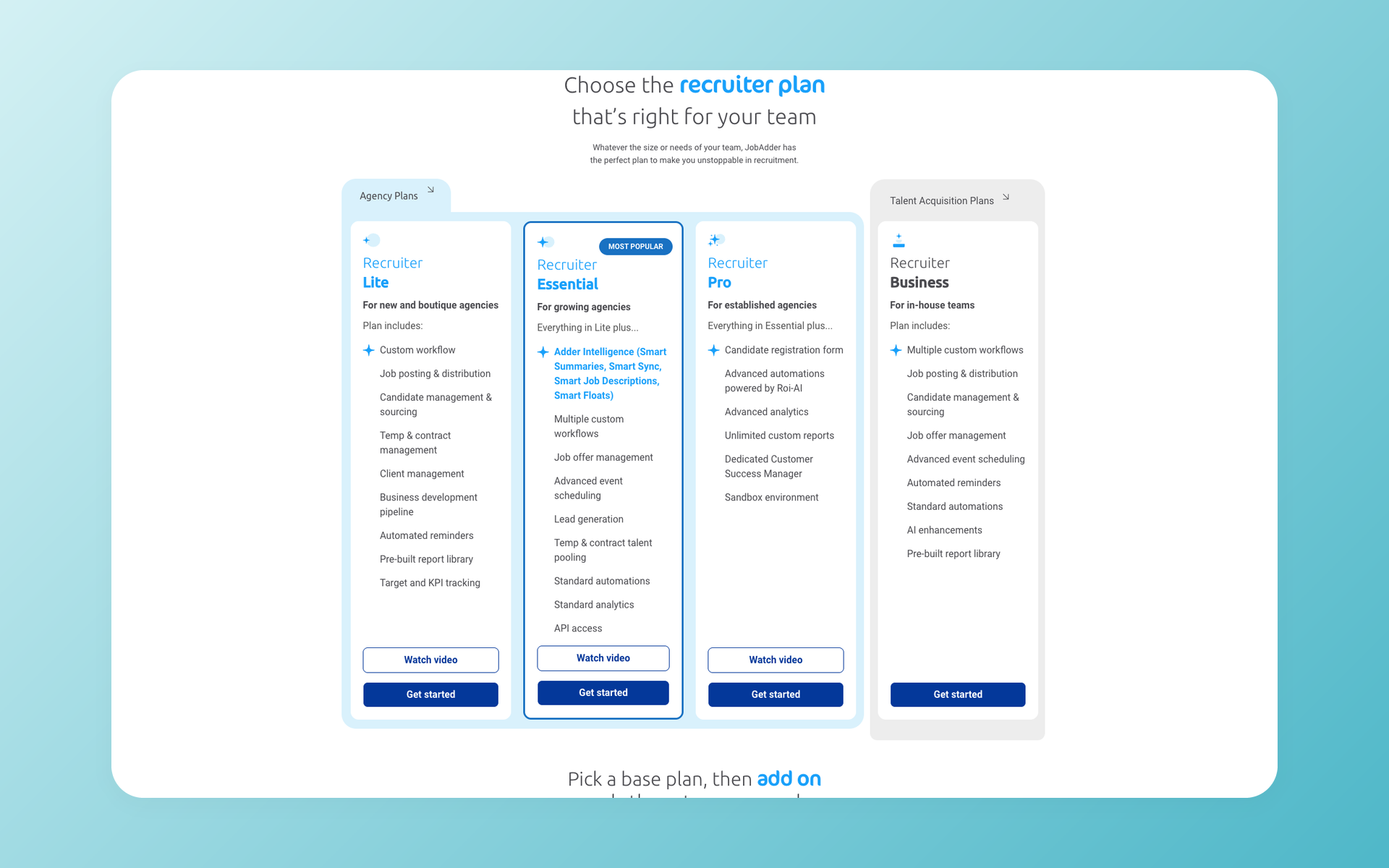
The buying gaps matter. JobAdder shows no public dollar price. Lite is capped at 5 users, Pro is presented for 21+ users, and Lite has no API or sandbox.
Add-ons have separate boundaries. Current evidence does not prove native payroll, a full pay-and-bill engine, placement accounting, or named VMS automation.
JobAdder is the stronger default when front-office adoption and placement coordination matter most and another system can own deeper staffing operations.
The best-fit JobAdder buyer knows the boundary before purchase. Recruiters need one place for candidate and client work, and operations accepts a documented handoff into separate payroll, billing, accounting, or VMS systems.
Bullhorn fits broader staffing operations paths
Bullhorn best fits an enterprise or operations-heavy staffing firm that needs deeper CRM, VMS, onboarding, middle-office, pay-and-bill, invoicing, workforce, or ecosystem paths.
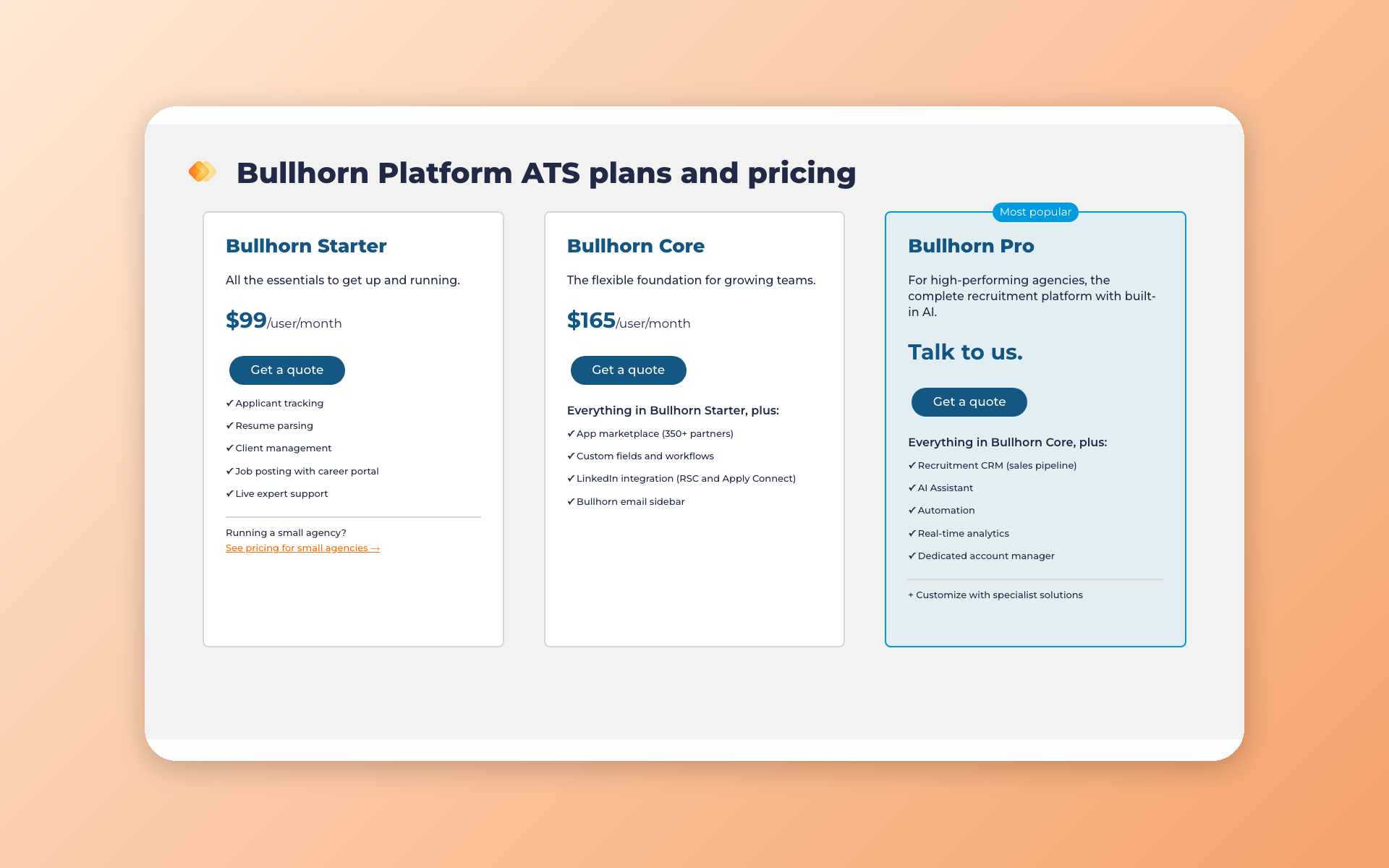
Starter and Core provide public entry units. Pro extends the recruitment CRM with AI Assistant, automation, analytics, and an account manager. Specialist products create clear routes into staffing operations.
The gaps sit in the commercial scope. Commitment cadence, Pro pricing, specialist prices, migration scope, and configured TCO are not publicly shown. Standard Bullhorn One excludes several products.
Bullhorn is the stronger fit when the firm will purchase, connect, administer, and use the added operational scope. Breadth has value only when a named owner governs it.
When neither fits: where 100Hires belongs
100Hires publishes this article and is our own product. This section uses a narrow candidate-side fit.
Where 100Hires can fit
100Hires is a disclosed AI-first tool for candidate-side screening, outreach, and recruiting automation that can coexist with a staffing system. It is not payroll, VMS, or staffing back-office software.
AI Score supports candidate evaluation against job criteria. AI Copilot uses candidate and job context, and AI Email Composer drafts personalized candidate messages. Sourcing, nurture, enrichment, and automation sit in the same front-office scope.
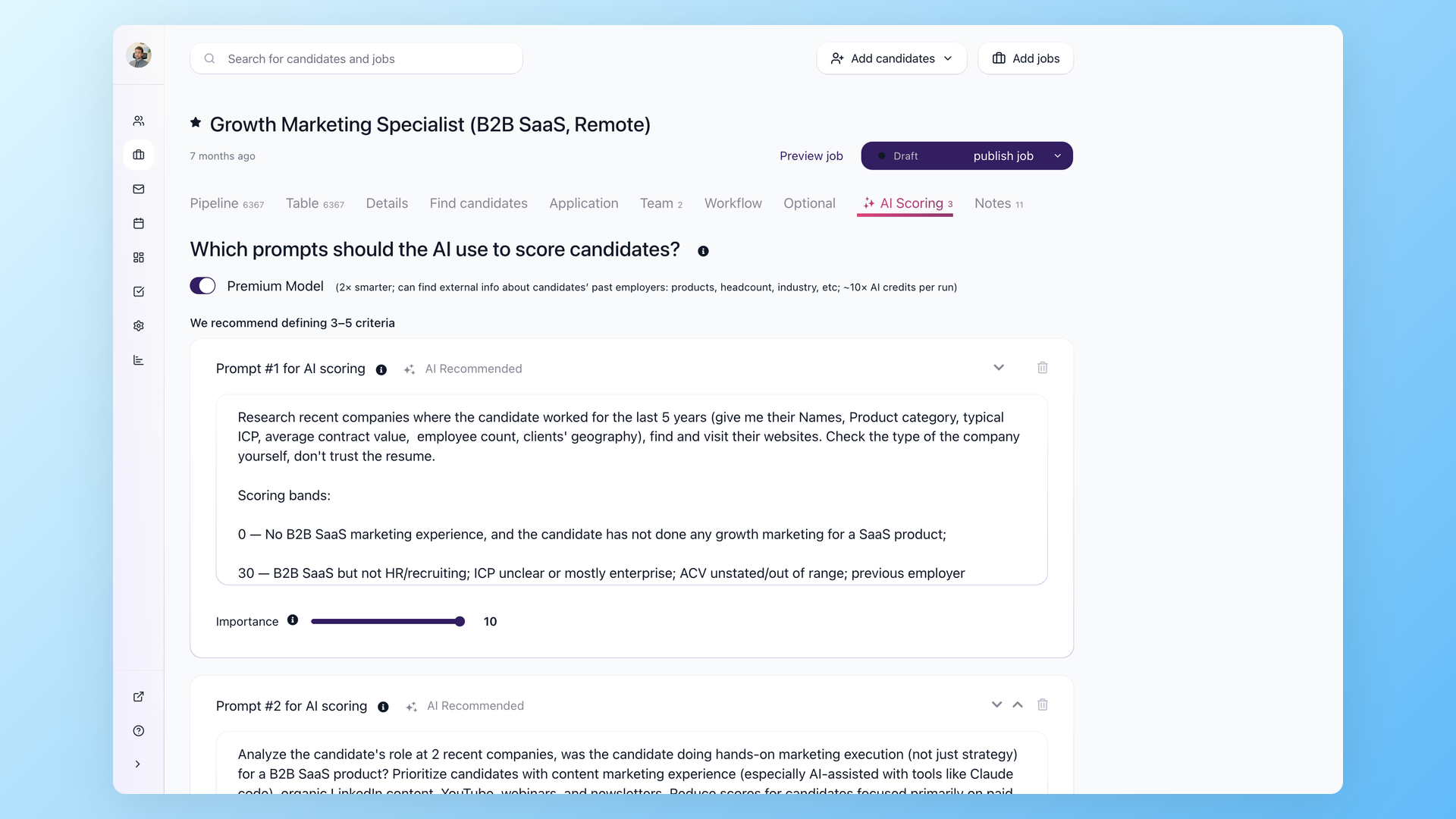
This can suit a lean permanent-placement, search, or in-house team. It can coexist with a staffing system that retains time, pay, billing, VMS, and workforce records.
A coexistence setup needs a documented agreement on which system owns each type of data. Define which system owns candidate identity, consent, stage, placement status, messages, and deletions. Then test how updates move without creating duplicate records.
Where 100Hires is not enough
Do not select 100Hires as the system of record for payroll, staffing timesheets, shift or workforce scheduling, invoicing, VMS, an out-of-the-box client portal, placement accounting, or full staffing sales CRM. 100Hires does include interview scheduling.
Stored 100Hires API documentation describes custom implementations for multiple-company access and customer-built white-label workflows. These are not native staffing back-office modules.
Decision framework: choose by operating model
- Choose JobAdder when recruiters need an approachable agency front office and coordinated placements, with full staffing operations kept elsewhere.
- Choose Bullhorn when deeper CRM, VMS, onboarding, middle-office, pay-and-bill, invoicing, or workforce paths must sit in or connect tightly to the purchased platform.
- Consider 100Hires when AI-assisted candidate work is the priority and the team accepts its staffing-operation limits.
- Use a split stack when one front office and one back office can own their records and handoffs more cleanly than a single purchased package.
Before signing, name the owner for time approvals, invoice corrections, payroll handoff, VMS submissions, report definitions, data quality, and post-launch administration.
Require a package map with the base tier, add-ons, specialist products, integrations, services, cadence, limits, and accountable owner. The right choice is conditional, not universal.
JobAdder vs Bullhorn FAQs
What is the main difference between JobAdder and Bullhorn?
JobAdder is the approachable default for a recruiter-led agency front office and temp-placement coordination. Bullhorn fits operations-heavy teams needing broader post-placement product paths. Size alone does not settle it. 100Hires AI Score can support candidate evaluation, but 100Hires has no verified payroll, VMS, or staffing back office. The deciding test is which purchased package must own time, invoicing, pay, and workforce records after placement, not the number of employees on the buyer’s org chart alone.
How much do JobAdder and Bullhorn cost?
JobAdder does not publicly show dollar prices for Recruiter Lite, Essential, Pro, Business, or add-ons. Bullhorn displays Starter at $99/user/month and Core at $165/user/month. Its cadence, annual totals, Pro price, and specialist prices are not publicly shown. 100Hires publishes Start at $99/month and $49/month annual-equivalent. 100Hires annual totals for Start, Advanced, and Pro are derived in the manifest; no Bullhorn annual total is inferred from its public unit alone. Request an itemized proposal before committing.
Does JobAdder handle payroll, timesheets, and invoicing?
JobAdder supports mobile timesheets, overtime, reminders, approvals, invoice templates, and synchronization to payroll or billing systems. Reviewed pages do not document a native payroll engine or full pay-and-bill ledger. Reviewed 100Hires product documentation does not verify native timesheets, payroll, or invoicing; its AI Copilot belongs in candidate-side work. Use a live contractor scenario to confirm rejected time, corrections, invoice output, and the receiving system for every payroll or billing handoff before purchase for your agency.
Does Bullhorn include Automation, Analytics, Amplify, VMS, Pay & Bill, and Bullhorn One in every plan?
No. Bullhorn distributes these capabilities across Pro, add-ons, specialist products, Bullhorn One, Middle Office, and separate package paths. Standard Bullhorn One excludes several products. Confirm entitlement and price in writing. 100Hires includes recruiting automation by plan, but has no verified Bullhorn-equivalent VMS, Pay & Bill, or middle-office scope. The proposal should list each base tier, product, prerequisite, service, price, cadence, limit, and accountable administrator, then identify every excluded item in writing before signing the contract.
Is 100Hires a good alternative to JobAdder or Bullhorn for a staffing agency?
100Hires can fit a lean candidate-side workflow through AI Score, AI Copilot, AI Email Composer, sourcing, nurture, enrichment, and automation, or coexist with a staffing system. It is not a fit for native payroll, staffing timesheets, shift or workforce scheduling, invoicing, VMS, client portal, placement accounting, or full staffing sales CRM. It does include interview scheduling. 100Hires publishes this comparison. Its custom API, multi-company, and white-label paths can connect systems, but they do not create native staffing operations or remove the need for a separate owner.
Try 100Hires for free
No credit card. 14-day trial. Forbes Advisor #1 ATS for SMBs.

