SmartRecruiters vs iCIMS: enterprise ATS comparison in 2026 - 100Hires
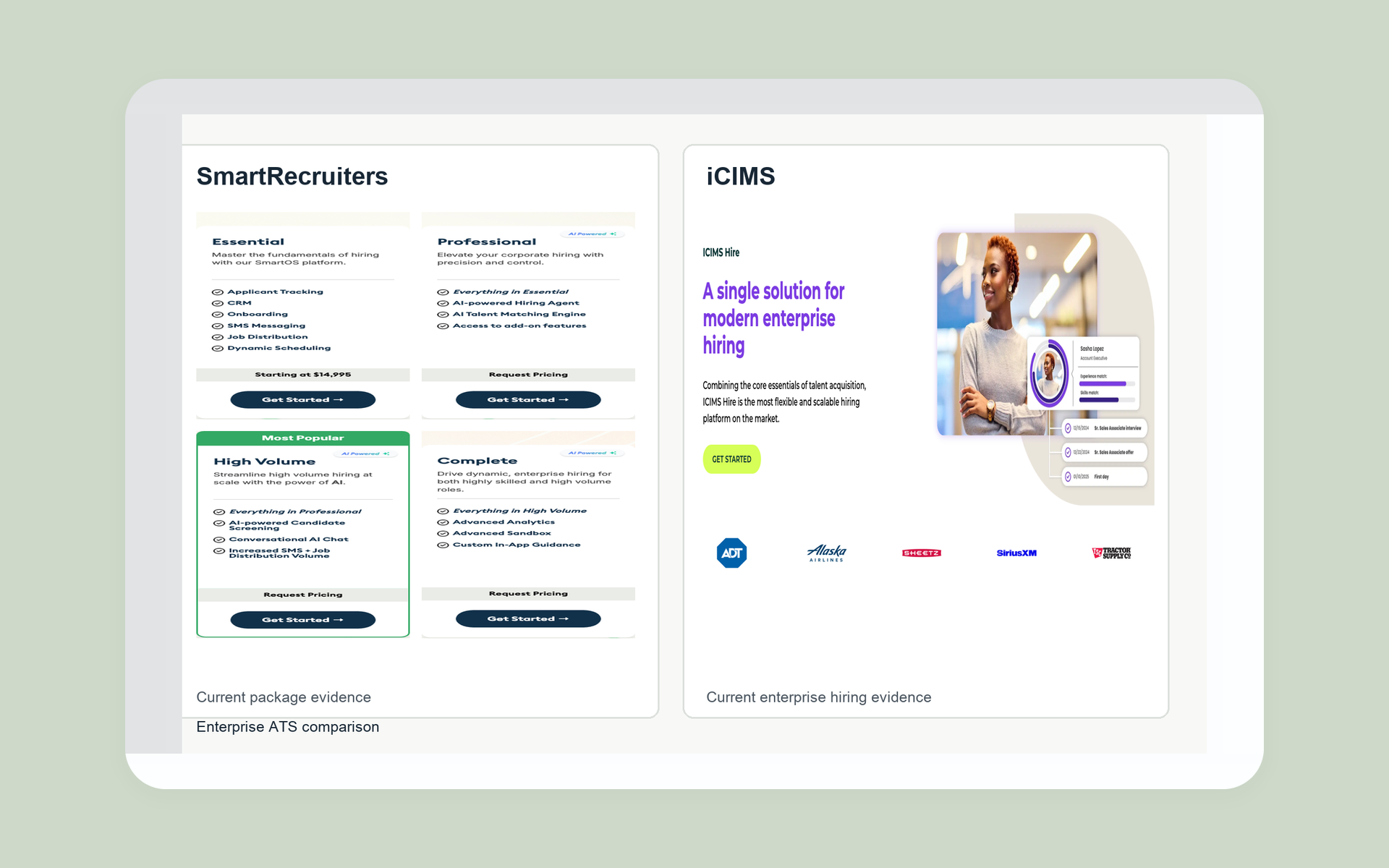
A polished ATS demo does not show how much administrator time reporting, exceptions, and workflow changes will require after launch.
Based on the evidence reviewed, SmartRecruiters is the stronger choice when adoption, published package details, and public developer evidence matter most.
iCIMS is the stronger choice when deeper configuration, approvals, and reporting ownership matter most.
Neither is the universal winner. Your result depends on the operating model your team can maintain after launch.
We checked current public pages, product demos, training videos, practitioner discussions, and internal buyer conversations. We separate current facts from observed workflows, recurring opinions, and contract details that remain private.
Comparison pages often blend vendor claims, old reviews, observed screens, and private contract terms. We kept those evidence classes apart.
- Current public facts: package names, displayed prices, product labels, API documentation, and dated SAP records
- Observed workflows: product demonstrations and customer training that show real tasks, not every possible tenant setup
- Practitioner patterns: recurring reports about adoption, administration, reporting, migration, and support, treated as hypotheses
- Contract unknowns: implementation scope, SLA, renewal, export, deletion, and exit help that require written terms
The Google results contain vendor-controlled comparisons and independent pages. Several accessible pages repeat an easy-versus-deep story. Repetition does not prove the story, so our scorecard turns it into tests.
We did not use conflicting marketplace totals, old iCIMS price estimates, universal implementation ranges, or vendor-selected outcome claims. We did not treat a preview label as proof that a feature is available in a buyer's package.
A known gap can become a demo script, quote field, or contract clause. A made-up answer cannot.
Dates matter here. Product names, ownership, and package labels changed across older sources. We use exact dates for those events and current wording for statements intended to remain current.
SmartRecruiters vs iCIMS at a glance
The hiring playbook, in your inbox
One email a week - benchmarks, AI screening tactics, and short interview templates from the 100Hires team. No product pitches.
This first view includes 100Hires, our product, for teams that may not need a full enterprise suite.
| Criterion | 100Hires | SmartRecruiters | iCIMS |
|---|---|---|---|
| Best fit | Lean corporate TA and sourcing teams | Enterprise teams focused on recruiter and manager adoption | Enterprise teams with dedicated TA systems ownership |
| Operating model | One recruiting pipeline for a narrower scope | Guided enterprise workflows with broad stakeholder use | Detailed configuration, approvals, and process control |
| Public pricing | Public monthly and annual plan prices | Essential starts at $14,995; billing period not shown | Numeric price not publicly shown |
| Workflow emphasis | Sourcing, outreach, screening, scheduling, and ATS work | Recruiter and hiring-manager collaboration | Requisitions, permissions, statuses, and formal handoffs |
| Reporting | Recruiting reports; BI connection on Enterprise | Analytics listed by package; exact limits need a demo | Strong configuration hypothesis; admin effort needs testing |
| Developer evidence | Custom integrations on Enterprise | Public API objects, OAuth 2.0, throttling, and lifecycle notes | Public integration area and marketplace; inventory was not exposed in our capture |
| Implementation responsibility | Confirm migration, setup, and custom-work owners | Confirm vendor, customer, and partner scope in writing | Confirm vendor, customer, and partner scope in writing |
| Main limitation | Not a global HCM governance suite | Special reports, package access, and admin needs remain buyer tests | Configuration depth can raise admin and support demands |
If both enterprise options feel too heavy, review enterprise recruiting software from 100Hires. The fit is narrower, and the buying path is easier to inspect.
The better fit depends on your operating model
A feature tally can give you a neat score and a bad decision. Both products cover core enterprise recruiting. The sharper split is who must configure, use, and maintain the system.
SmartRecruiters fits adoption-led enterprise teams
Current demos put recruiter tasks, jobs, candidates, approvals, interviews, and hiring-manager work in a shared flow. That makes SmartRecruiters a sound option when occasional users need to act without living in the ATS.
Its public package ladder is useful. Essential, Professional, High Volume, and Complete show meaningful scope changes. Public developer pages expose API objects, OAuth 2.0, throttling, and product lifecycle references.
Those signals do not settle the purchase. Buyers still need to test navigation, scheduling, custom reports, permissions, package access, and the work required from an internal administrator.
The daily cost appears in small delays: a hiring manager cannot find the scorecard, a rescheduled panel drops a notification, or a specialist waits for an admin to change a report filter.
iCIMS fits administration-led enterprise teams
Observed iCIMS training materials show detailed requisition fields, ordered approvals, role separation, candidate statuses, and controlled recruiter-manager handoffs. This favors buyers that want formal process ownership.
The tradeoff is maintenance. Detailed fields and status rules need an owner. Detailed reporting requires clear definitions. Changes need testing. A flexible system setup can become hard to use when each business unit adds one more exception.
Those exceptions become real queue work: another approval route, a new regional field, a revised status map, or a notification rule that must be tested across roles.
Much of this evidence comes from customer-specific workflows and practitioners, not a public iCIMS plan matrix. Treat the product's configuration depth as a strong hypothesis to test in a demo, not a blanket product verdict.
Workflow adoption separates the daily experience
Do not ask each vendor for its best demo. Give both vendors the same hiring case and watch where users need help.
| Workflow test | SmartRecruiters evidence | iCIMS evidence | What to demo |
|---|---|---|---|
| Create a requisition | Job, task, and approval views appear in current demos | Templates and detailed required fields appear in customer-specific training materials | Use your fields, roles, and legal entities |
| Approve a role | Shared dashboards expose approvals and tasks | Ordered approval chains support formal handoffs | Reject, reroute, and delegate an approval |
| Screen a candidate | Pipeline, profiles, questions, tags, and scorecards are visible | Candidate records and configured status steps are visible | Handle an exception without admin help |
| Schedule interviews | Scheduling is present, but practitioner concerns merit a live test | Scheduling and feedback depend on tenant setup | Reschedule a panel across time zones |
| Capture feedback | Shared recruiter and manager views support scorecards | Role and notification design controls the handoff | Test late, missing, and conflicting feedback |
| Report the outcome | Analytics vary by package | Configurable reporting is a recurring strength pattern | Build the report from raw sample data |
Run the same six-step demo in both systems
- Create and approve a requisition.
- Publish it to the agreed channels.
- Screen one standard candidate and one exception.
- Schedule and reschedule a panel.
- Collect structured feedback.
- Produce an audit-ready funnel report.
Put a recruiter, hiring manager, administrator, and regional stakeholder in the room. Track clicks, completion time, permission errors, exception handling, and each moment that needs admin support.
Configuration, reporting, and governance expose the tradeoff
The available evidence more strongly supports iCIMS for detailed approval design, field ownership, status crosswalks, and report administration. SmartRecruiters offers a more guided workflow and lists Advanced Analytics in Complete.
The public materials we reviewed do not answer the questions that matter after launch: report counts, export formats, calculated fields, dashboard limits, API entitlements, or the effort needed to change a definition.
A deep reporting layer has little value when leaders cannot trust the fields feeding it. Ask who owns data definitions, new-field requests, historical restatements, dashboard QA, and access rules.
Test reports with your own definitions
- Time in stage, including reopened candidates
- Source quality by recruiter and region
- Recruiter workload and aging requisitions
- Regional access and compliance fields
- Raw export and BI handoff
Build each report from the same sample file. Change one field and test whether history stays intact. Schedule delivery, apply row-level permissions, export the raw records, and document who can fix a broken result.
Teams with simpler process needs can compare the administrative workload of these enterprise suites with recruitment automation software from 100Hires. It serves a narrower purpose, with less suite-level governance.
Integrations, data, and AI need package-level proof
Marketplace totals in comparison pages conflict, so we did not use them. Counts can mix apps, partners, connectors, and custom work. A long directory says little about the five systems your company needs.
In the public sources we reviewed, SmartRecruiters offers clearer technical evidence. iCIMS has an official integration area and marketplace, yet the public pages we reviewed did not show an equivalent list of integrations.
For each required system, ask who built the connector, who supports it, which objects move, how often data syncs, how errors surface, and what happens when an API version changes.
AI needs the same discipline. SmartRecruiters ties named AI functions to Professional and High Volume packages. iCIMS names Coalesce AI and Frontline AI, but public packaging and exact workflow access need confirmation.
Ask both vendors to show data boundaries, explanations, overrides, audit logs, human review, retention, and package limits. Review the EEOC guidance on employment selection procedures with your legal and compliance team.
SAP changes the SmartRecruiters architecture question
SAP completed its SmartRecruiters acquisition on September 11, 2025. SmartRecruiters for SAP SuccessFactors became a separately licensed, customer-configured integration on February 23, 2026.
SAP says current SuccessFactors Recruiting customers do not have to migrate. That is not a sunset announcement.
SuccessFactors buyers should test user identity, foundational HR data, position-led hiring, SSO, error ownership, and the roadmap for each licensed component.
Implementation and contract terms can reverse the verdict
Public pages do not settle the hardest commercial questions for either vendor. That gap matters more than another row in a feature grid.
| Workstream | Vendor commitment to confirm | Customer commitment to confirm | Partner commitment to confirm | Proof to request |
|---|---|---|---|---|
| Data migration | Tooling, validation, and retries | Cleanup, mapping decisions, and sign-off | Extraction, transformation, or load work | Included objects, attachments, history, and owners |
| Configuration | Build scope and technical guidance | Workflow rules, roles, and approvals | Design or build tasks outside vendor scope | Responsibility matrix and acceptance criteria |
| Integrations | Connector setup and product support | Source access and business rules | Middleware, custom code, and monitoring | Objects, frequency, monitoring, and error SLA |
| Reporting | Platform setup and entitlements | Definitions, QA, and access policy | BI modeling or dashboard delivery | Required reports built from sample data |
| Training and UAT | Materials and issue resolution | Attendance, scenarios, and acceptance | Change management or regional training | Named hours, roles, and exit criteria |
Put support, renewal, and exit in the order form
- Support: named tier, hours, response targets, escalation, and service credits
- Renewal: notice window, uplift cap, module changes, and usage reconciliation
- Export: records, attachments, audit history, formats, and delivery timing
- Termination: read-only period, deletion date, certificate, and exit help
A demo answer is not a contract term. Put each promise in the order form or an attached schedule.
Ask the implementation lead to estimate the cost of one realistic exception as well: a failed HRIS sync, a late regional field request, or a report definition that changes during UAT.
The response shows how change requests, partner hours, and acceptance delays affect the final cost.
Pricing is transparent in different ways
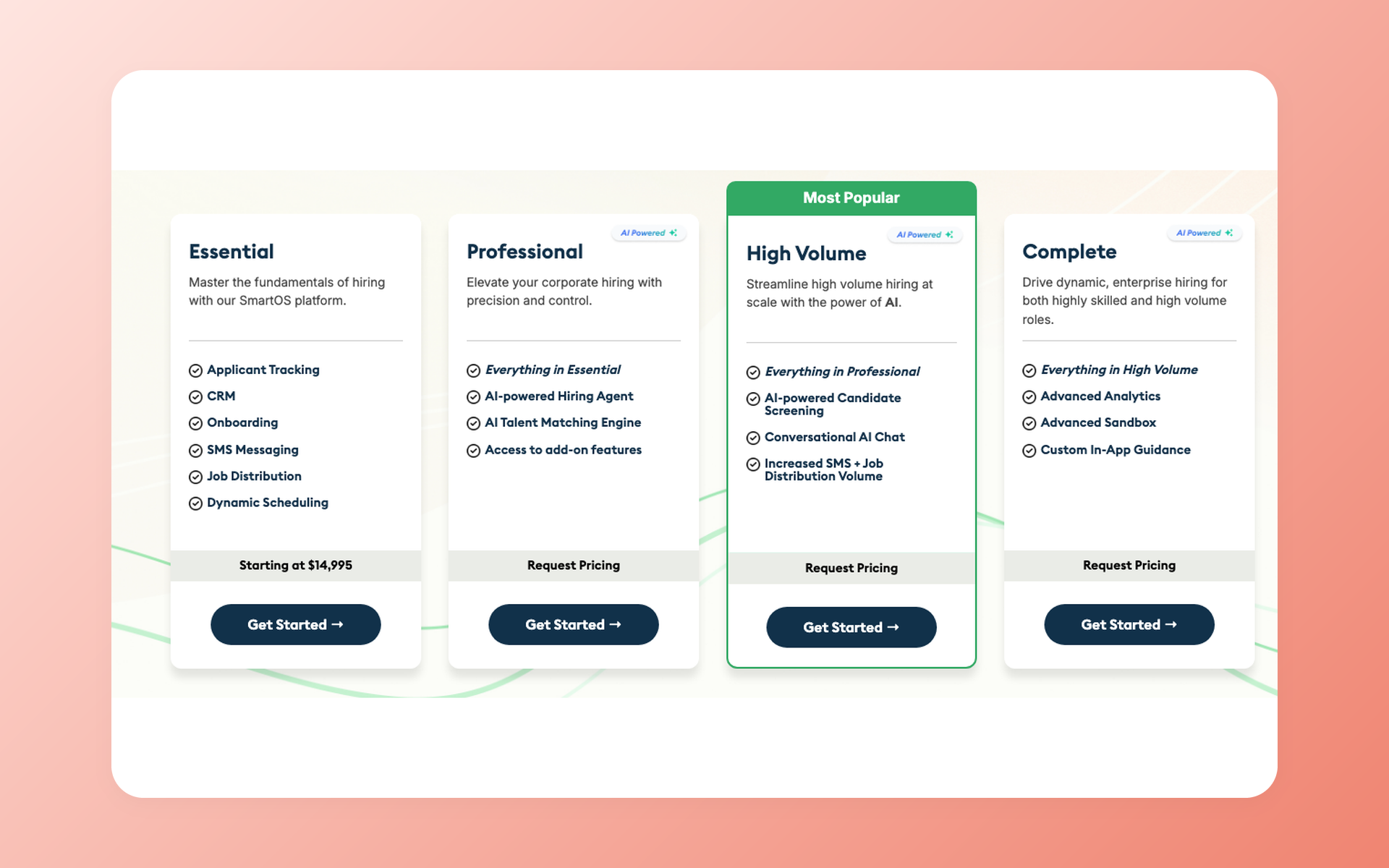
SmartRecruiters publishes one starting figure and four package names. iCIMS does not publish a verified numerical price. 100Hires publishes three numeric plans and a custom Enterprise tier.
| Vendor and plan | Monthly | Annual equivalent | Annual total | Scope and billing basis |
|---|---|---|---|---|
| 100Hires Start | $99 displayed | $49 per month displayed | $588 derived | Annual rate billed annually; up to 3 jobs, 100 candidates, 1 user, and 100 monthly AI credits |
| 100Hires Advanced | $249 displayed | $199 per month displayed | $2,388 derived | Annual rate billed annually; unlimited jobs, candidates, and users; 300 monthly or 1,000 annual AI credits |
| 100Hires Pro | $499 displayed | $399 per month displayed | $4,788 derived | Annual rate billed annually; 3,000 monthly or 5,000 annual AI credits; free, comprehensive data migration on annual Pro contracts |
| 100Hires Enterprise | not publicly shown | not publicly shown | not publicly shown | Custom pricing; SSO, account management, approvals, BI, custom work, compliance, and reports |
| SmartRecruiters Essential | not publicly shown | not publicly shown | not publicly shown | Starts at $14,995; period and exact scope not shown; package lists ATS, CRM, onboarding, SMS, distribution, and scheduling |
| SmartRecruiters Professional | not publicly shown | not publicly shown | not publicly shown | Request pricing; named hiring-agent and talent-matching functions |
| SmartRecruiters High Volume | not publicly shown | not publicly shown | not publicly shown | Request pricing; named candidate-screening and conversational functions |
| SmartRecruiters Complete | not publicly shown | not publicly shown | not publicly shown | Request pricing; Advanced Analytics, sandbox, and in-app guidance |
| iCIMS platform and modules | not publicly shown | not publicly shown | not publicly shown | Quote or demo flow; Hire, Engage, Employer Branding, Coalesce AI, and Frontline AI are public labels |
Do not divide $14,995 by twelve. SmartRecruiters does not show the billing period for that figure. Do not reuse old third-party iCIMS price estimates. No current primary source we reviewed supports them.
Normalize the quote before comparing totals
Ask for a three-year schedule that separates subscription, modules, environments, implementation, migration, integrations, support, training, usage limits, renewal uplifts, and exit services.
Use the same company entities, users, regions, hiring volume, data scope, and AI usage in both quotes. A lower license price may not produce a lower total cost once required services and modules are added to the schedule.
When neither enterprise suite fits, consider 100Hires
100Hires is our product. It fits lean corporate TA and sourcing teams that want one pipeline for candidate sourcing or import, enrichment, validation, outreach, questionnaires, stage automation, scheduling, and reporting.
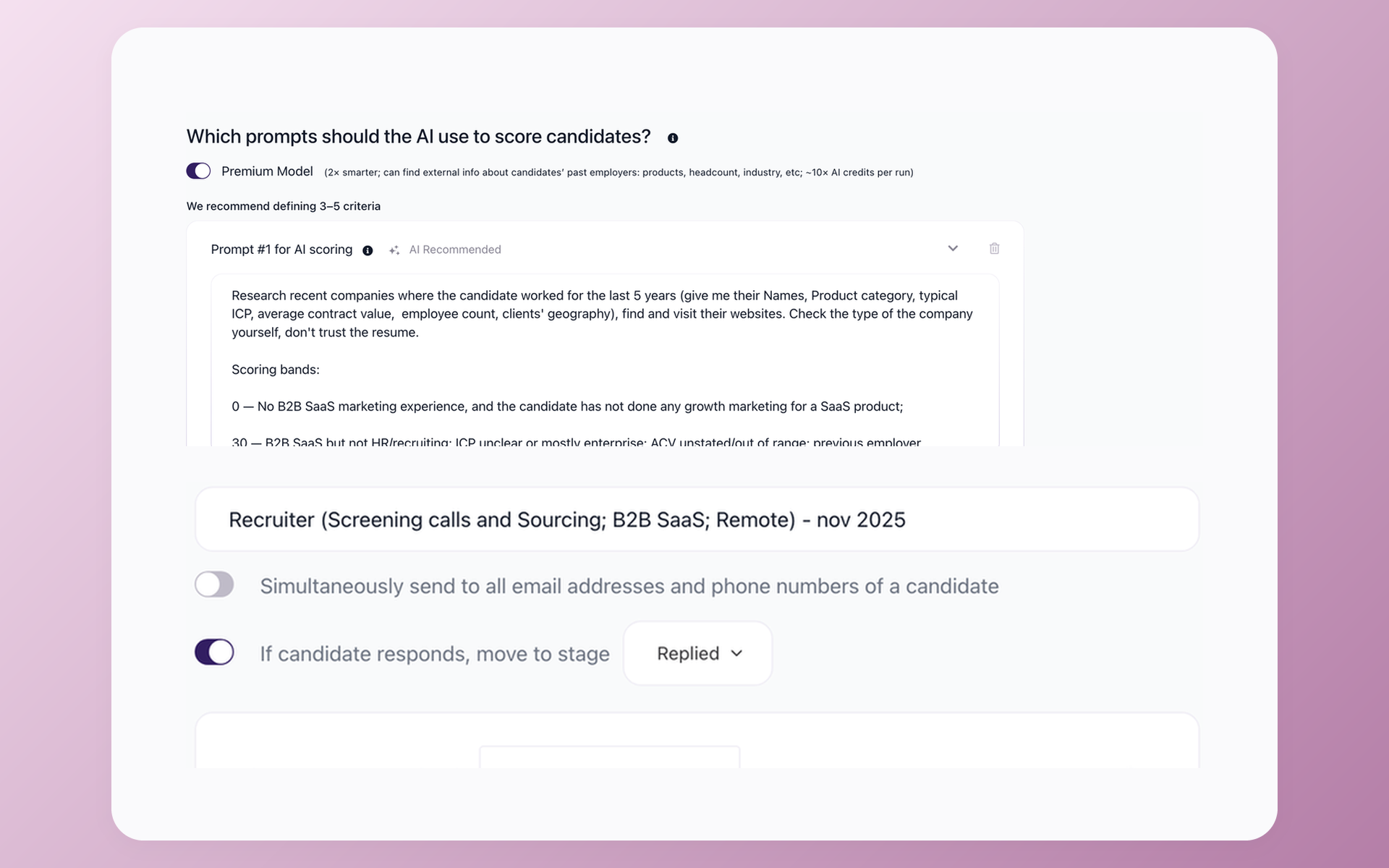
100Hires includes AI Score. Teams can use questionnaires, email and calendar sync, workflow rules, and practical recruiting reports without a large TA systems group.
100Hires also has limitations. It is not a universal replacement for country-specific workflows at multinational companies, deeply customized HCM orchestration, or the governance depth of a large enterprise suite.
None of the external research sources we reviewed mentioned 100Hires. This section uses our current product and pricing pages, not independent comparison evidence.
See 100Hires pricing for the public plan limits. If the narrower fit matches your team, book a 100Hires demo with your actual recruiting workflow.
Use this procurement scorecard to decide
Set weights before the demos. Score what the team sees, not what a slide promises.
| Criterion | Your weight | SmartRecruiters evidence | iCIMS evidence | Contract proof |
|---|---|---|---|---|
| Adoption | ___ | Strong recruiter and manager workflow hypothesis | Depends more on tenant design | Role-based acceptance test |
| Workflow fit | ___ | Shared task and pipeline evidence | Structured requisition and status evidence | Identical six-step demo |
| Administration | ___ | Admin effort needs buyer testing | Stronger depth and ownership hypothesis | Change request completed live |
| Reporting | ___ | Package-dependent analytics | Strong admin and reporting pattern | Required reports and export |
| Integrations | ___ | Clearer public developer evidence | Marketplace and integration area | Named connectors, objects, SLA |
| AI governance | ___ | Named functions by package | Named AI product families | Availability, controls, audit record |
| Implementation | ___ | Responsibility remains contract-specific | Responsibility remains contract-specific | RACI, hours, UAT, acceptance |
| Support | ___ | Public evidence does not settle terms | Public evidence does not settle terms | SLA, hours, and escalation |
| Renewal | ___ | Public terms not shown | Public terms not shown | Notice, uplift cap, and module changes |
| Export | ___ | Full mechanics not public | Full mechanics not public | Format, attachments, and audit history |
| Exit | ___ | Full mechanics not public | Full mechanics not public | Access period, help, and deletion |
Choose SmartRecruiters when user adoption and clearer package options matter most in your scorecard. Choose iCIMS when configuration and formal administration matter most. Choose neither until the demo and contract prove your highest-weight requirements.
If 100Hires matches the narrower operating model, book a demo and run the same six-step test.
SmartRecruiters vs iCIMS FAQ
Which is better, SmartRecruiters or iCIMS in 2026?
SmartRecruiters is the stronger fit for adoption-led teams. iCIMS is the stronger fit for configuration-led teams. 100Hires suits lean TA teams that need less suite-level administration.
Is SmartRecruiters part of SAP?
Yes. SAP completed the acquisition on September 11, 2025. Its licensed integration launched on February 23, 2026. SAP says current SuccessFactors Recruiting customers need not migrate. SAP has not announced a sunset date in the sources reviewed. 100Hires remains a separate option.
How much do SmartRecruiters and iCIMS cost?
SmartRecruiters Essential starts at $14,995, with no public billing period. iCIMS has no verified public numeric price. 100Hires publishes monthly and annual prices, starting at $99 monthly or $49 per month billed annually.
Which platform is better for enterprise reporting and integrations?
Available evidence points to greater iCIMS configuration and reporting depth, but test it with your data and definitions. SmartRecruiters has clearer public developer evidence. 100Hires offers practical reports and custom Enterprise integrations.
When should a team choose 100Hires instead?
Choose 100Hires for a lean TA team that wants ATS, sourcing, outreach, questionnaires, scheduling, and reporting in one pipeline. Plans start at $99 monthly or $49 per month billed annually. It is not a multinational HCM governance suite.
Try 100Hires for free
No credit card. 14-day trial. Forbes Advisor #1 ATS for SMBs.

