
Switching from Snaphunt? Move to 100Hires






Start hiring in 100Hires with the import path your source supports
Switching from Snaphunt starts with the source you can access. 100Hires provides free self-service candidate CSV import and bulk PDF or DOC resume upload. Starting a trial does not approve a managed migration or define its scope.
Current Snaphunt export formats, objects, API access, account conditions, and stage history were not publicly verified. Share the available account-level export or source details so 100Hires can confirm the path.
This migration page was prepared by 100Hires using current publicly available sources. 100Hires is not affiliated with Snaphunt.
- Candidate CSV: map compatible standard and custom fields, then review reported errors or duplicates.
- Resume files: upload PDFs or DOC files, parse them, and preview the resulting profiles.
- Managed path: annual Pro materials mention that migration is included, subject to confirmation of the source, scope, and eligibility.
For general migration mechanics and questions, see the 100Hires data migration overview.
| Migration item | 100Hires path | Snaphunt source status |
|---|---|---|
| Source export handoff | Review the available export or source details and confirm the path | Format, objects, API, and account conditions not publicly verified |
| Candidate CSV import | Free self-service import of compatible CSV files, with mapping and review | Candidate CSV availability not publicly verified |
| Resume upload | Free self-service bulk parsing of PDF or DOC files with profile preview | Resume-file handoff not publicly verified |
| Field mapping | Standard and custom field mapping, sample review, and quality checks documented | Source field list not publicly verified |
| Duplicate handling | CSV review can surface duplicates or changes; managed scope is reviewed | Source identifiers and duplicate behavior not publicly verified |
| Pipeline stages | Configure destination Pipeline stages and optional job or stage assignment | Exact source stage and history transfer not publicly verified |
| AI Score after import | Evaluate usable records against configured job criteria | Not a source transfer object |
| Talent Pools after import | Organize usable candidates in Talent Pools while retaining their Pipeline stages | Pool or assignment transfer not publicly verified |
| Managed migration eligibility | Annual Pro materials mention that migration is included after confirmation of the source, scope, and eligibility | Snaphunt-specific approval not publicly verified |
| Next owner | Customer shares export or source details; 100Hires confirms the path and next step | Account-level handoff required |
Put usable candidate data to work after the move
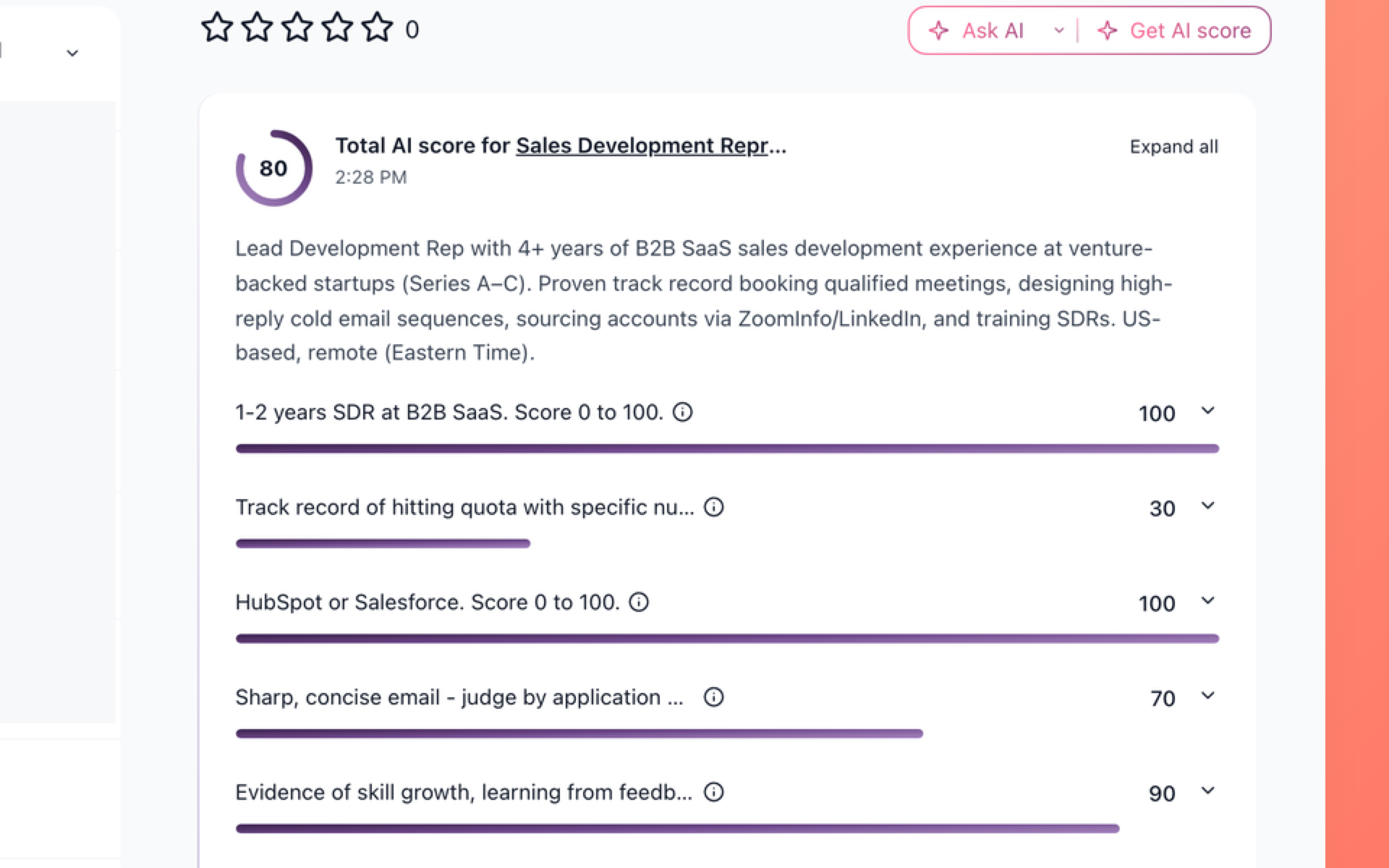
Prioritize usable records after the move
See the total AI Score and per-criterion results for a candidate so recruiters can focus post-move review on the evidence in 100Hires.
- Total AI Score
- Per-criterion results
AI Score is a workflow in 100Hires, not a transferred Snaphunt object. Its output depends on the present records and configured criteria, and the recruiter makes the hiring decision. Learn how 100Hires candidate matching supports review.
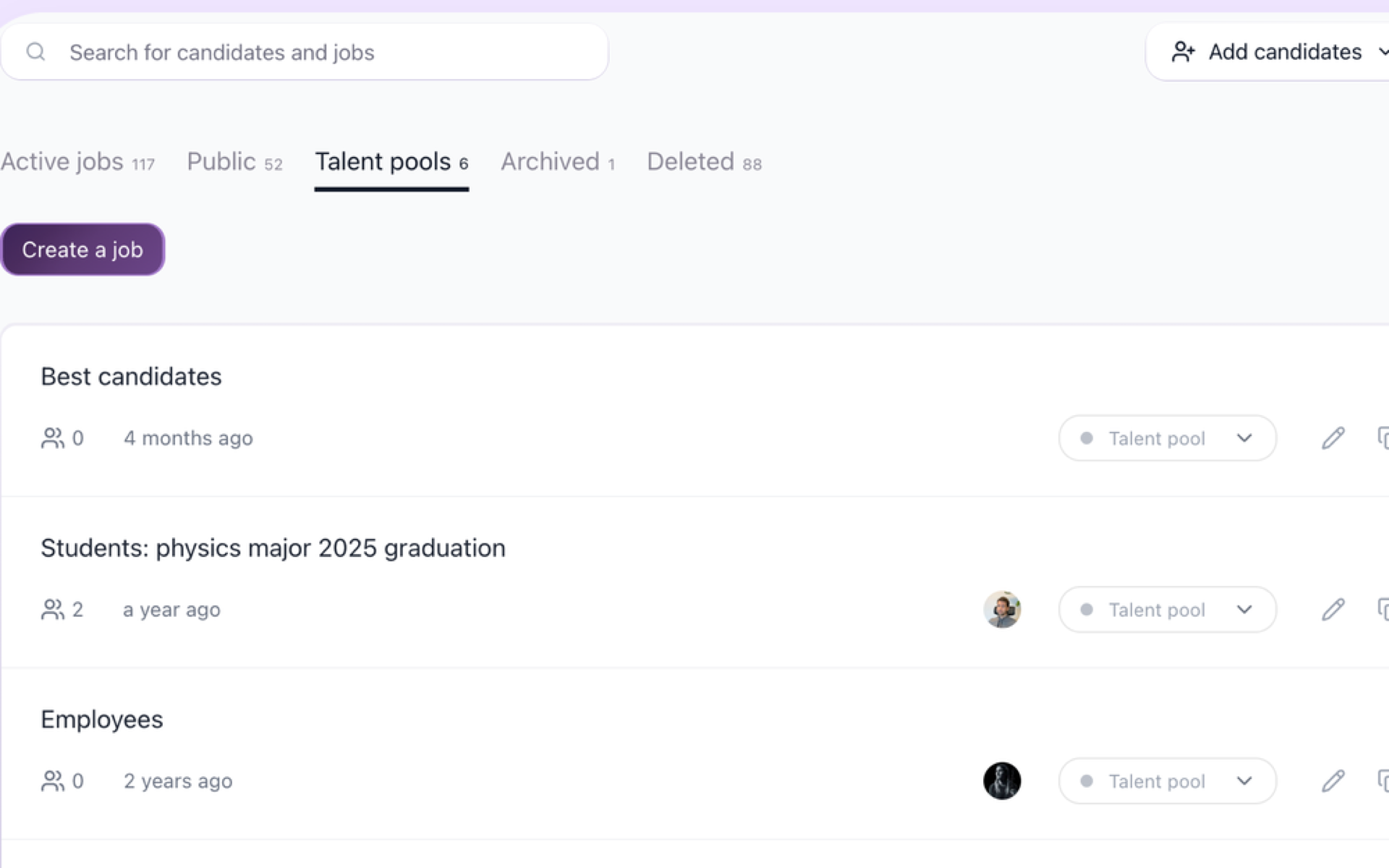
Find candidates for future roles after the move
See named Talent Pools, candidate counts, a status for each Talent Pool, and search controls so the team can find an organized group faster.
- Named Talent Pools
- Candidate counts
- Pool status
- Search
After usable records arrive, teams can use communication and scheduling workflows in 100Hires. These are workflows in 100Hires, not promises that source messages or automations will transfer.
See how Talent Pools and recruitment automation work after the import is validated.
You can also use evaluation and automation workflows with usable records. These workflows begin after validation and should not be confused with source assessments, records, or a transfer guarantee.
Before changing source access or contractual arrangements, confirm the names, contact fields, job assignments, Pipeline stages, and Talent Pools your team needs in 100Hires.
Document a representative validation sample and the accepted mapping before a larger migration. That gives both teams a clear reference for usable destination data without turning the sample into a promise about every source record.
Scope and AI limits to confirm
100Hires confirms managed scope only after reviewing the available source, files, fields, identifiers, quality, requested mappings, volume, and complexity. Managed migration is not automatically included with every plan or approved for every Snaphunt source.
- No promise covers every record, field, file, note, message, stage, assessment, automation, report, or permission.
- No one-click transfer, complete transfer, no-data-loss, no-downtime, fixed timeline, automatic duplicate cleanup, or delta sync is promised.
- Destination Pipeline stages can be configured, but exact source stage history depends on available evidence and approved mapping.
- AI Score uses present data and configured criteria. The recruiter reviews the result and makes the decision.
- Talent Pools organize usable destination records. They do not prove that a source pool or assignment will transfer.
- 100Hires does not cancel or manage the customer's Snaphunt account or contract.

It solved all of my recruitment problems and offered all of the features I was looking for. It can automate most of my recruitment processes.

I’d happily recommend it to my industry peers. I’m able to use the platform with ease and don’t have to think twice about which function to use.

The system is very user-friendly. Even people with no experience will find it easy to understand its functionality.







 4.7
4.7
 4.8
4.8
The hiring playbook, in your inbox
One email a week - benchmarks, AI screening tactics, and short interview templates from the 100Hires team. No product pitches.