
Manatal vs Recruit CRM: agency ATS in 2026 - 100Hires
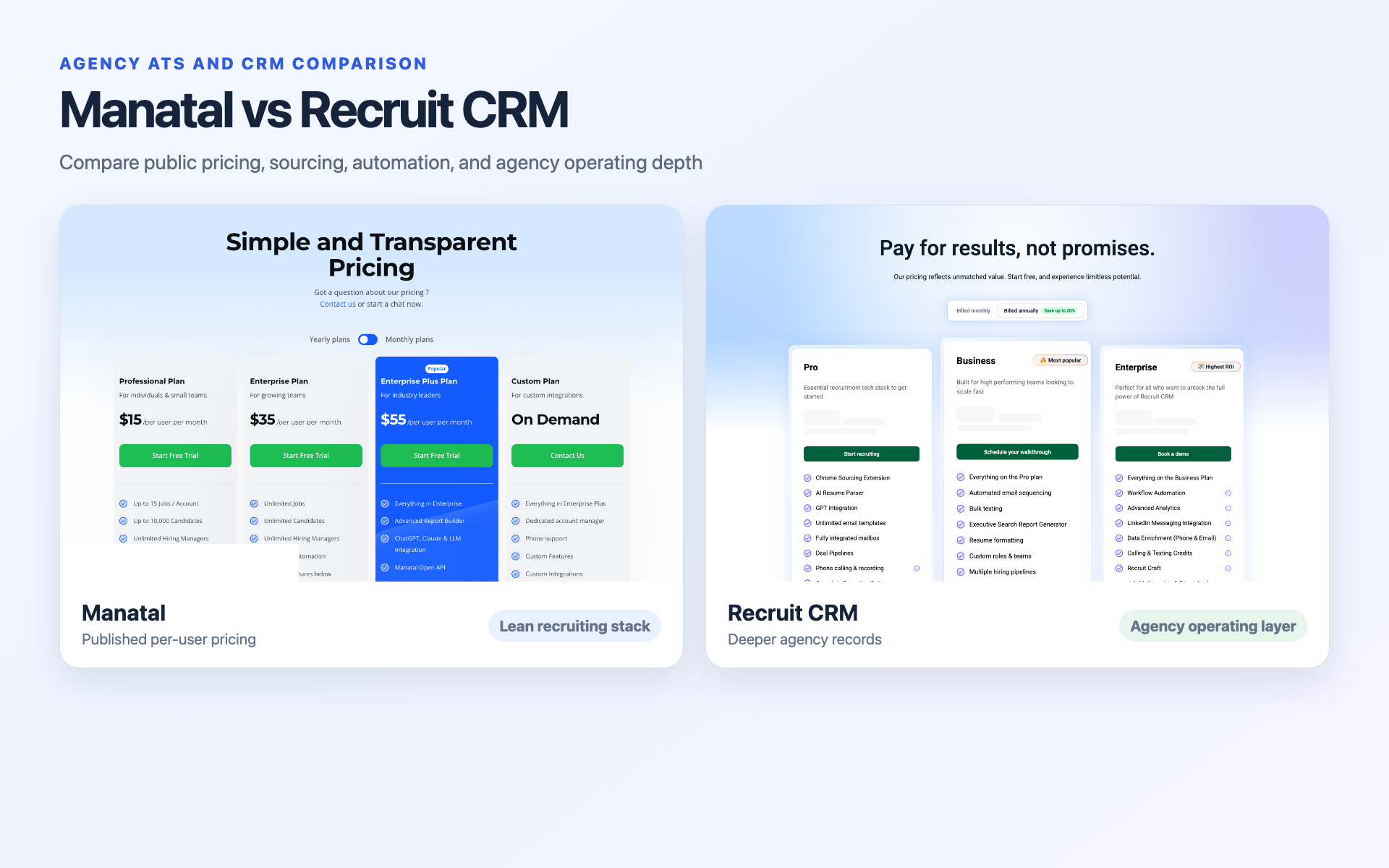
Choose Manatal for clear, low per-user pricing and a simpler recruiting workflow. Choose Recruit CRM when deals, submissions, placements, timesheets, and invoices need to sit near the candidate record.
Neither product wins every agency scenario. Recruit CRM's current rates are not publicly shown, and its broader operating scope makes a raw entry-price comparison misleading.
This comparison uses current official packaging, live pricing captures, product demos, dated review-platform snapshots, and paraphrased practitioner evidence.
Manatal vs Recruit CRM at a glance
The hiring playbook, in your inbox
One email a week - benchmarks, AI screening tactics, and short interview templates from the 100Hires team. No product pitches.
The quick comparison table
| Criterion | Manatal | Recruit CRM |
|---|---|---|
| Best fit | Lean permanent-placement or executive-search agency | Growing agency with deeper client and placement operations |
| Starting price visibility | Professional: $19/user/month, or $15 with annual billing | not publicly shown |
| Sourcing | Browser profile creation, People Match, semantic search, enrichment | Chrome sourcing, advanced search, matching, enrichment |
| AI assistance | Scoring, recommendations, Notetaker, beta Copilot | Parsing, matching, and plan-dependent AI features |
| Workflow automation | Starts on Enterprise | Sequences and task allowances vary by plan |
| Candidate ATS | Yes | Yes |
| Client CRM | Client records and sales pipeline | Clients, contacts, companies, and deals |
| Deals and placements | Sales pipeline and placement-revenue logging | Deals, submissions, placements, and agency reports |
| Timesheets and invoicing | No verified native back-office module | Timesheets, invoicing, and contractor-pay calculations |
| API access | Enterprise Plus | Business and Enterprise |
| Migration | Test import and export scope in the trial | Free self-import or paid expert migration |
| Main limitation | Entry plan excludes automation; agency back-office scope is lighter | Current price is not public; feature depth adds setup work |
The Manatal entry rate comes from its current public pricing page. Recruit CRM's plan names and feature gates come from its current matrix; its numeric rate is left unknown rather than filled with an older estimate.
The short answer depends on agency depth
A solo or small permanent-placement agency gets the clearest starting point from Manatal. The pricing is public, the candidate workflow is capable, and the client pipeline may cover a simple desk.
A growing multi-desk agency has more reason to shortlist Recruit CRM. Its documented model reaches past candidates into contacts, deals, submissions, placements, timesheets, invoices, and contractor-pay calculations.
A temp-heavy agency should test both with care. Recruit CRM comes closer to covering back-office work, yet it is not a full payroll system. Tax withholding and direct deposit still need a payroll provider.
See the AI-first alternative for lean recruiting teams.
Manatal publishes entry prices; Recruit CRM does not publicly show current rates
Price is the easiest difference to spot and the easiest one to misread. Manatal sells per paid user. Recruit CRM publishes plan names and limits, but its current exact rates are unavailable on the captured public page.
Manatal pricing is public and automation starts above Professional
Manatal's pricing page, captured July 14, 2026, showed three plans with public numeric rates. The monthly rates and annual-billing equivalents are displayed values. The annual totals below are calculated from those displayed rates.
| Plan | Monthly billing | Annual-billing equivalent | Derived annual total | Public scope and limits |
|---|---|---|---|---|
| Professional | $19/user/month | $15/user/month | $180/user/year | 15 jobs per account, 10,000 candidates, no Workflow Automation |
| Enterprise | $39/user/month | $35/user/month | $420/user/year | Unlimited jobs and candidates, Workflow Automation |
| Enterprise Plus | $59/user/month | $55/user/month | $660/user/year | Adds User Groups, SSO, API, priority support, and beta features |
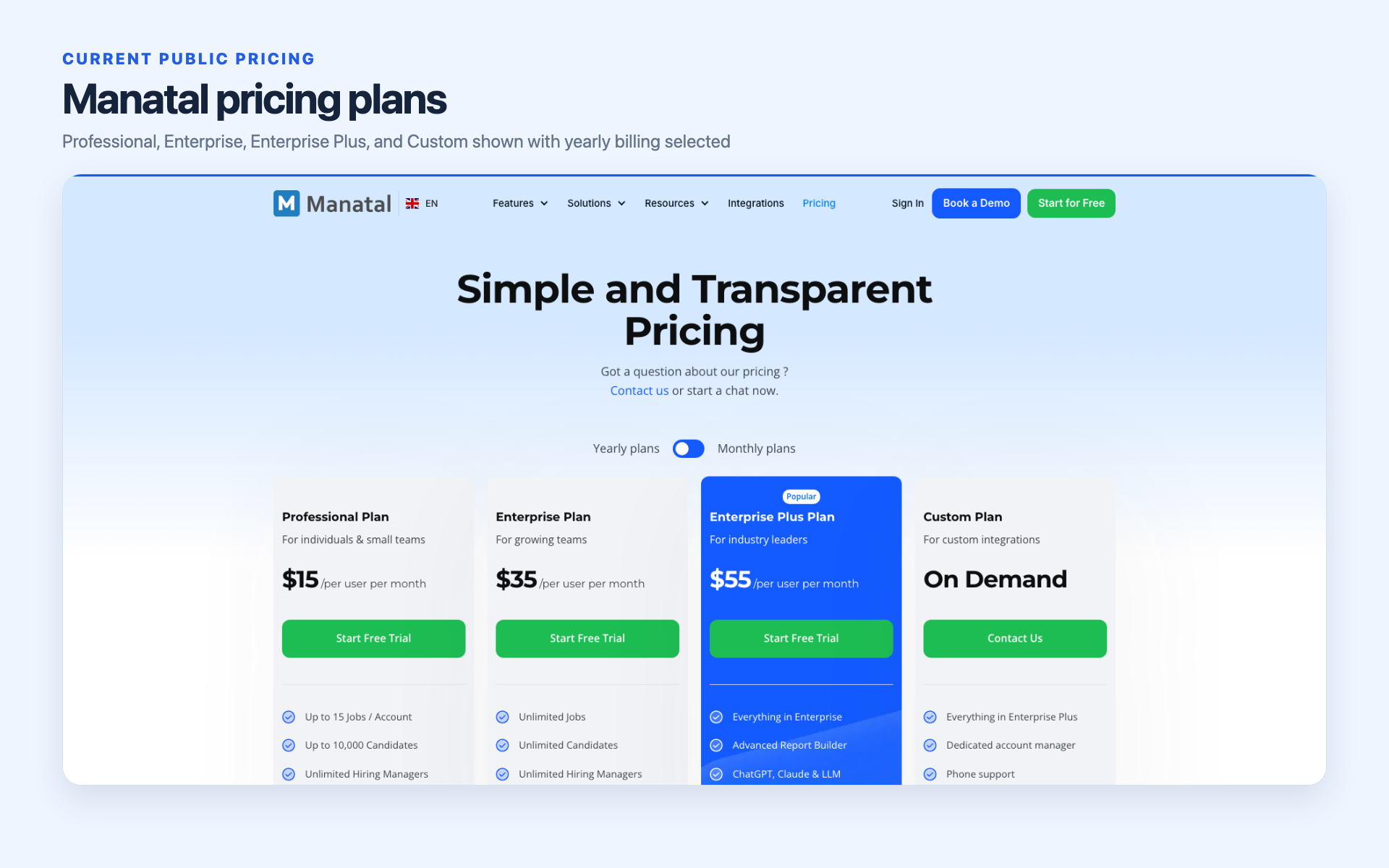
The Professional job cap belongs to the account, not each recruiter. A team cannot multiply 15 jobs by its seat count. Manatal does not publicly state a minimum seat count in the captured evidence.
The next table shows costs for 1, 3, 5, and 10 paid users. Every team total is derived from Manatal's displayed per-user rates and excludes taxes, add-ons, and any undisclosed seat minimum.
| Plan | Users | Derived monthly team total | Derived annual-billing monthly equivalent | Derived annual total |
|---|---|---|---|---|
| Professional | 1 | $19 | $15 | $180 |
| Professional | 3 | $57 | $45 | $540 |
| Professional | 5 | $95 | $75 | $900 |
| Professional | 10 | $190 | $150 | $1,800 |
| Enterprise | 1 | $39 | $35 | $420 |
| Enterprise | 3 | $117 | $105 | $1,260 |
| Enterprise | 5 | $195 | $175 | $2,100 |
| Enterprise | 10 | $390 | $350 | $4,200 |
| Enterprise Plus | 1 | $59 | $55 | $660 |
| Enterprise Plus | 3 | $177 | $165 | $1,980 |
| Enterprise Plus | 5 | $295 | $275 | $3,300 |
| Enterprise Plus | 10 | $590 | $550 | $6,600 |
Manatal lists a 14-day trial with no card. The trial excludes job-board posting, Manatal-domain email, mass email, email automations, AI job descriptions, and the GDPR consent-request tool.
Manatal says its fees and add-ons are net of tax. The public page names 9% GST for Singapore tax residents. Buyers elsewhere should ask how tax appears on the invoice before comparing totals.
Recruit CRM requires a quote for a true price comparison
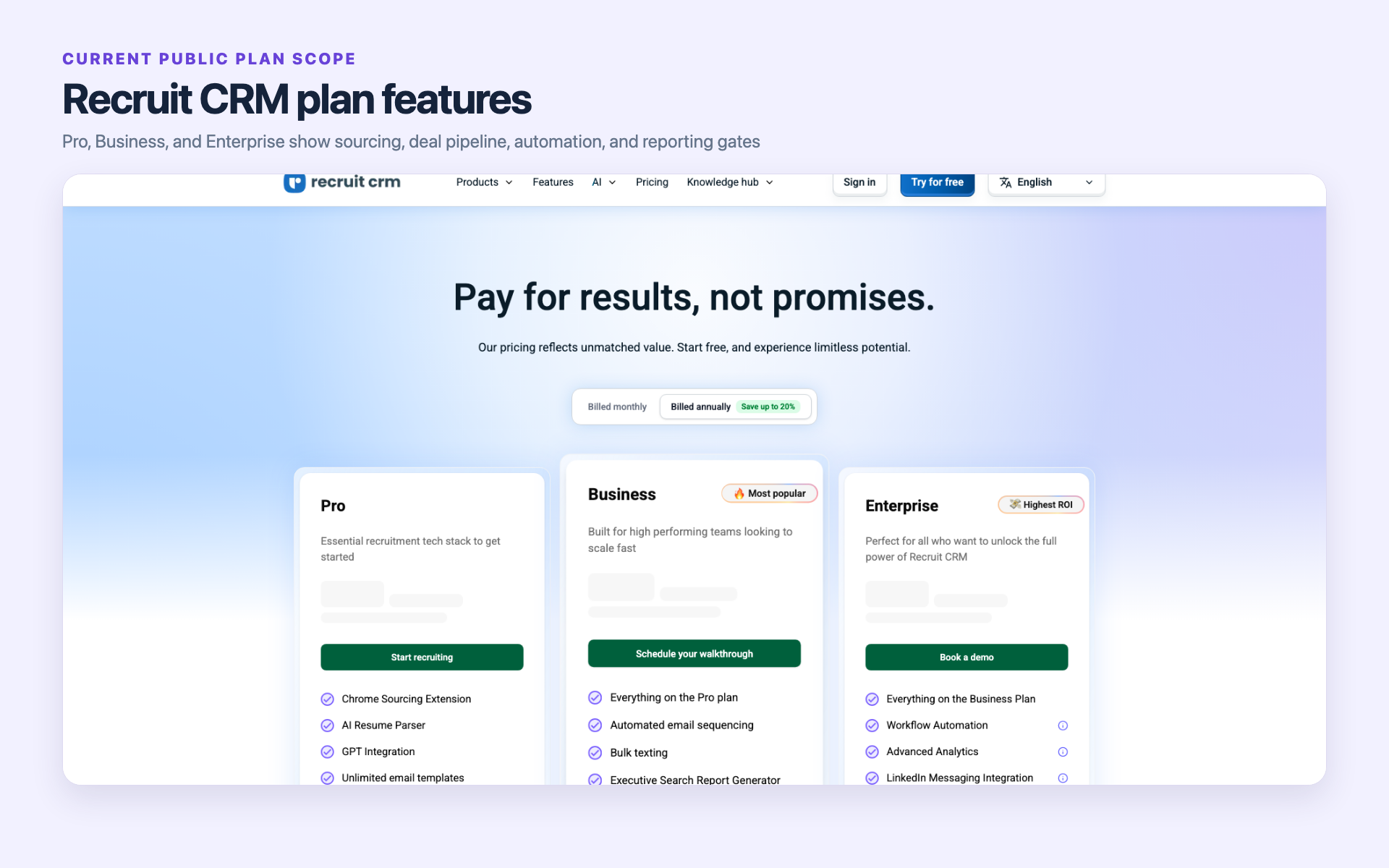
Recruit CRM's current pricing page names Pro, Business, and Enterprise. It does not expose enough public data to calculate a valid team total. Unknown fields should remain unknown until the buyer receives a quote.
| Plan | Monthly rate | Annual-billing monthly equivalent | Annual total | Currency | Minimum seats | Add-on rates | Trial duration | |
|---|---|---|---|---|---|---|---|---|
| Pro | not publicly shown | not publicly shown | not publicly shown | not publicly shown | not publicly shown | not publicly shown | not publicly shown | |
| Business | not publicly shown | not publicly shown | not publicly shown | not publicly shown | not publicly shown | not publicly shown | not publicly shown | |
| Enterprise | not publicly shown | not publicly shown | not publicly shown | not publicly shown | not publicly shown | not publicly shown | not publicly shown | not publicly shown |
The plans still reveal scope. Pro has smaller matching, custom-field, and sequence limits. Business opens API access, multiple pipelines, and deeper integrations. Enterprise adds larger workflow and enrichment allowances.
The current matrix shows 2 candidate matches and up to 15 custom fields on Pro, compared with 50 matches and up to 150 fields on Business and Enterprise. Business and Enterprise remove Recruit CRM branding.
Total cost includes usage limits, migration, and adjacent tools
That low rate is not the automation rate. A team that needs Workflow Automation must budget for Enterprise at $39 per paid user per month, or $35 per paid user per month with annual billing.
Recruit CRM may replace separate deal, placement, timesheet, and invoicing tools for some agencies. Credit-based calling, texting, enrichment, multiposting, workflow tasks, and paid migration can change the total.
A broader suite can reduce tool switching, yet unused modules still carry setup and training work. Compare the cost of the operating model your agency will use, not the number of features on the page.
- Price the exact user count and billing term.
- Map job distribution, enrichment, email, and workflow volume.
- List every required API, calendar, inbox, and finance connection.
- Ask who handles migration, field mapping, duplicates, and attachments.
- Require written confirmation for any plan entitlement that drives the purchase.
Sourcing and AI differ more in workflow than in labels
Both products can source, parse, search, match, and rank records. The better fit depends on where that work lands and how much human review the agency builds around it.
Manatal emphasizes matching inside the recruiting pipeline
Manatal can create candidate records from LinkedIn and supported sites, parse resumes, search semantically, suggest profiles through People Match, and score candidates against job criteria.
Its AI Notetaker and beta Copilot help users work with records and notes. Manatal says Copilot credit use varies with data volume, context, record length, and prompt complexity.
Copilot can read candidate profiles, job records, matches, organization records, notes, and candidate email threads within each user's permissions. Current documentation says it cannot access custom fields or make hiring decisions.
Test this with a role that has one hard requirement stored in a custom field. The result will show whether the team must move that evidence into a supported field or keep a manual review step.
Recruit CRM ties sourcing to the agency database and credits
Recruit CRM connects its Chrome extension, advanced search, AI resume parsing, candidate matching, and enrichment to candidate, contact, company, job, deal, submission, and placement records.
Complete records matter here. A matched candidate can move into outreach, a submission, a placement, and later agency reporting without rebuilding the commercial context in another database.
Plan limits shape the experience. Pro lists 2 candidate matches, and Business and Enterprise list 50. Enterprise adds 500 enrichment credits per user each month; every plan gets 25 free enrichment credits.
Current review snapshots give a mixed signal. Users often value how the product organizes recruiting work. Individual reviewers have reported problems with search, parsing, enrichment, duplicate handling, or AI precision.
One recent buyer in our sales-call research found Recruit CRM easy to adopt and less costly than another option, yet the same buyer was frustrated with its AI integration. That is one buyer's experience, not evidence of a market-wide pattern.
Human review remains part of AI-assisted screening
Matching and scoring depend on job criteria, record quality, and the evidence stored in the profile. Drafted output needs a recruiter to check context before it reaches a candidate or client.
The NIST AI Risk Management Framework gives a useful general principle: AI use should be risk-managed, reviewable, and trustworthy. NIST does not endorse either product.
For the proof-of-concept, score a known sample, inspect the source evidence, record recruiter disagreements, and test an override. The aim is a reviewable decision path, not automatic rejection from an untested score.
Automation is plan-gated and usage-limited in different ways
An automation label says little about daily capacity. Buyers need to test triggers, actions, prerequisites, limits, recovery, and the human review step before client-facing messages go out.
Manatal automation starts on Enterprise
Manatal reserves Workflow Automation for Enterprise and Enterprise Plus. Professional users can run the recruiting workflow, but the entry plan does not include the automation builder.
The product supports global and job automations with stage or record triggers. Email actions require a connected Gmail or Outlook inbox plus prepared email templates.
Admins must turn the feature on. Authorized non-admin users can create job automations. Each active global or job automation counts against a fair-use limit that does not reset.
Ask the demo team to show how archived jobs, paused rules, duplicated automations, and changed templates affect that limit. The answer matters more than a simple checkmark.
This changes the price question. The derived Enterprise cost for a three-user agency is $117 with monthly billing, or a $105 monthly equivalent with annual billing, before taxes or add-ons.
Recruit CRM automation is tied to plan allowances and actions
Recruit CRM's plan matrix gives Pro one email sequence. Business and Enterprise list unlimited sequences with up to 500 active users. Zapier appears across all three plans.
Enterprise documents 1,000 workflow tasks, 10 job-multiposting credits, and 500 enrichment credits per user each month. The product counts a workflow task after a bot action succeeds.
Those figures describe capacity, not total cost. The related plan rate, currency, seat minimum, and add-on rates are not publicly shown in the current capture.
The plan cards and matrix disagree on a few entitlements, including bulk texting and the executive-search report generator. Use the captured matrix as a reference, and get written confirmation of any feature access that affects the purchase.
Test exceptions before automating client-facing work
A clean demo uses perfect records. Real agency data includes duplicates, missing fields, reassigned owners, unsubscribe requests, reopened jobs, delayed clients, and candidates who move backward in the pipeline.
- Force an action to fail and inspect the retry path.
- Create a duplicate and see which record receives the task.
- Record an unsubscribe request during a live sequence.
- Reassign the record owner after an automation starts.
- Roll a stage back and inspect the audit history.
- Exhaust the monthly task allowance and see which automations stop.
- Require approval before a client or candidate message is sent.
Recruit CRM goes deeper into client, placement, and back-office records
This is the main product difference for an agency. Both platforms cover client-side recruiting work. Recruit CRM covers more of the agency's work after a candidate enters the pipeline.
Manatal covers candidate and client workflow without the same back-office depth
Manatal's agency demo shows candidates, jobs, clients, activities, reports, and a visual client sales pipeline from prospect to signed contract. It can store contract or invoice files on a client profile.
The same demo shows placement-revenue entries, transaction dates, and commission splits. These records support agency tracking, but they do not prove native invoice generation, payment processing, tax handling, or payroll.
That distinction is practical. Storing an invoice file keeps context on the client record. Creating the invoice, approving time, sending it, collecting payment, and correcting payroll are separate operations.
Manatal keeps the entry price low by focusing on the recruiting workflow. Agencies that outgrow its search, reporting, or customization often start looking for a system that covers more of their agency operations.
Recruit CRM models more of the agency desk
Recruit CRM is built around the agency desk. The question is whether its broader client, deal, placement, and reporting features justify the time and effort required to buy and implement the system.
Its documented objects cover candidates, contacts, companies or clients, jobs, deals, submissions, and placements. Business and Enterprise add multiple hiring pipelines.
Timesheets can feed client billing and contractor-pay calculations. Invoices and agency reports keep more commercial context close to the recruiting record.
The depth has value only when the team records each handoff. A deal with no owner, a placement with no fee detail, or an unapproved timesheet leaves the same gaps as a separate spreadsheet.
One staffing founder in our sales research wanted an ATS plus CRM, timesheet integration, and a QuickBooks handoff. The founder saw Recruit CRM as capable and found the interface visually dense. That view is anecdotal.
Neither should be assumed to replace payroll
Recruit CRM Bill & Pay supports timesheet-based client billing and contractor-pay calculations. It does not perform tax withholding or direct deposit. Those steps remain with a payroll provider.
Think of it as a calculation and billing workflow, not as a way to transfer payroll funds. Ask which data is sent to the payroll provider, who approves it, and how corrections return to the agency system.
Agencies with high temporary-worker volume should test time capture, approvals, overtime rules, payroll export, finance sync, compliance, corrections, and invoice disputes using their real operating sequence.
Manatal should not be assumed to cover that sequence either. Its verified agency scope is strongest around candidate and client workflow, stored files, pipeline activity, and revenue records.
Reporting, integrations, migration, and support affect long-term fit
A feature grid can look complete on purchase day. The long-term test is whether the system keeps data usable after more clients, recruiters, fields, reports, integrations, and ownership changes arrive.
Reporting quality depends on the records an agency needs
Manatal provides recruiting reports. In dated Capterra cards, some users valued the ease of adoption, and some described reporting, export, Boolean relevance, or customization as basic.
Recruit CRM documents a complete reporting suite and an executive-search report generator. Individual reviews still mention dense views, hard-to-find reports, difficulty using filters, and occasional slowness.
Test one report that the owner uses to run the business. Build it from imported data, save the filters, share it with the right role, export it, and trace each number back to its record.
API and integration access can force a higher plan
Manatal places API access on Enterprise Plus. Recruit CRM's matrix places Open API and LogicMelon job posting on Business and Enterprise, with Pro excluded from both.
Recruit CRM documents a 60-request-per-minute limit for each API token. Its plan cards and full matrix conflict on bulk texting, executive-search reports, account management, and generic job-board wording.
If an integration determines the purchase, ask for the entitlement, allowance, add-on rate, and support owner in writing. A checkmark on a pricing page is not an implementation plan.
Migration ranges from self-import to paid assistance
Recruit CRM supports free Excel or CSV self-import for candidates, companies or clients, and linked notes. Its current pricing page says paid expert migration takes 10 to 14 business days and is priced by data volume.
A migration test should include duplicates, activities, attachments, custom fields, client links, submissions, placement history, owners, consent data, and a complete export after the import.
Current verified evidence does not establish a public Manatal migration duration. Ask both vendors to import the same sample and document which data types require manual cleanup.
Current review snapshots are useful but not a winner
G2's July 14, 2026 snapshot showed both products at 4.8/5, based on 147 Manatal reviews and 114 Recruit CRM reviews. Capterra showed 4.6/5 based on 141 reviews and 4.9/5 based on 470 reviews.
Keep the platforms separate. Their samples, dates, incentives, and methods differ. These scores add context, but they cannot determine which product fits your database, desk structure, or client workflow.
Support evidence is mixed on both sides too. Some reviewers describe helpful onboarding or responsive support. Others report delays or weak follow-through. Test the channel, response ownership, and escalation path during the trial.
Choose the product that matches the agency operating model
The best shortlist starts with the work your agency handles after sourcing. One tool favors a lean recruiting stack. The other keeps more records related to sales, placements, and finance together.
Choose Manatal for a lean, price-transparent recruiting stack
- You run permanent placement or executive search with a modest team.
- Candidate sourcing, screening, communication, and pipeline work dominate the day.
- A client sales pipeline and placement-revenue record cover the commercial need.
- You want a public per-user rate before a sales call.
- You can accept 15 jobs per account on Professional or pay more for automation.
- API access can wait until Enterprise Plus.
The agency owner or operations lead must weigh the tradeoff. If reporting, customization, integrations, or back-office requirements grow, Manatal's lower entry rate may no longer represent the needed plan or stack.
Model the likely upgrade before signing. A team that expects automation soon should compare the cost of Enterprise now, rather than plan around Professional and treat the later move as a surprise.
Choose Recruit CRM for deeper agency operations
- Several desks share candidate, client, company, and deal records.
- Submissions and placements need a clear commercial history.
- Timesheets, invoicing, and contractor-pay calculations belong near recruiting.
- Multiple pipelines, API access, and agency reports matter.
- Your team will model credits, tasks, add-ons, and migration before signing.
- You can accept quote-based pricing and a more involved implementation.
The person responsible for adoption and cost must weigh the tradeoff. Confirm any plan-card or matrix conflict in writing, then test the interface with the users who will live in it each day.
Do not buy unused depth. If the agency never records deals, timesheets, invoices, or contractor calculations in the platform, Recruit CRM's broader model may create more fields without reducing the number of other tools the agency needs.
Run the same proof-of-concept in both systems
Create the same fictional client, job, candidate, submission, placement, duplicate, and activity history in each system. Then run search, automation, reporting, reassignment, failure recovery, and export.
Calculate costs for the exact user count and plan, including credits, migration, integrations, and job distribution. Ask each vendor to confirm scope in writing. A shared test script makes the result easier to compare than two polished demos.
100Hires is the AI-first alternative for lean recruiting workflows
100Hires publishes this article, and 100Hires is our product. External research did not establish it as a direct substitute for Recruit CRM's client, deal, placement, invoice, payroll, or timekeeping layer.
The fit is sourcing, candidate CRM, outreach, and AI assistance
100Hires fits teams focused mainly on pre-hire recruiting. Its Chrome extension can source profiles. Enrichment adds contact data. Candidate pools and communication history keep the database usable.
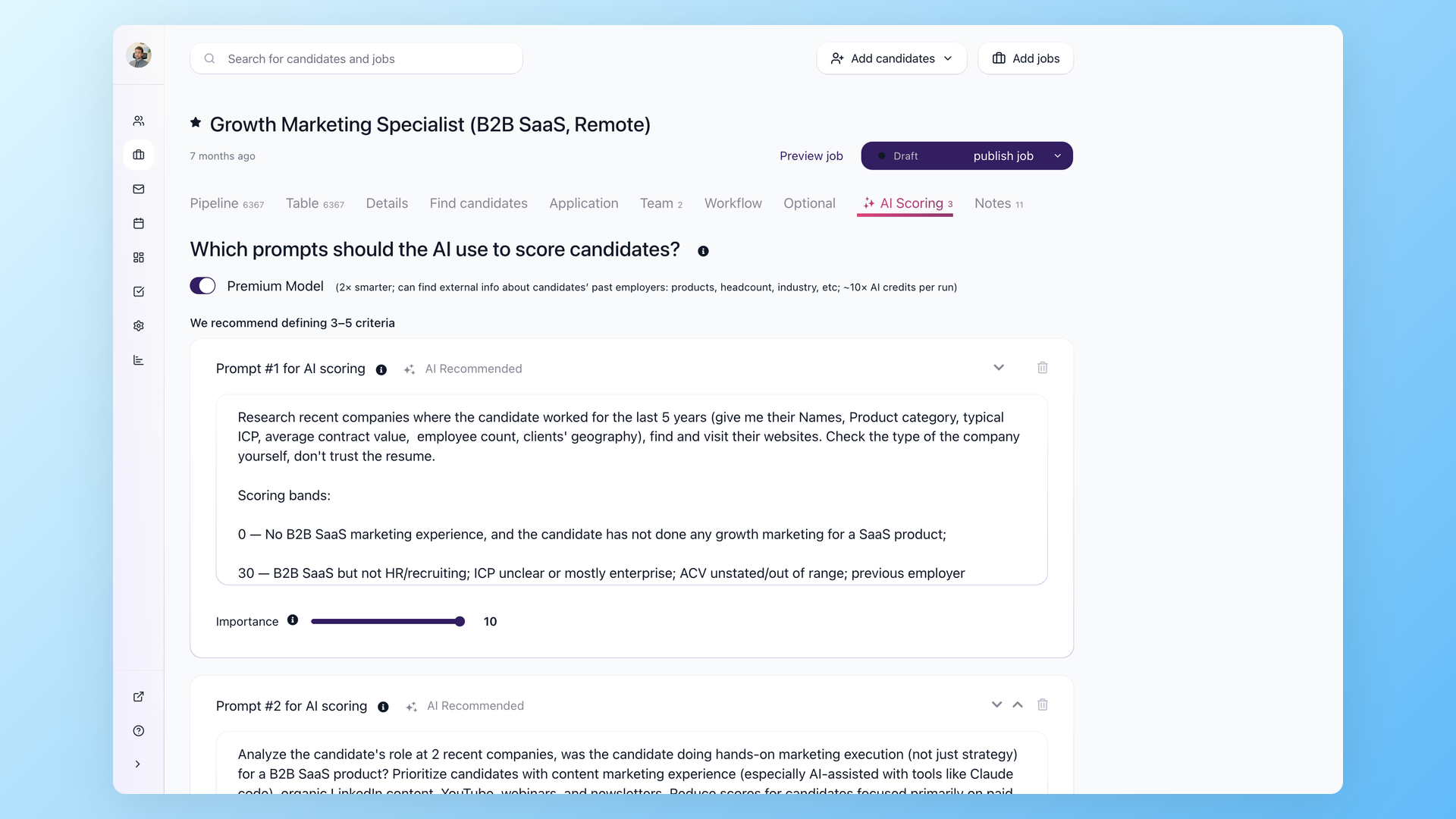
AI Score ranks recorded evidence against recruiter-set job criteria. AI Recruitment Copilot can work from resumes, job notes, application answers, messages, evaluations, and interview notes and cite the source data.
AI Score cannot infer a skill or trait that the record does not contain. Recruiters should keep hard criteria tied to recorded evidence, review low scores, and route early automation to a review queue during calibration.
AI Email Composer drafts from candidate and job context, then leaves the message editable before sending. Nurture, validation, task, scoring, and stage actions support recruitment automation workflows with defined limits.
The same strengths come with a firm boundary. 100Hires does not include a native client sales CRM, deals, placement accounting, invoice generation, payroll, timekeeping, timesheets, shift scheduling, or a contractor back office.
The operating boundary is as important as the AI layer
A lean team can use 100Hires for sourcing, candidate records, outreach, nurture, evaluation, and recruiting automation. It should not buy 100Hires expecting Recruit CRM-style deals, placements, invoices, payroll, or timesheets.
Multi-company accounts can separate recruiting work for several companies, and the API can support custom portals. Those options do not provide a native client sales pipeline, placement ledger, invoice engine, or staffing back office.
Forbes Advisor currently places 100Hires in its Best for Startups and Small Businesses editorial category. This is an editorial label, not an agency endorsement or formal award.
Capterra includes 100Hires in its alphabetical 2026 list of top-rated AI-enabled recruiting software. Alphabetical inclusion is not a first-place rank.
Current pricing is employee-band based, not recruiter-seat based
The live 100Hires selector was set to 1-20 employees and USD on July 14, 2026. Both monthly and annual billing options were checked. Annual-equivalent rates are displayed; annual totals are derived.
| Plan | Monthly billing | Annual-billing equivalent | Derived annual total | 1-20 employee scope in USD |
|---|---|---|---|---|
| Start | $99/month displayed | $49/month displayed, billed annually | $588/year derived | 3 jobs, 100 candidates, 1 user, 100 AI credits/month |
| Advanced | $249/month displayed | $199/month displayed, billed annually | $2,388/year derived | Unlimited jobs, candidates, and users; 300 monthly AI credits or 1,000 on annual billing |
| Pro | $499/month displayed | $399/month displayed, billed annually | $4,788/year derived | 3,000 monthly AI credits or 5,000 on annual billing; enrichment and outreach/warmup |
| Enterprise | Contact sales | not publicly shown | not publicly shown | Custom scope |
These prices are based on company employee bands, not recruiter seats. Advanced adds automated emails, knockout questions, a custom career-site domain, and global calling or texting. Pro adds warmup for email outreach, enrichment, onboarding, and migration terms.
100Hires lists a 14-day no-card trial. Its current trial limit includes 10 candidates from external boards. Use that window to test scoring criteria, outreach edits, nurture timing, and the data export process.
Start a 14-day free trial if your main requirement is sourcing and pre-hire workflow rather than a staffing back office.
Frequently asked questions
Is Manatal or Recruit CRM better for recruitment agencies?
Manatal fits lean agencies that value public per-user pricing. Recruit CRM fits teams that need deals, placements, timesheets, invoices, and reports together. 100Hires is our disclosed AI-first sourcing option, not a substitute for that back office.
Which costs less, Manatal or Recruit CRM?
Manatal lists Professional at $19 per user monthly, or $15 with annual billing. Recruit CRM's current rates are not publicly shown, so compare a written quote. 100Hires uses employee-band pricing, not recruiter seats.
Does Manatal or Recruit CRM have better automation?
Manatal gates Workflow Automation to Enterprise and Enterprise Plus. Recruit CRM varies sequence and task allowances, integration access, and credit limits by plan. 100Hires offers pre-hire automations with plan and AI-credit limits.
Can Manatal or Recruit CRM handle client CRM and placements?
Both support client-side recruiting. Recruit CRM documents deeper support for deals, submissions, placements, timesheets, invoicing, and contractor-pay calculations. Neither replaces payroll. 100Hires is not a native agency back office.
When should an agency consider 100Hires instead?
Consider 100Hires when AI sourcing, candidate CRM, outreach, nurture, evaluation, and pre-hire automation are the main needs. 100Hires publishes this comparison and is our product; it does not replace Recruit CRM's agency back-office functions.
Final verdict
Manatal is the better default for an agency that values transparent pricing with a low entry point and a simpler recruiting workflow. Its client pipeline may be enough for permanent placement without a full staffing back office.
Recruit CRM is the better default when client contacts, deals, submissions, placements, reports, timesheets, invoices, and contractor-pay calculations need to stay closer together. Get a quote before comparing cost.
100Hires is our disclosed AI-first alternative when your needs are limited to sourcing and pre-hire recruiting. It is not a native replacement for agency sales CRM or back-office accounting.
Run the same proof-of-concept, calculate the exact plan and usage costs, confirm in writing that the plan covers each purchase requirement, and export sample data before committing.
Try 100Hires free for 14 days if that narrower AI-assisted recruiting scope suits your team.
Try 100Hires for free
No credit card. 14-day trial. Forbes Advisor #1 ATS for SMBs.

