
JobDiva vs Manatal: Agency ATS Comparison 2026 - 100Hires
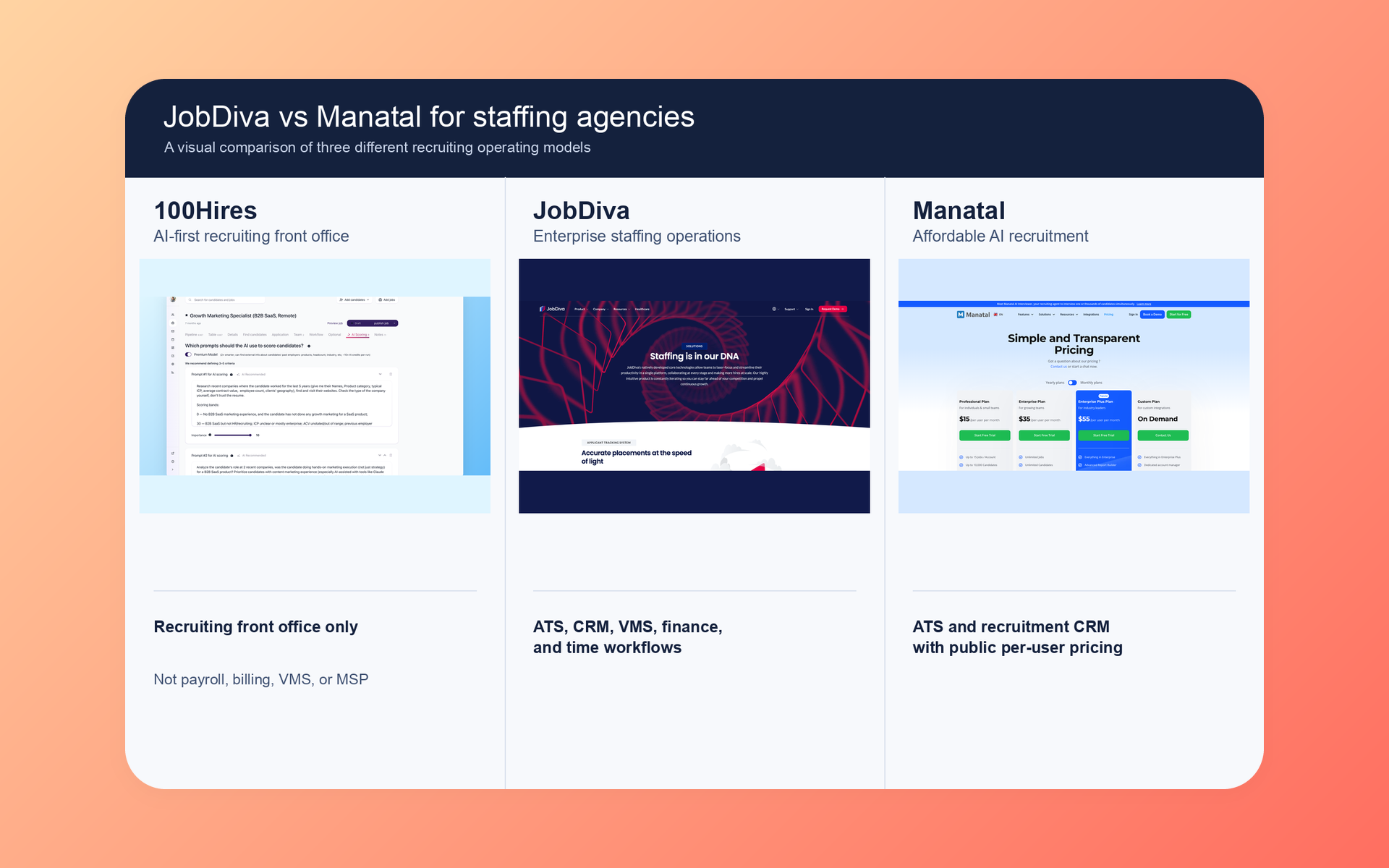
If your agency needs recruiting tied to staffing operations, JobDiva is usually the better fit. If you need a recruiting ATS and CRM with public per-user pricing, Manatal is usually the clearer buy.
100Hires is our product. It appears here as an AI-first recruiting front-office option, not as a replacement for staffing payroll, billing, timekeeping, invoicing, shift scheduling, VMS, or MSP operations.
We checked current product claims against official pages captured on July 14, 2026. Recent independent evidence about this exact pair was sparse, so this comparison does not pretend that a few reviews prove a universal winner.
JobDiva vs Manatal at a glance
The hiring playbook, in your inbox
One email a week - benchmarks, AI screening tactics, and short interview templates from the 100Hires team. No product pitches.
The key difference is where each product's workflow ends. JobDiva documents recruiting, VMS, finance, time, and staffing back-office processes. Manatal documents a recruiting ATS and CRM with public plans and named AI tools.
| Criterion | 100Hires | JobDiva | Manatal |
|---|---|---|---|
| Role in this article | Owned recruiting front-office alternative | Head-to-head product | Head-to-head product |
| Best fit | Teams seeking AI scoring, outreach, nurture, and recruiting automation | Staffing firms with VMS and back-office needs | Recruiting-led agencies seeking ATS and CRM |
| Pricing basis | Public company-size pricing, not per user | Custom quote | Public per-user pricing billed annually |
| ATS and CRM | Yes, with client-company records | Yes, built for staffing workflows | Yes, with recruitment CRM |
| Staffing back office | Not documented in the captured official set | Documented finance, time, billing, and payroll-process scope | Not documented in the captured official set |
| VMS and MSP | Not documented in the captured official set | VMS synchronization plus separate DivaVMS product | Not documented in the captured official set |
| AI and automation | AI Score, AI Copilot, outreach, nurture, and workflow automation | AI-enabled search, matching, and automation | Named AI catalog; workflow automation starts on Enterprise |
| API | API v2 and webhooks | Open API claimed; captured public shell lacks endpoint detail | Open API on Enterprise Plus |
| Trial | Request current terms | No public trial found | 14-day no-card trial with exclusions |
| Strongest reason to shortlist | AI-first recruiting workflows without a staffing suite | Broad documented staffing operating scope | Clear recruiting scope and public pricing |
| Main limitation | No documented staffing back-office parity | Pricing and package scope require a sales process | Several advanced functions are plan-gated |
If the front office is your full scope, review 100Hires pricing. If payroll or VMS sits inside the buying decision, keep those requirements in the scorecard from day one.
Use the table as a routing guide, not a final score. A firm that places permanent hires may value CRM clarity and public pricing. A temp agency may place far more weight on time, expenses, VMS intake, and finance handoffs.
Team size alone does not settle the choice. A small specialist staffing firm can have demanding back-office needs. A larger internal recruiting team may need none of them.
JobDiva is built around staffing operations
JobDiva presents one broad environment for staffing work. Its official pages join ATS, client CRM, job workflow, onboarding, reporting, VMS synchronization, mobile tools, and back-office functions.
Recruiting, client CRM, and candidate search
The recruiting side covers candidate records, job orders, client relationships, submissions, communication, resume harvesting, search, matching, and reports. That scope lets a staffing team connect recruiter activity to client demand.
The product's public material names AI-enabled search and matching, yet it does not supply a controlled quality test against Manatal. Treat search speed, match quality, duplicate handling, and report usability as pilot questions.
That distinction matters. A feature can exist and still fail your real dataset, role mix, or recruiter habits. Load a representative sample and measure how many searches produce usable shortlists.
Check the client side with equal care. Staffing recruiters often switch between a candidate, an open order, a contact, and a submission trail. Count the clicks, note missing context, and test how quickly a new recruiter learns the flow.
Reports should answer operational questions, not merely export rows. Ask whether managers can see aging jobs, recruiter activity, submission movement, client demand, and gaps that need action without rebuilding the report each week.
VMS, financial, and back-office depth
This is where JobDiva separates itself. Current official material documents VMS job synchronization, timekeeping, billing and payroll processes, timesheets, expenses, SOW financial tools, and payroll or general-ledger integrations.
DivaVMS is a separate named product. Its scope covers hiring managers, suppliers, candidates, MSP services, approvals, cost centers, time, and expenses. Ask which modules sit inside your quote.
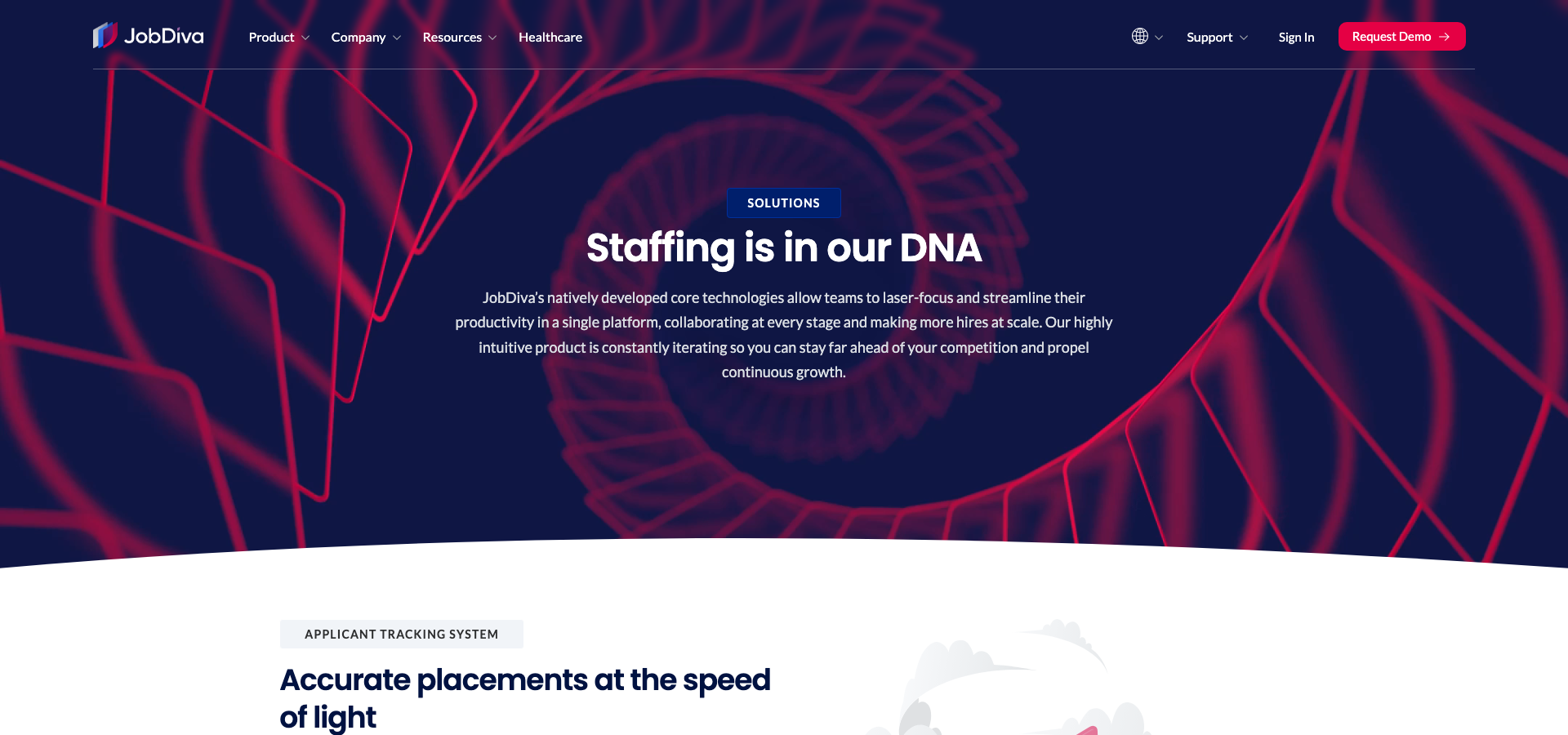
A broad product map can reduce handoffs. It can create more implementation work too. Confirm data ownership, finance rules, approval paths, and the boundary between JobDiva, DivaFinancials, DivaVMS, and external systems.
For each back-office step, ask where the system of record lives. A VMS may send the requisition. JobDiva may hold the candidate and assignment. A payroll or accounting system may receive approved data. Map each handoff.
That map exposes the real integration burden. It shows which team fixes rejected records, how corrections return, and whether an operations manager can trace one placement from client request to paid invoice.
Buying and implementation limits
JobDiva prices each client separately. We found no public seat price, plan matrix, general implementation estimate, or public trial. The quote needs more than one bottom-line number.
- List every named module and integration in scope.
- Ask what migration, configuration, training, and testing include.
- Request API documentation, sandbox access, limits, and support ownership.
- Separate first-year services from recurring software cost.
JobDiva publishes a public Swagger page; in a JavaScript-capable browser it loads full Version 1 and Version 2 API specifications without credentials. Do not count an integration as proven until your team sees the relevant endpoints, events, rate limits, and data model.
Manatal is the clearer recruiting-platform purchase
Manatal draws a cleaner box around recruiting. It combines candidate pipelines with a recruitment CRM, public per-user plans, agency client workflows, migration support, and a broad catalog of named AI functions.
Recruiting CRM and candidate workflow
Agency teams can track clients and leads, keep communication history, send batch email, collect feedback through the Guest Portal, follow placement milestones, and record revenue data.
Candidate intake can come from resume upload, a browser extension, CSV or JSON files, email forwarding, forms, a career page, and connected job boards. Applicants from supported boards can enter the relevant job.
The captured Manatal official set did not document staffing payroll, contractor timekeeping, invoicing, or VMS and MSP operations. That is a source boundary, not proof that no adjacent integration exists.
For permanent placement, that recruiting focus may be enough. A team can manage prospects, client contacts, open roles, candidates, feedback, and placement milestones without buying a broader temporary-staffing operations layer.
Test agency permissions early. Client-facing portals, recruiter ownership, shared notes, contact visibility, and revenue fields can expose weak process design long before the ATS itself becomes the problem.
AI, automation, API, and migration
Manatal's help center names Copilot, Interviewer, Notetaker, Advanced Search, Recommendations, Parsing, People-Match, profile enrichment, AI job descriptions, and MCP.
Only AI Recommendations was explicitly marked Beta in the captured sources. Workflow Automations start on Enterprise. Open API, SSO, User Groups, priority support, and Beta access sit on Enterprise Plus.
The Open API uses V3, carries fair-usage limits, and may need support enablement. Manatal's MCP server needs Enterprise Plus and Admin permission. Buyers should test the API path they plan to use.
Named AI tools are useful only when they support a recruiter's decision-making process. Ask what input each feature reads, what output it creates, where a human can edit it, and whether the system records the final choice.
Plan gates matter here. A Professional-plan demo may show the core recruiting surface, yet an automation, SSO, API, or MCP requirement can move the purchase into a higher tier.
Migration follows a documented sequence: extraction, mapping, a test upload, review, and live import. Manatal confirms timing case by case, so a generic setup promise should not replace a written plan.
Trial and distribution caveats
The 14-day trial asks for no card. It excludes several functions, including job-board posting, Manatal-domain email, mass email, email automations, AI job descriptions, and the GDPR consent-request tool.
Manatal uses two public distribution measures: more than 2,500 channels and more than 30 direct job boards. The sources do not reconcile their scope. Verify the exact boards and posting rules your agency needs.
Head-to-head comparison by workflow
Counting features does not show which product is the better fit. Compare the work your team must finish, the systems it must touch, and the proof each vendor can show in your environment.
ATS and client CRM
Verdict: JobDiva fits firms that want recruiting tied to wider staffing operations. Manatal fits teams that want a more clearly packaged recruiting CRM and candidate pipeline.
Both products cover candidates, jobs, clients, communication, and reporting. JobDiva extends those records toward submissions, VMS demand, and operational data. Manatal centers client pipelines, portal review, placement milestones, and recruiter workflow.
Test one client request from intake through placement. Check permissions, duplicate rules, search, stage changes, feedback, email history, export quality, and the report your account manager sends each week.
Use the same test script for both systems. Give vendors the same data, the same recruiter task, and the same time box. Record workarounds as failures unless the workaround is acceptable to the person doing it every day.
Staffing back office and VMS
Verdict: JobDiva has the stronger documented scope for VMS, time, expenses, billing, payroll processes, and finance integrations.
For a temp or contract agency, placement is not the finish line. Hours need approval, expenses need review, client terms affect invoices, and payroll data must move correctly. JobDiva publishes evidence across those steps.
Those functions were not documented in the captured Manatal set. Ask Manatal to demonstrate any required integration before you treat it as covered. A marketplace logo is not the same as a working operational handoff.
Ask to see exception handling. Hours arrive late. A manager rejects a timesheet. An expense lacks a receipt. A client disputes a rate. The normal path is easy to demo; the exception path reveals the operational fit.
AI and workflow automation
Verdict: Manatal exposes a broader named AI catalog in public documentation. The evidence does not establish better output quality.
JobDiva documents AI-enabled search, matching, and automation, but its captured public detail is thinner. Manatal documents several distinct assistants and search or recommendation functions, with plan and Beta gates where noted.
Run the same roles through both products. Compare false positives, missed candidates, explanation quality, recruiter override, audit records, and the time needed to tune criteria.
Start with a review queue, not automatic rejection. Build a small labeled sample, compare recruiter decisions with system output, inspect disagreements, and adjust the criteria. Recheck after the job profile or labor market changes.
Keep scores tied to job-related selection criteria. Route uncertain results to human review, test for discriminatory impact, and tighten automation only after the team has checked real outcomes.
Sourcing and job distribution
Verdict: Neither product earns a universal distribution win from the collected evidence.
JobDiva documents resume harvesting, job-board connections, VMS synchronization, and integrations. Manatal documents applicant intake from connected boards and sourcing tools, but its two distribution counts use scopes that remain unclear.
- Confirm the exact free and paid boards for each hiring market.
- Check candidate ownership, duplicate rules, and source attribution.
- Test sponsored-post controls and spend reporting.
- Inspect how VMS jobs and direct-client jobs stay separate.
APIs and integrations
Verdict: Compare access and proof, not catalog size.
JobDiva says it connects with more than 100 products and services across recruiting, payroll, finance, messaging, screening, VMS, and related categories. Reading the specs is free, but seeing them does not prove endpoint behavior for your flows until you test with credentials.
Manatal's Open API belongs to Enterprise Plus. Its help material names V3, feature enablement, and fair usage. That is clearer access documentation, yet it still does not prove your planned integration.
Ask both vendors for a sandbox, endpoint docs, webhook coverage, rate limits, error handling, change notices, and a named owner when data stops moving.
Then run one round trip. Create or update a candidate, move an application, trigger a message, and bring the result back into the source system. Screenshots of documentation cannot replace this test.
Reporting, migration, and support
Verdict: No universal winner is defensible from the current independent evidence.
JobDiva documents reporting but gives no public general implementation schedule. Manatal documents a staffed migration process but sets timing case by case. Neither fact predicts your project's finish date.
Give each vendor a migration sample with messy records, attachments, custom fields, client contacts, consent data, and duplicate candidates. Review the imported result before agreeing to a full transfer.
Run a support test too. Submit one configuration question and one data-flow failure. Record response time, answer quality, escalation steps, and which party owns the fix.
Need AI Score, nurture, outreach, scheduling, automation, API access, and webhooks in the recruiting front office? Book a 100Hires demo. Keep staffing back-office systems in the evaluation if your agency depends on them.
Pricing works on three different bases
A raw monthly-price winner would mislead. 100Hires prices the captured scenario by company size, JobDiva quotes each client, and Manatal prices each user.
The figures below exclude taxes, implementation, migration, add-ons, and unverified usage charges. Annual totals marked as derived are simple monthly-rate calculations.
Price the same operating scope for each option. Include the ATS, required CRM seats, automation tier, API tier, migration, training, support, data cleanup, integrations, and any separate back-office products.
| Product | Billing basis | Month to month | Annualized month-to-month cost | Annual-billing monthly rate | Annual-billing total | Displayed or derived | Scope and limits |
|---|---|---|---|---|---|---|---|
| 100Hires Start | Company-size based, not per user; default company-size band not shown | $99 | $1,188 | $49 | $588 | Monthly rates displayed; both annual totals derived | Up to 3 jobs, 100 candidates, 1 user, 100 monthly AI credits |
| 100Hires Advanced | Company-size based, not per user; default company-size band not shown | $249 | $2,988 | $199 | $2,388 | Monthly rates displayed; both annual totals derived | Unlimited jobs, candidates, and users; automated emails; knockout questions; custom career-site domain; global calling/texting; 300 or 1,000 monthly AI credits by billing mode |
| 100Hires Pro | Company-size based, not per user; default company-size band not shown | $499 | $5,988 | $399 | $4,788 | Monthly rates displayed; both annual totals derived | Email carousel/warmup, contact enrichment, onboarding support, annual-contract data migration; 3,000 or 5,000 monthly AI credits by billing mode |
| 100Hires Enterprise | Company-size based, not per user | Not publicly shown | Not publicly shown | Not publicly shown | Not publicly shown | Quote-only; no public numeric amount | Security, privacy, governance, SSO, dedicated account manager, requisition approvals, BI connection, custom features, integrations, compliance, and reports |
| JobDiva | Custom client quote | Not publicly shown | Not publicly shown | Not publicly shown | Not publicly shown | Quote-only; no public numeric amount | No public tier, seat price, plan matrix, or trial terms found; quoted staffing ATS, CRM, VMS, back-office, and integration scope may vary |
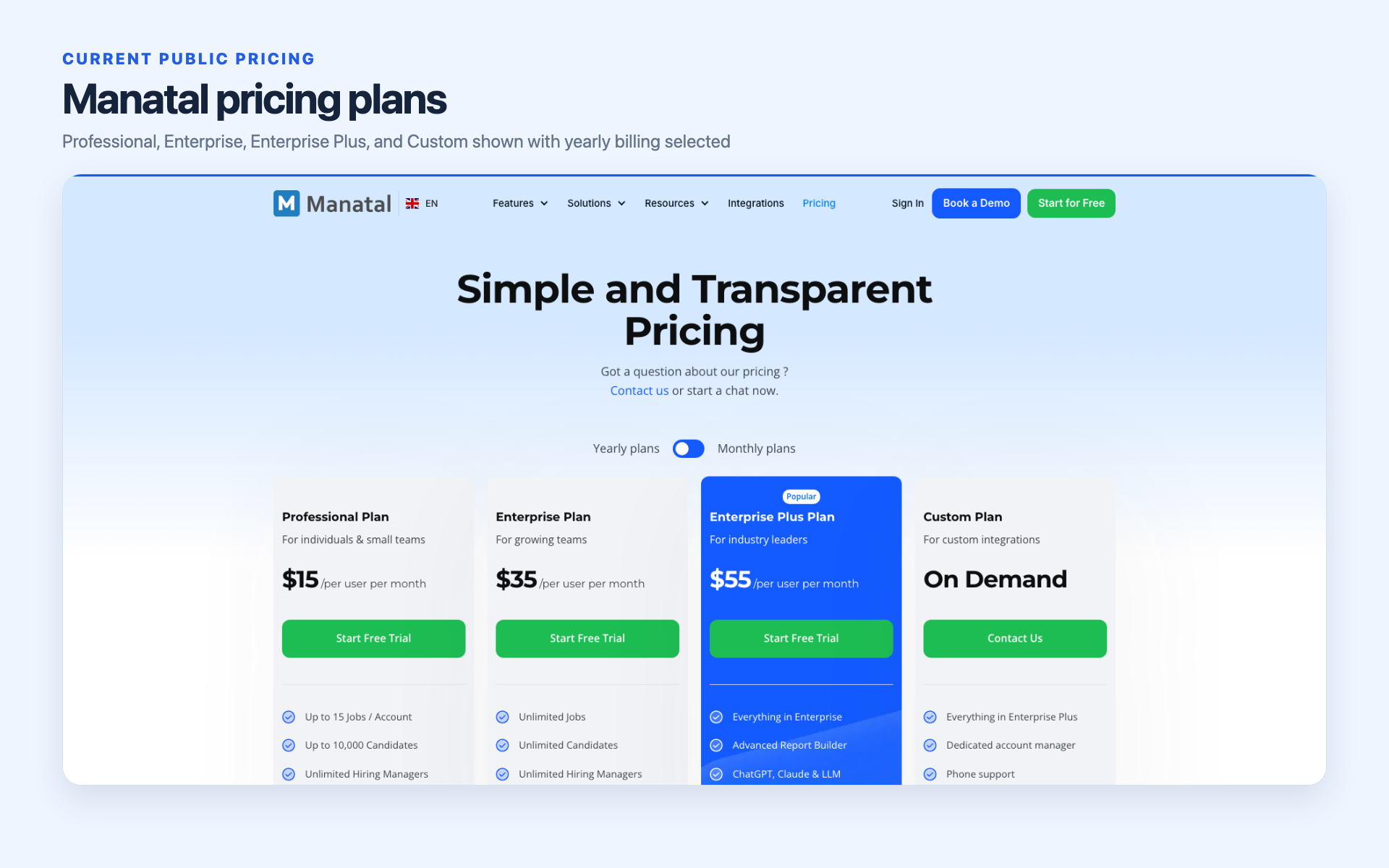
| Manatal Professional | Per user, billed annually | Not publicly shown | Not publicly shown | $15 per user | $180 per user per year | Annual-billing monthly rate displayed; annual total derived | 15 jobs and up to 10,000 candidates |
| Manatal Enterprise | Per user, billed annually | Not publicly shown | Not publicly shown | $35 per user | $420 per user per year | Annual-billing monthly rate displayed; annual total derived | Unlimited jobs and candidates; Workflow Automations |
| Manatal Enterprise Plus | Per user, billed annually | Not publicly shown | Not publicly shown | $55 per user | $660 per user per year | Annual-billing monthly rate displayed; annual total derived | User Groups, SSO, API access, priority support, and Beta access |
Four-user and ten-user Manatal scenarios
For four users, derived annual Manatal totals are $720 on Professional, $1,680 on Enterprise, and $2,640 on Enterprise Plus.
For ten users, the matching totals are $1,800, $4,200, and $6,600. The lowest plan may not fit if you need unlimited jobs, workflow automation, API access, SSO, or other gated functions.
How to compare a JobDiva quote
Normalize the quote against your required outcome. List the included modules, VMS scope, financial and payroll integrations, implementation work, migration volume, training, API access, support level, storage, and renewal terms.
Ask for first-year and recurring totals. A lower subscription can still cost more in year one if data work, configuration, training, or integration services sit outside the quoted license.
Request the renewal basis in writing. Check contract length, notice period, included support, storage, user growth, extra environments, API usage, and the cost of removing your data at the end.
How to read 100Hires pricing fairly
100Hires public pricing is based on company size, not seats. The captured page did not expose which employee band produced the displayed figures. Do not divide the prices by a guessed recruiter count.
The product covers recruiting front-office work. Its captured sources do not document payroll, billing, timekeeping, invoicing, shift scheduling, or VMS and MSP operations. Price only the scope it can serve.
Choose by operating model, then prove it in a pilot
The better fit depends on where recruiting ends. JobDiva reaches into staffing operations. Manatal has a more clearly defined recruiting scope. 100Hires belongs only on a shortlist for AI-first front-office needs.
Choose JobDiva when
- Your agency runs temp or contract staffing.
- VMS or MSP work belongs inside the daily process.
- Time, expenses, billing, payroll processes, or finance integrations are in scope.
- Recruiters and operations need shared records and reports.
- Your team accepts a quote-led purchase and implementation.
Confirm which JobDiva products and modules the quote includes. The broad public product family should not be mistaken for one automatic package.
Choose Manatal when
- Your team mainly needs recruiting ATS and CRM workflows.
- Public per-user pricing helps budget approval.
- Client pipelines, Guest Portal review, and placement milestones matter.
- The needed AI and automation fit the chosen plan.
- Enterprise Plus pricing fits any API, SSO, or MCP need.
Keep staffing back-office requirements separate unless Manatal demonstrates them. They were not documented as product capabilities in the captured official set.
Run this proof-of-fit pilot
- If 100Hires is shortlisted, test one recruiting workflow and confirm the front-office boundary.
- In JobDiva, test the same job, candidate set, client record, stages, messages, report, API request, and migration sample.
- In Manatal, repeat that test with the target plan and its actual gates.
- For staffing work, add VMS intake, timesheet, expense, billing, payroll handoff, invoice, and finance-report checks.
- Write pass or fail rules, cost assumptions, owners, and open risks before signing.
Use production-like data with names and contact details replaced. Let recruiters, account managers, operations, finance, and IT score the parts they own. One polished demo cannot represent all those jobs.
Use a weighted scorecard. Give must-have operational steps more weight than attractive extras. Mark each item as proven, partly proven, not proven, or out of scope. Add the evidence link or pilot note beside the score.
Set a stop rule before the pilot. If a critical payroll handoff, VMS flow, API action, permission model, or migration sample fails, pause the purchase until the vendor supplies a tested remedy.
When neither fits, consider 100Hires for the recruiting front office
Full disclosure: 100Hires is our product.
It belongs in this comparison for a narrow reason. Some teams need AI-assisted recruiting, outreach, nurture, scheduling, and automation, but they do not want a staffing back-office suite.
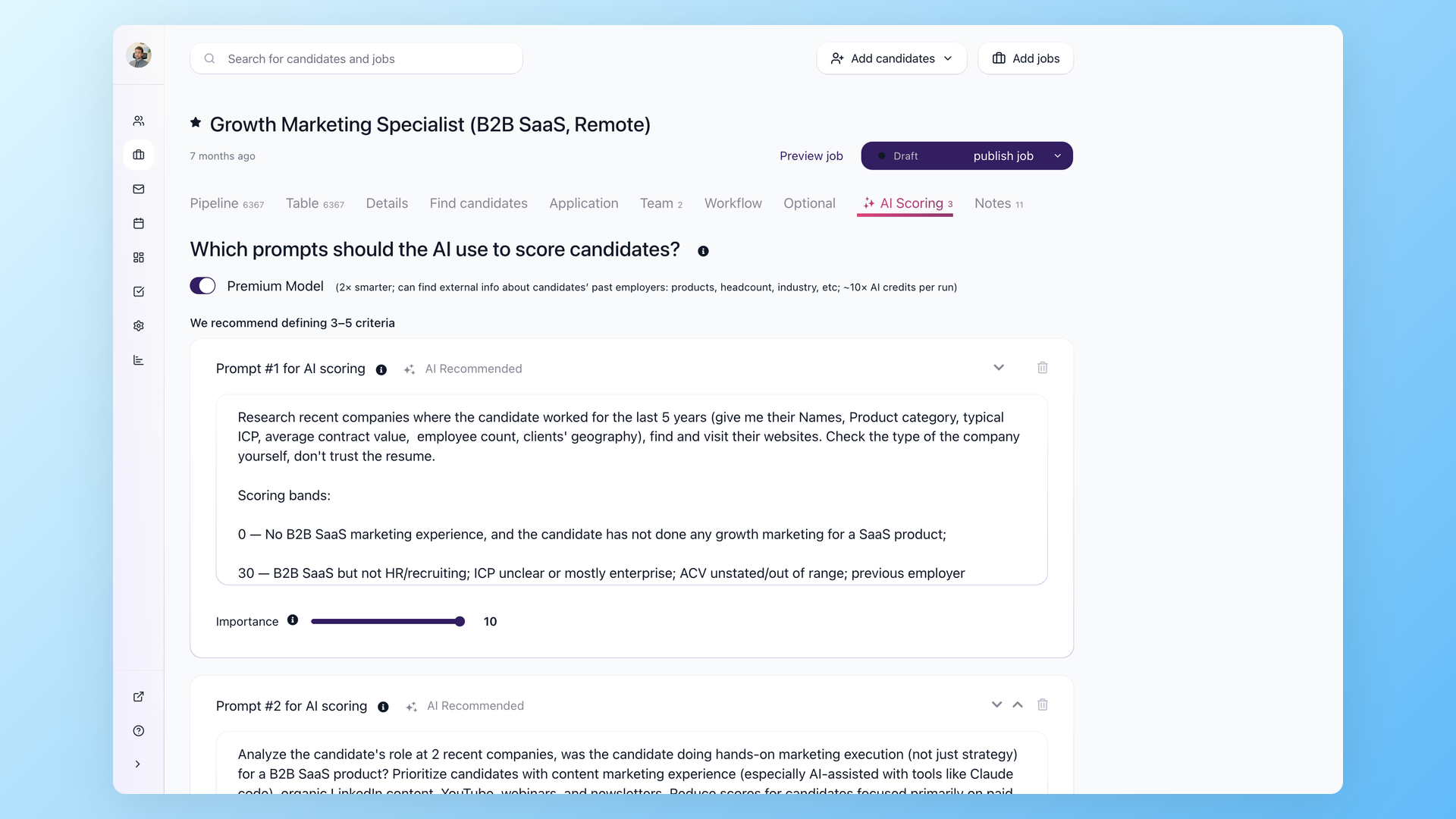
100Hires supports configurable AI Score, AI-assisted screening, email, SMS and voicemail steps, nurture campaigns, enrichment, reporting, scheduling, API v2, and webhooks.
A practical fit is a recruiting team that wants to score applicants against explicit criteria, route candidates through review, automate follow-up, schedule interviews, and keep outreach activity with the application record.
That fit can include an agency front office, but our current customer-profile research favors direct employers. Agencies should judge 100Hires by the workflow it proves in a pilot, not by a broad claim of category parity.
The limit needs equal space. Our captured sources do not document staffing payroll, billing, timekeeping, built-in timesheets, invoicing, shift scheduling, VMS, or MSP operations.
That makes 100Hires a poor substitute for JobDiva's documented staffing back office. It can fit a recruiting-led team that keeps those operational systems elsewhere.
Current public figures are $99, $249, or $499 month to month for Start, Advanced, or Pro. Annual billing lowers the displayed monthly rates to $49, $199, or $399. Enterprise is quote-only.
Those prices use company size. The public pricing page we reviewed did not show the default company-size band. Review plan limits and your company band before comparing them with Manatal's per-user totals.
Frequently asked questions
Is JobDiva or Manatal better for staffing agencies?
JobDiva has the stronger documented fit when staffing work includes VMS, time, billing, payroll processes, or finance integrations. Manatal fits recruiting-led agencies focused on ATS and CRM. 100Hires is a front-office option without documented staffing back-office scope.
How much do JobDiva and Manatal cost in 2026?
JobDiva uses custom quotes. Manatal costs $15, $35, or $55 per user per month billed annually. 100Hires uses company-size pricing, not per-seat pricing. Its public monthly figures are $99, $249, and $499, or $49, $199, and $399 with annual billing.
Does Manatal include payroll, timesheets, or VMS?
Those capabilities were not documented in the captured Manatal official set. That does not prove every adjacent integration is absent. JobDiva documents them more directly. 100Hires does not document payroll, built-in timesheets, invoicing, or VMS operations either.
Which platform has better AI recruiting features in 2026?
Manatal has the broader named public AI catalog. JobDiva documents AI-enabled search, matching, and automation with less detail. No controlled test proves a quality winner. 100Hires offers configurable AI Score. Use human review, job-related criteria, and impact monitoring.
Can a team replace JobDiva or Manatal with 100Hires?
Only when the scope is the recruiting front office. 100Hires covers ATS, AI Score, outreach, nurture, automation, scheduling, reporting, API access, and webhooks. It is not a replacement for JobDiva's staffing back office. Test Manatal client workflows before switching.
The final choice
Choose JobDiva when recruiting must connect to VMS and staffing operations. Choose Manatal when the priority is a publicly priced recruiting ATS and CRM with clear plan gates.
If you need an AI-first recruiting front office and can keep payroll, billing, timekeeping, invoicing, shift scheduling, and VMS or MSP work elsewhere, book a 100Hires demo.
Try 100Hires for free
No credit card. 14-day trial. Forbes Advisor #1 ATS for SMBs.

