
Breezy HR API guide for 2026: access, authentication, endpoints, and webhooks
Breezy HR has a documented REST API. Whether your plan lets you call it is a different question.
This guide covers what the Breezy HR API offers as of July 2026: how access works, how to authenticate and make your first request, what the 62 documented operations cover, how webhooks behave, and where the documentation goes quiet.
It closes with a comparison against the 100Hires API.
Quick disclosure before we start: 100Hires, an ATS with its own developer API, publishes this guide. The Breezy claims below come from its live documentation, its pricing page, and the other public sources linked in each section, so you can check every claim yourself.
Key takeaways
The hiring playbook, in your inbox
One email a week - benchmarks, AI screening tactics, and short interview templates from the 100Hires team. No product pitches.
- Breezy HR has a real v3 REST API: 62 documented operations across 50 endpoints at api.breezy.hr/v3, with Personal Access Token auth.
- API Access appears on Breezy's pricing page only as an optional add-on to the custom-priced Pro tier. Startup, Growth, and Business plans do not list it.
- Webhooks require a Pro account and support 10 event types, a 10-endpoint quota, HMAC signing, and a documented retry schedule.
- The documented rate limit is 100 requests per 60 seconds per token, returned as a 429 with X-RateLimit headers.
- The 100Hires API includes self-serve keys in all paid plans at no extra cost and provides one public OpenAPI 3.1 spec covering 89 paths and 133 operations.
Does Breezy HR have an API?
Yes. Breezy HR runs a v3 REST API with a single base URL, https://api.breezy.hr/v3, and a per-endpoint reference at developer.breezy.hr.
The per-endpoint documentation is genuinely good. Each page includes request and response schemas, status codes, and embedded OpenAPI 3.1 JSON. There is even an llms.txt file, a machine-readable index of the full reference that AI coding assistants can consume.
There are two details worth knowing up front. Resource IDs are 12- to 14-character hex strings, and 14-character IDs ending in 01 belong to EU-region accounts. And there are two ways to authenticate, covered below.
The API itself is not the hard part. Before writing code, you need to understand who can access the API and where its operational documentation starts and stops.
Breezy HR API access and authentication
Here is the part no ranked page in this keyword's search results spells out: having the docs open does not mean your plan can call the API.
Three official Breezy sources tell the same story. First, the pricing page lists API Access among the advanced features that can optionally be added to the Custom Pro plan, alongside advanced reporting and data export.
In other words, it is an optional add-on to the top tier, not an automatic inclusion, and it has no public price.
Second, the company endpoint reference states that the company's plan must have the Developer API feature enabled; otherwise, the endpoint returns a 403.
Third, Breezy's help center describes token creation with a telling conditional: if your account has API access, any admin can create tokens.
For context, here is the paid-tier lineup as of July 2026, per Breezy's pricing page:
| Breezy HR plan | Price (annual billing) | Price (monthly billing) | API Access listed |
|---|---|---|---|
| Startup | $157/mo | $189/mo | No |
| Growth | $273/mo | $329/mo | No |
| Business | $439/mo | $529/mo | No |
| Custom Pro | Contact sales | Contact sales | As an optional add-on |
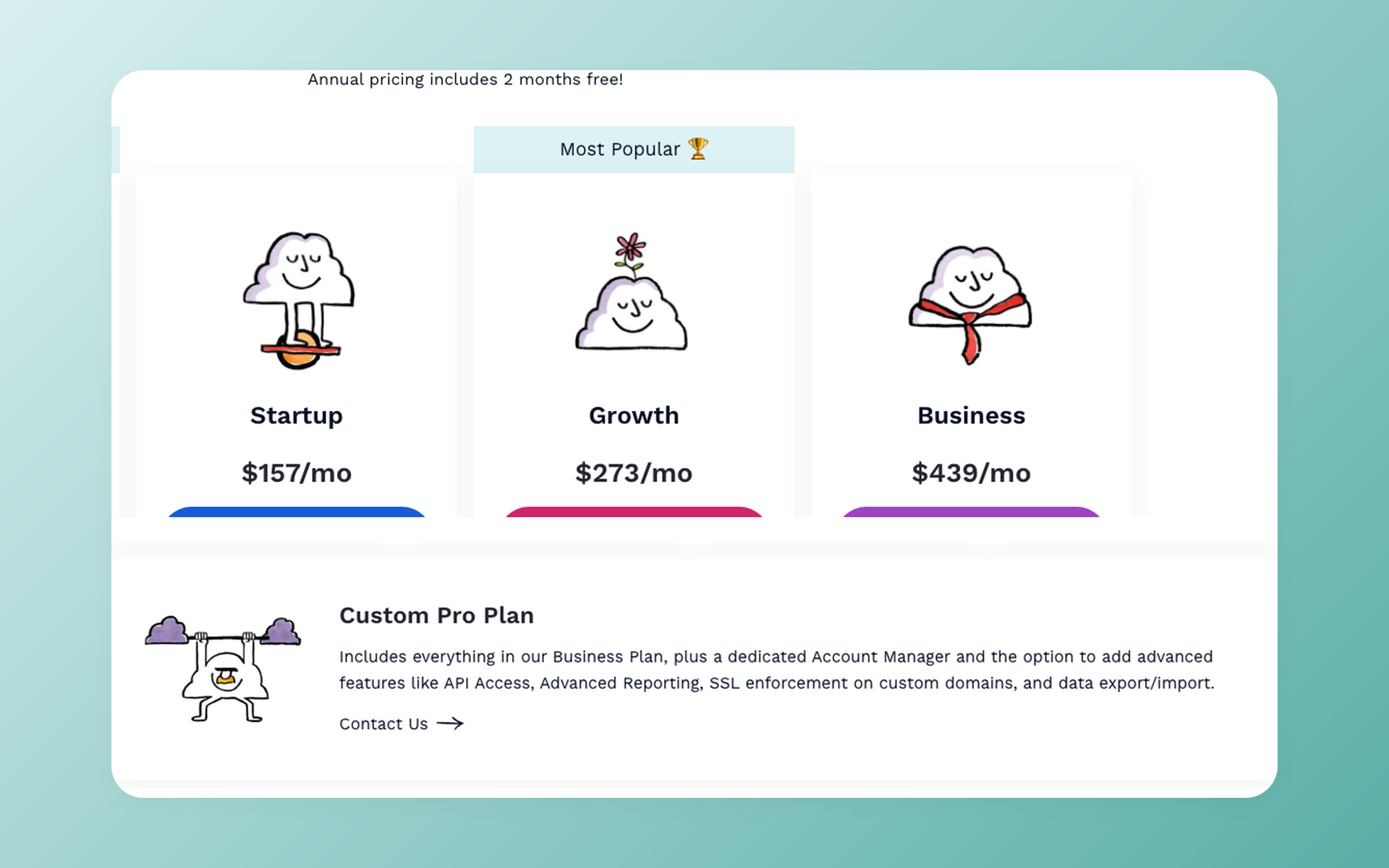
What this means in practice: if your team is on Startup, Growth, or Business, budget a sales conversation and an unpriced add-on before you write a line of integration code.
That is a packaging choice on Breezy's side, and it is worth knowing on day one rather than mid-sprint.
How authentication works
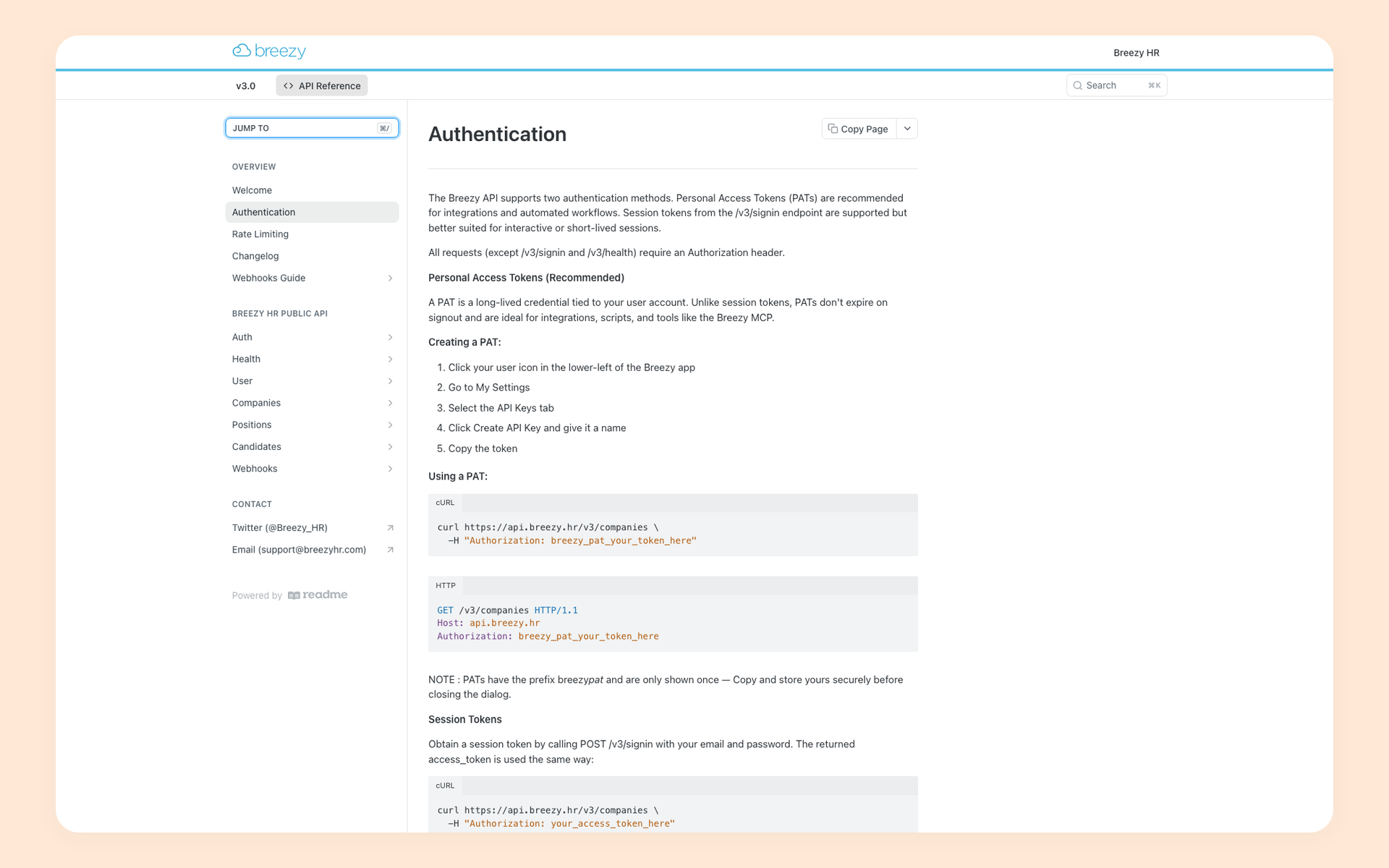
Breezy documents two auth mechanisms. The main one is a Personal Access Token: a long-lived bearer token sent in the Authorization header as breezy_pat_<token>.
A PAT remains valid after sign-out but, according to the help center, is invalidated when its owner is removed from the account. Choose the token owner with that documented behavior in mind.
The second is a session flow: POST /v3/signin with email and password returns a session token valid for 30 days from last use. That 30-day clock applies to session tokens only, not to PATs.
The public reference documents these two flows and does not document an OAuth flow. That is a public documentation finding, not proof the capability is absent.
Webhooks are gated too
Breezy's own customer guide to webhooks opens with the requirement that webhook functionality is available for Pro plans, and the first prerequisite it lists is a Breezy Pro account. Full webhook mechanics get their own section below.
Step by step: your first Breezy HR API request
One caveat before the steps: everything here is derived from Breezy's current reference docs as of July 2026. We did not run these calls against a live paid Breezy account because API access requires the eligible plan described above.
- Confirm plan access first. Breezy's public pricing lists API Access only as a Custom Pro option, so confirm eligibility and price with their sales team. A 403 on /company/{id} has two documented causes: the token owner lacks authorization for that company, or the plan lacks the Developer API feature. Check permissions before concluding it is the plan.
- Create a Personal Access Token. Once API access is enabled, any admin can generate one from their user settings, per Breezy's help center.
- Make the first call: list the companies your token can see, and note the company _id in the response. Most endpoint paths include it.
- Next, retrieve jobs with GET /company/{id}/positions, then use the candidate endpoints for each position.
- Read failures correctly. A 401 indicates an authentication problem, such as a missing or invalid token, and calls for standard HTTP troubleshooting. A 403 means one of the two documented causes from step 1.
curl "https://api.breezy.hr/v3/companies" \
  -H "Authorization: breezy_pat_<your-token>"
One pagination note before you build a sync job. Company-wide candidate search caps at 50 records per page and 20 pages.
Other list endpoints behave differently: the positions list is unpaged by default, and the position-candidate list page documents two different caps in its prose and its embedded schema. Read each endpoint page before you rely on its pagination.
Breezy HR API endpoints: what the 62 operations cover
The reference documents 62 operations across 50 endpoints. Nobody should have to read 66 separate pages to see the shape of it, so here is the inventory by resource group.
- Candidates (29 operations): the largest resource group. Search, create (including create-by-resume), update, stage moves, cross-position moves, scorecards, messages, documents, questionnaires, assessments, background checks, custom fields, education, and work history.
- Companies (12): company details, departments, categories, pipelines, questionnaire and email templates, custom fields.
- Positions (9): create, read, update, state changes, hiring team, activity stream, custom fields.
- Webhook management (7): create, list, get, update, delete, pause, resume.
- Auth, user, and system (5): signin, signout, user details, health check.
Typical pairings: a CRM sync uses candidate endpoints plus webhooks. A reporting export leans on candidate search and positions. A custom intake form uses the candidate creation and custom field endpoints.
One gap to note: the public reference covers workflows used by recruiters. It does not include a public API for careers sites or job applications.
Where the documentation lives, and what was not found
The reference at developer.breezy.hr is the real thing, with one quirk we hit in testing: its static HTML rendered "No API Endpoints" to our plain HTTP fetches, and the content loaded only in a full browser session.
The machine-readable index lives at developer.breezy.hr/llms.txt, which lists all 66 reference pages. Per-page embedded JSON follows the OpenAPI 3.1 format.
As of July 2026, a few items stand out. The Getting Started page is an unedited placeholder template. We found no standalone errors reference and no official SDK in the public sources we reviewed.
Individual endpoint pages do define an error shape, to be fair. There is a public changelog, though its dated entries jump from 2019 straight to July 2026. One quirk: the llms.txt index omits the overview pages, so machine readers can miss them.
Rate limits are documented on a dedicated rate-limiting page: 100 requests per 60 seconds per authentication token. Exceeding it returns a 429 response with X-RateLimit-Limit, X-RateLimit-Remaining, and X-RateLimit-Reset headers.
For a backfill or a heavy sync, that means pacing to roughly 100 calls per minute. Watch the X-RateLimit headers, implement client-side retry logic with backoff, and deduplicate webhook deliveries by event _id on your side.
Breezy HR webhooks: events, quotas, and delivery
Webhooks are the best-documented part of Breezy's API. The customer guide and its companion pages document 10 event types covering candidate and position lifecycle changes plus team notes.
Delivery behavior is spelled out too: a 30-second delivery timeout, 10 retries with exponential backoff, and abandonment after the tenth failure.
Payloads are signed with HMAC-SHA256, and the signature arrives in a documented header. The signing secret is shown once, at creation. Store it then, or you will be recreating the endpoint later.
Verification is the standard flow: compute the HMAC of the raw request body with your stored secret, and compare it against the header value before trusting the payload. Breezy's webhook security page walks through it.
Endpoints that keep failing are automatically disabled. The management API documents a resume operation that reactivates a paused or auto-disabled endpoint and clears its failure state, so you can automate recovery instead of opening a support ticket.
The ceilings are documented just as clearly. Each company gets 10 webhook endpoints, and exceeding that quota returns its own 429, separate from the request rate limit. The endpoint list returns at most 100 entries with no pagination.
One design consequence: there are no dedicated hired, offer, or interview-scheduled events. If your trigger is "candidate hired", you subscribe to stage-change events and filter on your side.
The earlier access requirement applies here too: the prerequisites list starts with a Breezy Pro account.
Breezy HR integrations without the API: Zapier and connectors
If your plan does not include direct API access, you can use a no-code connector, but check its exact capabilities before committing a workflow to it.
Breezy's official Zapier connector lists three triggers (New Candidate, New Candidate in Stage, New Active Position) and one action, Create Candidate, but no actions for searching existing records. That works for notifications and simple intake. It is not two-way sync.
A Zapier community thread from September 2025 makes a useful case study. A user found salary, address, and description fields missing from the New Active Position trigger.
The one reply, from a Zapier partner rather than staff, suggests the trigger does not map those fields, and points out that Breezy's own API documents custom-fields endpoints. The root cause was never confirmed in the thread.
The lesson stands either way: work out which layer you are debugging before drawing conclusions about the API, or the connector.
Four checks we would suggest to any team integrating with Breezy today:
- When something fails, test the API and the connector separately. They fail in different ways.
- Respect the documented rate limit of 100 requests per 60 seconds, and read the X-RateLimit headers instead of guessing.
- Build against the live reference. The community GitHub clients we found have zero stars and were last pushed in 2020.
- Confirm API access is in your contract before scheduling the integration sprint.
A scoped search suggests the wider developer ecosystem is thin: we found zero Stack Overflow questions about the Breezy API and zero developer tutorials among the 59 YouTube videos our five searches returned in July 2026.
Middleware platforms such as Celigo and Merge support parts of the API for their customers. If you already use Zapier for automation, 100Hires maintains a Zapier integration too, with triggers and actions for the same recruiting objects.
Breezy HR API vs the 100Hires API
Disclosure: 100Hires publishes this guide and offers the 100Hires API compared below. We use the same comparison criteria for both products, link to the sources, and leave the judgment to you.
| Criteria | 100Hires | Breezy HR |
|---|---|---|
| API access | Included in all paid plans at no extra cost | Optional add-on on the custom-priced Pro tier |
| Getting a key | Self-serve in Settings > Integrations; keys activate after company verification | Admin-created PAT, once the plan has API access enabled |
| Spec format | One public OpenAPI 3.1 file (89 paths, 133 operations) | Per-page embedded OpenAPI plus llms.txt index (62 operations, 50 paths) |
| Rate limits | Documented in-spec: 100 requests per 10 minutes on new keys, 429 with X-RateLimit headers, lift path via support | Documented on its own page: 100 requests per 60 seconds per token, 429 with X-RateLimit headers |
| Pagination | Page + size pagination documented in the spec for the main list endpoints | Inconsistent per endpoint |
| Webhooks | REST management endpoints, HMAC signing with secret rotation, per the spec | 10 event types, Pro-gated, 10-endpoint quota, HMAC signing, documented retries |
| Candidates and applications | Full CRUD plus stage moves, hire, reject, transfer, batch operations, AI Score retrieval | 29 candidate operations; no batch operations documented |
| Career site endpoints | Public job listing and application submit, authenticated by company slug rather than a bearer key | None in the public reference |
| OAuth or partner program | None; single bearer-key model | None documented for the main API |
| Official SDKs | None | None identified in public sources |
Table sources: Breezy's pricing page, API reference, rate-limiting page, and webhook guide; the 100Hires OpenAPI spec. All checked July 2026.
Two numbers in that table deserve context. Raw operation counts, 133 versus 62, describe inventory, not capability. The vendors group resources differently, so compare the rows that matter to your build, not the totals.
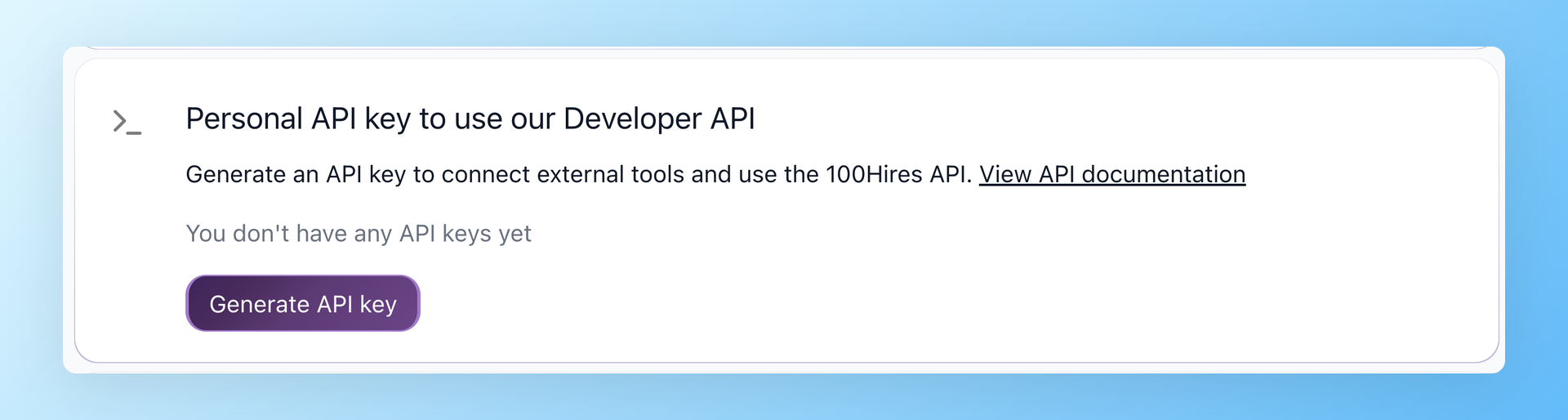
The main structural difference is how customers gain API access. The 100Hires spec is available at a public URL, api.100hires.com/v2/openapi.json, users create keys themselves, and the spec lists the rate limits and how to request higher ones.
Breezy provides thorough documentation for individual endpoints, but access starts with a sales conversation, and the plan gating itself carries no public price.
The 100Hires ATS is designed around AI. AI Scoring runs in-product and the resulting score is readable through the API. The AI Copilot, AI Email Composer, and AI resume parsing live in the product itself.
To keep this fair, the 100Hires API has real limitations too. New keys start with a tight 100 requests per 10 minutes until support raises it, which is fine for testing and slow for large backfills. Keys stay disabled until your company passes verification.
Documented webhook event coverage is narrower than Breezy's 10 event types. Like Breezy, 100Hires has neither an OAuth partner program nor an official SDK.
Choosing the right integration path
If you are already on Breezy, your budget covers the Custom Pro tier, and your build centers on candidate data, the Breezy API is documented well enough to be workable. Raise the API Access add-on with their sales team before the integration sprint, not during it.
If you want self-serve keys, one machine-readable spec, or API access without a top-tier contract, the 100Hires API offers exactly that, and smaller teams can start without a sales call.
Considering a switch beyond the API? Start with the Breezy HR alternatives comparison, or book a demo to see the API and the ATS together.
If neither API fits your needs today, you can still automate either product through Zapier.
FAQ
Does Breezy HR have an API?
Yes. Breezy HR documents a v3 REST API at api.breezy.hr/v3 with 62 operations and Personal Access Token auth. Access is an optional add-on on the custom-priced Pro tier, so confirm your plan includes it. 100Hires includes self-serve API keys in all paid plans at no extra cost.
Where is the Breezy HR API documentation?
The reference lives at developer.breezy.hr, with per-endpoint pages, rate-limiting and changelog pages, and an llms.txt index. As of July 2026 we found no standalone errors reference or official SDK there. 100Hires publishes one OpenAPI 3.1 spec at api.100hires.com/v2/openapi.json.
Does Breezy HR have webhooks?
Yes. Breezy documents 10 webhook event types with a management API, HMAC signing, a 30-second timeout, and 10 retries. Webhooks require a Pro account, with 10 endpoints per company. In the 100Hires API, webhook management is part of the standard REST API on every paid plan.
Does Breezy HR integrate with Zapier?
Yes, through an official connector with 3 triggers and one action, Create Candidate. In one community thread, a partner reply suggested missing trigger fields were a connector gap; the cause was never confirmed. 100Hires offers 3 triggers and 3 actions on Zapier.
How much does the Breezy HR API cost?
There is no public price. API Access appears as an optional add-on to the Custom Pro tier, whose price is available only from sales; other paid plans start at $157/mo with annual billing as of July 2026. The 100Hires API has no separate price, since it is included in every paid plan.
What is Breezy HR used for?
Breezy HR is an applicant tracking system for small and mid-sized teams, known for drag-and-drop pipelines and broad job-board posting. This guide covers its API and developer tools. 100Hires exposes candidates, jobs, applications, notes, and webhooks through its REST API.
Try 100Hires for free
No credit card. 14-day trial. Forbes Advisor #1 ATS for SMBs.

