
Talent Acquisition Automation in 2026: What to Automate and What to Keep Human
You do not need a recruiting team to automate hiring. You need to know which parts of the process to hand to software and which to keep in your own hands.
This is a framework for making that call. It covers what to automate first across sourcing, screening, scheduling, and follow-up, how to design each automated step so it does not misfire, and which decisions to keep in human hands.
It is written for the person who runs hiring without a dedicated recruiter: a founder, an office manager, or an HR generalist juggling it alongside everything else.
This guide does not hand you a list of tools. It hands you a way to decide. By the end you will have a repeatable way to assess any hiring task and decide whether to automate it, automate it with a human check, or leave it alone.
Start with your worst bottleneck, not with a tool
The hiring playbook, in your inbox
One email a week - benchmarks, AI screening tactics, and short interview templates from the 100Hires team. No product pitches.
The teams that get automation right pick the problem before they pick the software. Decide what is actually costing you time and who owns fixing it, then choose a tool to serve that decision.
The order matters. Software applied to a process you have not examined just makes a messy process faster.
So start with the task that eats your week. Then run it through three quick questions before you automate anything.
- Impact: does this task cost you real hours every week? High-impact tasks earn automation sooner.
- Effort: can you write the rule in one sentence? If the logic is simple, it is cheap to automate and cheap to fix.
- Risk: if it misfires, is the damage small and reversible? Low-risk tasks are safe to hand off. High-risk ones are not.
Automate a task first when it scores high on impact and low on effort and risk. Posting a job to five boards is the clean example. It saves real time, the rule is obvious, and a mistake usually means nothing worse than a duplicate listing you can delete. Automate it today.
Now flip it. Deciding who advances past the interview is high impact too, but the risk is large and the logic will never fit in one sentence. That one stays with you. The rubric sorts your work fast:
| The task eating your week | What it usually is | Automate first? |
|---|---|---|
| Too many applicants to read | Screening triage | Careful: rank them, do not auto-decline everyone |
| Back-and-forth on interview times | Scheduling | Yes |
| Forgetting to reply to candidates | Reminders and follow-up | Yes |
| Posting the role in five places | Job distribution | Yes |
| Deciding the final hire | Evaluation and offer | Keep human |
A repeatable way to design each automated step
Once a task passes the rubric, design it the same way every time. A good automation is not just a trigger and an action. It has six parts, and the last three are the ones people skip.
- Manual task: the thing you do by hand today.
- Trigger: the event that starts the automation.
- Automated action: what the system does on its own.
- Human checkpoint: the moment a person reviews the result before anything final happens.
- Exception path: what happens when the input is unclear or missing.
- Success metric: the number that tells you it helped.
Here is one full example built from real product mechanics. Say you want to screen applicants without reading every resume. The manual task is sorting inbound applications. The trigger is a candidate completing a short questionnaire.
The automated action moves the candidate forward and uses automated resume screening to score them against the role's criteria. The human checkpoint is you reviewing the borderline score band by hand.
The exception path routes anyone who left the questionnaire blank to manual review instead of a silent decline. The success metric is how long screening now takes per role.
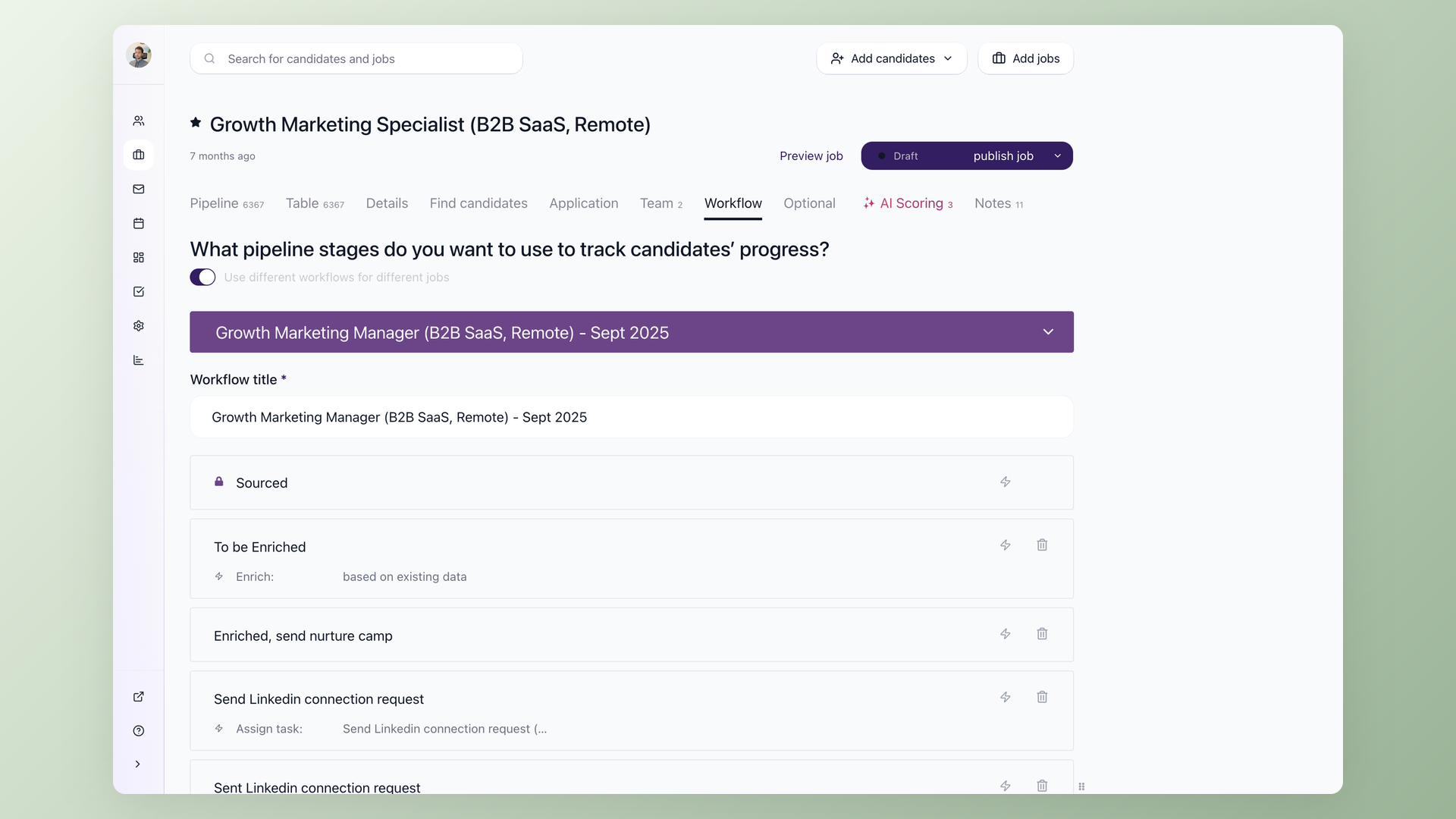
In 100Hires, steps like these are stage automations: each stage in your pipeline has a bolt icon that adds an automated action.
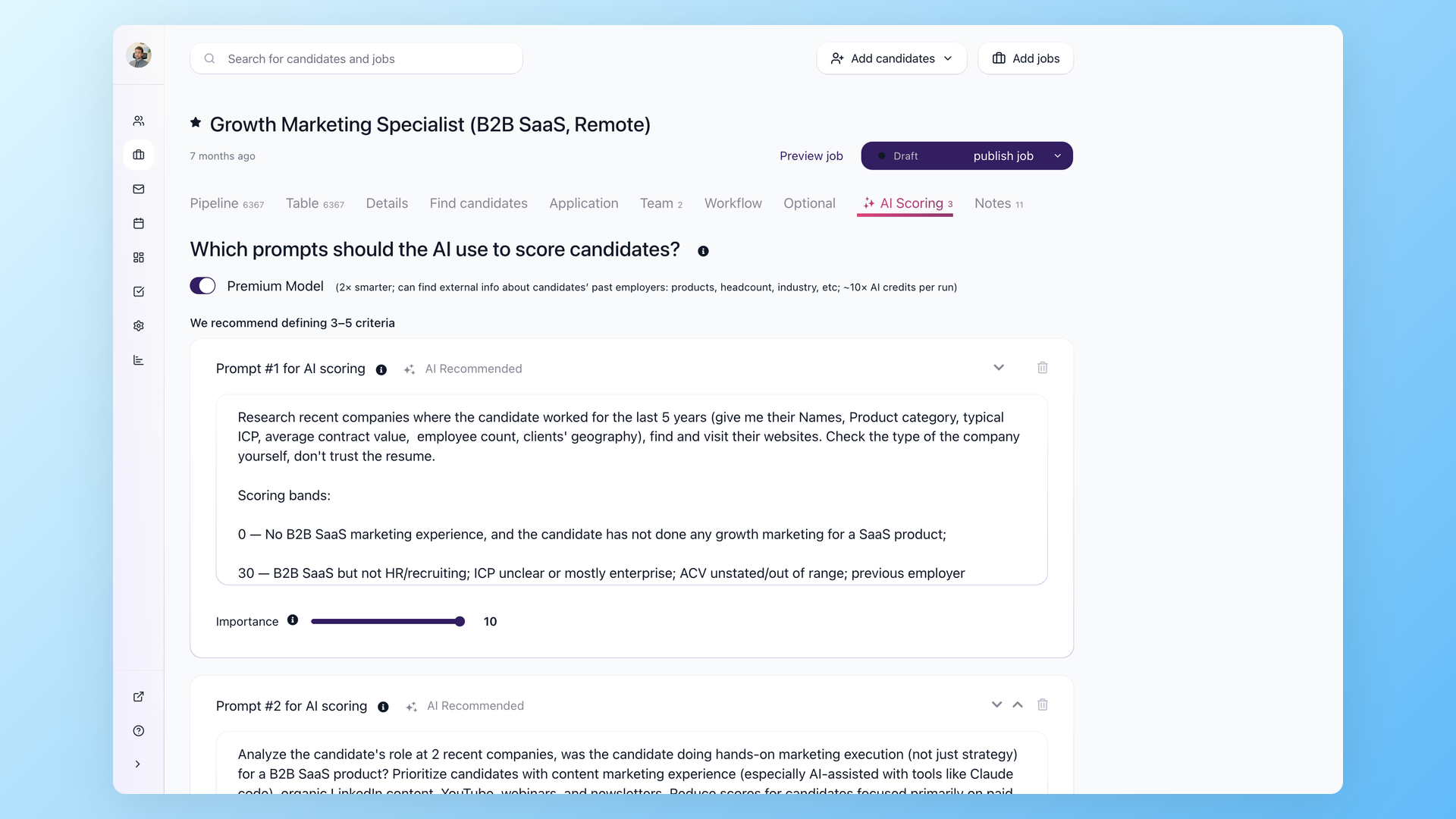
AI scoring supports two thresholds: one for advancing candidates who score above it and another for declining candidates who score below it. That lets you split applicants into advance, review, and early-decline groups.
The product's own guidance is worth repeating: AI scoring assists judgment, it does not replace it, and it is meant for prioritizing candidates rather than making the final call. Design the checkpoint accordingly.
Run a second task through the same six parts and the pattern clicks. Interview scheduling: the manual task is trading emails to find a time. The trigger is a candidate reaching the interview stage. The automated action sends a self-scheduling link and syncs it to your calendar.
The human checkpoint is confirming the panel and the format before the invite goes out. The exception path handles the candidate who never books, nudging them once and then flagging them for you. The success metric is your no-show rate.
Every workflow you build can be described this way, and the ones that cannot usually should not be automated yet.
What to automate first when you are the whole team
When one person runs hiring, automation should expand what that person can cover without taking the decisions that matter out of their hands. These five workflows tend to pass the rubric for a lean team, roughly in order of how safe they are to hand off.
- Job distribution: post one role to several boards at once. Low risk, saves real time, and the obvious first win.
- Knockout questions: deterministic yes-or-no gates for hard requirements like work authorization, a license, or availability. These are rules, not AI. You set them, and you audit the declined pile now and then. In 100Hires, knockout questions are included on every plan, including the 14-day free trial.
- Screening as prioritization: let a score rank applicants so you read the strongest first. Read the top band closely and sample the declined band. Ranking is safe to automate; rejecting the whole pile on an unaudited rule is not.
- Interview scheduling: self-scheduling links, calendar sync, and interview reminders remove the email tag that swallows hours. This is one of the clearest wins for automated interview scheduling.
- Follow-up and nudges: sequences that reply to candidates on time, plus a rule that pings you when someone has sat in a stage too long. This kills the "I forgot to get back to them" problem that loses good people.
Sourcing needs its own line, since some parts are safe to automate and others are not. Pulling matching candidates from a database and drafting outreach for you to approve is fine to automate.
Deciding who to target, personalizing the message, and running cold outreach at scale are not.
Mass automated outreach reads as spam, so keep a person responsible for choosing the targets and wording the message even when a tool does the drafting.
Put together, the five workflows look like this. The point of the table is the two columns people skip. The human checkpoint and the exception path are what separate an automation you trust from one that quietly hurts you.
| Task | Trigger | Automated action | Human checkpoint | Exception path | Success metric |
|---|---|---|---|---|---|
| Distribute the role | Job set to open | Publish to selected boards | Spot-check one live listing | Board rejects the post: flag for manual fix | Time from open to live |
| First-pass gate | Application submitted | Decline on a failed hard requirement | Audit the declined pile weekly | Answer unclear: send to manual review | Share of declines that were correct |
| Screen and rank | Questionnaire completed | Score and sort into bands | Read the top and sample the declined band | Missing data: hold for review | Screening minutes per role |
| Schedule interviews | Candidate advanced | Send self-scheduling link and reminders | Confirm the panel and format | No slot booked: nudge, then reach out | No-show rate |
| Follow up | Candidate enters a stage | Send a scheduled follow-up sequence | Approve the message tone | Candidate replies: stop and route to you | Reply rate and time-in-stage |
A fair word on limits. Some features depend on your plan or setup: nurture response-tracking that auto-moves a candidate when they reply is documented as a Pro-plan feature, and SMS or voicemail steps need a phone integration. Know these before you design a workflow around them.
If you want to see how one system handles these automations together, 100Hires covers them as recruitment automation software, and the same building blocks fit into any full hiring process you already run.
What to keep human
Automation and human judgment are not opposites here, and the line between them is narrower than the loudest takes suggest. Early-stage routing can run on its own as long as it is auditable and reversible with a person watching.
The tasks that should stay entirely in human hands are specific: interviews, offers, final hiring decisions, and any rejection that comes after a real interview. Those stay with you.
Inside that zone, a few things should never be handed off:
- The interview and the offer: this is where judgment happens, and a small team has less margin to hand it off than a big one, not more. Automate the scheduling around it, not the conversation itself.
- Rejection after an interview: automate the send if you like, but a person makes the call, and the message must not claim a careful review that did not happen. Queue these for daytime; overnight rejection emails read as impersonal even when the decision was sound.
- Anything not written down: a scoring model works only from what has been recorded, whether that is the resume, profile answers, or questionnaire responses. Traits that were never written down, like how someone carries a room or a strength that never reached the page, stay invisible to it. It can see an unconventional career path on paper, but whether that path is a strength is your call, not the model's.
- Relationships and senior roles: scripted screening bots struggle with director-level candidates whose work spans many responsibilities, and making a bot the required first step can push strong candidates to withdraw before you ever see them.
- Fairness review and the override: make sure a person can overturn any automated gate, and check that gates are not filtering out a group you did not intend to exclude.
One distinction matters when you set out to protect candidates. People lump two different things together as "AI rejection." One is a resume-reading model. The other is a deterministic knockout rule that fires before any human sees the application.
The second is the more mechanical of the two, and it is the one that can quietly go wrong. A mistyped requirement can wrongly decline qualified applicants, and that is easy to miss unless someone is checking.
That is the case for a standing human checkpoint and a habit of auditing the declined pile.
Public bodies have started to weigh in here too. The EEOC's guidance on AI hiring tools and the ADA is worth reading before you let any gate run unattended.
How to tell if your automation is actually helping
An automation that saves time can still cost you good hires. To catch that, measure two separate things and do not confuse them.
The first group is what the system reports for you. In 100Hires, that includes time to hire and time to disqualify, pipeline conversion per stage (a stage holding a large share of your candidates points to a bottleneck), and reply rate on your sequences.
These are dashboard numbers you can pull.
The second group is on you. These are not numbers a dashboard hands you; they are habits you build:
- False-negative sampling: pull a handful from the declined pile each week and check whether any should have advanced.
- Override rate: track how often you overturn an automated gate. A rising rate is a signal to stop and review the rule.
- Candidate drop-off: watch where people stop replying after an automated step. That is where the experience is breaking.
The rule is simple: every automation gets one efficiency number from the first group and one quality guardrail from the second. If a workflow saves hours but your override rate climbs, that is your cue to look closer before you trust it further.
A first 30 days when you have no recruiter
You do not roll all of this out at once. Sequence it so each step earns its place before the next one goes live. The weeks below are a default pace, not a deadline: only move to the next workflow once the current one holds a steady metric and its exception path is behaving.
- Week 1: automate one high-volume, clear-rule, low-risk task. Usually job distribution or knockout questions. Write down a baseline number so you can tell if it helped.
- Week 2: add scoring as prioritization. Read the top band, and sample the declined band every day until you trust the calibration.
- Week 3: turn on scheduling and reminders. This is where a person hiring alone gets a visible chunk of the week back.
- Week 4: add follow-up sequences and stuck-candidate nudges, then review your quality guardrails and keep only what earned its keep.
Through all of it, keep the checkpoints from the earlier sections. The aim is one person operating like a team, not a hands-off machine running the hiring for you.
You can try this on a single open role: start a 100Hires trial, which gives full feature access for 14 days, and automate one workflow before you decide what to build next.
The short version
Talent acquisition automation gives a small team the reach of a bigger one, and the teams that use it well automate the repetitive work and stay human where judgment decides the outcome. Run each task through impact, effort, and risk.
Design every automation with a checkpoint, an exception path, and a metric. Keep interviews, offers, and final hiring decisions in your own hands. Do that, and the framework carries over to the next role you open, and the one after that.
Frequently asked questions
What is talent acquisition automation?
Talent acquisition automation uses software to handle the repeatable parts of hiring, such as posting roles, sorting applications, scheduling interviews, and following up, so a small team can spend its time on the judgment-heavy work. In practice it is a mix of simple rules and AI scoring layered onto your existing pipeline, with a person still owning the decisions that matter.
What hiring tasks can be automated?
The safest tasks to automate are job distribution to multiple boards, knockout screening on hard requirements, resume prioritization by score, interview scheduling and reminders, and follow-up sequences. In 100Hires, the screening, knockout, scoring, and follow-up steps run as stage automations you configure on your pipeline, with job posting handled separately as multi-board distribution.
Does talent acquisition automation replace recruiters?
No. It takes the repetitive admin off their plate, so one person can cover the volume of a bigger team and spend the time saved on sourcing, interviews, and closing candidates. The work shifts toward judgment, it does not disappear.
What should you not automate when hiring?
Keep interviews, offers, final advance-or-reject decisions, and any rejection after a real interview in human hands. Keep a person responsible for relationship-building, senior-role screening, fairness review, and the ability to override any automated gate. Early-stage routing can run on its own as long as it stays auditable and reversible.
How do you automate hiring without hurting candidate experience?
Put a human decision behind every post-interview rejection, and keep early automated declines auditable with a periodic review of the declined pile. Queue candidate messages for daytime hours, never let automated copy claim a careful review that did not happen, and watch for drop-off after any automated step.
Do you need a big budget to automate talent acquisition?
No. Automate one high-volume, low-risk workflow first, prove it saves time, then add the next. In 100Hires, job posting, screening, knockout questions, and scheduling are available from the entry-level plan, and the 14-day free trial gives full feature access so you can test them before you pay.
Start your 100Hires trial and automate your first hiring workflow this week.
Try 100Hires for free
No credit card. 14-day trial. Forbes Advisor #1 ATS for SMBs.

