MIGRATE FROM STAFFEDUP

Migrate from StaffedUp to 100Hires

Switching from StaffedUp? Start a 100Hires trial, scope your import, and add AI Score, Contact Finder, and Nurture campaigns after the move.

4.7
4.8
based on 1,300+ reviews
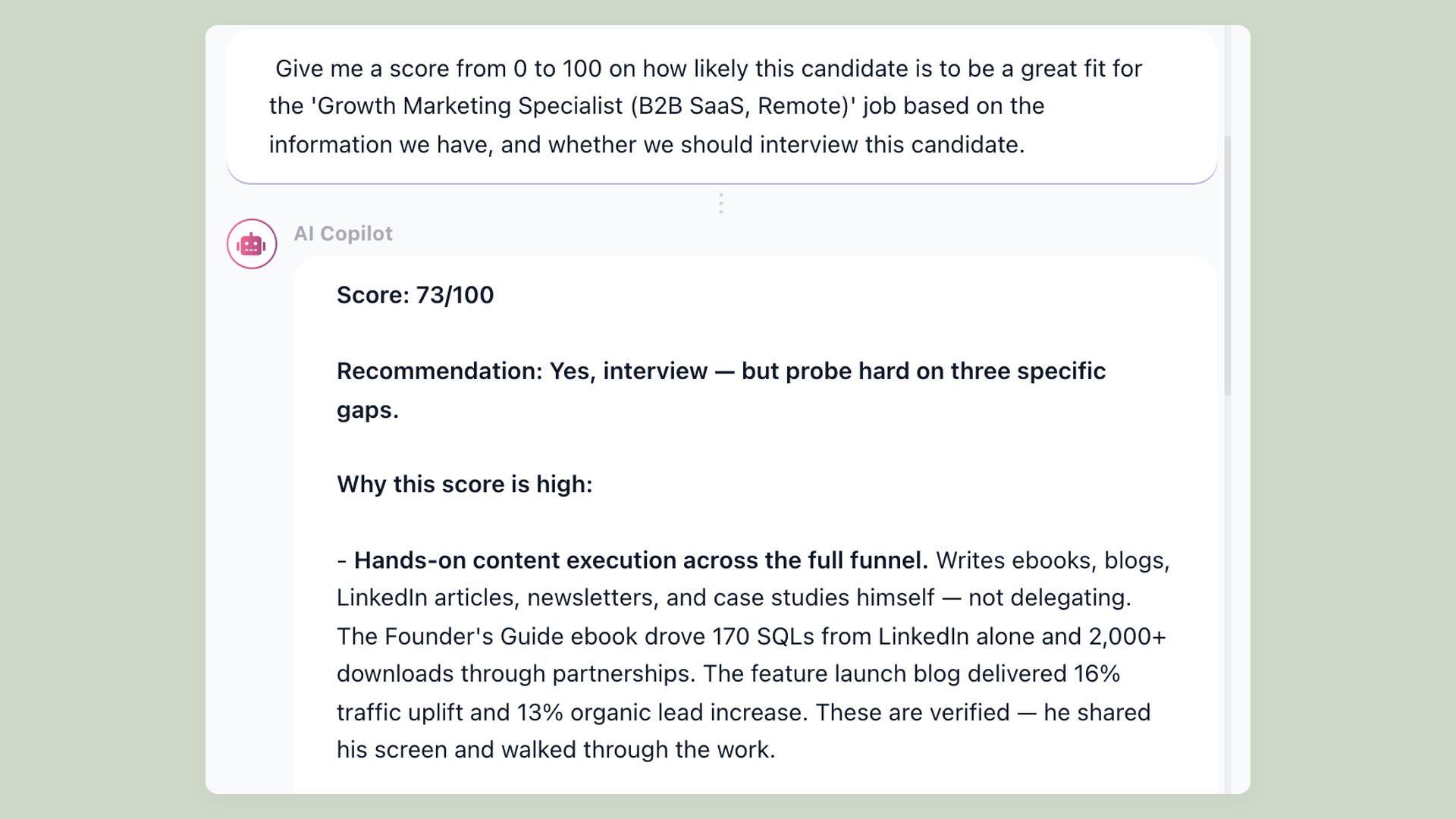
100Hires candidate profile showing AI Score, summary, and recommendation after imported candidate data is reviewed

StaffedUp is publicly positioned for hourly and high-turnover hiring teams, with job posting, candidate communication, interview scheduling, onboarding, analytics, integrations, and SmartMatch AI-assisted scoring described on its official pages.

This page is for a different moment: you are considering a move from StaffedUp and want a broader SMB ATS with AI Score, Contact Finder, Nurture campaigns, and a practical import path. 100Hires is not affiliated with, endorsed by, or sponsored by StaffedUp.

How the StaffedUp migration is scoped

Migration scope review before moving from StaffedUp
Step What happens What is not promised
Start a trial Create a 100Hires account and confirm the jobs, candidates, files, and fields you want to bring over. A trial signup does not by itself confirm managed migration eligibility.
Review source data Support reviews your current ATS, candidate and job counts, exported files, resume files, fields, and requested history. No claim is made that every StaffedUp object or history item can be migrated.
Choose import path Use CSV candidate import, bulk PDF/DOC resume upload, or managed migration when scope and plan qualify. Self-service import is not the same as a guaranteed done-for-you migration.
Confirm Pro annual eligibility Free comprehensive migration is available on annual Pro contracts after scope review. No no-downtime, no-data-loss, one-click, or fixed-timeline guarantee.
Validate in 100Hires Review imported candidates, resumes, fields, and workflows before your team relies on the new workspace. Do not cancel StaffedUp until your own team has validated the data it needs.

What changes after you move

100Hires
From $49 per month billed annually
StaffedUp
Starter $20/mo, Smarter $49/mo, Pro $99/mo on captured public pricing
Primary use case
Broader SMB ATS with AI Score, sourcing, outreach, and recruiting workflow automation
Hourly and high-turnover hiring workflows, including restaurants, hospitality, recreation, and multi-location operators
Candidate import
CSV candidate import and bulk PDF/DOC resume upload with parsing
StaffedUp export details were not publicly verified in our captured official sources
Managed migration
Free comprehensive migration on annual Pro contracts after source data and requested scope are reviewed
Not applicable
AI candidate scoring
AI Score gives a 0-100 match score with recruiter-reviewable explanation
StaffedUp officially describes SmartMatch AI-assisted scoring
Sourcing after import
Contact Finder helps find candidate contact details for sourced prospects
Not publicly verified in our captured StaffedUp official sources
Follow-up after import
Nurture campaigns and AI Email Composer help automate candidate outreach
StaffedUp officially describes automated candidate messaging and reminders
Job board distribution
Post jobs to major boards from 100Hires
StaffedUp officially describes automated job board posting and an Indeed integration
Interview scheduling
Scheduling links and workflow automation help reduce back-and-forth
StaffedUp officially describes interview scheduling
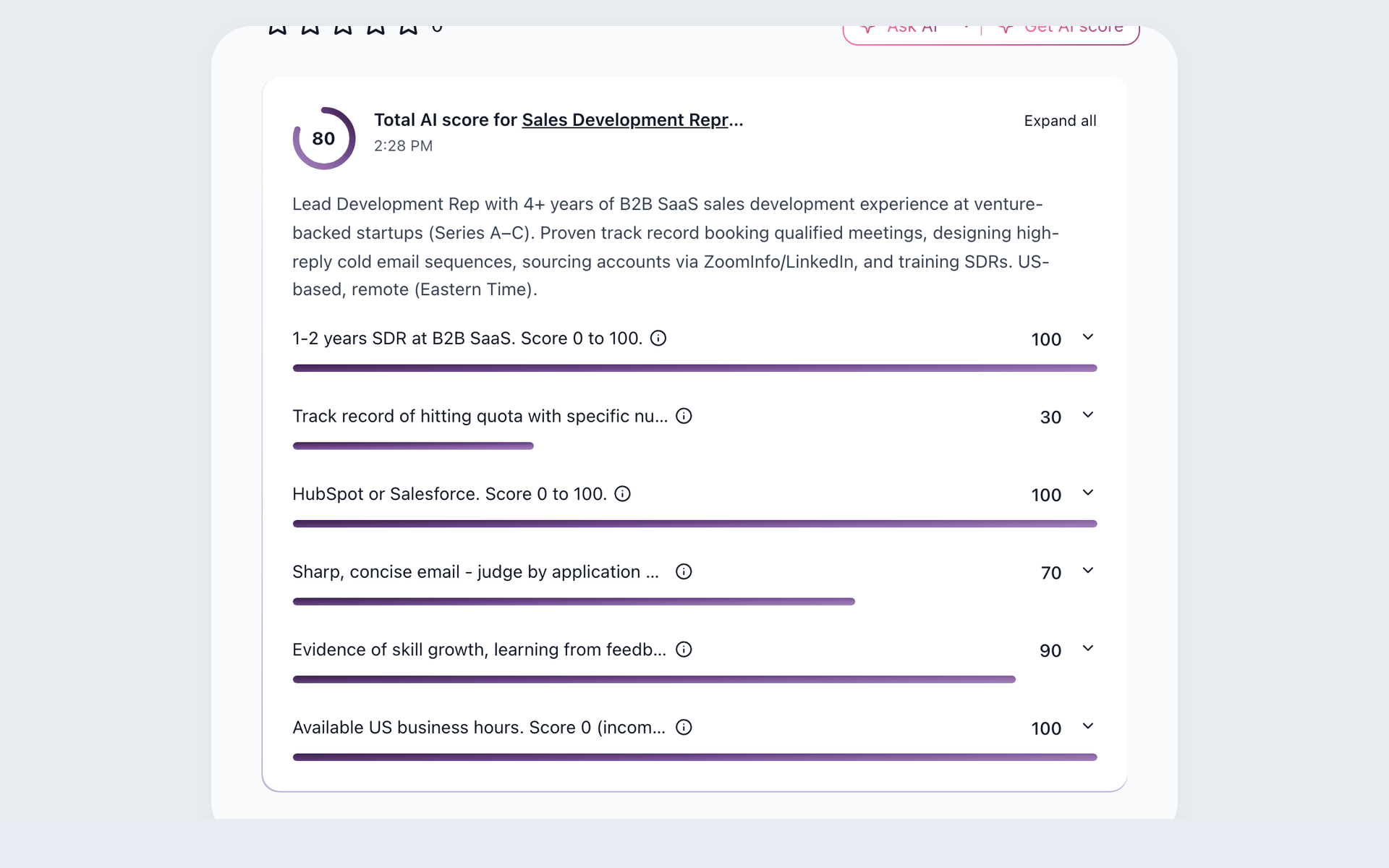
100Hires AI Score breakdown with a total score and per-criterion detail

Use AI Score on candidates after the import

Once candidates are in 100Hires, AI Score helps rank them against the job criteria your team defines. The score is a starting point for review, with an explanation and evidence on the candidate profile.

  • AI Score for applicant review and imported candidate records
  • Explanation on the profile for recruiter review
  • Useful for repeat hourly and SMB roles
  • Learn more at /resume-screening.html
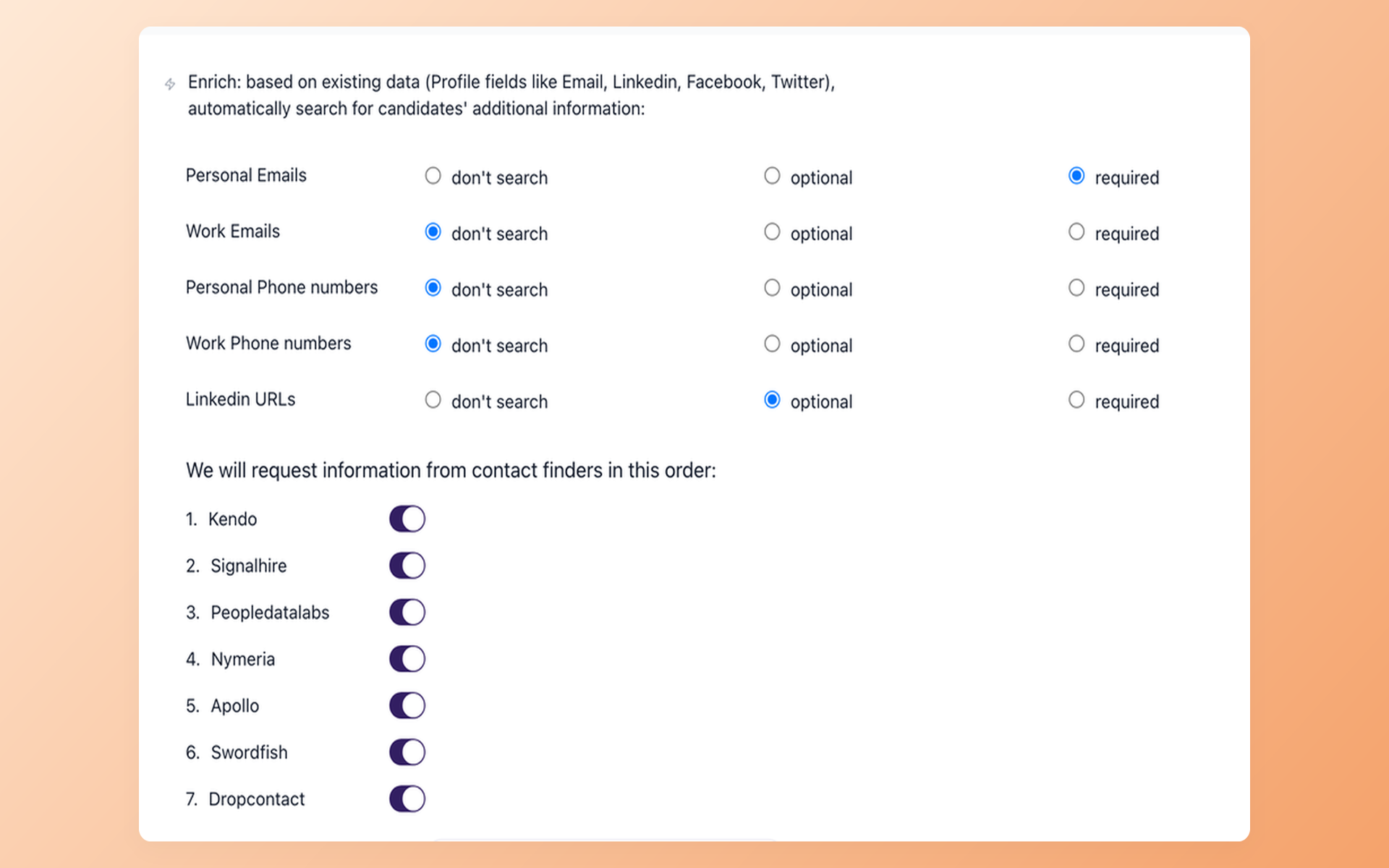
100Hires Contact Finder workflow for candidate sourcing

Add sourcing and outreach after the switch

A migration should not only recreate the old workspace. 100Hires adds Contact Finder for sourced prospects and Nurture campaigns for follow-up, so recruiters can build new candidate pipelines after historical records are imported.

  • Contact Finder for sourced candidates
  • Nurture campaigns for follow-up sequences
  • AI Email Composer for personalized recruiting messages
  • Workflow automation details at /recruitment-automation-software.html

Scope your StaffedUp move before rebuilding records

Start a 100Hires trial and prepare the candidate, job, resume, and field list you want reviewed for import or managed migration.

Free migration, with the right scope language

100Hires supports self-service CSV candidate import and bulk PDF/DOC resume upload. For annual Pro contracts, 100Hires offers free comprehensive migration after support reviews the source ATS, record counts, files, fields, and requested data.

That scope review matters. Our captured StaffedUp official sources did not publicly verify StaffedUp export/API object details, so this page does not promise a one-click migration, every history item, a fixed timeline, no downtime, or no data loss.

The practical path is straightforward: start the trial, gather what you can export, list the candidate and job records you need, then confirm the migration scope with support before your team relies on the new workspace.

Atiq Arshad
Technical Recruiter @Kidan

It solved all of my recruitment problems and offered all of the features I was looking for. It can automate most of my recruitment processes.

Source: G2
Philipp Maschelski
Talent Acquisition Partner @G42

I'd happily recommend it to my industry peers. I'm able to use the platform with ease and don't have to think twice what function to use.

Source: Capterra
Teodora Franich
HR Manager @TeachMeSkills

The system is very user-friendly. Even people with no experience will find it easy to understand its functionality.


Source: G2
Capterra Shortlist 2026 Capterra Best Ease of Use 2026 Capterra Best Value 2026 Software Advice Front Runners 2026 Software Advice Most Recommended 2026 G2 Leader Winter 2026 G2 Users Love Us 2026
4.7
4.8
based on 1,300+ reviews
Migrating from StaffedUp FAQ
+ Is 100Hires affiliated with StaffedUp?
No. 100Hires is not affiliated with, endorsed by, or sponsored by StaffedUp.
+ Is migration from StaffedUp free?
Free comprehensive migration is available on annual Pro contracts after 100Hires support reviews your current ATS, candidate and job counts, files, fields, and requested data. CSV candidate import and bulk PDF/DOC resume upload are also available as self-service options.
+ Can 100Hires guarantee every StaffedUp record will migrate?
No. This page does not promise every object, history item, attachment, automation, or integration will migrate. Scope depends on the files and fields available from the source system and what your team needs in 100Hires.
+ What should I prepare before asking for migration help?
Prepare the current ATS name, candidate and job counts, available exports or resume files, the fields you rely on, and the history you need to preserve. Support uses that information to confirm the right import path and whether managed migration applies.
+ What improves after moving from StaffedUp to 100Hires?
The main additions are broader SMB ATS workflows plus AI Score for screening, Contact Finder for sourcing, Nurture campaigns for follow-up, and AI Email Composer for recruiter messaging. StaffedUp official sources already describe AI-assisted scoring, messaging, scheduling, onboarding, analytics, and integrations, so this page focuses on the 100Hires capabilities you add rather than unsupported absence claims.
23,000+ recruiters & business owners read this newsletter

The hiring playbook, in your inbox

One email a week - benchmarks, AI screening tactics, and short interview templates from the 100Hires team. No product pitches.

Start the move with a trial workspace

Create your 100Hires account, add a role, and gather the StaffedUp data you want reviewed for import or managed migration.

We use cookies to offer you our service. By continuing to use this site, you consent to our use of cookies as described in our policy