
Migrate from Jobtrain to 100Hires
Switching from Jobtrain? Get a scoped path for the data your team needs and a simpler AI-first destination, with free managed migration available on annual Pro after review.






These are current 100Hires customer logos. They are not Jobtrain migration references and do not guarantee eligibility, scope, timing, or a migration result.
Free managed migration starts with a source and scope review
The review prevents an available export route from being mistaken for a promise about every record or field.
The review determines whether the files or approved access can support the records, fields, documents, and destination requirements the team actually needs.
Bring the available source files or access details, approximate record counts, required fields, requested history and documents, integration requirements, and acceptance priorities.
The review can then separate essential day-one scope from data that may be unavailable, incomplete, unsuitable for mapping, or better rebuilt in the destination.
A 14-day 100Hires trial evaluates the destination ATS. It lets recruiters test candidate review, messaging, follow-up, stages, and team workflows.
Starting it does not confirm managed-migration eligibility, supported objects, coverage, timing, plan terms, or validation criteria.
Choose the source path your Jobtrain account actually supports
Jobtrain documents several bounded ways data may be available. These include API routes, Talent Network Excel, Candidate Packs, Word exports, reporting exports, and procurement statements about CSV exports.
The exact route depends on the account, permissions, configuration, time windows, and files available. A documented route is evidence to inspect, not proof that every requested object or history item can move.
- Managed service: 100Hires reviews the source and requested destination scope before confirming eligibility and supported coverage.
- Candidate CSV import: the team maps source columns, assigns candidates to a job or stage where appropriate, reviews errors, and imports the rows supported by the file.
- Bulk resume upload: PDF or DOC resume files can create candidate records when a structured source export is not the right path for those documents.
A bounded process moves through inventory, scope confirmation, preparation and mapping, import, validation, and recruiter onboarding. It does not assume a direct Jobtrain connector, automatic field matching, one-to-one workflow transfer, or universal history coverage.
| Decision point | 100Hires destination | Jobtrain source or review state |
|---|---|---|
| Source files and account access | Review the files or approved access available to the customer | API, Excel, Candidate Pack, Word, report, and CSV routes are bounded by account and configuration |
| Candidate and application records | Supported records are mapped into the agreed destination structure | Fields, relationships, counts, and availability require review |
| CVs and selected documents | Supported files can be included in managed scope or added through bulk resume upload | Document availability and contents depend on the source route |
| Notes, communications, history, and custom fields | Include only the items confirmed in supported scope | No universal object or full-history coverage is assumed |
| Jobs, stages, statuses, pools, and workflows | Design the destination workflow that recruiters will use | Source configuration does not imply one-to-one transfer |
| Self-service import | Candidate CSV mapping with error review plus bulk PDF or DOC resume upload | The available export or files determine what can be supplied |
| AI candidate review | AI Score works on supported records after they arrive and keeps the decision with the recruiter | Jobtrain documents AI-assisted assessment and screening |
| Messaging and follow-up | AI Email Composer drafts for review; Nurture campaigns run separate multi-step follow-up | Source messages and automations do not automatically transfer |
| Scheduling, reporting, and integrations | Configure required destination workflows after scope confirmation | Jobtrain documents these categories; source settings do not automatically transfer |
| Onboarding and compliance | Rebuild only the approved destination process and permissions | Jobtrain documents onboarding and compliance workflows; required data needs review |
| Managed-migration eligibility | Free on annual Pro after source and requested-scope review | No direct Jobtrain-to-100Hires connector is promised |
| Trial | 14 days with no credit card to evaluate 100Hires | A trial does not confirm migration eligibility or coverage |
| Timeline and validation | Confirm sequencing and checks after scope is known | No fixed-time, zero-loss, or no-downtime guarantee |
Jobtrain is a trademark of its owner. This independent migration page is not affiliated with or endorsed by Jobtrain.
Map candidate data before you import it
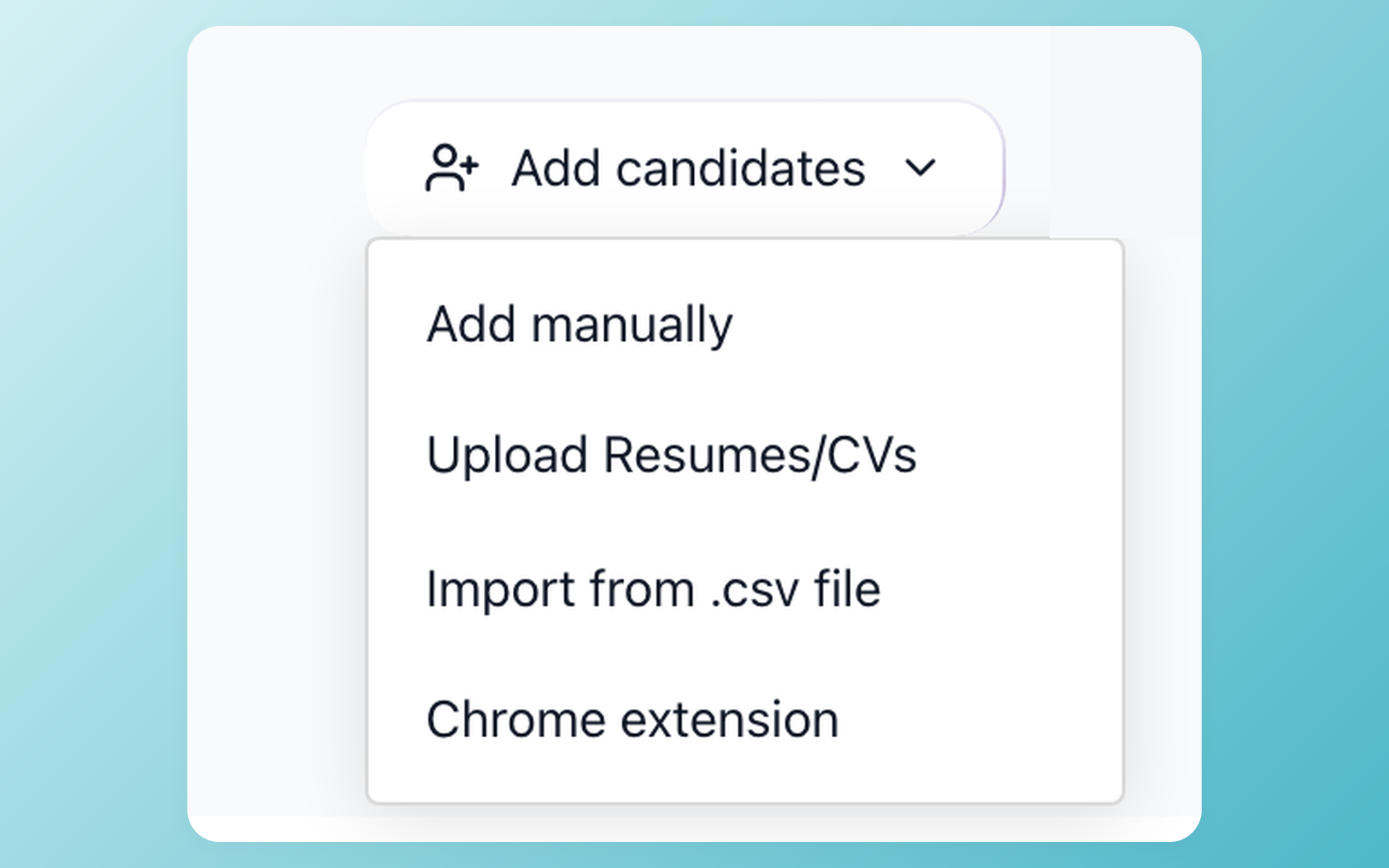
Choose the right import path for the source in hand
Start with the route that matches the source in hand. The visible Add candidates menu keeps CSV import, resume upload, and manual entry separate.
- CSV import entry point
- Resume-upload alternative
- Manual-add option
A useful test file represents real source variations: blank values, multiple locations, different stage names, date formats, and records with or without resumes.
Reviewing a representative set helps expose mapping decisions before the wider import begins.
CSV import does not turn the screenshot into a Jobtrain-specific connector. It works with the structured file supplied to 100Hires. The CSV route does not confirm managed-service scope.
Prioritise imported candidates with role-specific criteria
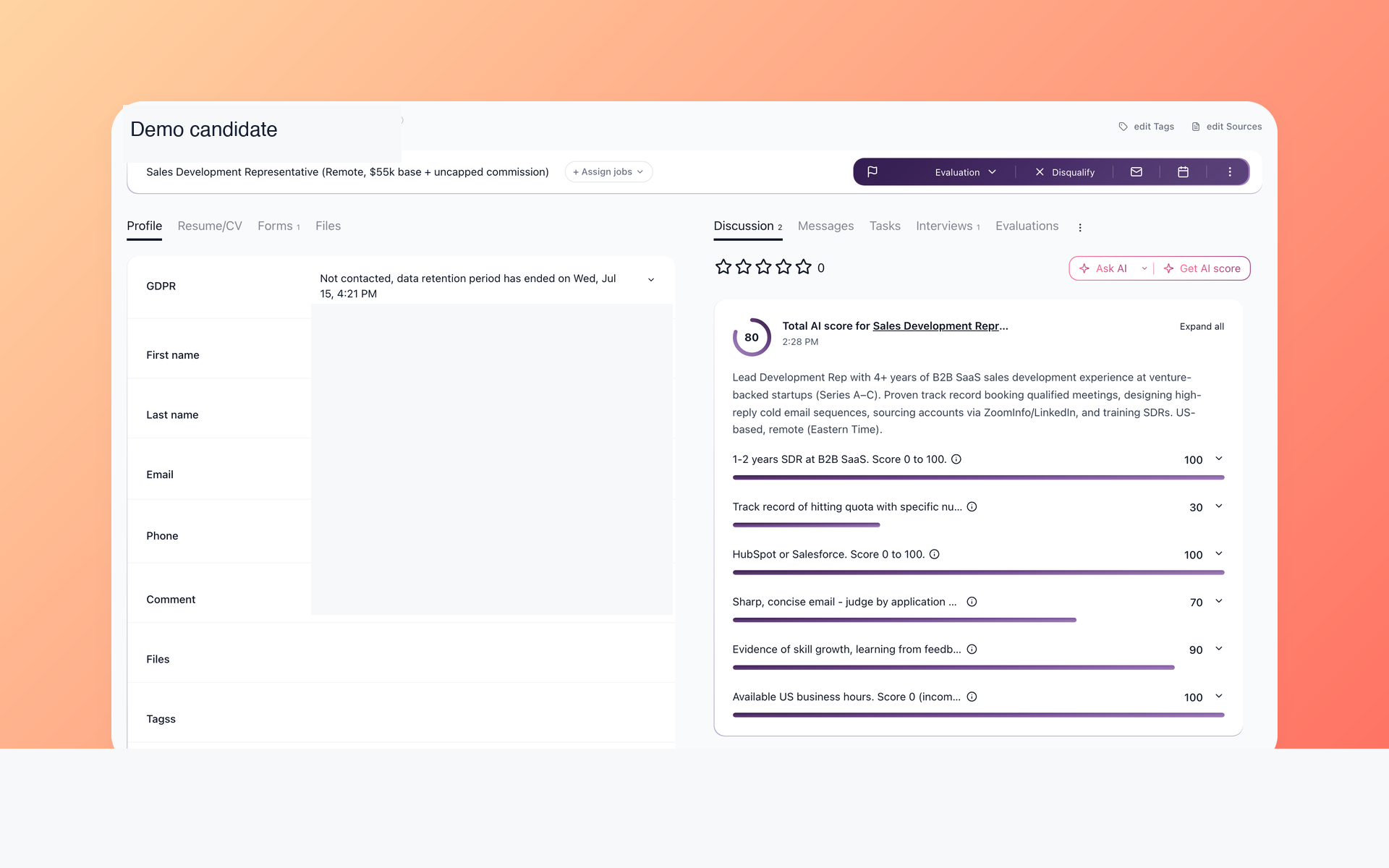
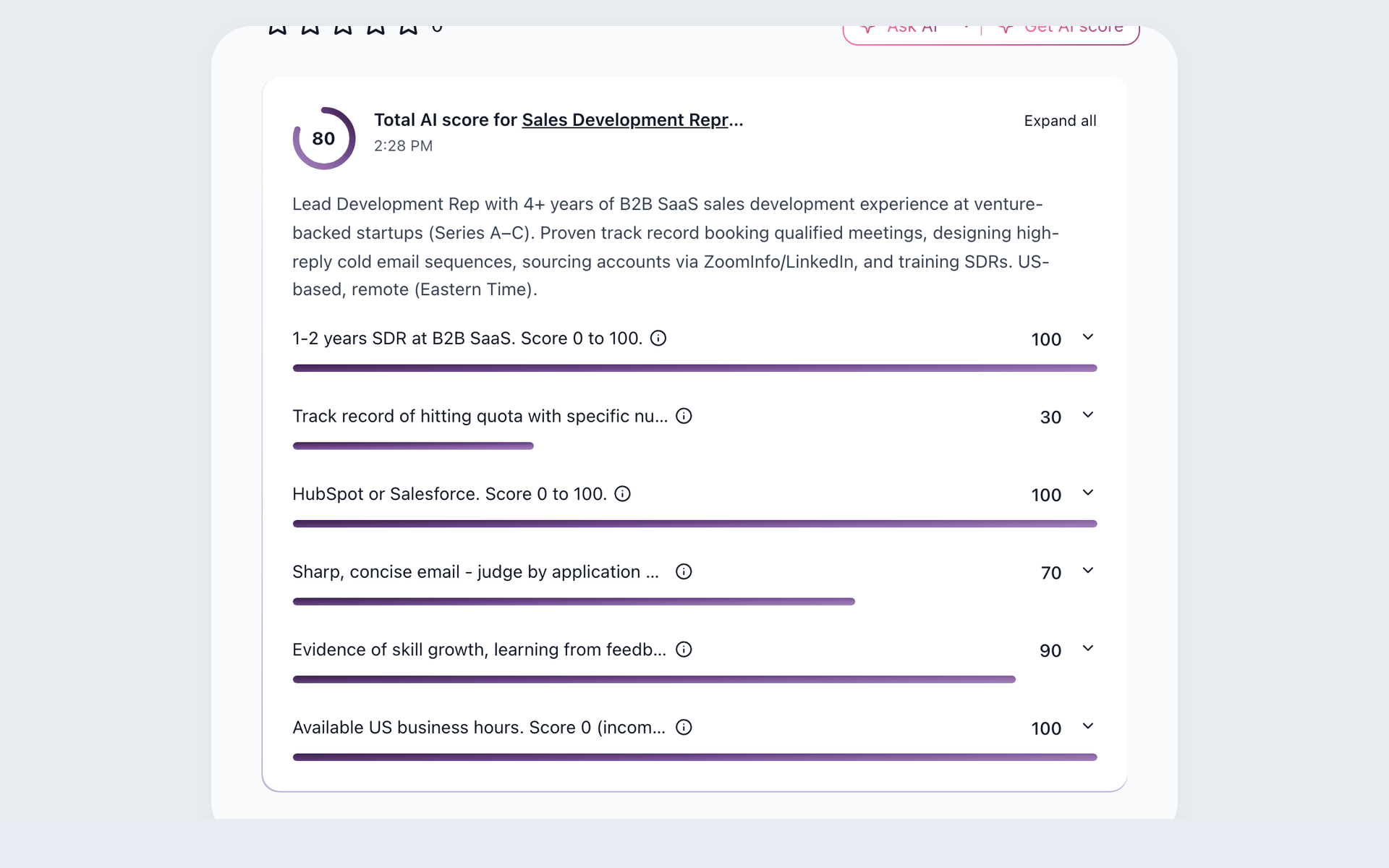
Reach the right imported candidates sooner with AI Score
After approved candidate data enters 100Hires, define criteria for the role and inspect a total score, a summary, and per-criterion 0-100 results. The recruiter checks the available evidence and owns the next decision.
- Role-specific criteria
- Per-criterion results
- Human review before action
AI Score can work only with the candidate and job context available in 100Hires. Missing source information does not reappear after import, and a score does not replace a hiring decision.
The AI resume screening workflow explains how criteria, evidence, and recruiter review fit together.
Keep follow-up moving after the switch
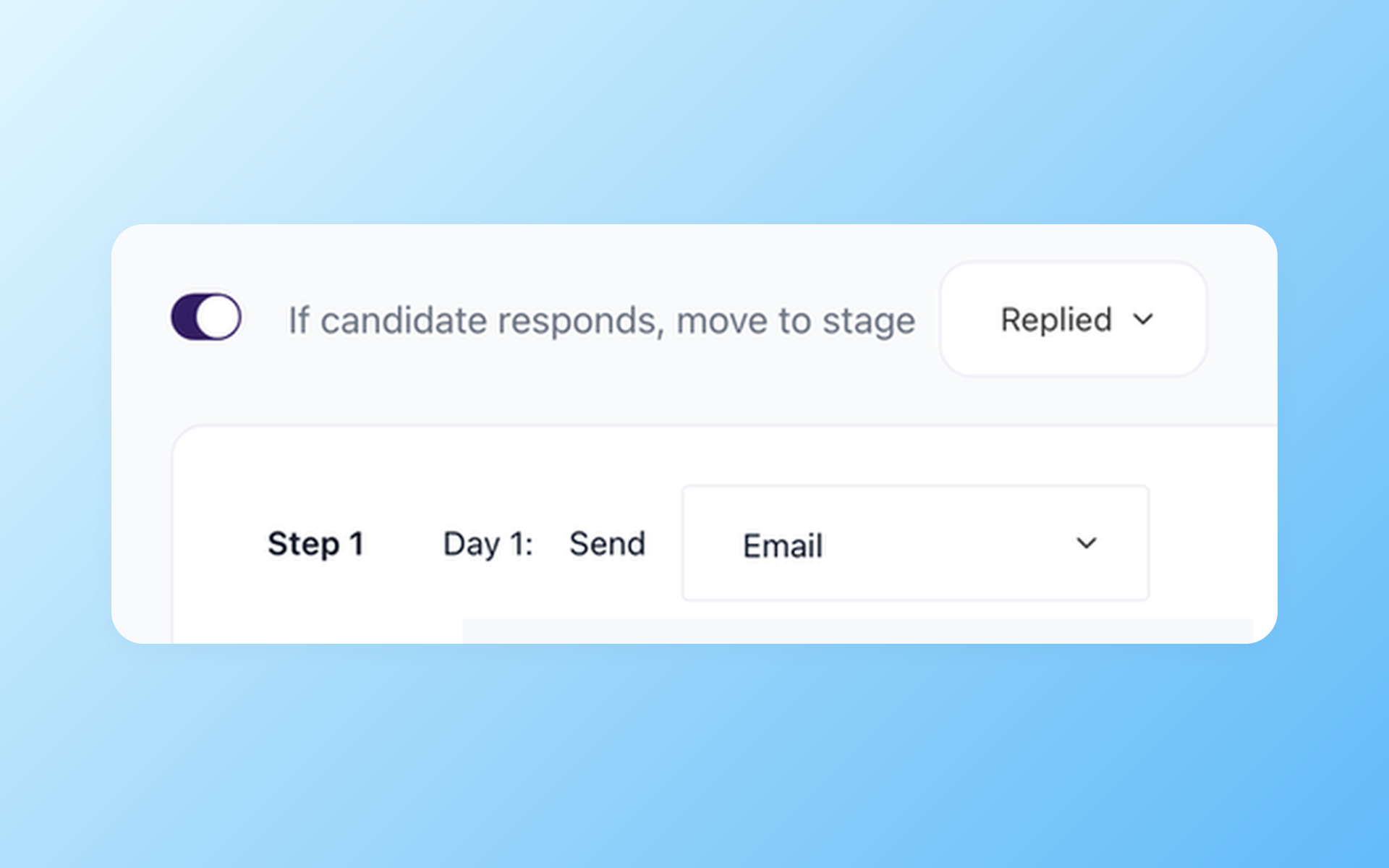
Give every approved follow-up a clear next step
Keep active candidates from disappearing after the first message. AI Email Composer prepares copy for review, and Nurture campaigns schedule later steps that stop when the candidate replies.
- Recruiter-reviewed message draft
- Scheduled follow-up steps
- Reply and stage handling
For an active role, the team can review the first message, schedule a reminder, and stop later steps when the candidate replies. AI Copilot can help inspect the candidate and job context already present in the destination record.
Self-scheduling links can support the next interview step. These are post-move capabilities, not evidence that a corresponding Jobtrain configuration or history automatically transfers.
The broader recruitment automation workflow shows how message drafting, scheduled actions, and recruiter review remain distinct parts of the process.
Validate the agreed result before closing the old process
Validation should mirror the scope that was approved. Start with record counts and the required fields for active hiring.
Sample candidate records across different jobs and stages, open representative CVs and selected documents, and confirm that recruiters can find the information they need.
- Compare supported record counts with the agreed source set.
- Check required candidate and job fields across representative records.
- Open selected CVs and documents included in scope.
- Verify jobs, stages, statuses, talent pools, and destination ownership rules.
- Confirm access permissions and the integrations configured in 100Hires.
- Run a recruiter walkthrough using a real hiring scenario.
The exact checks depend on source availability and confirmed scope. A staged review can identify mismatches before the team relies on the destination for current hiring.
100Hires does not promise a fixed completion time, no downtime, or zero data loss before the migration is assessed and planned.
Build the recruiting workflow the team wants after the move
100Hires becomes useful once the approved candidate data is usable. AI Score helps prioritise role-based review, and AI Copilot helps recruiters question the available record.
AI Email Composer prepares candidate-aware drafts for review. Nurture campaigns schedule later follow-up, and self-scheduling links support interview coordination.
100Hires publishes current USD plan prices. Start is $99 month-to-month or $49 per month billed annually. Advanced is $249 month-to-month or $199 per month billed annually. Pro is $499 month-to-month or $399 per month billed annually.
Check the current 100Hires pricing page for plan scope and quotas. Migration eligibility is confirmed in the separate source review.
Jobtrain can remain a reasonable choice for teams that value its documented configurable complex-hiring, public-sector, onboarding and compliance, AI, reporting, automation, and integration scope.
A switch should be based on the destination workflow and approved migration plan, not on an unsupported claim that Jobtrain lacks implementation, training, support, or product capabilities.
Current 100Hires customer evidence
The shared reviews, ratings, and awards below help evaluate 100Hires as the destination ATS. They do not describe Jobtrain migration outcomes and do not guarantee the scope or result of a future move.

It solved all of my recruitment problems and offered all of the features I was looking for. It can automate most of my recruitment processes.

I’d happily recommend it to my industry peers. I’m able to use the platform with ease and don’t have to think twice about which function to use.

The system is very user-friendly. Even people with no experience will find it easy to understand its functionality.







 4.7
4.7
 4.8
4.8
The hiring playbook, in your inbox
One email a week - benchmarks, AI screening tactics, and short interview templates from the 100Hires team. No product pitches.