
Migrate from JobScore
Switching from JobScore? Move to the AI-first 100Hires workflow with free migration on an annual Pro contract, subject to source and scope review.
Start free trialEasy setup No credit card required






These are current 100Hires customer logos. They do not make a claim about JobScore or guarantee a migration result.
Confirm the managed migration scope before work starts
100Hires offers free comprehensive managed migration on an annual Pro contract after the available JobScore source data and requested scope are reviewed.
The review can cover source access or files, candidate and job counts, requested records, fields, mappings, attachments, validation needs, and sequencing.
Starting a 100Hires trial lets your team evaluate the destination ATS. It does not confirm managed-migration eligibility, supported objects, field coverage, timing, or scope.
If your search starts with a free JobScore import, separate the paths. CSV and resume imports are self-service product tools. Managed service eligibility is confirmed separately.
Use the JobScore source route your account supports
JobScore documents candidate export to Excel, custom reports, and an API. API access depends on account authorization. These routes help assess a scoped move but do not prove that every requested record or history item is available.
- Managed migration: 100Hires reviews the source and requested records before confirming the supported service scope.
- Candidate CSV import: map columns, review duplicates and errors, and import the candidate data available in the file.
- Bulk resume upload: upload PDF, DOC, DOCX, RTF, or TXT resumes and create candidate records from the available files.
The practical process is to inventory the available source data, confirm the supported scope and mappings, test the result, and verify the records your team needs.
Define the acceptance checks before data moves
A useful migration plan begins with the records your team needs on day one. List the active jobs, candidate fields, resumes, stages, notes, evaluations, attachments, and communication history that matter to current hiring work.
Next, compare that list with the JobScore export or approved access available to your team. A field can be mapped only when the source provides it in a usable form.
Use a test set to check field mappings, candidate-job relationships, stage values, dates, attachments, and duplicate handling. Resolve mismatches before the wider import is approved.
After the supported records enter 100Hires, verify counts and sample the records recruiters rely on most. This is how the team confirms the agreed scope without assuming every historical item can move.
| Decision point | 100Hires after the move | JobScore or source-state evidence |
|---|---|---|
| Core applicant tracking | Candidate records, jobs, configurable pipeline stages, search, evaluations, communication, and reporting | Candidate tracking, configurable workflows, collaboration, evaluations, communication, and reporting are documented |
| Job distribution and scheduling | External-board distribution, careers-page options, calendars, and self-scheduling are documented | Distribution to 75+ boards and interview scheduling are documented |
| AI candidate review | AI Score returns role-specific 0-100 results with supporting detail for recruiter review | AI summaries, recommended scoring criteria, ranking, gap analysis, and interview questions are documented |
| Recruiter AI assistance | AI Copilot uses candidate and job context available in the record | Other AI assistance is documented; the reviewed sources do not name a product called AI Copilot |
| Sourcing and candidate reuse | Contact Finder and Talent Pools support contact enrichment and reusable groups where data is available | Social recruiting, recommendations, contacting, grouping, and reuse for future jobs are documented |
| Candidate follow-up | AI Email Composer drafts for recruiter review; Nurture campaigns schedule separate multi-step follow-up | Candidate email, templates, and communication workflows are documented |
| Available source routes | 100Hires reviews the files or approved access available for the migration | Candidate Excel export, custom reports, and an API are documented; API access and exact source coverage depend on the account and authorization |
| Managed migration | Free comprehensive managed migration on annual Pro after source and requested-scope review | JobScore-to-100Hires object and field coverage must be inspected rather than assumed |
| Self-service import | Candidate CSV mapping with error review plus bulk PDF, DOC, DOCX, RTF, or TXT resume upload | The available JobScore export or files determine what can be supplied |
| Validation boundary | Supported scope is mapped, tested, approved, and verified | No universal every-record, complete-history, zero-loss, or no-downtime promise |
| Trial | 14 days with no credit card; quotas apply to candidates from external job boards and to AI use | JobScore documents a 30-day trial; this does not change migration scope |
JobScore is a trademark of its owner. This independent migration page is not affiliated with or endorsed by JobScore.
Plan for the workflow the imported records will support
The destination should do more than store an export. Decide how recruiters will review active applicants, reuse prior candidates, complete missing contact fields, send outreach, and move people through the pipeline.
In 100Hires, AI Score and AI Copilot support candidate review. Contact Finder and Talent Pools support sourcing and reuse. AI Email Composer and Nurture campaigns support distinct parts of follow-up.
These features operate on the data and context available in 100Hires. The migration scope, product plan, AI quota, and recruiter review process still define what the team can do.
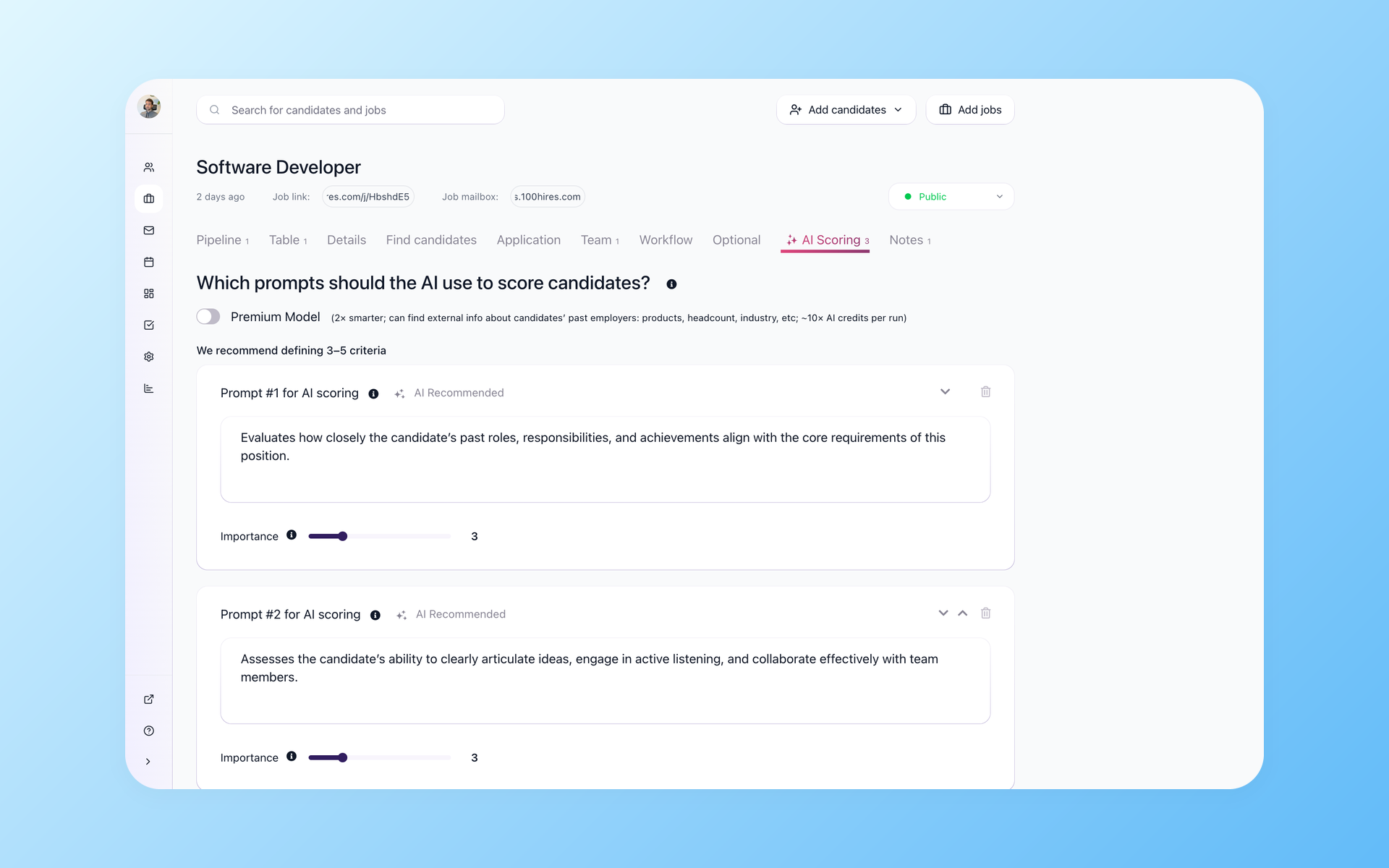
Review supported records with AI Score
After supported records enter 100Hires, AI Score can evaluate candidates against recruiter-defined criteria and return a total, a summary, and per-criterion 0-100 results for human review.
- Role-specific criteria
- Per-criterion evidence
- Human review
AI Score works with the candidate data available in 100Hires and supports prioritization rather than replacing a hiring decision. The AI resume screening workflow explains the review process.
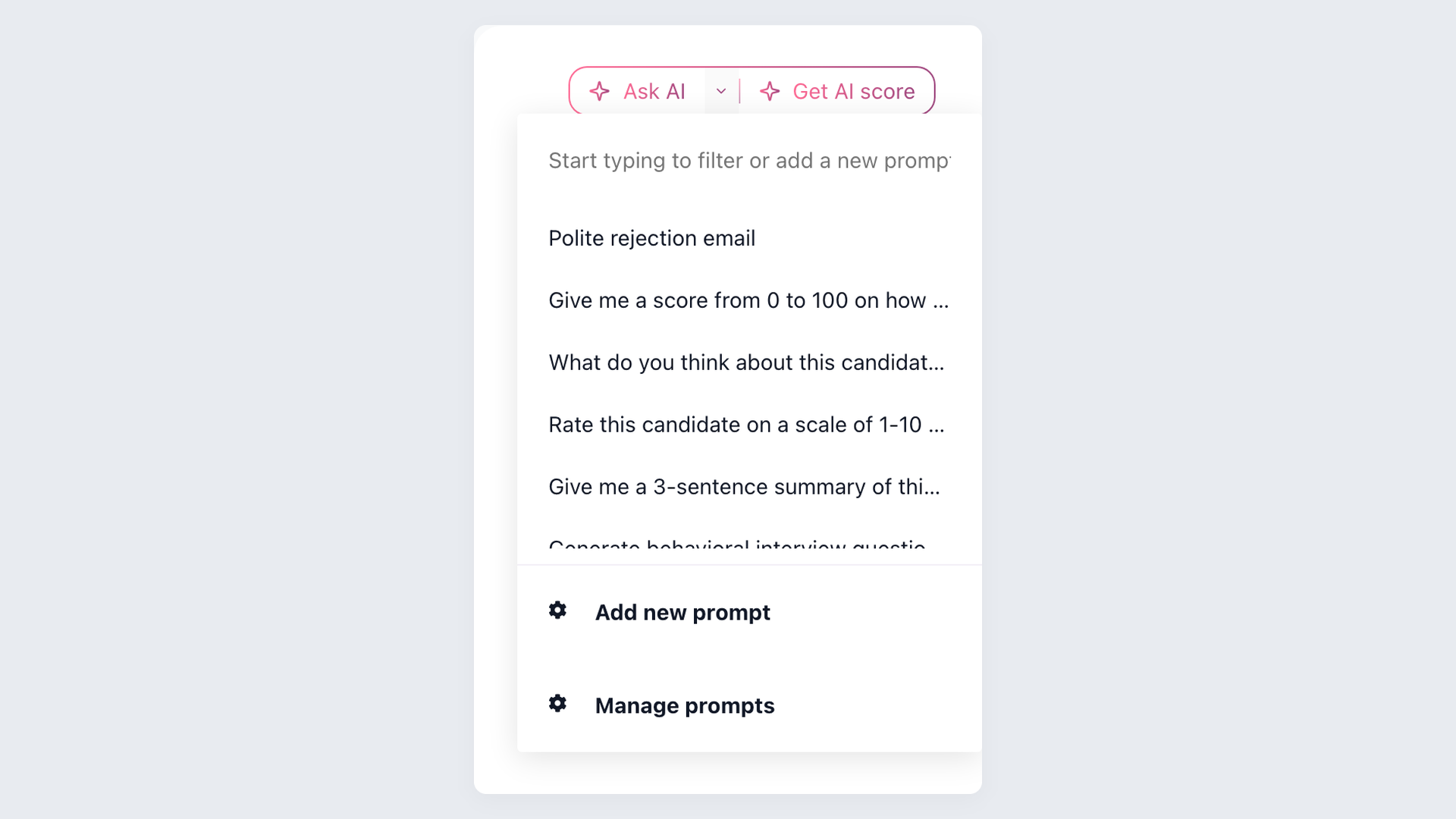
Ask AI Copilot about the record in front of you
AI Copilot can use resume and profile data, application answers, notes, email history, evaluations, and job context available in a 100Hires record. It does not make the hiring decision.
- Available record context
- Saved prompts
- Recruiter judgment
AI Copilot works only with context available in 100Hires. Test records with different levels of source detail before launch so recruiters know what the available resumes, notes, evaluations, and job data can answer.
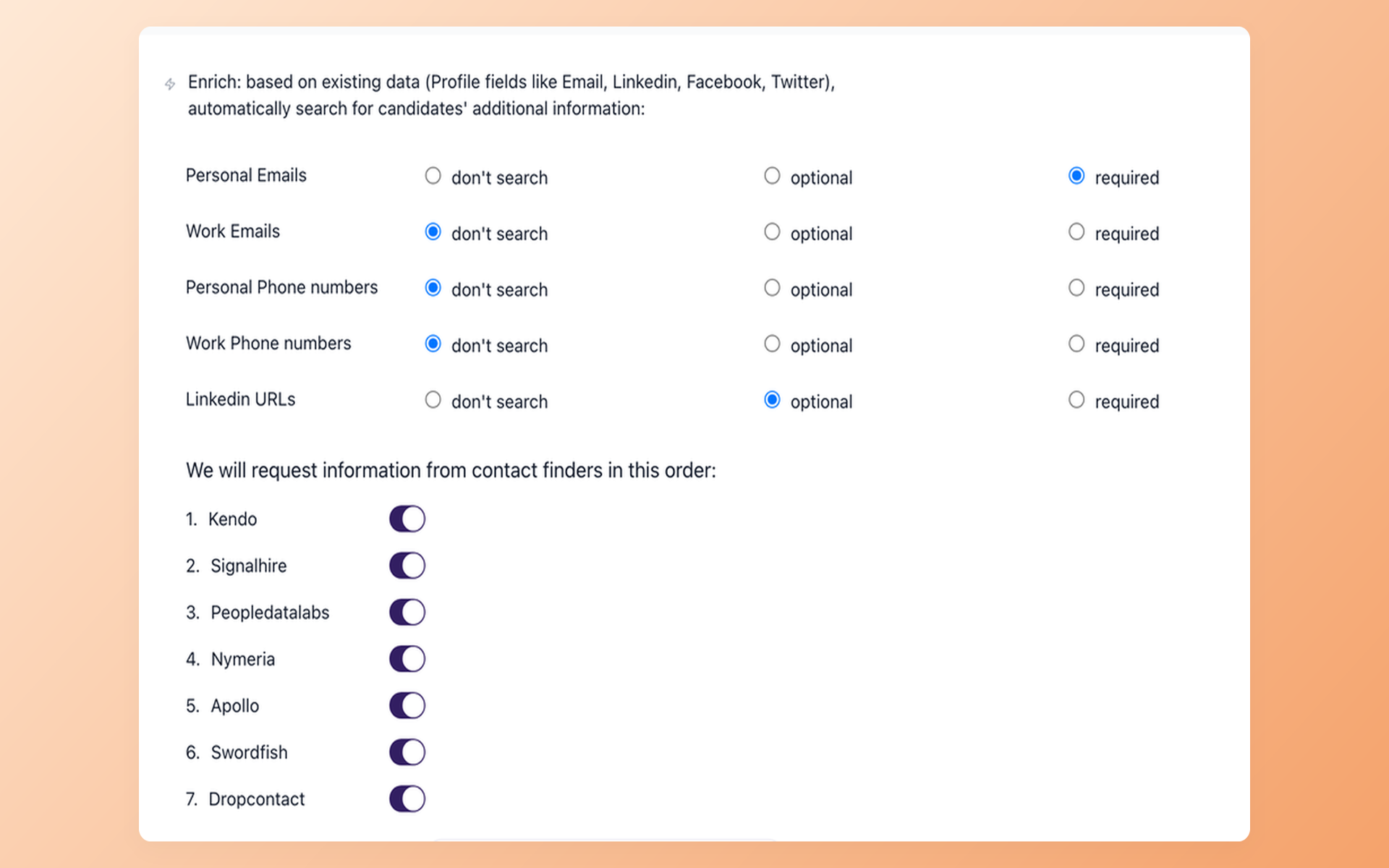
Build a reachable pipeline beyond imported applicants
Contact Finder can attempt selected contact enrichment for sourced candidates where data is available. Results attach to the 100Hires record, but availability varies and a match is not guaranteed.
- Selected contact fields
- Results saved to records
- No match guarantee
Contact Finder and broader sourcing and outreach are available with Pro. The personal email finder explains how selected contact fields are handled where data is available.
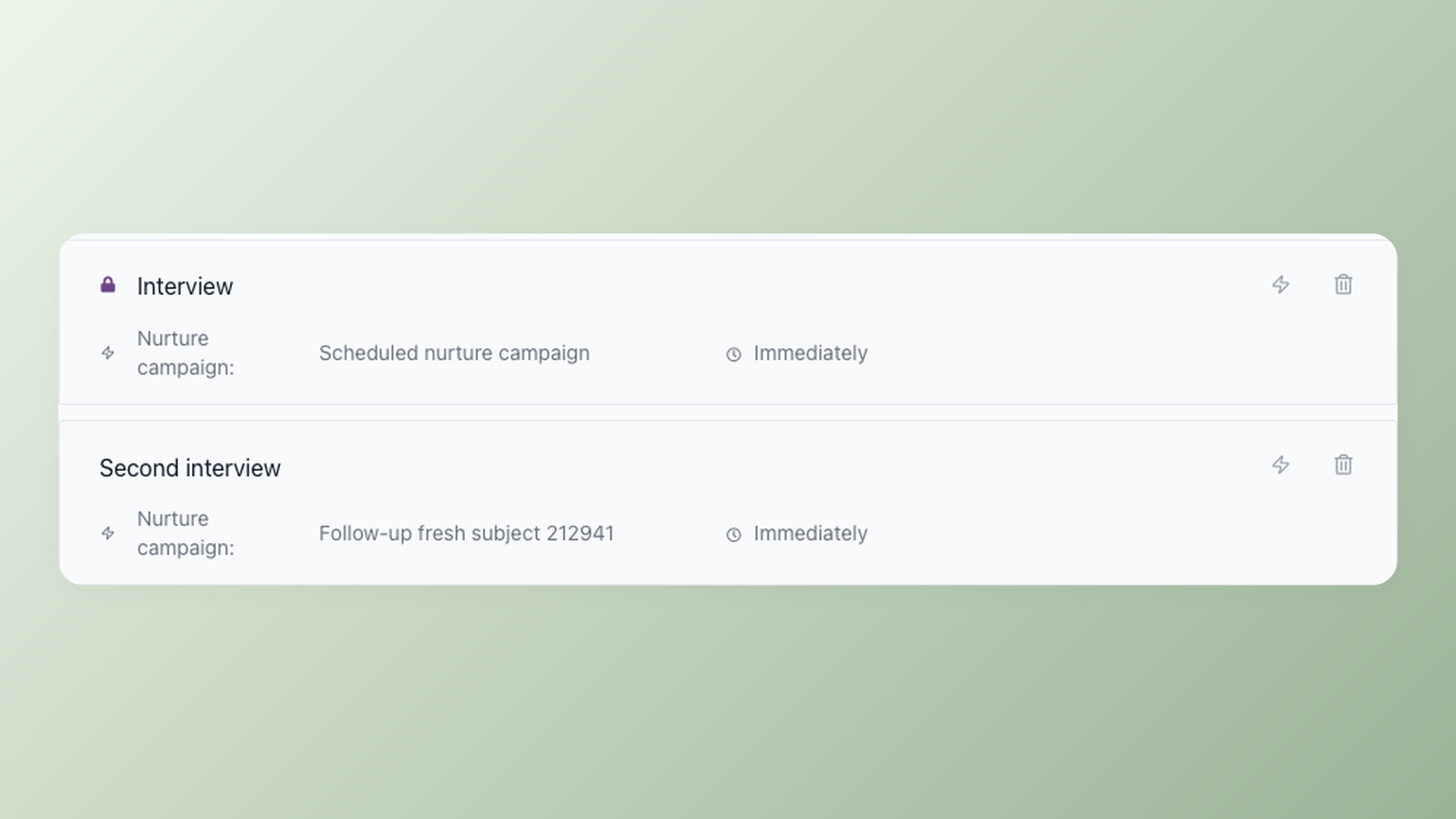
Draft outreach and keep follow-up moving
AI Email Composer prepares a draft using candidate information for recruiter review, editing, and sending. Nurture campaigns run scheduled multi-step follow-up as a separate workflow.
- Recruiter-reviewed draft
- Scheduled follow-up
- Response-based movement
AI Email Composer handles the draft. Nurture campaigns handle the later sequence. The recruitment automation software workflow keeps those jobs distinct.
Build the first campaign with a clear audience, send window, exit rule, and stage movement. Test the sequence on approved records before using it across a larger imported group.
Staying with JobScore can still be reasonable
JobScore may fit a team satisfied with its documented SMB ATS workflow, job distribution, collaboration, scheduling, reporting, exports, authorized API access, integrations, 30-day trial, and current AI assistance.
100Hires is the destination to test when the team wants role-specific AI Score, candidate-context AI Copilot, Contact Finder, Talent Pools, AI Email Composer, and Nurture campaigns in one ATS.
Plan limits apply to that destination: AI use is quota-based, broader sourcing and outreach are available with Pro, and managed migration follows the eligibility terms above.
See current customer reviews, ratings, and awards
The 100Hires customer reviews, ratings, and awards below help evaluate the product your team would use after the move. They do not describe JobScore or guarantee a migration result.

It solved all of my recruitment problems and offered all of the features I was looking for. It can automate most of my recruitment processes.

I’d happily recommend it to my industry peers. I’m able to use the platform with ease and don’t have to think twice about which function to use.

The system is very user-friendly. Even people with no experience will find it easy to understand its functionality.







 4.7
4.7
 4.8
4.8
The hiring playbook, in your inbox
One email a week - benchmarks, AI screening tactics, and short interview templates from the 100Hires team. No product pitches.