
Migrate from Hirebridge






Start a free trial to test the AI-first workflow. Managed migration is separate: 100Hires confirms eligibility only after scope review for an annual Pro contract.
Hirebridge covers core ATS workflows. This comparison focuses on the AI, enrichment, and follow-up workflow your team can configure in 100Hires after a move.
Know the scope before anyone moves data
Free comprehensive managed migration is available for eligible annual Pro contracts after scope review. 100Hires reviews the current ATS, candidate and job counts, available exports, and requested data before managed scope is confirmed.
- Review the source and request. List the records your team needs and the files Hirebridge makes available to you.
- Map and move the agreed data. Confirm the destination fields, jobs, stages, and files included in scope.
- Validate and onboard. Check the result before your team relies on the new workspace.
This process does not promise a fixed timeline, every object, full history, every attachment, old automations, integrations, zero downtime, or zero data loss. Those details depend on the source data and the scope your team confirms with 100Hires.
Compare the post-move workflow, feature by feature
The comparison below credits the Hirebridge capabilities documented in current first-party sources. It uses “Not publicly stated” for unverified named equivalents and export scope.
| Feature | 100Hires first, then Hirebridge |
|---|---|
| Candidate records |
100Hires: Profiles, resumes, pipelines, notes, messages, and evaluations. Hirebridge: Applications, assessments, screening answers, notes, emails, and history. |
| Job and pipeline workflow |
100Hires: Multiple pipelines, custom stages, views, and stage automations. Hirebridge: Custom workflows, milestones, job-specific steps, and status changes. |
| Job-specific screening |
100Hires: AI Score uses recruiter-written criteria and returns a human-reviewed 0-100 score. Hirebridge: AppFit analyzes resumes and applications against the job, returns a 0-100 alignment score, and requires human review; scored pre-screening and knockout questions are also documented. |
| Candidate-context assistant |
100Hires: AI Copilot uses available candidate and job context. Hirebridge: An equivalent named candidate-context copilot is not publicly stated in the reviewed sources. |
| Contact discovery |
100Hires: Contact Finder supports verified-email enrichment on Pro. Hirebridge: An equivalent named contact-discovery workflow is not publicly stated in the reviewed sources. |
| Nurture and follow-up |
100Hires: Nurture campaigns support reply-aware follow-up. Hirebridge: Email templates and automated notifications are documented; broader sequence scope is not publicly stated. |
| Job distribution |
100Hires: Career site, social sharing, and supported job boards. Hirebridge: Career center, job search sites, social networks, and paid boards. |
| Scheduling and collaboration |
100Hires: Scheduling, self-scheduling, evaluations, and shared context. Hirebridge: Manager access, calendars, invitations, and feedback. |
| Reporting |
100Hires: Recruitment, outreach, and pipeline analytics. Hirebridge: Real-time and custom source, time, traffic, compliance, and pipeline reporting. |
| Integrations |
100Hires: Email, calendar, communications, automation, API, and job boards. Hirebridge: Assessment, screening, onboarding, HRIS, payroll, communications, and ADP. |
| Mobile candidate apply |
100Hires: Mobile-friendly career site and application flow. Hirebridge: Responsive apply on smartphones and tablets. |
| Free managed migration |
100Hires: Eligible annual Pro contracts after scope review. Hirebridge: Complete export and managed-migration scope is not publicly stated in the reviewed sources. |
| Self-service import |
100Hires: CSV candidate import and bulk PDF or DOC resume upload. Hirebridge: Complete public export steps are not stated in the reviewed sources. |
Hirebridge's official AppFit announcement documents its AI-generated 0-to-100 alignment score and tells recruiters to review the underlying details rather than rely on the score alone.
Start the new pipeline with job-specific review
After the move, the first question is simple: can your recruiters see which candidates meet the criteria they defined for a role without treating an automated score as the final answer?
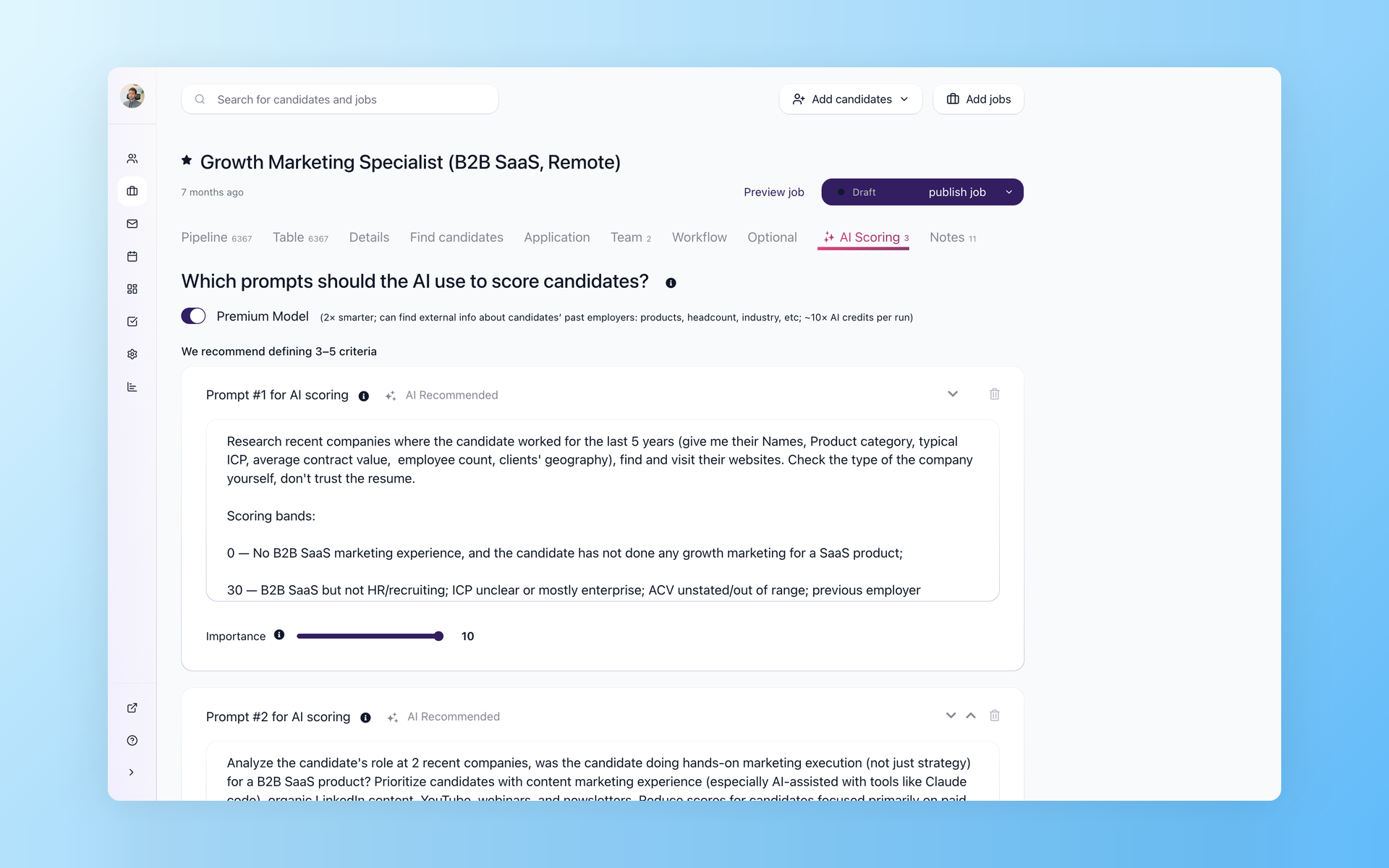
Set the review bar for each job
AI Score evaluates available candidate data against criteria your recruiter writes for the role. Importance weights run from 1 to 10, results run from 0 to 100, and optional thresholds can route candidates for the next review step.
- Job-specific criteria
- Editable importance weights
- Per-criterion score and evidence
- Recruiter review before a decision
See how AI Score supports job-specific resume screening in 100Hires. It can only assess the data present in the record, so a non-standard candidate or a sparse resume may need a closer human read.
Use the candidate context available in 100Hires
Migration scope and AI context are connected. If a field, note, message, or evaluation is not available and mapped, AI Copilot cannot use it. The page makes that limit visible before promising what the destination can do.
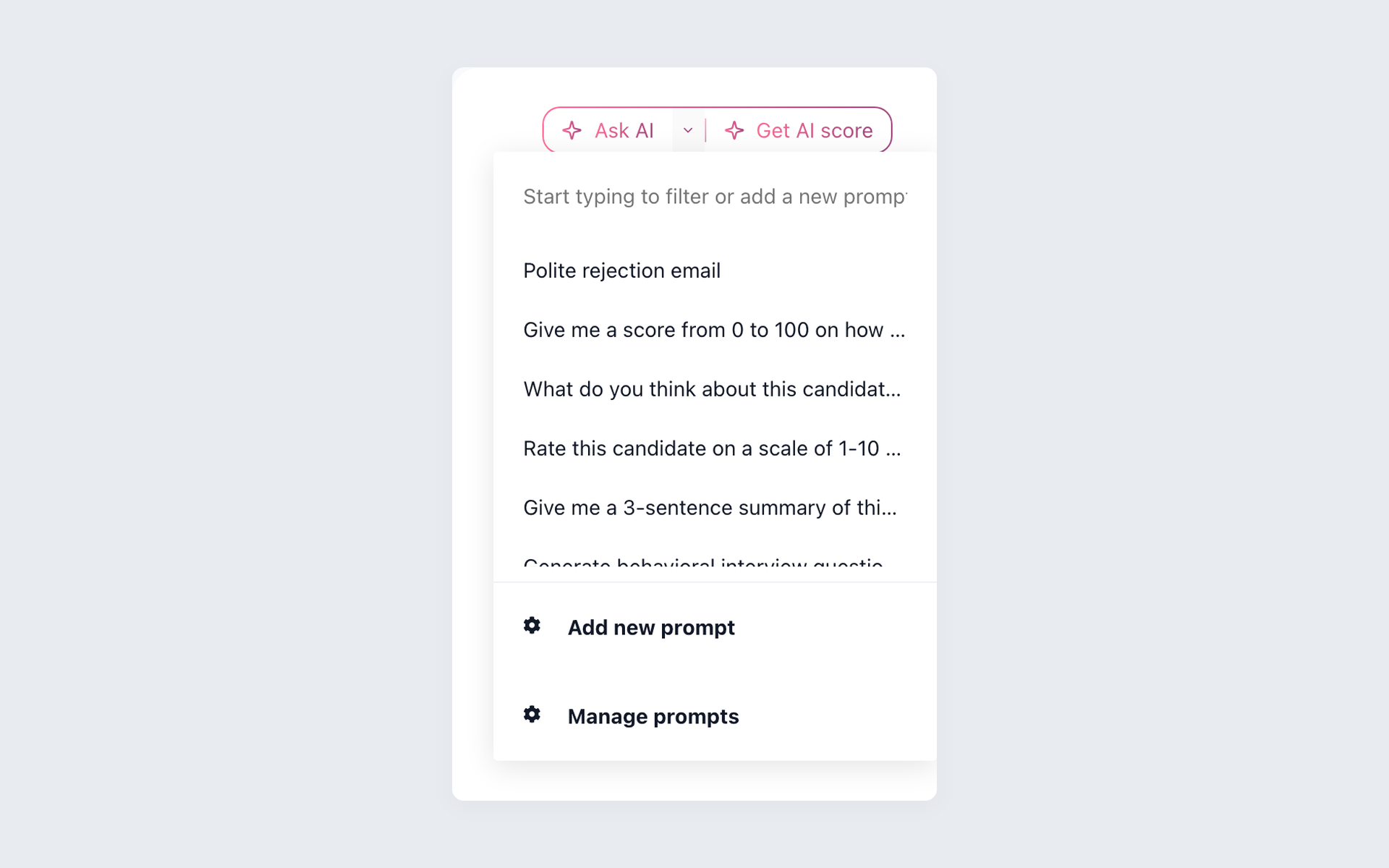
Start each review with a saved prompt
AI Copilot shows saved recruiter prompts in the candidate record. A prompt can request a summary or job comparison, but it cannot use context that was not available and mapped.
- Resume and profile context
- Application answers and job details
- Available notes and evaluations
- Saved prompts for repeat reviews
The 100Hires AI recruiter page shows more AI Copilot workflows. Recruiters should verify the source record before relying on a summary or comparison.
Reach people you want to re-engage
A useful candidate record is the starting point. Sourcing may still call for current contact data before a recruiter can open a new conversation.
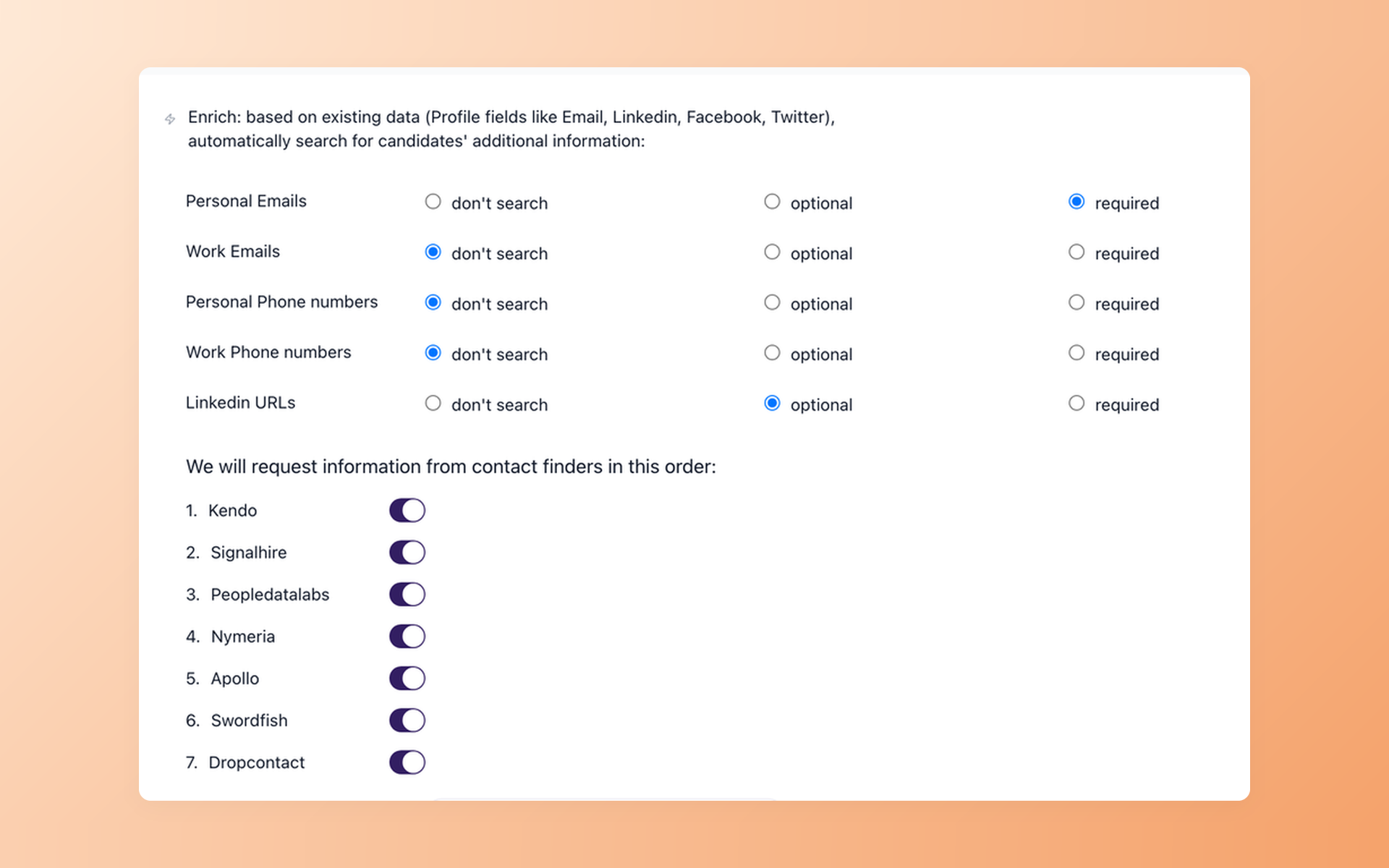
Add a supported contact step after the move
Contact Finder supports verified-email enrichment on Pro. Your team controls which fields are required or optional and can place enrichment in the new workflow without making a database-size or coverage promise.
- Personal or work email options
- Required and optional field controls
- Provider sequence in one workflow
- No match-rate promise
Build follow-up around the new workflow
Old templates, sequences, automations, and communication history are not assumed to transfer. Nurture campaigns are a destination workflow your team can set up once the new stages and recruiter handoffs are clear.
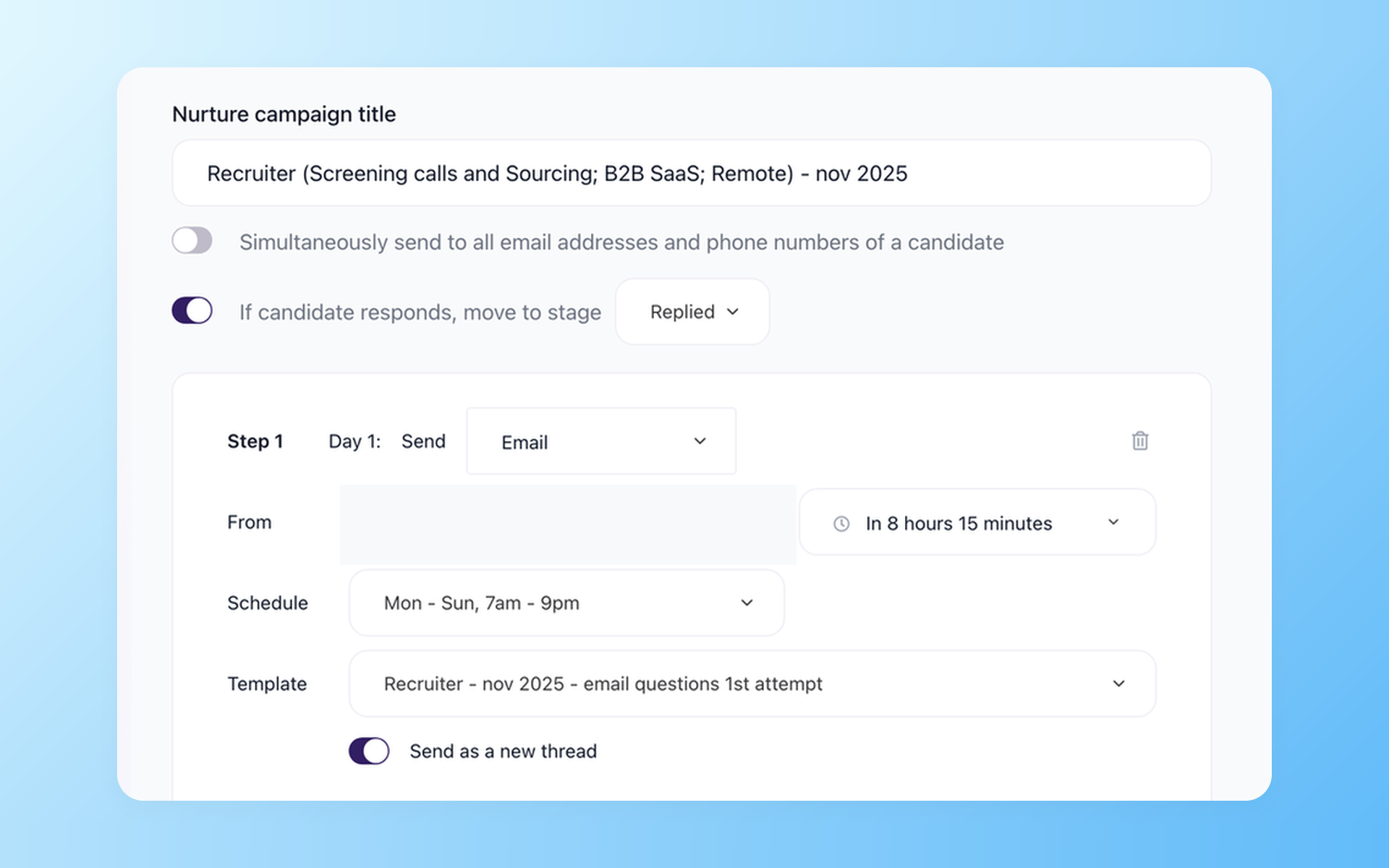
Give every follow-up a next step
Nurture campaigns can schedule multistep outreach, respect candidate time zones, stop when someone replies, move the candidate to a chosen stage, and report the result. Optional steps include SMS, voicemail, or recruiter tasks.
- Timed multistep follow-up
- Candidate time-zone scheduling
- Stop and move on reply
- Email, SMS, voicemail, or tasks
See how 100Hires recruitment automation connects Contact Finder, Nurture campaigns, screening, and stage actions. The recruiter stays responsible for the conversation and the decision.
Choose managed help or a self-service path
Managed migration, CSV candidate import, and bulk resume upload are separate options. CSV import lets your team map columns, review errors, preview proposed changes, and assign candidates to a job and stage.
Bulk PDF or DOC resume upload parses multiple files and previews mapped fields. Neither self-service path proves which export format Hirebridge will make available to your account. Confirm the source files first.

It solved all of my recruitment problems and offered all of the features I was looking for. It can automate most of my recruitment processes.

I’d happily recommend it to my industry peers. I’m able to use the platform with ease and don’t have to think twice about which function to use.

The system is very user-friendly. Even people with no experience will find it easy to understand its functionality.







 4.7
4.7
 4.8
4.8
The hiring playbook, in your inbox
One email a week - benchmarks, AI screening tactics, and short interview templates from the 100Hires team. No product pitches.
100Hires is not affiliated with, endorsed by, or sponsored by Hirebridge.