
Manage Your Hiring from Claude and ChatGPT
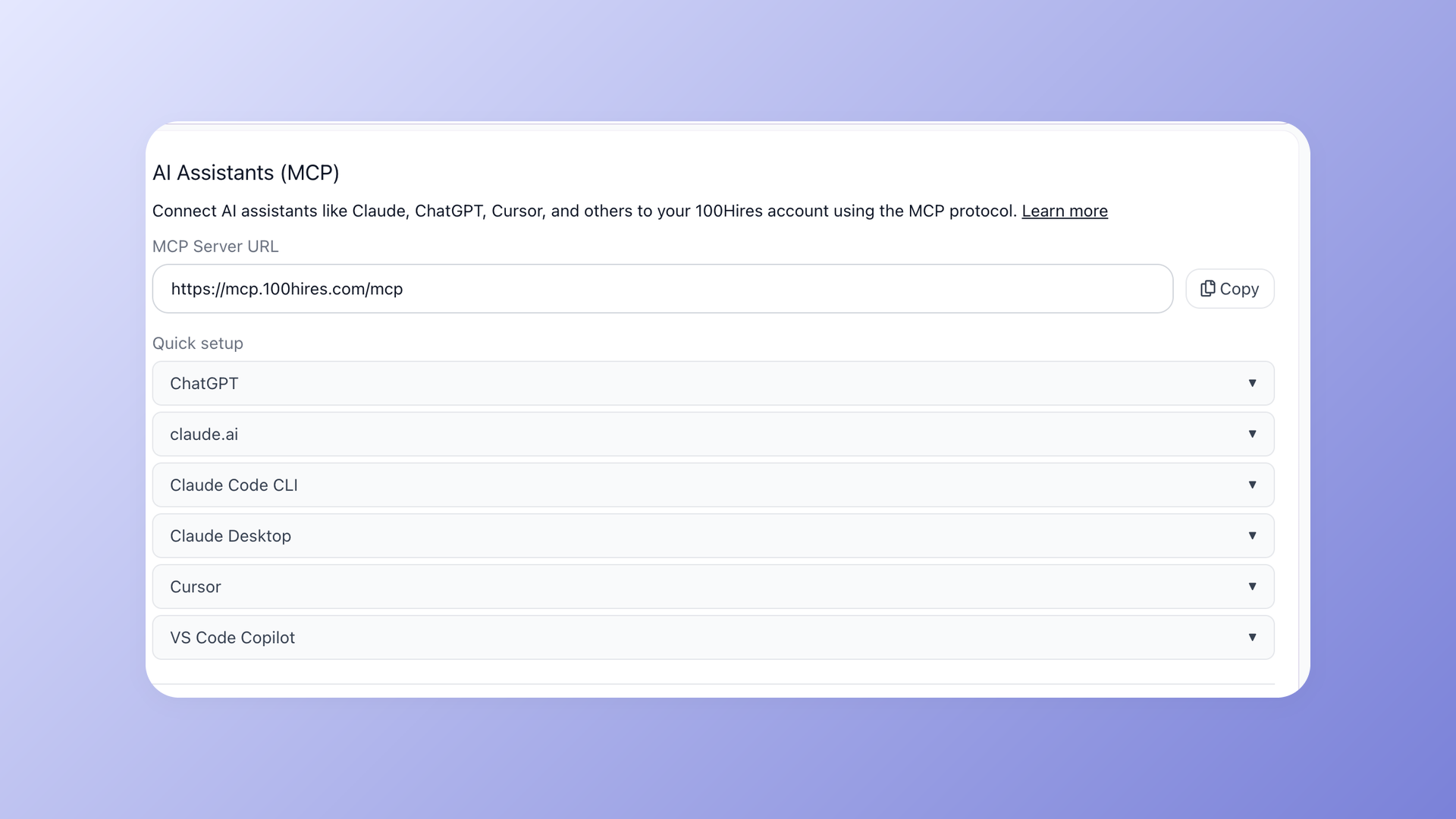
Your hiring data now lives where you already think out loud. 100Hires connects to Claude, ChatGPT, Cursor, and any MCP-compatible AI assistant, giving them secure access to 130 tools for candidates, jobs, applications, and interviews. Instead of clicking through tabs, you just ask.
It runs on the Model Context Protocol (MCP), the emerging standard for connecting AI assistants to real tools and data. Turn it on once, and your assistant can read and act on your pipeline on your behalf.
Talk to your ATS in plain English
The hiring playbook, in your inbox
One email a week - benchmarks, AI screening tactics, and short interview templates from the 100Hires team. No product pitches.
No new query language, no exports, no switching screens. You describe the outcome, and your assistant does the work inside 100Hires. A few things people ask on day one:
- "Show me candidates who applied this week for the Senior PM role"
- "Move all rejected candidates from this job to the talent pool"
- "Schedule a 30-minute interview with Sarah next Tuesday for the Backend Engineer role"
- "Draft a follow-up email to candidates who haven't replied in 5 days"
- "Find every LinkedIn candidate with Python on their resume and tag them 'pythonista'"
The same prompts that would take a dozen clicks and a few filters now take one sentence. Sourcing, follow-ups, scheduling, and pipeline clean-up stop being chores you context-switch into.
Works with the AI assistants you already use
We did not build a walled-garden chatbot. 100Hires plugs into the assistants your team already opens every day: Claude (web, Desktop, and Code), ChatGPT, Cursor, VS Code, Codex, Windsurf, and Zed. If it speaks MCP, it can talk to your account.
All 130 tools span the full hiring workflow, so your assistant is not limited to search. It can create and update jobs, move and tag candidates, draft and send messages, and schedule interviews, the same actions you take by hand today.
Secure by design
Connecting an AI assistant to live candidate data is a trust decision, so we built the guardrails in from the start. Authorization uses OAuth 2.1 with PKCE and Dynamic Client Registration, the current best practice, not a shared API key pasted into a chat window.
- Access tokens expire after one hour, with refresh tokens issued automatically, so a leaked token has a short life.
- Every connected client is listed under Settings > Integrations, and you can revoke any session in one click.
- Destructive actions require explicit IDs, and we recommend keeping human confirmation on, so nothing irreversible happens by accident.
Connect in under a minute
Open Settings > Integrations and find the "AI Assistants (MCP)" panel. Pick your client from the Quick setup list, copy the server URL (https://mcp.100hires.com/mcp), and approve the one-time OAuth consent screen.
To confirm it worked, ask your assistant to list your open jobs. Once it answers, you are connected, and all 130 tools are available. That is the whole setup.
Why we built it
Recruiters lose hours to repetitive clicks: filtering lists, chasing replies, booking calls, tidying pipelines. AI assistants are great at exactly that kind of work, but only if they can reach your real data. MCP is the bridge, and now 100Hires is on the other side of it.
Ready to try it? Open Settings > Integrations in your 100Hires account, or read the full guide at 100hires.com/mcp.
Try 100Hires for free
No credit card. 14-day trial. Forbes Advisor #1 ATS for SMBs.