
ChatGPT for recruiters - powered by the 100Hires app
Move candidates, draft outreach, and pull weekly hiring updates from inside one chat. The 100Hires ChatGPT app connects ChatGPT to your live pipeline, so the answers come from your actual candidates - not pasted fragments






ChatGPT for recruiters, now with your live pipeline
Recruiters already use ChatGPT every day for job descriptions, Boolean strings, and quick rewrites. The catch is always the same: ChatGPT does not know your candidates, so every useful answer starts with a paste from the ATS and ends with a paste back into it.
The 100Hires ChatGPT app removes that loop.
Install the 100Hires ChatGPT app from the ChatGPT App Directory, approve the OAuth scope, and ChatGPT can read your live 100Hires pipeline, draft outreach using real candidate notes, and take action when you ask it to.
No exports, no copy-paste, no parallel "AI tab" you keep flipping between.
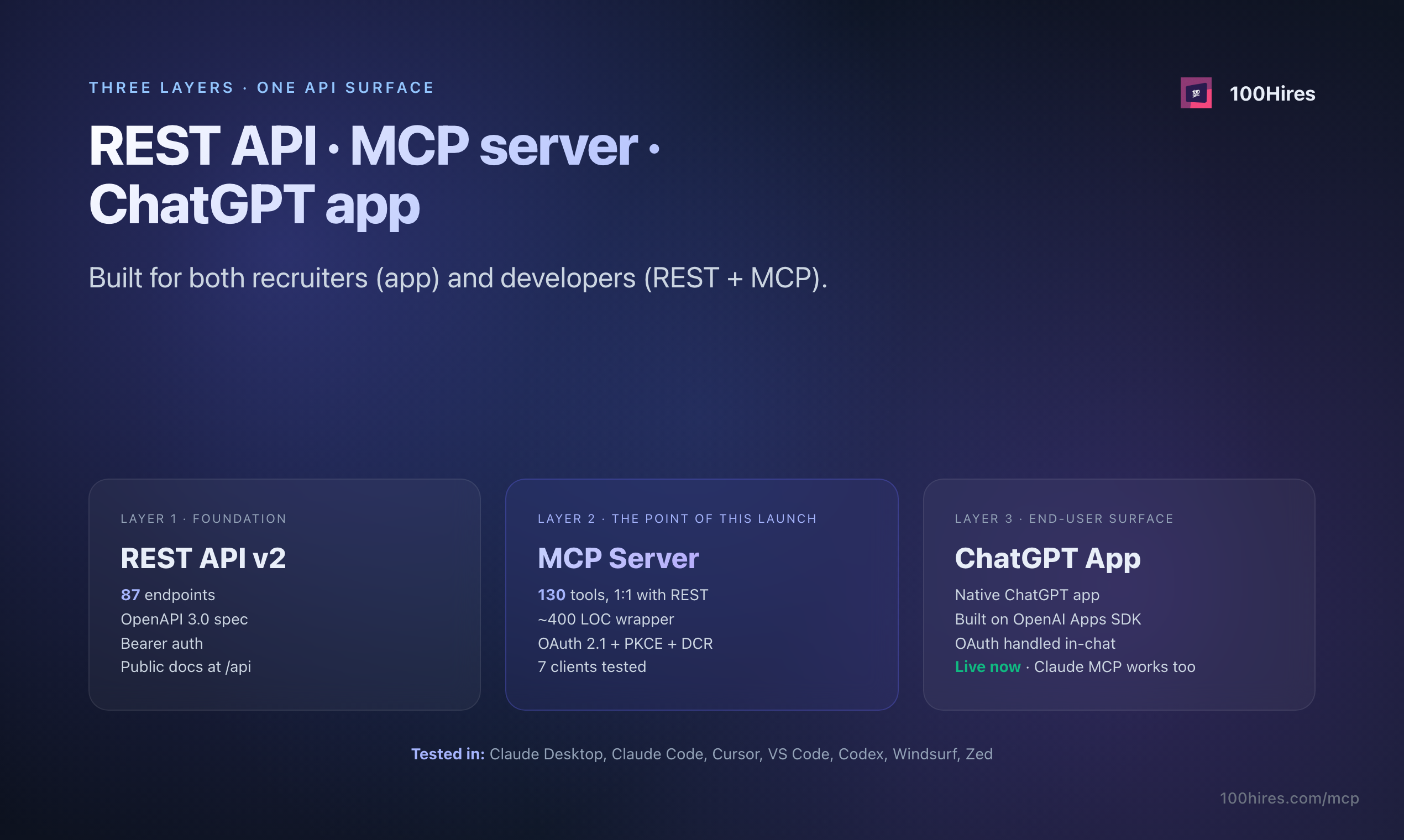
The 100Hires ChatGPT app is built on the OpenAI Apps SDK and a 130-tool MCP server, so recruiters can ask ChatGPT to work with their live 100Hires pipeline instead of pasted context. The answers use your actual candidate and job data.
How recruiters use ChatGPT for hiring with 100Hires
Most recruiter ChatGPT usage clusters around six patterns. The 100Hires ChatGPT app keeps every one of them and removes the manual data shuffling that made the patterns brittle.
Writing and editing assistance is a safe entry point
Recruiters trust ChatGPT for job-description drafts, message rewrites, and post-call summaries because the model is strong at "writing" and stays away from "deciding".
The 100Hires ChatGPT app keeps that writing strength but now drafts open against real candidate notes from 100Hires, not pasted fragments.
The result reads like the rest of your hiring voice because the chat saw the actual record.
Searching past applicants by skill, stage, or note
Recruiters used to lean on ChatGPT to draft a Boolean string and then paste it into LinkedIn or Google.
The 100Hires ChatGPT app changes the search surface: instead of stringing operators together for an external source, the recruiter asks the chat to find candidates inside 100Hires by skill, tag, stage, or note content.
The app reads the pipeline directly and returns a real shortlist - no string syntax to debug, no copy-paste back into the ATS.
Submittal and candidate summaries are quietly automated
The common workflow is to paste a candidate PDF, ask for a summary, and paste the summary back into the ATS. The 100Hires ChatGPT app reads approved 100Hires candidate fields directly, drafts the summary, and lets the recruiter decide the next action in the same turn.
The AI Score the chat shows comes from 100Hires AI Copilot; scoring methodology is covered separately on the AI Copilot page.
Use ChatGPT to draft weekly hiring updates
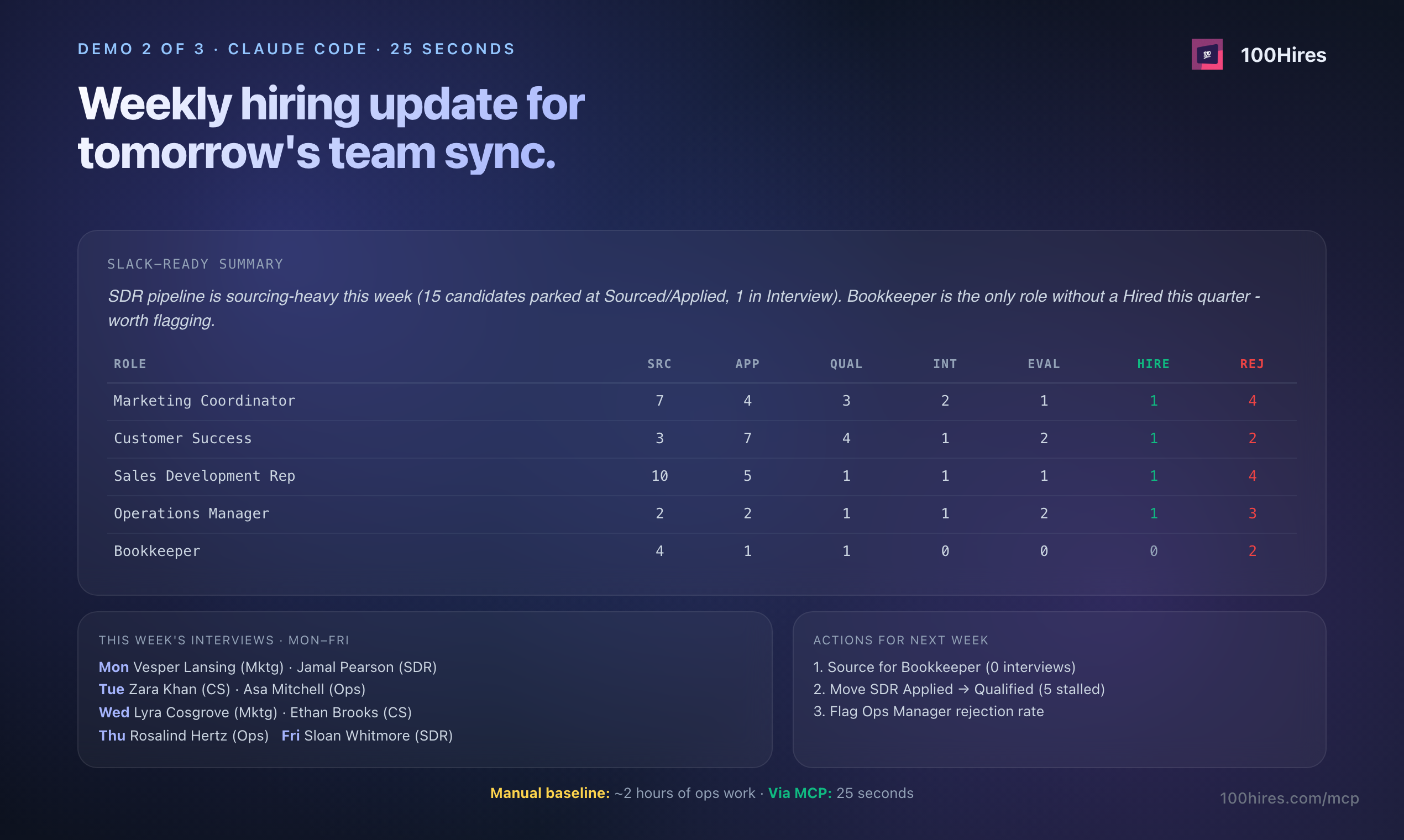
Roll-up reports used to mean an export, a spreadsheet, and a half-hour of stitching. With the 100Hires ChatGPT app, the chat pulls live pipeline movement - active roles, stages, week-over-week deltas - and drafts the manager-ready summary in one turn.
The recruiter edits, sends, and moves on with the rest of Monday.
Pipeline triage runs in chat
Recruiters describe the same pattern in different words: "show me Phone Screen candidates with no contact in five days," "who is stuck behind a hiring-manager review," "who did we promise feedback to last week."
The 100Hires ChatGPT app supports each of these requests directly because it sees stage history, last-contact dates, and recruiter notes.
The recruiter still decides who to message - the app just finds the list.
Re-engagement and rediscovery compound the budget you already spent
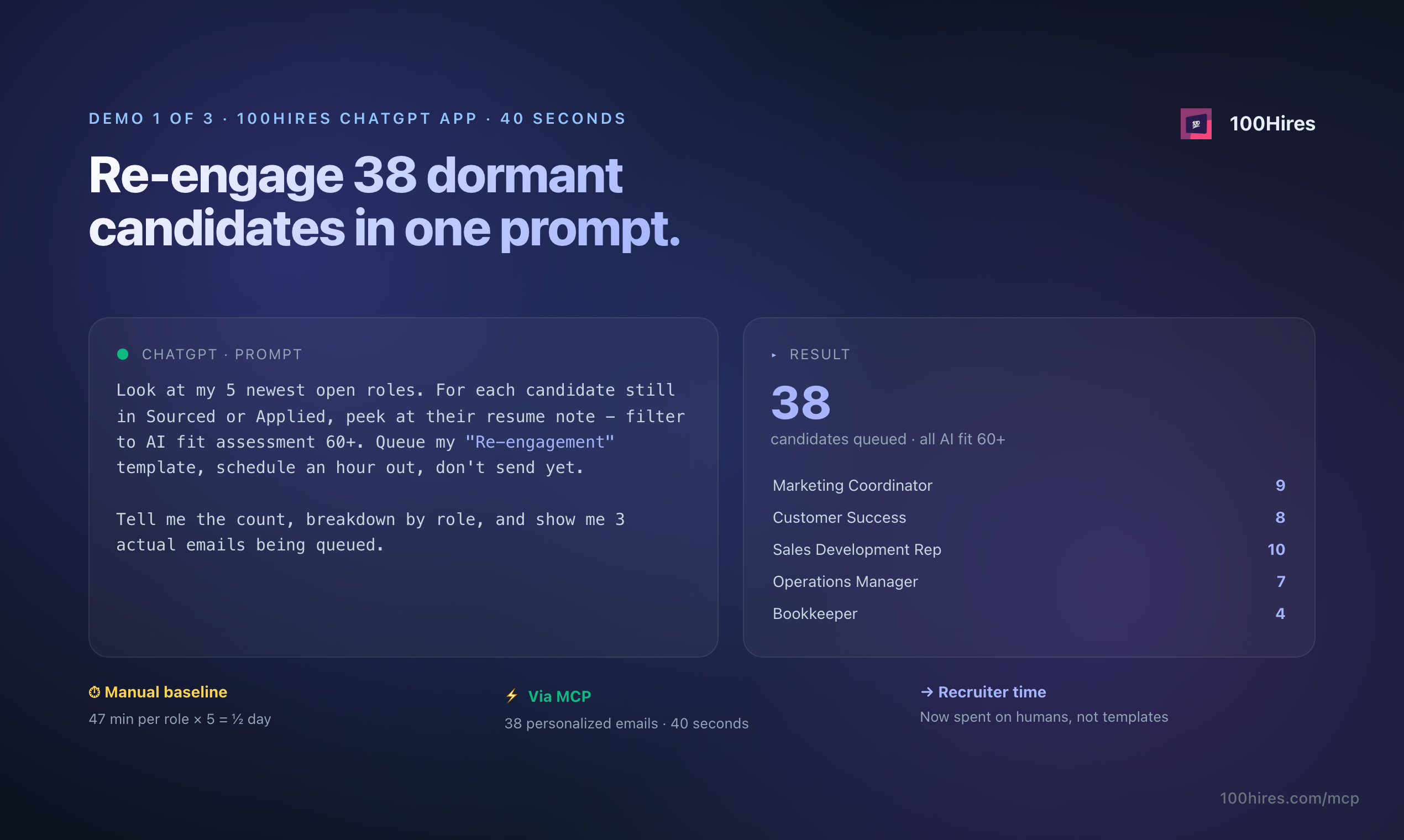
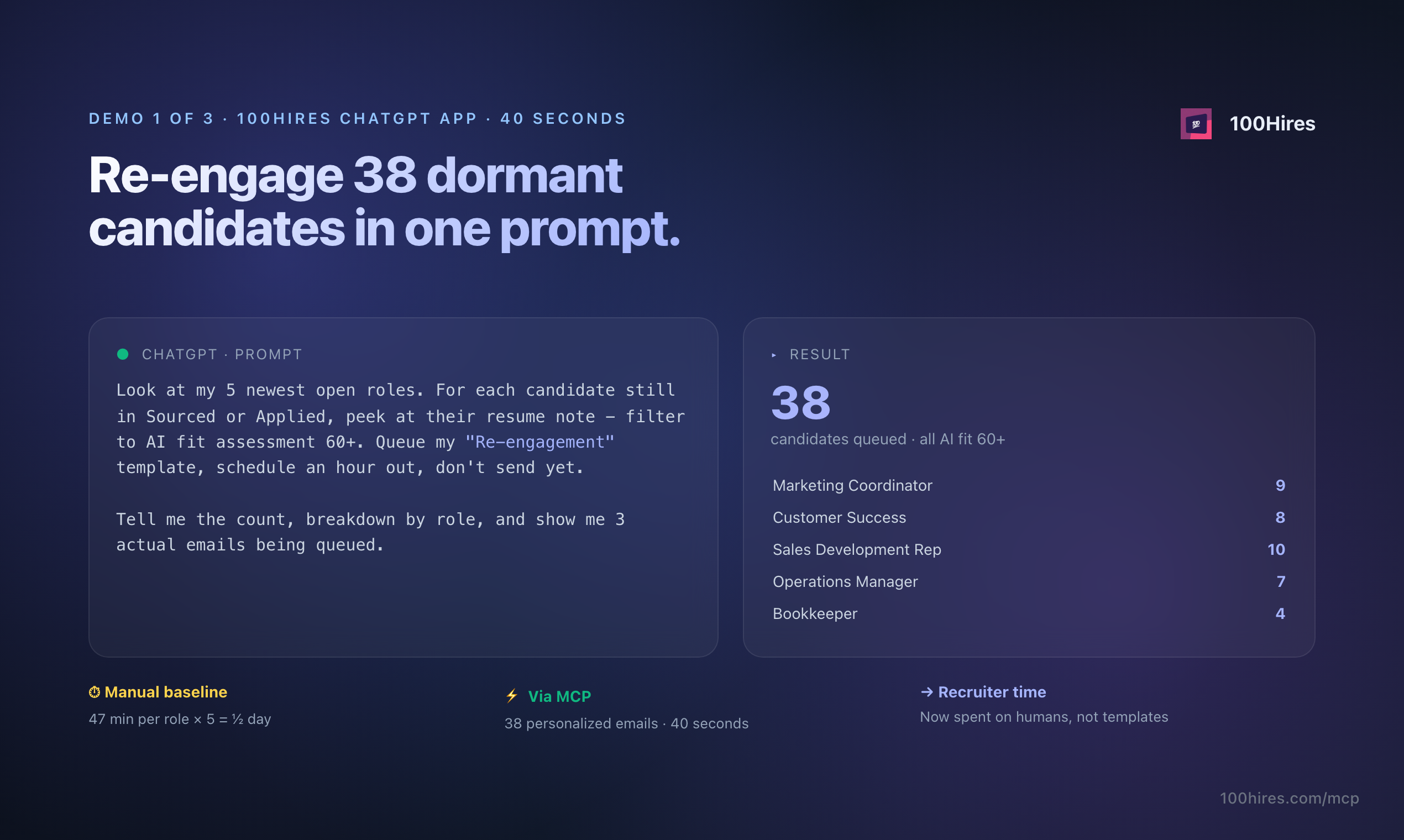
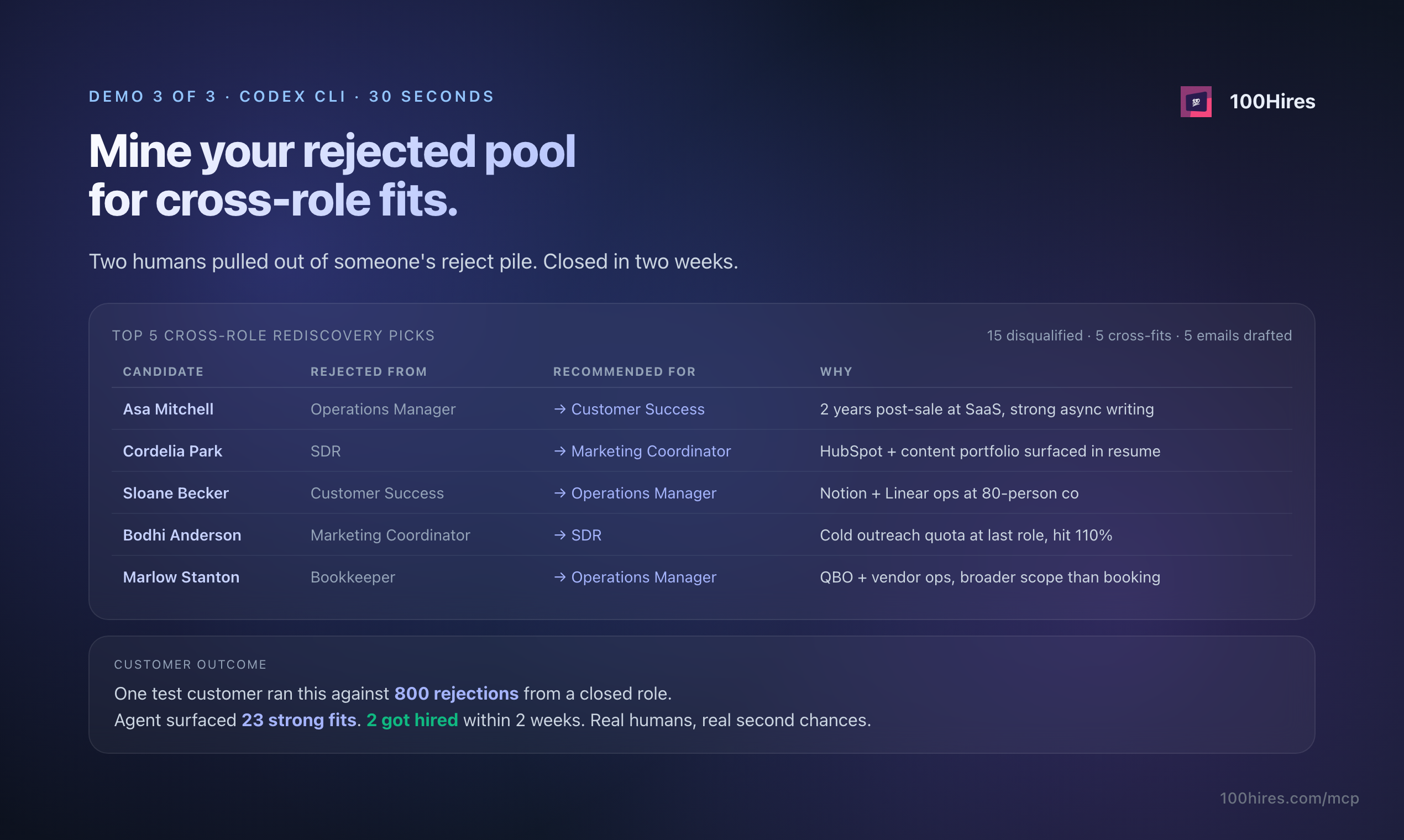
Every cold candidate represents recruiting spend you have already made. Recruiters call them silver medalists - real interest, real fit, no offer.
The 100Hires ChatGPT app reads past applicants and drafts re-engagement outreach in one chat, replacing the export-spreadsheet-mail-merge ritual with a single conversation.
Setup is short and OAuth-scoped: install from the ChatGPT App Directory, sign in, approve the scope, and the 100Hires app shows up in the composer next message. The full step-by-step with a screenshot lives further down on this page.
What the 100Hires ChatGPT app actually does
The 100Hires ChatGPT app is a native ChatGPT app, not a Custom GPT and not a prompt pack. It is listed in the ChatGPT App Directory, installed per-user, and authenticated with OAuth 2.1.
Once installed, the 100Hires app appears in the ChatGPT composer for every new chat the recruiter starts.
Built on OpenAI's Apps SDK with a 130-tool MCP server underneath, the 100Hires app gives ChatGPT scoped access to your real ATS records.
The 130 tools span 22 categories - candidates, jobs, applications, notes, messages, interviews, tags, stages, evaluations, attachments, hiring team, calendar, and the rest of the 100Hires API surface.
Most recruiter workflows chain three to five of those tools in a single turn.
The same 100Hires MCP server that powers the ChatGPT app also works in Claude, Cursor, Codex, Windsurf, VS Code, and Zed. The ChatGPT App Directory listing is the ChatGPT-specific entrypoint; other clients connect through their own MCP support.
The underlying permissions stay the same per-user.
The 100Hires ChatGPT app reads real ATS records and does not invent candidate facts. Names, stages, last-contact dates, AI Score, and notes come straight from the 100Hires record - the chat is grounded in your data, not in a paraphrase.
For the scoring methodology behind AI Score, the 100Hires AI Copilot page has the full explanation. This page explains the app and chat experience; the Copilot page explains assessment and scoring.
Bring back the candidates you let go cold
Ask ChatGPT to surface every candidate you talked to in the last 90 days who never reached a final stage. The 100Hires app reads your pipeline, filters by stage and last-contact date, and drafts a re-engagement message that already knows the candidate's history.
- Stage + last-contact filter
- Draft outreach in one turn
- Real pipeline, no exports
- Send from the same chat
Write the Monday hiring update in one chat
Roll-up reports usually mean tabs, exports, and a half-hour of stitching. Ask the 100Hires app for active roles, stages, and movement this week, and you get a hiring-manager-ready summary you can edit and paste straight into the email thread.
- Active roles + stage map
- Week-over-week movement
- Editable manager-ready draft
- Same chat, same context
Rediscover candidates you already paid to attract
Most ATSes hide silver-medalist talent behind search filters nobody uses. Ask the 100Hires app for past applicants who matched a new role's notes, and ChatGPT returns a real shortlist - filtered against the criteria the recruiter already wrote into the role.
- Past-applicant rediscovery
- Filter on stored notes
- Live ATS data, not a paste
- Shortlist in one turn
Raw ChatGPT vs ChatGPT with the 100Hires app
The 100Hires ChatGPT app is not a smarter prompt. It is the connection layer between ChatGPT and your live pipeline. The comparison below is descriptive, not a points contest.
 ChatGPT with the 100Hires app
Connect 100Hires to ChatGPT in under five minutes
From the ChatGPT App Directory, pick 100Hires, sign in with the same email you use for the ATS, and approve the OAuth scope you want ChatGPT to see. No exports, no admin ticket, no copy-paste. The 100Hires app appears in your chat composer for your next message.
- Install from ChatGPT App Directory
- OAuth 2.1 per-user scope
- No admin ticket
- Live in your next chat
The connection is per-user, not per-company. Every recruiter on the 100Hires account installs the 100Hires ChatGPT app in their own ChatGPT, and every action they take in the chat is logged in 100Hires against their user.
Revoke any time from ChatGPT - Settings - Apps or from 100Hires - Settings - Integrations - the connection terminates immediately on either side.
The hiring playbook, in your inbox
One email a week - benchmarks, AI screening tactics, and short interview templates from the 100Hires team. No product pitches.