
100Hires vs Tellent Recruitee
Comparing Recruitee alternatives or pricing? See how 100Hires and Recruitee differ across AI scoring, sourcing, follow-up, contract terms, and migration support.






Choose the ATS that matches your hiring workflow
Recruitee is a credible choice for teams that prioritize collaborative hiring. It documents configurable workflows, team roles, notes, tasks, evaluations, scheduling, automation, talent pools, sourcing, Screening Assistant, and Matching Assistant.
100Hires fits a different buying priority. It combines a published AI Score, Contact Finder, recruiter-controlled AI writing, scheduled follow-up, self-scheduling, public entry pricing, and a qualified migration path in one ATS.
See which hiring workflow fits your team
Choose Recruitee when collaborative workflow depth is the main requirement. Choose 100Hires when explicit candidate scoring, contact enrichment, outreach follow-through, and visible buying terms matter more.
| Decision point | 100Hires | Recruitee |
|---|---|---|
| AI Score | 0-100 total and per criterion with rationale; plan and credit limits apply | Screening is criterion based; the documented workflow is not a ranked suitability list |
| Inbound screening | AI Score evaluates applicants against role criteria; plan and credit limits apply | Screening Assistant reviews up to six criteria; plan and Screening credit limits vary |
| Existing candidates | Scores selected candidates against role criteria; plan and credit limits apply | Matching Assistant searches talent pools and active jobs; plan and search limits apply |
| Contact Finder | Enriches selected email, phone, or LinkedIn fields; plan and credit limits apply | Matching Assistant searches stored candidates; plan and search limits apply |
| Team collaboration | Shared pipelines, notes, tasks, evaluations, and permissions | Collaborative workflows, roles, notes, tasks, and evaluations |
| Candidate follow-up | AI drafts plus scheduled Nurture campaigns; recruiter review applies | Email, templates, automation, and talent-pool communication |
| Scheduling | Self-scheduling links let candidates choose available times | Scheduler and interview scheduling are documented |
| Entry pricing | Start for 1-20 employees: $49 per month billed annually or $99 month to month | Price varies by plan, employee count, and billing period |
| Free trial | 14 days | 18-day Advance trial |
| Managed migration | Annual Pro after export and scope review | Source export availability and requested scope require review |
Recruitee is used here only to identify the compared product. 100Hires is not affiliated with or endorsed by Recruitee or Tellent.
Run the comparison with one representative open role, not a generic feature tour. Write down the role criteria, the evidence recruiters expect, the team members who review candidates, and the point at which a candidate should move to outreach or scheduling.
Load a small candidate set that your team is permitted to use. Compare how each product presents evidence, keeps recruiter judgment visible, records team input, and moves a reviewed candidate into the next action.
Test enrichment separately from database matching. Note each workflow's input, result, applicable plan or usage limit, and required recruiter action. This keeps unlike sourcing tools from being scored as if they were the same feature.
Finish with buying and change-management checks: contract cadence, trial window, required seats, plan limits, evaluation ownership, and rollout responsibilities.
A useful trial result is a documented fit decision, not a promise that every source record or workflow will transfer.
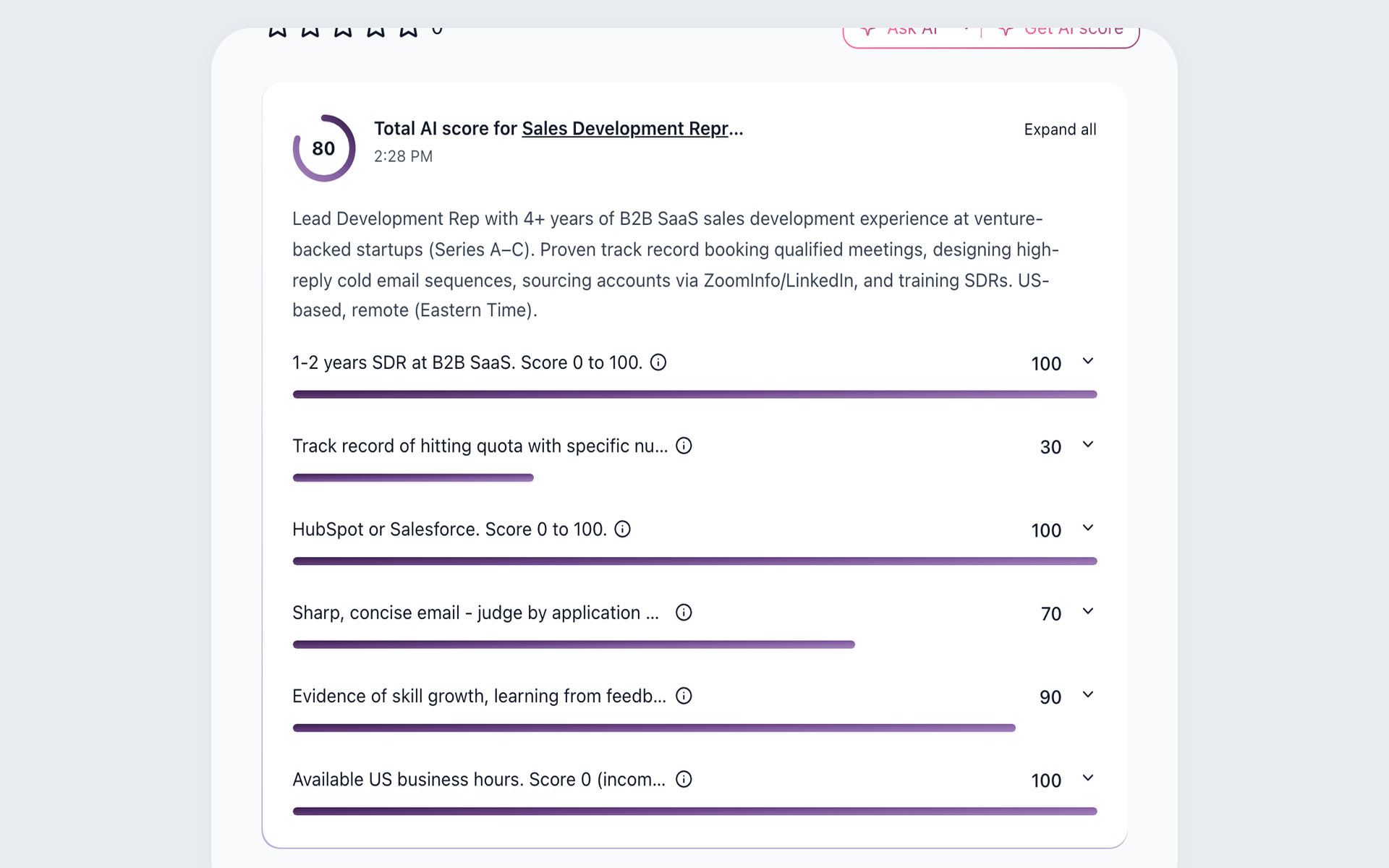
Prioritize review with a role-specific AI Score
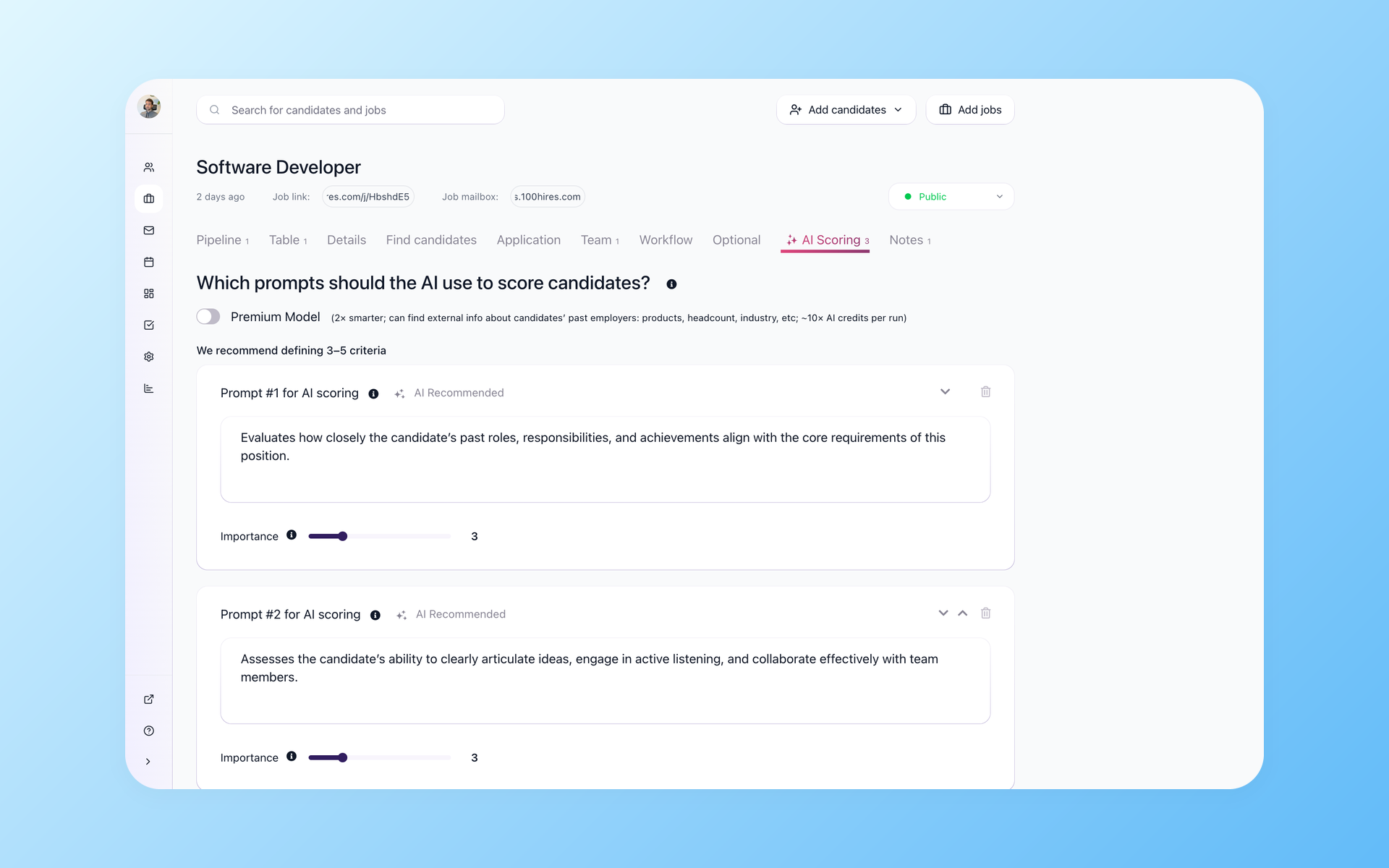
Set the evidence that matters for each role
Focus review on evidence that matters for the role. In 100Hires, set role criteria, assign 1-to-10 importance, and review a 0-100 total plus per-criterion results. Explanations and follow-up questions inform review; the recruiter decides. Plan and credit limits apply.
- Role-specific criteria
- Weighted importance
- Recruiter review
This scoring view is designed to focus review time, not make an autonomous decision. See how AI resume screening connects scoring criteria with the applicant record.
Find contact details without confusing matching with enrichment
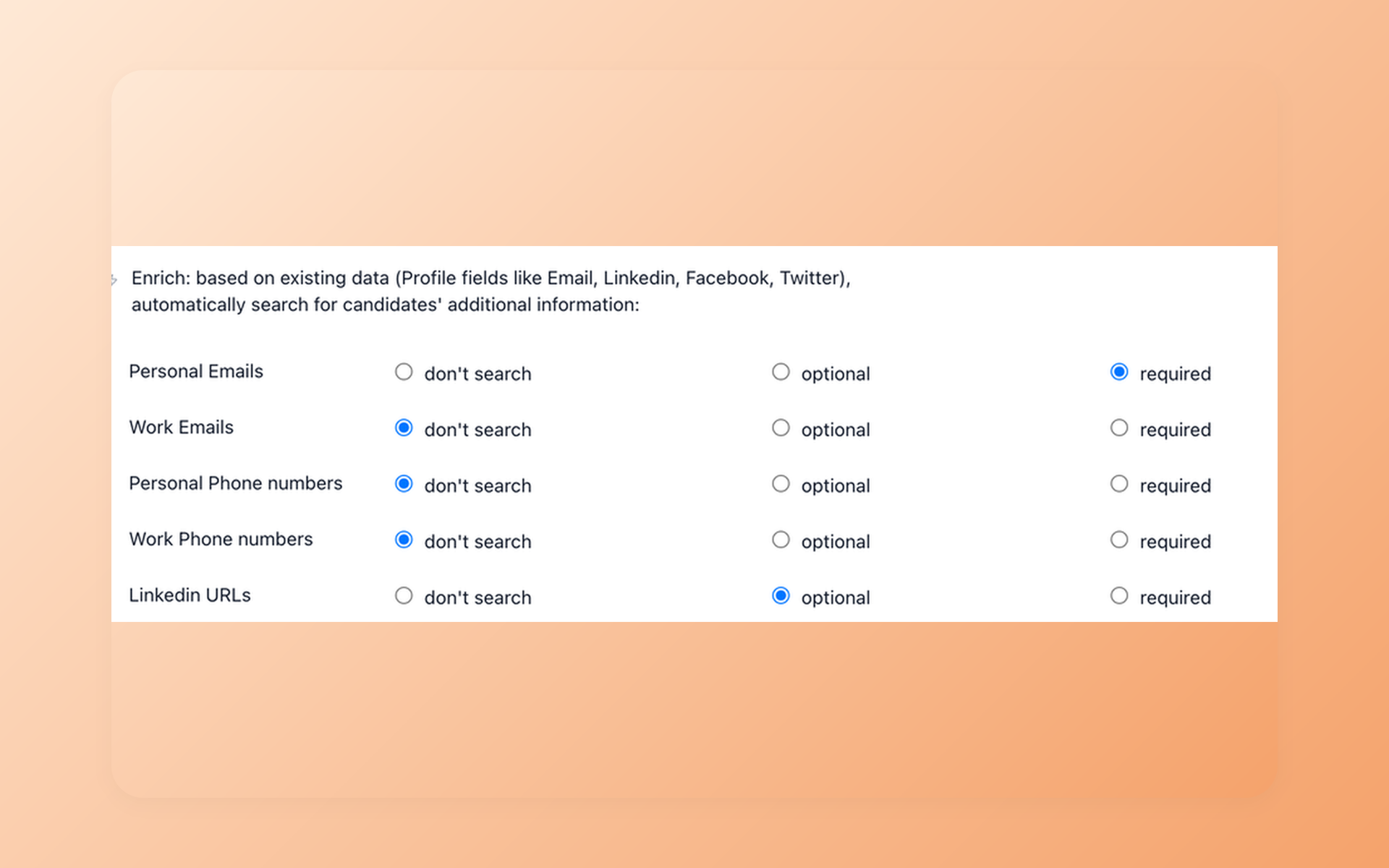
Turn a useful profile into a reachable record
Make a promising profile actionable before outreach. Contact Finder uses a LinkedIn URL or email to look for selected personal or work email, phone, or LinkedIn fields. Availability varies, and plan or credit limits apply; a result is not guaranteed.
- Selected contact fields
- Results saved to records
- Plan and credit limits
Contact Finder is contact enrichment. Recruitee Matching Assistant searches people already stored in talent pools and active jobs; plan and search limits apply.
Those are different sourcing jobs. Review the candidate contact enrichment workflow before comparing them.
Move from a shortlist to consistent follow-up
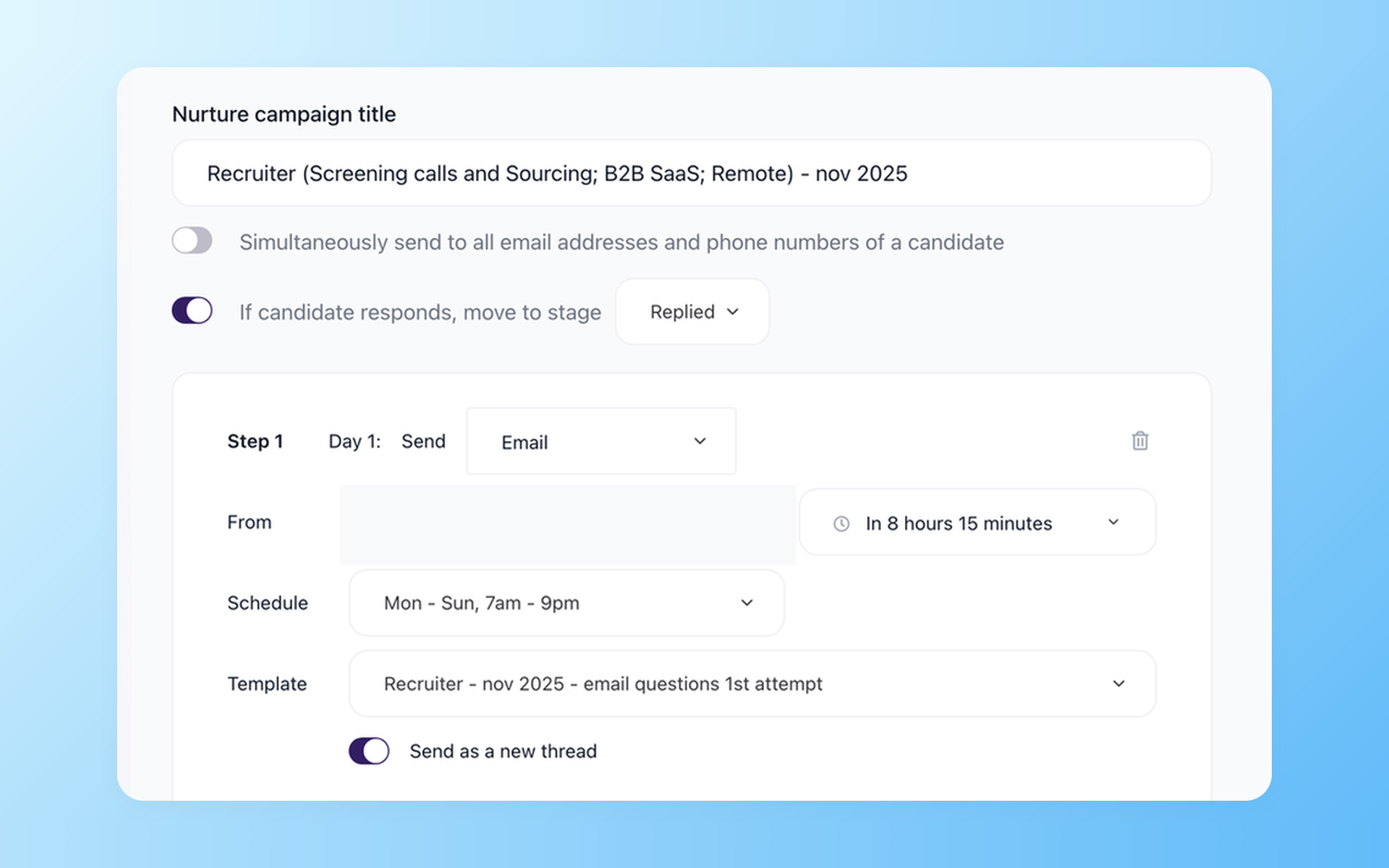
Keep outreach moving after the first message
Keep reviewed candidates moving without giving up recruiter control. AI Copilot uses stored context, AI Email Composer drafts for review, Nurture schedules later steps, and Self-scheduling exposes available times. Each tool has a distinct job.
- Context-aware drafts
- Scheduled follow-up
- Candidate self-scheduling
AI Email Composer drafts; the recruiter reviews, edits, and sends. Nurture campaigns handle the sequence after the first message. See the complete recruitment automation workflow.
Compare pricing and contract terms
For teams with 1-20 employees, 100Hires Start is $49 per month when billed annually or $99 month to month. That public entry point makes the initial budget visible before a sales conversation.
Recruitee publishes Start, Advance, and Optimize plans, but not a fixed public dollar amount for a like-for-like comparison.
Price depends on the plan, employee count, and billing period. A one-year minimum applies, and annual payment carries a 20% discount.
These are different buying structures, not a basis for a savings claim. Compare the required workflow, contract cadence, and applicable plan limits before deciding.
Switch with a qualified migration path
Eligible annual Pro customers can request free comprehensive managed migration after 100Hires reviews the available export, record counts, fields, and requested scope.
Starting a trial does not confirm migration eligibility, coverage, or timing. Candidate CSV import and bulk PDF or DOC resume upload are separate self-service paths. Available files and an approved mapping determine what can move.

It solved all of my recruitment problems and offered all of the features I was looking for. It can automate most of my recruitment processes.

I’d happily recommend it to my industry peers. I’m able to use the platform with ease and don’t have to think twice about which function to use.

The system is very user-friendly. Even people with no experience will find it easy to understand its functionality.







 4.7
4.7
 4.8
4.8
The hiring playbook, in your inbox
One email a week - benchmarks, AI screening tactics, and short interview templates from the 100Hires team. No product pitches.