
100Hires vs Hirebridge






Compare the hiring work your team does every week
You may be comparing Hirebridge pricing, checking Hirebridge competitors, or asking whether a different ATS would change the way your team screens and follows up. This page puts 100Hires and Hirebridge side by side, without turning the decision into a ten-tool list.
Hirebridge documents applicant tracking, job distribution, mobile apply, configurable workflows, collaboration, reporting, integrations, and support. The useful question is which review, sourcing, and follow-up workflow your team wants next.
100Hires is not affiliated with, endorsed by, or sponsored by Hirebridge.
100Hires vs Hirebridge feature comparison
Both systems cover the core work of an ATS. The table uses current first-party documentation and says “Not publicly stated” when the reviewed Hirebridge sources do not describe an equivalent named workflow.
| Feature | 100Hires first, then Hirebridge |
|---|---|
| Candidate tracking |
100Hires: Profiles, resumes, pipelines, notes, messages, and evaluations. Hirebridge: Applications, assessments, screening answers, notes, emails, and history. |
| Job distribution |
100Hires: Career site, social sharing, and supported job boards. Hirebridge: Career center, job search sites, social networks, and paid boards. |
| Configurable workflow |
100Hires: Multiple pipelines, custom stages, views, and stage automations. Hirebridge: Custom workflows, milestones, job-specific steps, and manager updates. |
| Job-specific screening |
100Hires: AI Score uses recruiter-written criteria and returns a human-reviewed 0-100 score. Hirebridge: AppFit analyzes resumes and applications against the job, returns a 0-100 alignment score, and requires human review; scored pre-screening and knockout questions are also documented. |
| Candidate-context assistant |
100Hires: AI Copilot uses available candidate and job context. Hirebridge: An equivalent named candidate-context copilot is not publicly stated in the reviewed sources. |
| Contact discovery |
100Hires: Contact Finder supports verified-email enrichment on Pro. Hirebridge: An equivalent named contact-discovery workflow is not publicly stated in the reviewed sources. |
| Nurture and follow-up |
100Hires: Nurture campaigns support reply-aware follow-up. Hirebridge: Email templates and notifications are documented; broader nurture-sequence scope is not publicly stated. |
| Scheduling and collaboration |
100Hires: Scheduling, self-scheduling, evaluations, and shared context. Hirebridge: Manager access, calendars, invitations, and feedback. |
| Reporting |
100Hires: Recruitment, outreach, and pipeline analytics. Hirebridge: Real-time and custom source, time, traffic, compliance, and pipeline reporting. |
| Integrations |
100Hires: Email, calendar, communications, automation, API, and job boards. Hirebridge: Assessment, screening, onboarding, HRIS, payroll, communications, and ADP. |
| Mobile candidate apply |
100Hires: Mobile-friendly career site and application flow. Hirebridge: Responsive apply on smartphones and tablets. |
| Pricing visibility |
100Hires: Public Start, Advanced, and Pro pricing below. Hirebridge: Contact the vendor for current pricing. |
| Migration and import paths |
100Hires: Self-service imports; free managed migration for eligible annual Pro contracts after scope review. Hirebridge: Complete export and managed-migration scope is not publicly stated in the reviewed sources. |
Hirebridge's official AppFit announcement documents its AI-generated 0-to-100 alignment score and tells recruiters to review the underlying details rather than rely on the score alone.
With annual billing, 100Hires costs the equivalent of $49 per month for Start, $199 for Advanced, and $399 for Pro. Those correspond to annual totals of $588, $2,388, and $4,788.
Month-to-month prices are $99 for Start, $249 for Advanced, and $499 for Pro. Hirebridge asks buyers to contact the vendor for current pricing.
Start with the evidence that matters for this job
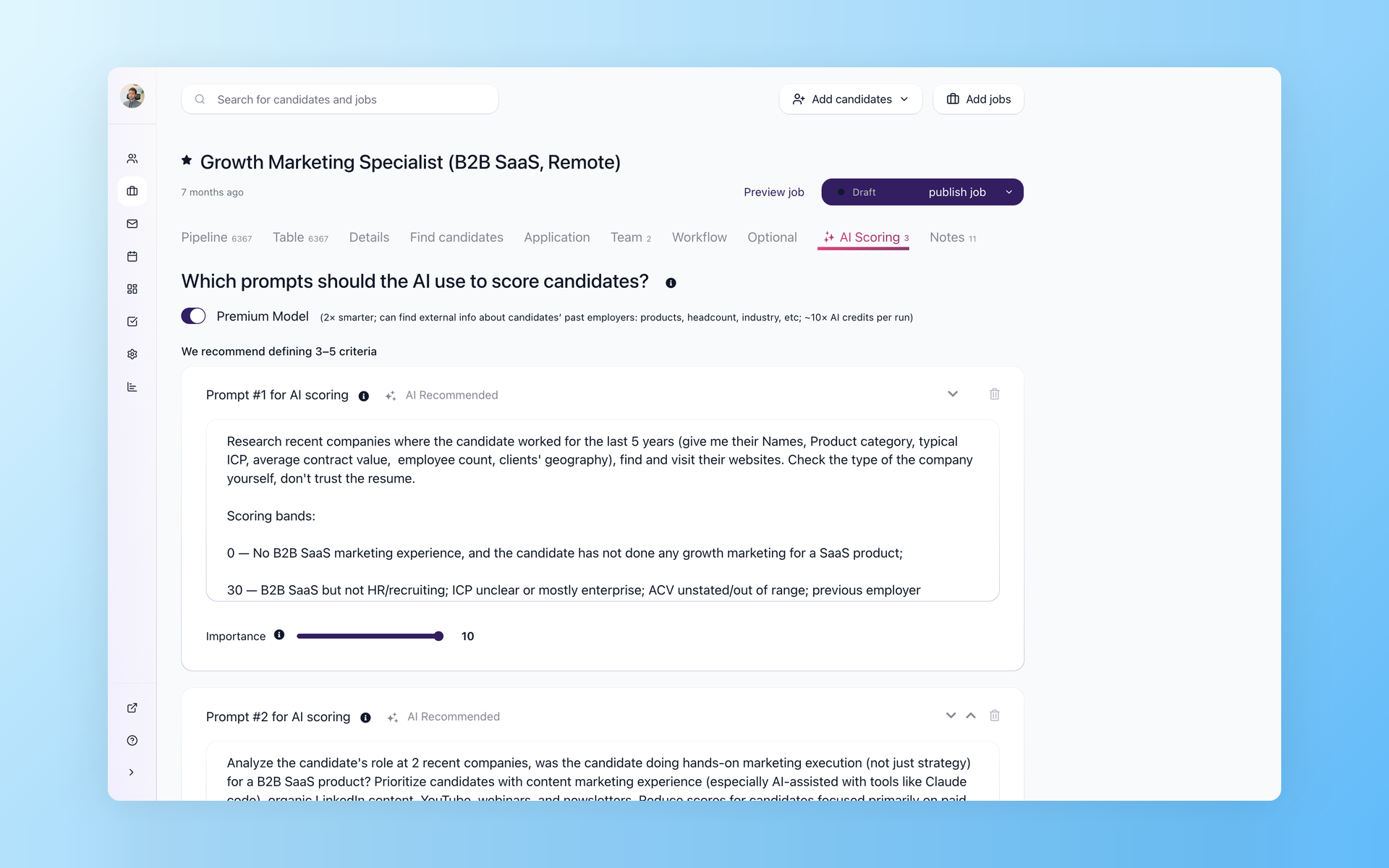
When a role brings a crowded queue, recruiters need a repeatable way to decide which profiles deserve the first read. AI Score starts from criteria your recruiter writes, with adjustable importance for each one.
Read the shortlist before the whole inbox
AI Score gives each candidate a 0-to-100 result against the job-specific criteria your team controls. Recruiters can review the criteria breakdown, sort the pipeline, and decide which profiles need a closer read.
- Criteria written for each job
- Importance weights from 1 to 10
- Per-criterion score and explanation
- Human review stays in control
For a closer look at criteria, scoring, and recruiter review, see how 100Hires handles job-specific resume screening. AI Score works from the data in the record; it does not fill in missing experience or make the hiring decision for you.
Reuse the questions your recruiters ask
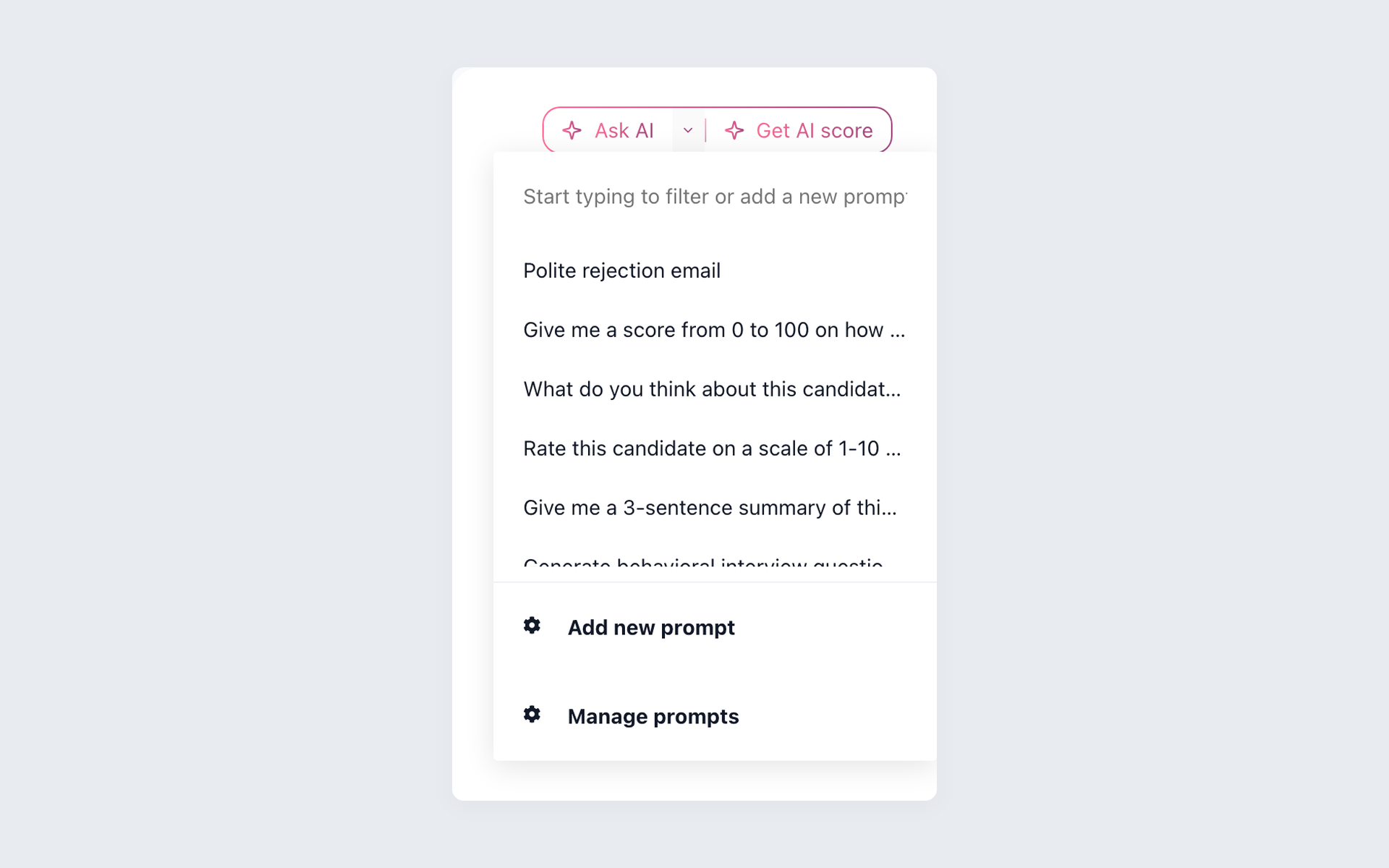
Saved prompts give recruiters a repeatable way to ask candidate-specific questions. AI Copilot can use the resume, answers, notes, messages, evaluations, and job context already available in 100Hires.
Start each review with a saved prompt
AI Copilot shows saved recruiter prompts in the candidate record. A prompt can request a summary or role comparison, but the answer is only as complete as the candidate and job context available in 100Hires.
- Resume and profile context
- Application answers and job details
- Notes, messages, and evaluations
- Saved prompts for repeat questions
The 100Hires AI recruiter page shows more ways to use AI Copilot for candidate review. A recruiter should still verify the source record, especially when a profile follows a non-standard career path.
Turn a candidate profile into a reachable person
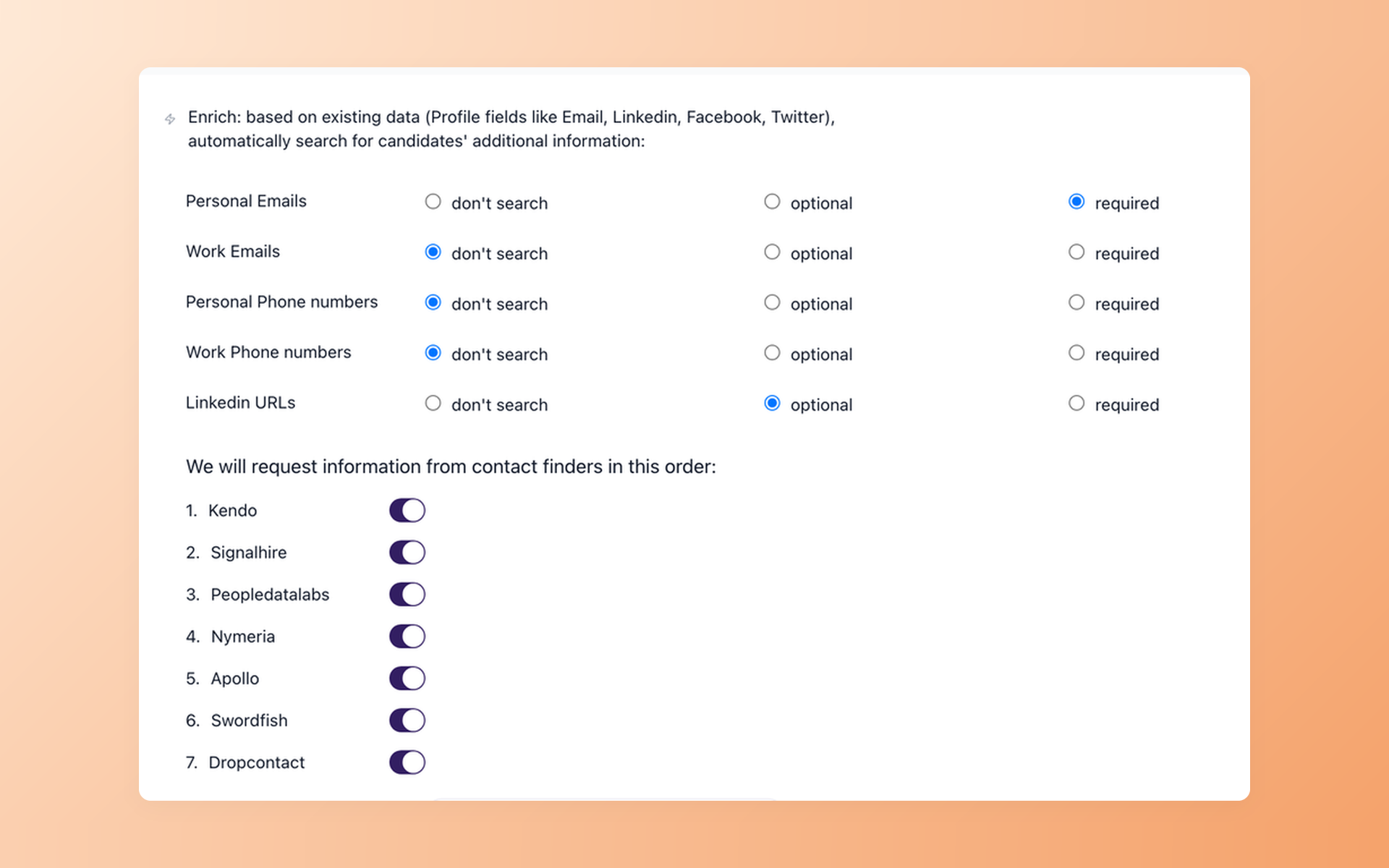
Passive-candidate work stalls when a useful profile has no reachable contact detail. Contact Finder keeps that step tied to the recruiting record.
Spend sourcing time on people you can contact
Contact Finder supports verified-email enrichment on Pro. Your team controls which fields are required or optional and can add enrichment to a sourcing workflow without claiming that every profile will return a result.
- Personal or work email options
- Required and optional field controls
- Provider sequence in one workflow
- No database-size promise
Follow up on a schedule without losing the human handoff
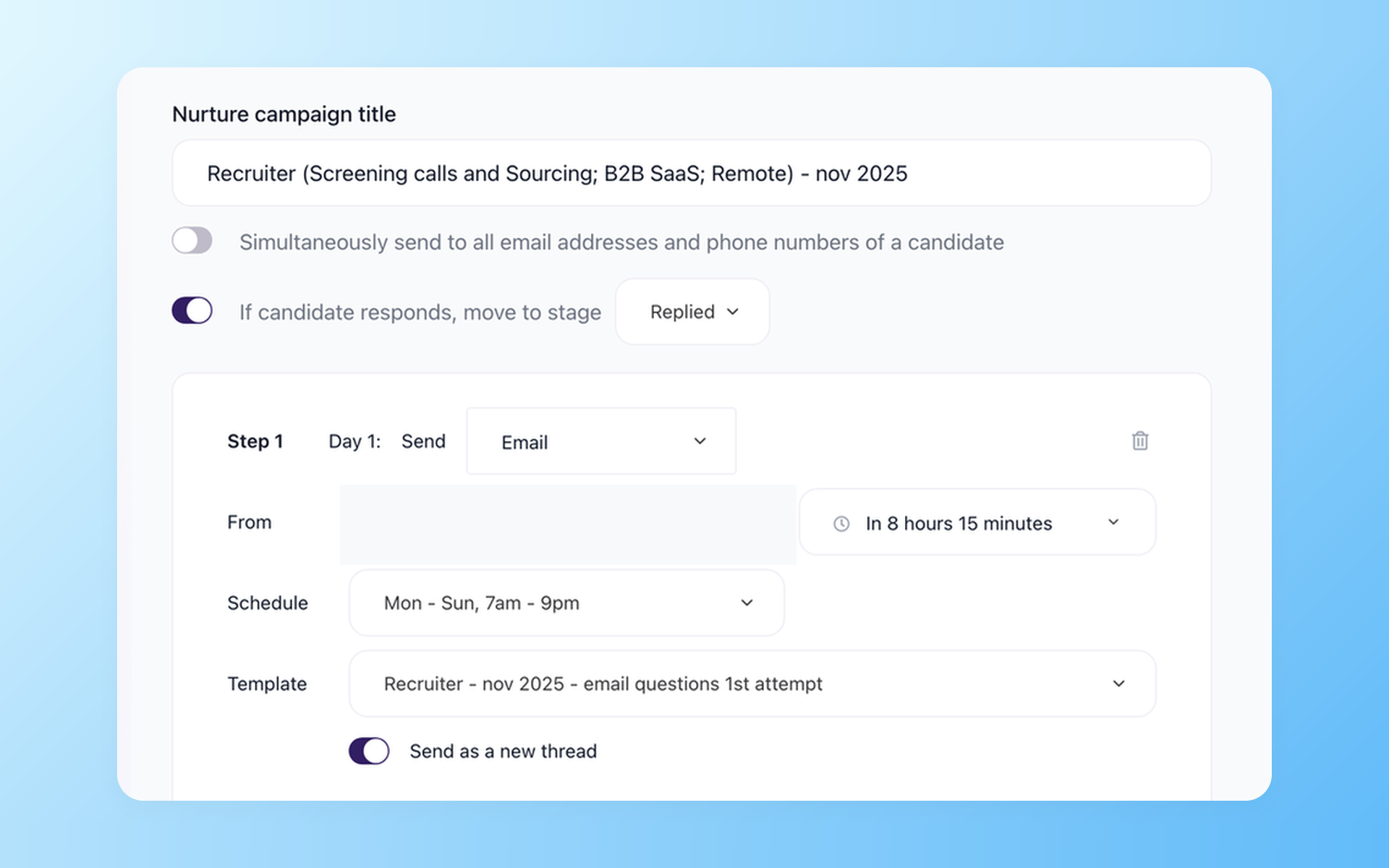
A useful sequence does more than send the same email again. It respects send windows, stops when someone replies, and hands the next step back to the recruiter at the right pipeline stage.
Keep the follow-up moving after message one
Nurture campaigns can schedule multistep outreach, use candidate time zones, stop on reply, move a candidate to a chosen stage, and report what happened. Optional steps can include SMS, voicemail, or a recruiter task.
- Timed multistep follow-up
- Candidate time-zone scheduling
- Stop and move on reply
- Email, SMS, voicemail, or tasks
See how recruitment automation in 100Hires connects Contact Finder, Nurture campaigns, screening, and stage actions. The aim is consistent follow-up with a recruiter ready to step in, not a relationship left to a bot.

It solved all of my recruitment problems and offered all of the features I was looking for. It can automate most of my recruitment processes.

I’d happily recommend it to my industry peers. I’m able to use the platform with ease and don’t have to think twice about which function to use.

The system is very user-friendly. Even people with no experience will find it easy to understand its functionality.







 4.7
4.7
 4.8
4.8
The hiring playbook, in your inbox
One email a week - benchmarks, AI screening tactics, and short interview templates from the 100Hires team. No product pitches.