
Time to hire: what it is, formula, benchmarks, and how to reduce it
Time to hire is the number of days between the moment a candidate enters your pipeline, by applying or being sourced, and the moment that same candidate accepts your offer. It is the cleanest read you have on how fast your selection process actually moves.
It is not the same as time to fill, and mixing the two is where most reporting goes wrong. This guide gives you the formula, current benchmarks by role, the difference between the two metrics, and a short list of changes that cut the number without trading away the quality of your hires.
Key takeaways
The hiring playbook, in your inbox
One email a week - benchmarks, AI screening tactics, and short interview templates from the 100Hires team. No product pitches.
- Time to hire counts the days from a candidate applying or being sourced to offer acceptance. It measures selection speed from the candidate's side.
- Time to fill is the wider number: from the day a role opens to the day someone accepts. It is always longer, so never compare one to the other.
- Global time to hire now sits near 41 to 44 days in recent industry data, but it swings hard by role. Tech roles move faster, senior and engineering roles run much longer.
- The most fixable delay is usually interview scheduling, not sourcing.
- Speed only counts if quality holds. Track time to hire next to quality of hire, not in place of it.
What is time to hire?
Time to hire measures the speed of your selection process. The clock starts when a candidate enters the pipeline and stops the day they accept the offer.
Two points decide the number. The start is when the candidate first shows up as a real prospect, either by applying or by being sourced or referred. The end is offer acceptance, and on that point every major source agrees.
The start point is where people slip. Some teams count only applicants, others count sourced and referred candidates too. Either choice is defensible. Pick one and apply it the same way to every hire, or your trend line means nothing.
One thing time to hire is not: the day you posted the job. That start belongs to time to fill, which is the next section.
Time to hire vs time to fill
These two get used as if they mean the same thing. They do not.
Time to fill covers the whole process, from the day a job requisition opens or gets approved to the day a candidate accepts. It answers a business question: how long does a seat stay empty? Time to hire is narrower. It tracks one candidate's journey through your funnel, so it answers a recruiting question: how efficient is our selection process?
| Aspect | Time to hire | Time to fill |
|---|---|---|
| Clock starts | Candidate applies or is sourced | Requisition opens or is approved |
| Clock stops | Offer accepted | Offer accepted |
| Answers | How fast is our selection process? | How long does a role stay open? |
| Watched by | Recruiters, talent teams | Hiring managers, finance, ops |
| Length | Shorter | Longer (includes the time before candidates enter the pipeline) |
Why the confusion? Both metrics end at the same place, offer acceptance, and most published averages never say which one they report. So a "44 day" stat can be right for one team and wrong for another. The fix is simple: always check where the clock started.
Which one should you track?
Track both, for different reasons. Use time to hire to find and fix drag inside your process, like slow feedback or scheduling gaps. Use time to fill to set realistic expectations with hiring managers and to plan capacity. 100Hires reports both per job (plus time to disqualify), so you can watch selection speed and open-seat time side by side.
How do you calculate time to hire?
The formula is one subtraction:
Time to hire = offer acceptance date minus application (or sourcing) date
Say a candidate applied on March 19 and accepted on April 4. That is a time to hire of 16 days for that hire. Simple.
For a team number, average across hires. Add each hire's time to hire and divide by the number of hires. Five recent hires at 16, 21, 15, 30, and 28 days come out to 22 days on average.
Two details that change the result. First, calendar days versus business days. Most sources, including SHRM, count calendar days with weekends and holidays included. Business days make the same gap look shorter, so decide which you use and stay consistent. Second, you measure it on the candidate you hired, not on everyone who applied. Rejected candidates feed a separate number, time to disqualify.
What is a good time to hire? Benchmarks by role and industry
Here is the honest answer: published averages cluster around 40 to 44 days, but they measure different things, from different start points, in different years. A single "good number" is misleading. Read every benchmark with its metric, source, and year attached.
| Figure | Metric | Source and year |
|---|---|---|
| ~44 days, global | Time to hire | Josh Bersin Company and AMS, 2023 |
| 41 days (up ~24% since 2021) | Time to hire | Gem, 2024 data |
| 36 avg / 30 median days | Time to fill | SHRM Talent Acquisition report, 2017 (origin of the famous "36 days") |
| 43.6 to 59.7 days, 2022 to 2025 | Time to fill | Greenhouse benchmarks |
| Senior roles ~37% longer; technical ~15 days longer than business roles | Structural (relative) | Ashby talent trends, 2021 to 2026 data |
The "36 days" everyone repeats is a SHRM time to fill figure from 2017, not a current time to hire number. The "44 days" is a 2023 global time to hire figure. Both are real. They just measure different things.
Role matters more than the headline. Tech and media roles have run near 20 days in the Bersin data, while engineering, energy, and senior positions stretch much longer. A warehouse associate and a VP of Engineering should never be held to the same target.
As a rough rule of thumb, not an official standard, about 25 to 40 days is solid for time to hire, 41 to 44 days is average, and 60 days or more is slow for most roles. Treat that as a starting line, then calibrate against your own roles and history.
Why time to hire matters
Two things happen when the number climbs.
First, cost. A role that stays open longer eats recruiter hours and the productivity of the empty seat. Second, lost candidates. Ashby's data shows faster offers correlate with higher acceptance rates: candidates who accept respond in about 2.8 days on average, while those who decline take closer to 6. A dragging process quietly hands your top choice to someone else.
Now the counterweight, because this matters. Time to hire is a means, not the goal. A 15 day hire can still be a mis-hire, and a slightly longer, well structured process that lands a strong performer beats a fast one that does not. Watch the number next to quality of hire, never instead of it. Speed that costs you good hires is not a win.
How to reduce time to hire
You cannot cut what you have not measured. Start by finding the stage where candidates sit longest, then work on these five areas.
- Find the bottleneck first. Look at stage level timing, not just the headline average. The slow stage is usually one specific handoff, and you cannot fix what you cannot see.
- Tighten the top of the funnel. Knockout questions screen out applicants who do not meet hard requirements before anyone reads a resume. An AI score then surfaces the strongest profiles so recruiters stop reading every application by hand.
- Kill scheduling delays. This is one of the biggest gaps you can close. Many teams run multiple interview rounds, and emailing back and forth to book each one adds days. Self-scheduling links let candidates pick a slot from your real availability, which removes the ping pong entirely.
- Build a talent pool. A pre-screened pipeline means you start a new search with warm candidates instead of starting from zero. The candidates you liked but did not hire last quarter are your fastest source this quarter.
- Speed up decisions. Set a feedback rule, like scorecards submitted within 24 to 48 hours, and keep candidates warm with stage updates so no one stalls between steps waiting to hear back.
Here is where the manual process and an automated one split apart.
| Hiring step | With 100Hires | Done manually |
|---|---|---|
| Screening | Knockout questions and AI Score rank candidates against your criteria | Read every resume one by one |
| Interview scheduling | Self-scheduling links tied to live calendars | Email back and forth for each round |
| Keeping candidates warm | Automatic stage notifications and nurture campaigns | Manual follow-ups that are easy to miss |
| Spotting slow roles | Time to hire report with min, max, and average per job | Spreadsheet rebuilt by hand each month |
A faster process is mostly a matter of removing dead time between stages. Start a free 100Hires trial and see where your own time leaks. For the scheduling piece specifically, our interview scheduling tools handle the part that wastes the most days.
Common mistakes that inflate time to hire
- Mixing time to fill and time to hire. Reporting one number while quoting the other's benchmark. Decide which metric you mean and label it every time.
- Inconsistent start dates. Counting applicants on some hires and sourced candidates on others. Pick one start point and use it for every hire, or the trend is just noise.
- Comparing to a global average. Holding a niche or senior role to a blended 44 day figure. Compare against the same role, not the headline.
- Chasing the number over quality. Rushing to hit a speed metric and landing mis-hires. The goal is a good hire on time, not a fast one.
Track time to hire in 100Hires
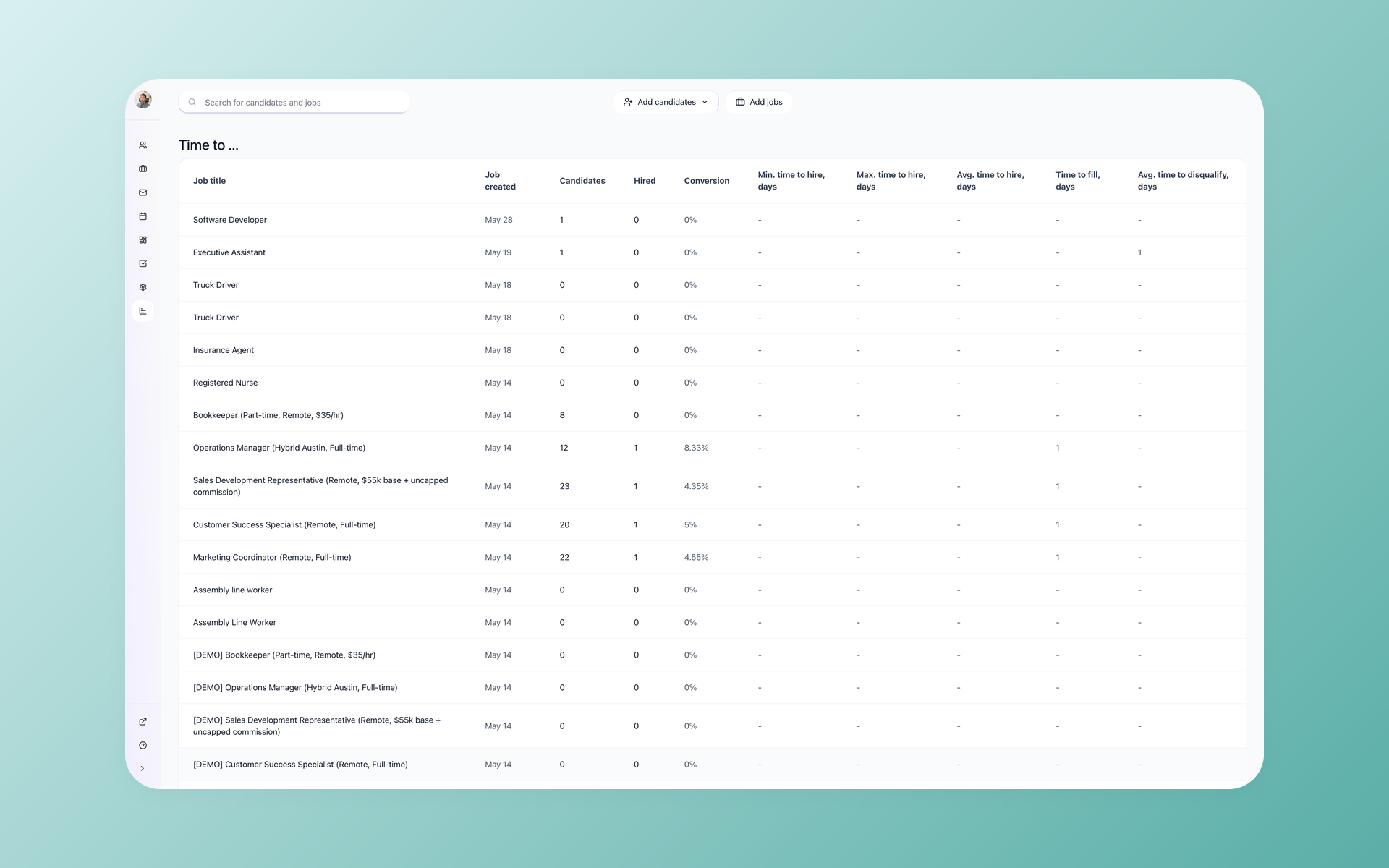
100Hires calculates time to hire for you, so you are not maintaining a spreadsheet. The Reporting view breaks it down per job: the number of candidates and hires, the minimum, maximum, and average time to hire for each role, plus time to fill and average time to disqualify in the same table. Type a job name to filter down to the role you care about.
That makes it easy to see which roles move fast and which drag, without rebuilding a report by hand each month.
One honest limit. It is a numbers table, not a charting tool, so you get the minimum, maximum, and average per role rather than a visual distribution or a trend line. For most teams that is enough to spot the slow roles and act on them. If you want time-series dashboards, you will export the data and chart it elsewhere.
Frequently asked questions
What is the difference between time to fill and time to hire?
Time to fill measures the whole process, from the day a role opens to offer acceptance, so it shows how long a seat stays empty. Time to hire measures only the candidate's journey, from applying or being sourced to accepting the offer, so it shows how efficient your selection is. Both end at offer acceptance, which is why they get confused. 100Hires reports time to hire, time to fill, and time to disqualify per job in its Reporting view.
What is the formula for time to hire?
Time to hire equals the offer acceptance date minus the application or sourcing date. For an average, add each hire's time to hire and divide by the number of hires. Do not start the clock at the job-posted date, because that is time to fill. 100Hires runs this calculation automatically, so you skip the spreadsheet step.
What is a good time to hire?
For most roles, under about 25 to 40 days is solid, around 41 to 44 is average, and 60 plus is slow. The right target depends heavily on the role, since technical and senior positions run longer. The 100Hires time to hire report shows the minimum, maximum, and average per role, so you can compare against your own roles rather than a generic global average.
Is time to hire measured in calendar days or business days?
Most sources, including SHRM, count calendar days, weekends and holidays included. Business days are fine too, but they make the same gap look shorter, so the only rule that matters is consistency across every hire. 100Hires reports time to hire the same way across every role, so your numbers stay comparable.
What is the 70/30 rule in hiring?
A common version of the 70/30 rule says to hire a candidate who meets about 70% of the role's requirements and develop the other 30% on the job. It speeds up decisions and widens your pool, since holding out for a perfect match is what slows hiring down. 100Hires AI Score helps you weigh that 70% against your criteria instead of going on gut feel.
The bottom line
Time to hire is a fast, honest read on your selection process. Measure it the same way every time, compare it against the same role rather than a global average, and fix the slow stage, which is often scheduling, without cutting the quality of the decision. Start a free 100Hires trial to see your time to hire calculated automatically, or book a demo to walk through it with us.
Try 100Hires for free
No credit card. 14-day trial. Forbes Advisor #1 ATS for SMBs.